Free Timesheet templates and Examples.
Keep track of the hours with free, printable timesheet templates to track how time is spent.

Keeping track of time is no easy task—especially when you’re managing even a small team. Basic time sheet templates aren’t just about checking in on employees – they give you important data on where hours are going, and if they need to be reinforced or reduced.
Discover how to create a timesheet with timesheet templates from Adobe today.
What is a timesheet template?
Timesheets templates are documents designed to help you track how much time has been spent – and where someone has spent it. They are an excellent way to see how much time people are spending on certain tasks.
This allows you to allocate resources based on accurate data, making sure clients and projects get the time they need—without paying for more than they use. It’s also an effective way to schedule shifts and ensure workers are paid accurately, whatever type of work you do.
Using a timesheet template saves you the time and effort of creating one from scratch. Explore a variety of free, downloadable templates with Adobe Acrobat today.
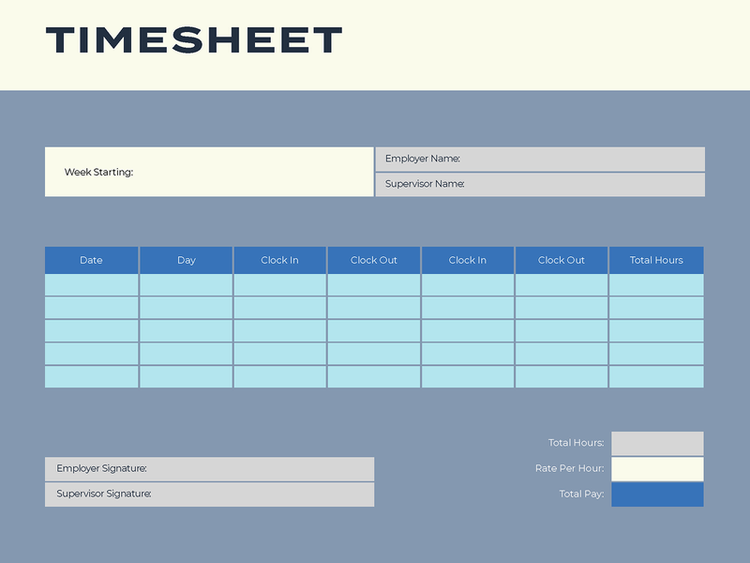
What information should I include in my timesheet template?
Creating an effective timesheet template isn’t as tricky as it sounds – and while the obvious inclusion is the hours worked, there’s a bit more to a timesheet template than that.
While ‘time worked’ is an essential heading in any timesheet template, there are several others that, when paired with worked hours, can give you a wealth of information to start informing your decisions when it comes to resourcing. Additionally, using a well-built timesheet ensures employees are accurately paid for their time.
The key points you should include in your timesheet templates are:
- Employee names. Make sure all employee names are accurate and listed in an intuitive order—such as alphabetically or by department
- Pay period. Define the pay period at the top of the sheet, so that you can pay employees accurately based on the hours worked in that period. Employees can then easily reference different pay periods if required.
- Dates worked. What dates did an employee work? With this column, you’ll know more than just the hours. This is essential for organising people into shifts, if needed.
- Hours worked. In this column, you should define how many hours someone worked in a day.
- Total hours for the pay period. Try to include a column to summarise the total hours an employee has worked, as this will save you time when it comes to adding everything up.
Remember, this isn’t an exhaustive list – you can put in any information that helps you calculate payroll, or track resources spent on clients by employees.
What are the different types of timesheet templates?
You’ve got a lot of options when it comes to tracking work hours with a timesheet template, depending on the structure of your business and what you need timesheet data for.
Some of the most common types of example timesheet templates include:
- Daily. True to its name, these timesheets record start and end times in a day, usually recording breaks and specific tasks worked on. Daily timesheet templates are a great project management tool.
- Weekly. Unlike daily timesheets, weekly timesheet templates document the hours an employee works during a seven-day period.
- Monthly. Monthly timesheet templates cover hours worked across a month – they can be ideal for employees who earn bonuses or commission, as well as for tracking long-term projects.
- Rotas. If you have varied shift patterns in your work, then a rota may be an ideal choice. It functions more like a scheduling tool than a traditional timesheet template (although it can support timekeeping). In most cases, it should reflect payroll, but it may not be used to calculate it.
- Client-based. In some instances, you might want to monitor hours worked by employees and those given to clients for billing. With a client-based timesheet, you can accurately bill your service based on a defined set of hours. Additionally, you can determine if you’re over or underserving a client.
Free, downloadable timesheet templates.
You can create your timesheet template from scratch in a document processor or spreadsheet. However, downloading a free timesheet template online is the easiest way to start tracking employee time with minimal effort.
Creating a timesheet template can be a bit trickier than it seems. You could use a word processor or spreadsheet – but if we’re counting hours, why not save a bit of time in getting started? With Adobe, you can download a free, online timesheet template to keep track of employee or client time (without the effort).
Employees will interact with a timesheet every day, so you need a timesheet template that can hold its formatting across devices and programs. With Adobe, you can easily convert from PDF to Word, Excel and even Google Docs (then back again).
Make edits, change layouts, leave comments and more with Adobe Acrobat’s online PDF editor – the flexible way to edit timesheet templates. You can even merge timesheets together and store them in one place.
Download and try timesheet templates from Adobe Acrobat for free today.
Approve timesheets templates electronically.
Many businesses require employee timesheets to be approved by their direct supervisors. Rather than printing completed timesheets, signing them with a pen, and scanning them back into the computer for filing, you can keep the entire process digital – simply approve your timesheet templates online with Adobe.
You can also fill and sign a PDF online in minutes – without needing a printer. Upload your PDF timesheet template on Adobe, select a signing option, drag your signature and you’re done – ready to file. You can even share your timesheet templates and request signatures, if you need multiple sign-offs.
Frequently asked questions.
What is a timesheet used for?
Can I make my own timesheet template?
Should timesheets be submitted daily or weekly?
Do I need to make a timesheet template?