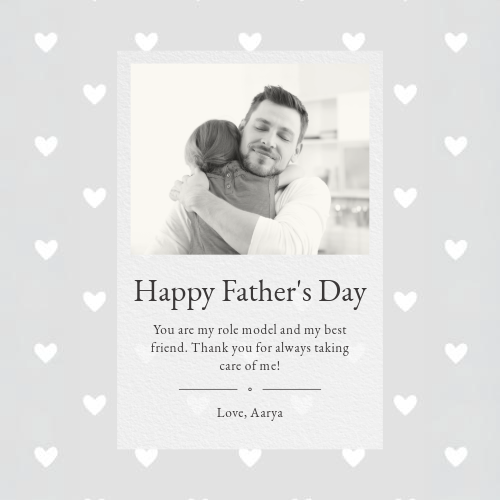
Happy Father’s Day card ideas for a personal touch.
Create a heartfelt and personalised Father’s Day card with Adobe Express. Use custom templates, unique design elements, and easy-to-use tools to make a card that truly celebrates dad.
Start designing with Adobe Express
One-click edits from any device
Fast creation with generative AI
Thousands of professionally designed templates
toc-title
Table of contents:
toc-aria-label
table of contents links
content-1
Why personalised cards make a great Father’s Day gift
content-2
Tools in Adobe Express for designing unique cards
content-3
Step-by-step guide to creating your card with Adobe Express
content-3-short
Step-by-step guide to creating your card
content-4
Creative card ideas for Father’s Day
content-5
Tips for adding personal touches to your card designs
A Father's Day card is a chance to celebrate the people who guide, support, and inspire us. From heartfelt messages and favourite memories to playful designs and personal photos, a customised card can make Dad feel truly appreciated. Create a Father's Day card with Adobe Express and personalise every detail with easy-to-edit templates, fonts, and creative tools.
Why personalised cards make a great Father’s Day gift.
A personalised Father’s Day card goes beyond a simple store-bought greeting—it adds a unique touch that shows thought and appreciation. Custom designs allow you to include heartfelt messages, meaningful photos, and creative design elements tailored to your dad’s personality. Whether he loves humour, classic elegance, or something artistic, a custom card lets you express your appreciation in a way that feels truly special. With Adobe Express, you can design a one-of-a-kind card using a variety of editable templates, premium fonts, and creative assets to make your Father’s Day message stand out.
Adobe Express offers a variety of features to make card design easy and visually appealing. Here are some key tools to help you create the perfect Father’s Day card:
AI-driven design tools:
Use text-to-template features to generate creative card layouts instantly.
Adobe Fonts integration:
Access a variety of stylish and easy-to-read fonts to personalise your message.
Resize, crop, and enhance images to include special memories on your card.
Isolate key elements in a photo for a clean and polished design.
Colour and texture effects:
Adjust contrast, brightness, and textures to match your card’s theme.
Multi-device accessibility:
Work on your design across desktop, tablet, or mobile seamlessly.
With these features, you can create a Father’s Day card that reflects your personality and strengthens the bond you share with your dad.
Step-by-step guide to creating your card with Adobe Express.
Follow these simple steps to design your perfect Father’s Day card:
Customise the layout.
Adjust the size and format to fit a folded card, postcard, or digital greeting.
Add photos.
Upload a meaningful image and resize, crop, or enhance it for the best quality.
Personalise the text.
Use Adobe Fonts to select a style that complements your message.
Experiment with colours.
Adjust the background and text colours to match your dad’s preferences.
Apply effects.
Use design tools to add subtle shadows, gradients, or textures for a professional look.
Remove image backgrounds.
Make your design stand out by isolating subjects in your photos with background removal tools.
Include icons or illustrations.
Browse the Adobe Stock asset library for Father’s Day-themed icons.
Finalise and preview.
Check your design for readability, balance, and overall appeal.
Download and print.
Save as a high-resolution PDF for printing or share it digitally as an e-card. Alternatively, get your card
printed by Adobe Express and sent to your dad directly as a surprise.
Creative card ideas for Father’s Day.
If you’re looking for unique Happy Father’s Day card ideas, try these creative approaches:
Compile a series of memorable pictures and arrange them in a stylish layout.
Funny Father’s Day card:
Use bold fonts and witty one-liners to add humour.
Handwritten message card:
Upload your own handwriting using Adobe Express’s image editing tools to give a personal touch.
Minimalist design:
Stick to clean lines, simple fonts, and a soft colour palette for an elegant look.
Vintage-style card:
Apply filters and textures to give your card a classic, timeless feel.
Add a QR code that links to a heartfelt video message or a shared album.
With Adobe Express, you can explore various styles and techniques to make your card as meaningful as possible.
Tips for adding personal touches to your card designs.
To make your Father’s Day card even more special, consider these final design tips:
Use colours that match his personality:
If he loves bold, vibrant tones, go for contrasting colour palettes. For a classic look, try neutral or pastel tones.
Write a heartfelt message:
Avoid generic phrases and add a personal memory, inside joke, or favourite saying.
Incorporate his hobbies:
If he loves fishing, sports, or music, add related icons, images, or themed fonts.
Choose high-quality paper:
If printing, use matte or glossy paper to enhance the final look.
Create a matching envelope:
Use Adobe Express to design a coordinating envelope for a complete, polished set.
A little extra effort goes a long way in making Father’s Day cards meaningful, memorable, and truly personal.
Start designing your Father’s Day card with Adobe Express.
Create a custom Father’s Day card that feels as special as the person receiving it. Use Adobe Express to personalise your design with photos, colours, and heartfelt messages. Start designing today and make this Father’s Day unforgettable.
Try Adobe Express for free now
The quick and easy create-anything app.
Make stunning social posts, images, videos, flyers, and more with Adobe Express. Dream it. Make it. Easy.
Get started for free
- Home
- Happy Father’s Day card ideas