Clean up dialogue in a click. Add music. Generate background audio and sound effects. Fine-tune your mix. Do it all with an all-in-one audio toolkit — built right into Adobe Premiere.
Combine speech, music and sound effects to create a compelling soundtrack with AI-driven audio editing in Premiere.
style
grid width 8
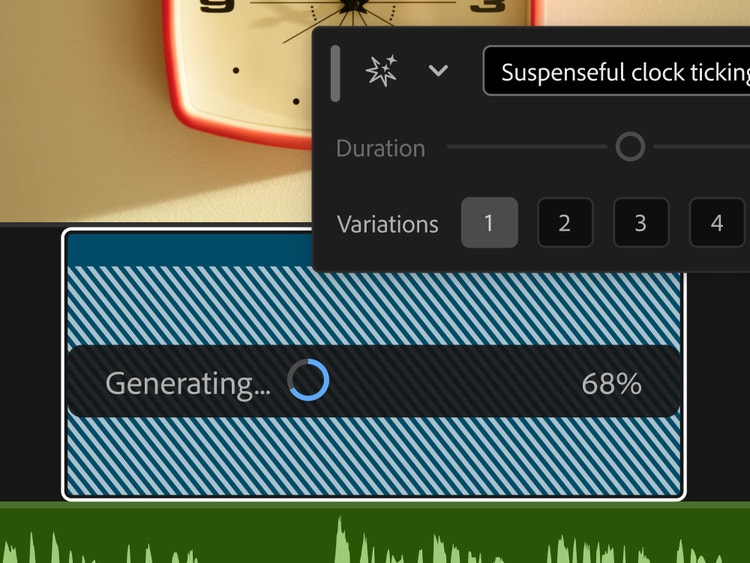
Generative sound has entered the mix.
Create the sound your story needs. Describe the background audio or sound effect you have in mind. Shape the timing and intensity using your voice. Generate it. Then audition the takes.
Hear every word with advanced dialogue editing.
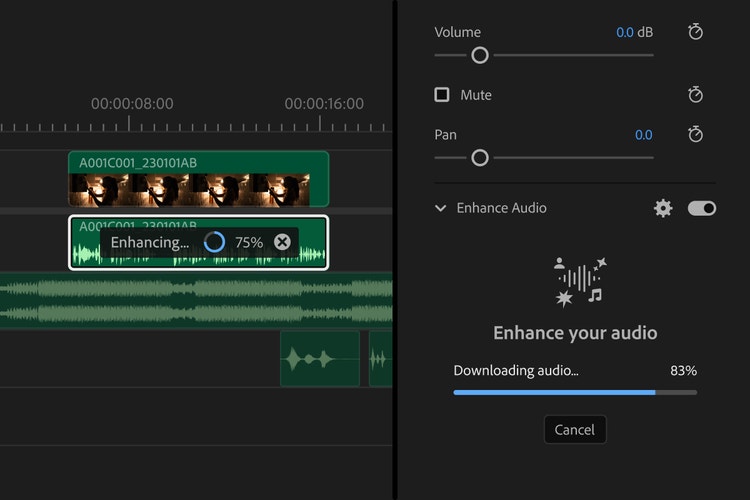
Make all your recorded dialogue sound studio-quality with AI-powered Enhance Speech. Remove background noise, use Auto Ducking to lower music volume during speech and record narration with a built-in voiceover tool. Then, mix it all in a few clicks with automatic loudness and level matching.
Sculpt your sound with audio effects.
Simulate the sound of any space — from a small wardrobe to a world-class concert hall — with built-in Reverb. Choose from over 50 professional audio effects like compressors, limiters and equalisers that include up to 30 bands for precise control over everything that comes out of the speakers.
Find the perfect music track.
Get instant access to music from Adobe Stock libraries right inside Premiere. Explore over 75,000 high-quality tracks in your sequence before licensing.
Mix masterfully.
Take advantage of professional mixer features like faders, panning, channel strips and effects. Automate your levels and other parameters and do it in everything from mono to full surround sound.
Sync music to edited clips.
Change the length of any song to make it fit your video perfectly with the AI-powered Remix tool. Identify ideal cut points, make edits, rearrange and instantly retime music to get to your final mix even faster.
Cut down clicks with AI audio tools.
AI automatically recognises if your clips are music, dialogue, sound effects or ambiance and adds an interactive badge. Just click to get instant access to the most relevant tools for that audio type.
Take audio even further with Adobe Audition.
Easily work on your project in Adobe Audition for even more advanced tools. Perform precision edits, restore damaged audio and make your tracks ring out clearly with one of the industry’s best audio editing tool.
Premiere has both AI-powered audio restoration features such as Enhance Speech and advanced tools such as Automatic Click Remover to help you clean up bad audio. Get to know the Essential Sound panel to help you to restore dialogue.
Auto Ducking uses AI to automatically drop the level of the music track whenever voices are detected to ensure the dialogue is heard.
Yes, use our new AI-powered Enhance Speech tool to help remove background noise in dialogue or try our many included effects designed to help fix audio (such as Reduce Rumble, DeHum and Reduce Noise).
The Auto Match tool in Premiere matches the loudness across dialogue clips, even if they were recorded in different rooms by different voices, making mixing a breeze.
style
Center, grid width 8, XXL spacing, dark, static links
Regularly at £66.49/moAlternatively at £32.66/moincl. VAT. Annual, billed monthly
Join a global community of over 7 million Creative Cloud Pro subscribers. Save 50% for the first 3 months on the full version of Adobe Premiere and 20+ apps plus Adobe Firefly creative AI. Pay £32.66/moincl. VAT for the first 3 months and £66.49/moincl. VAT after that. New subscribers only. See terms | See what’s included
Speed up your video workflows with Adobe Firefly generative AI.
Visualise shots and effects ahead of the shoot, generate assets missed in production to complement your edit and eliminate tedious tasks to stay focused on your creative ideas.
You can control how Adobe websites use cookies and similar technologies by making choices below. But note that if you disable cookies and similar technologies entirely, Adobe websites may not function properly.
Cookies are small text files stored by your web browser when you use websites. There are also other technologies that can be used for similar purposes like HTML5 Local Storage and local shared objects, web beacons, and embedded scripts. These technologies help us do things like remembering you and your preferences when you return to our sites, measure how you use the website, conduct market research, and gather information about the ads you see and interact with.
You can make choices in the menu below about what cookies and other technologies you want us to use on Adobe sites when you visit them from this browser. You can always change those choices later by clicking on the Cookie Preferences link at the bottom of the page.
If enabled:
We can improve your experience by tailoring the site and the content to things we think might be of interest
We can better keep track of your preferences — like what language you prefer to use
We will better understand your likely interests so we can provide you more relevant Adobe ads and content on non-Adobe websites and in non-Adobe apps
It will help us improve the performance of our website and those of our partners who use the Adobe Experience Cloud
If disabled:
We won’t be able to remember you from session to session so the experience may not be tailored to your interests
You’ll still have access to the content of the site but certain features that depend on cookies may not function
You’ll still see ads, they just may not be as relevant to you
General information
You can control how Adobe websites use cookies and similar technologies by making choices below. But note that if you disable cookies and similar technologies entirely, Adobe websites may not function properly.
Cookies are small text files stored by your web browser when you use websites. There are also other technologies that can be used for similar purposes like HTML5 Local Storage, web beacons, and embedded scripts. These technologies help us do things like remembering you and your preferences when you return to our sites, measure how you use the website, conduct market research, and gather information about the ads you see and interact with.
You can make choices in the menu below about what cookies and other technologies you want us to use on Adobe sites when you visit them from this browser. You can always change those choices later by clicking on the Cookie Preferences link at the bottom of the page.
If enabled:
We can improve your experience by tailoring the site and the content to things we think might be of interest
We can better keep track of your preferences — like what language you prefer to use
We will better understand your likely interests so we can provide you more relevant Adobe ads and content on non-Adobe websites and in non-Adobe apps
It will help us improve the performance of our website and those of our partners who use the Adobe Experience Cloud
If disabled:
We won’t be able to remember you from session to session so the experience may not be tailored to your interests
We’ll still count your use of our site and services
You’ll still have access to the content of the site but certain features that depend on cookies may not function
You’ll still see ads, they just may not be as relevant to you
Operate the site and core servicesOperate site and measure engagement
Always active
These cookies are required, and they are used to enable the site and related services core functionality. Without them the site could not operate, so they cannot be disabled.
These cookies enable the site and related services’ core functionality and collect statistics about user engagement, such as counting active use to help us understand trends. These cookies cannot be disabled.
Measure performance
These cookies are used to analyze site usage to measure and improve performance. Without them Adobe cannot know what content is most valued and how often unique visitors return to the site, making it hard to improve information we offer to you.
These cookies are used to analyze site usage to measure and improve performance. Without them Adobe cannot know what content is most valued, making it hard to improve information we offer to you.
Extend functionality
These cookies are used to enhance the functionality of Adobe sites such as remembering your settings and preferences to deliver a personalized experience; for example, your username, your repeated visits, preferred language, your country, or any other saved preference.
Personalize advertising
These cookies are used to enable Adobe and our partners to serve ads more relevant to your interests. Without them you will still see ads, but they might not be as relevant to you.