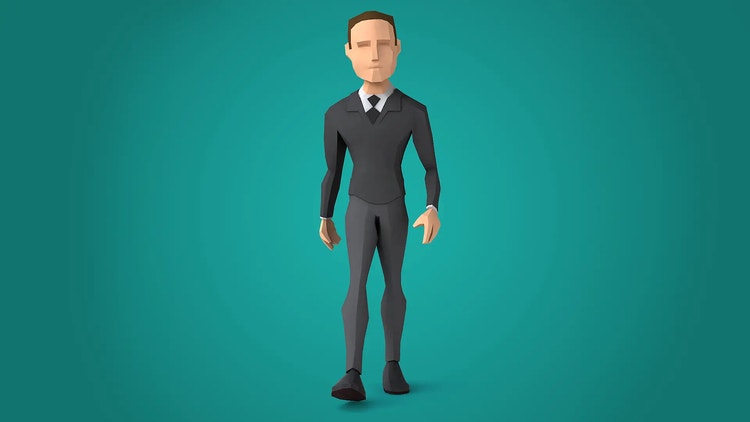
Low-polygon or low-poly modelling, is a technique that creates 3D models and characters using a smaller number of polygons. It initially emerged out of necessity because older computers could only process low-poly models, but today it remains a popular technique that balances creativity and efficiency.
Understanding low-poly modelling will help you design realistic characters and models that effectively convey detail, emotion and story — with fewer polygons and faster load times. This guide will explain what low-poly 3D models are and how you can start using them in your own creations.
What is a low poly 3D model?
A low-poly model is a 3D model with a small polygon count. Its straight-edged shapes have an abstract, almost cubist appearance, distinguishing it from its hyper-realistic counterpart, the high-poly model.
Low-poly models might be less realistic, but they offer several benefits:
Performance. Low-poly models require less processing power, which makes them ideal for video games. Some video game designers opt for low-poly models to create a retro throwback experience.
Style. Low-poly models have a clean, unique aesthetic that stands out from the trend toward hyper-realism.
Ease of use. Low-poly models have fewer details, which speeds up the design process.
Beginner-friendly. Low-poly models are an excellent way to learn the basics of shape, form and texture.
Getting started with low poly 3D modelling.
With 3D modelling, you create three-dimensional objects in a digital space. Every 3D model is composed of vertexes, edges and faces. With low-poly 3D modelling, the goal is to use as few components as possible while creating the desired shape and details.
Adobe Substance 3D makes it possible to build low-poly models that look nostalgic yet modern. Use Substance 3D Painter to create low-poly meshes for your designs. The platform comes with readymade shortcuts to cut down on navigation so you can spend more time in designing mode.
What can you do using low-poly modelling techniques?
Sculpting low poly 3D characters.
Here’s a quick guide to sculpting low poly 3D characters:
Start with reference images and concept art. Always have a clear vision before you build a 3D design. Reference images will give you a roadmap so you can stay true to your original idea.
Sculpt the basic form. Start with a primitive shape like a cube or sphere. Use transformation tools to scale, move and rotate the model’s components.
Add the finer details. With a basic shape in place, it’s time to make a more realistic model. Extrusion will pull out areas of your model to create features like limbs. Beveling softens sharp edges for a more nuanced look. In some cases, you can use subdivision, which increases the polygon count only in specific areas for added detail, like a character’s facial features.
Modelling low poly 3D objects.
Low-poly design is popular for architectural visualisations because it offers rapid rendering and a stlylised look. This makes low-poly design more helpful in the preliminary stages of architectural modelling.
Whether you’re in architecture or designing a video game, follow these tips to create low-poly 3D objects:
Build a simple structure. Start with basic geometric forms. Combine, intersect and modify these shapes to create complex structures while maintaining the style of the low-poly 3D model.
Add texture. Next, add a texture to the object. Use UV unwrapping to ensure every face of the model aligns perfectly with the texture to avoid distortions.
Optimise. Look over your model. Where can you remove polygons or details? Optimised models render more quickly and perform better, so remove any unnecessary details.
Tips for optimisation and efficiency.
Let’s take a look at some easy tips for optimisation and efficiency:
Efficient UV mapping. UV mapping flattens the models’ geometry into 2D when you apply a texture. An efficient UV layout maximises the texture space, reducing the need for high-res textures. Make sure your geometry doesn’t overlap because that could lead to unpredictable results.
Reduce unnecessary geometry. Remove faces or vertexes that won’t be seen. For example, if the viewer can’t see the bottom or back of a model, it’s usually safe to remove it.
Use texture optimisation. Texture compression tools drastically reduce the file size without a noticeable drop in visual quality. Instead of creating all-new textures for the model, use smaller, repeatable textures. This saves memory and texture space.
Why Adobe Substance is the ultimate choice for low-poly modelling.
Low-poly 3D models allow for constructing objects and characters with fewer polygons. The resulting images may not be realistic or high-resolution, but they’re well-suited for retro designs and architectural visualisations.
Learning low-poly 3D modelling not only gives you a unique aesthetic to play with, but also helps you to manage your resources and render times.
style
Grid width 8, static links
style
M spacing
Frequently asked questions
Low-poly models have fewer polygons, which gives them a simpler appearance. High-poly models have more polygons, which creates more complex visuals.
It depends. Creating a basic low-poly model can take less time than a detailed high-poly model. But it can still be tricky to convey recognisable objects with so few polygons. Artistically, low-poly designs can be more challenging.
You can make low-poly 3D models look more realistic with effective texturing, lighting and rendering techniques. This gives the designs more depth, but they’ll always have a more geometric appearance compared to high-poly models.
It depends on the use case and platform. A mobile game might use 500 polygons for a low-poly character, while a background object might have 100. The goal is to use the fewest polygons to convey all the necessary details.
style
Grid width 8, static links
background
#f5f5f5
style
M spacing
background
#f5f5f5
Adobe Substance 3D
A toolset for creative 3D solutions. 30 days free, then £48.98/moincl. VAT.
You can control how Adobe websites use cookies and similar technologies by making choices below. But note that if you disable cookies and similar technologies entirely, Adobe websites may not function properly.
Cookies are small text files stored by your web browser when you use websites. There are also other technologies that can be used for similar purposes like HTML5 Local Storage and local shared objects, web beacons, and embedded scripts. These technologies help us do things like remembering you and your preferences when you return to our sites, measure how you use the website, conduct market research, and gather information about the ads you see and interact with.
You can make choices in the menu below about what cookies and other technologies you want us to use on Adobe sites when you visit them from this browser. You can always change those choices later by clicking on the Cookie Preferences link at the bottom of the page.
If enabled:
We can improve your experience by tailoring the site and the content to things we think might be of interest
We can better keep track of your preferences — like what language you prefer to use
We will better understand your likely interests so we can provide you more relevant Adobe ads and content on non-Adobe websites and in non-Adobe apps
It will help us improve the performance of our website and those of our partners who use the Adobe Experience Cloud
If disabled:
We won’t be able to remember you from session to session so the experience may not be tailored to your interests
You’ll still have access to the content of the site but certain features that depend on cookies may not function
You’ll still see ads, they just may not be as relevant to you
General information
You can control how Adobe websites use cookies and similar technologies by making choices below. But note that if you disable cookies and similar technologies entirely, Adobe websites may not function properly.
Cookies are small text files stored by your web browser when you use websites. There are also other technologies that can be used for similar purposes like HTML5 Local Storage, web beacons, and embedded scripts. These technologies help us do things like remembering you and your preferences when you return to our sites, measure how you use the website, conduct market research, and gather information about the ads you see and interact with.
You can make choices in the menu below about what cookies and other technologies you want us to use on Adobe sites when you visit them from this browser. You can always change those choices later by clicking on the Cookie Preferences link at the bottom of the page.
If enabled:
We can improve your experience by tailoring the site and the content to things we think might be of interest
We can better keep track of your preferences — like what language you prefer to use
We will better understand your likely interests so we can provide you more relevant Adobe ads and content on non-Adobe websites and in non-Adobe apps
It will help us improve the performance of our website and those of our partners who use the Adobe Experience Cloud
If disabled:
We won’t be able to remember you from session to session so the experience may not be tailored to your interests
We’ll still count your use of our site and services
You’ll still have access to the content of the site but certain features that depend on cookies may not function
You’ll still see ads, they just may not be as relevant to you
Operate the site and core servicesOperate site and measure engagement
Always active
These cookies are required, and they are used to enable the site and related services core functionality. Without them the site could not operate, so they cannot be disabled.
These cookies enable the site and related services’ core functionality and collect statistics about user engagement, such as counting active use to help us understand trends. These cookies cannot be disabled.
Measure performance
These cookies are used to analyze site usage to measure and improve performance. Without them Adobe cannot know what content is most valued and how often unique visitors return to the site, making it hard to improve information we offer to you.
These cookies are used to analyze site usage to measure and improve performance. Without them Adobe cannot know what content is most valued, making it hard to improve information we offer to you.
Extend functionality
These cookies are used to enhance the functionality of Adobe sites such as remembering your settings and preferences to deliver a personalized experience; for example, your username, your repeated visits, preferred language, your country, or any other saved preference.
Personalize advertising
These cookies are used to enable Adobe and our partners to serve ads more relevant to your interests. Without them you will still see ads, but they might not be as relevant to you.