



What is a collaboration tool?
A collaboration tool is any digital solution that helps teams communicate, organize, brainstorm, and complete work together. These tools form the backbone of today’s virtual office, enabling real‑time messaging, shared document editing, project tracking, and seamless communication across distributed teams.
Acrobat plays a central role in this ecosystem by giving teams a shared space to review, edit, comment on, and sign documents, all while maintaining version control and security.
Collaboration tools define the virtual office environment. Messaging apps and real-time video conferencing have become more prominent in recent years, and collaboration software is now the primary medium in which many on-site and remote teams encounter each other in the workspace, both for collaborating on projects and day-to-day check-ins.
5 steps to choosing the best team collaboration tools
The best collaboration tools are easy to use, secure, and built to support your team’s workflow. Here’s how to choose the right ones.
1. Understand your team’s needs
Start by identifying what your team needs to accomplish. Consider:
- Do you need document collaboration with real‑time commenting?
- Should clients have limited access to shared files?
- Do you need tools that support cross‑department workflows?
- Is your team looking for more engagement or visibility into project progress?
If document collaboration is a priority, Acrobat provides a unified space where teams can review, annotate, and finalize PDFs together, without version chaos.
2. Choose tools that are easy to use
Adoption matters. A collaboration tool should:
- Require minimal training
- Offer intuitive navigation
- Reduce friction, not add to it
- Support customization without complexity
Acrobat’s interface is designed for clarity, making it easy for teams to jump in, collaborate on documents, and stay productive without a steep learning curve.
3. Prioritize the right features
Collaborative tools offer many features, and you’ll want to prioritize those that meet the unique needs of your team. These might include storage and security features, messaging and notification features, document sharing features, and calendar and scheduling features. It might also be important to have a tool with an intuitive interface that is mobile-friendly.
4. Ensure compatibility and integrations
Your team collaboration tools should work well with the systems your team already uses.
Choose tools that integrate seamlessly with:
- Email and messaging platforms
- Cloud storage solutions
- Industry‑standard file formats
- Desktop and mobile devices
This ensures your team can collaborate without switching between incompatible tools.
5. Opt for cloud-based technology
Cloud-based technology is a must-have for collaboration tools that your team relies upon. The security of all of your files and documents is automatically ensured when your collaborative online tools back up to the cloud. Team members won’t be occupied with worries about saving or backing up documents, and they can rest easy knowing that their work won't be lost.
3 key uses of online collaboration tools
Online collaboration tools typically fall into three categories: planning, communication, and content creation. Acrobat supports all three by giving teams a central hub for document‑based workflows.
1. Organizational tools for business management
Every organization, from a giant enterprise to a small business, needs to keep track of its employees’ work, responsibilities, and output. Any project manager can tell you that having a shared resource that explicitly states what everyone is responsible for improves workflow and clarifies project plans. Organizational and project management tools include time tracking and task management apps, a company CRM (customer relationship manager), a local intranet, file-sharing platforms, project management software, and cloud storage.
When you need to keep track of projects and initiatives, the following tools can be helpful:
- Asana. This is one of the most well-known project management platforms. Users can assign tasks to team members and add other people to projects to keep track of deadlines.
- Trello. Trello is easy to learn, and projects can be easily tracked with tasks and projects visible in a solitaire way. The projects look like cards, and you can drag tasks across them in a solitaire manner.
- Adobe Workfront. This enterprise work management software allows you to manage the complete lifecycle of projects, streamlining collaboration with strategic goals. Workfront integrates people, data, processes, and technology across teams, centralizing workflows and improving visibility.

2. Communication tools for messaging and chat
Teamwork only happens if team members can talk to each other. Email is the original online communications tool, but now teams can also communicate via remote collaboration tools for video calls, group chats, instant messaging, screen sharing, and comments within other apps. Even a whiteboard in an office filled with comments or announcements can be a communication tool, if used right — likewise for digital whiteboards with collaboration features.
The following tools can be helpful for messaging team members:
• Slack. This software offers instant messaging capabilities, file sharing, and easy searchability. It hosts a variety of features and many integration options.
• Microsoft Teams. If you have a business-level Microsoft 365 subscription, you should have access to Microsoft Teams. In addition to messaging, you can schedule calls and easily share files.
Email is an important communication tool in any business. The following platforms can be helpful for your remote teams:
• Microsoft 365. This platform includes Microsoft Outlook email software. The suite has essential business document creation tools, such as Microsoft Excel, Word, and PowerPoint, that you can use to create and send files to co-workers easily.
• Google Workspace. This collaborative suite not only comes with the Gmail app but also has document creation abilities through Google Docs, a video conferencing method through Google Meet, and more tools that help your team move with efficiency. With Gmail, you can easily create custom business emails for team members.
3. Brainstorming and creative tools for file editing
Apps where team members do creative work should also keep online collaboration tools in mind. Most deliverables are the work of a team, and that team needs to be able to access, edit PDFs online, and comment on their work quickly and easily. Apps for individual work also need to function for team collaboration, making everything from first drafts to final proofing much easier.
Sharing files is what keeps a business running. Check out these remote collaboration tools for efficient file editing:
• Adobe Acrobat. This platform has all the tools you need to edit, share, and collaborate on documents with your team. You can easily comment on and annotate PDFs to make them presentation-ready. Acrobat also has a variety of security features, so you can ensure your confidential company PDFs are only available to team members.
• Google Docs. Team members can easily edit files at the same time, and any changes are saved automatically.
• Microsoft SharePoint. Your team can share and edit files while easily viewing any changes made to the document as your projects progress.
With file collaboration tools, remote work efficiency can be the norm for you.
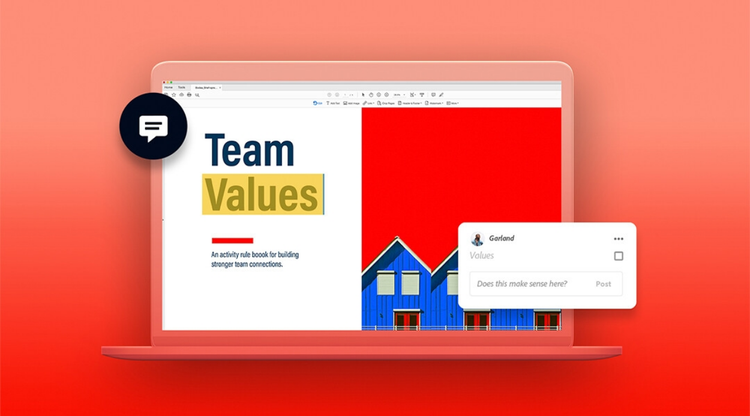
The benefits of team collaboration tools.
Good collaboration tools help teams:
- Stay aligned on goals and responsibilities
- Reduce miscommunication
- Increase engagement
- Improve productivity
- Maintain visibility across projects
Acrobat supports all of this by centralizing document workflows and giving teams a clear, organized space to collaborate.
What makes for good collaboration tools?
The best online collaboration tools are built with teams in mind and facilitate collaboration not only within a team, but also across an industry.
Purpose-built products
Good collaboration tools are purpose-built to enhance document workflow. All sorts of common tools can be jury-rigged to do a task they weren’t designed for, and apps that weren’t made to work together can be combined to achieve a given result. As appealing as improvised solutions can be, they’ll always have some degree of friction everyone involved will have to correct for, and they also tend to have steep learning curves for those who are unfamiliar with them. Truly good collaboration tools negate friction rather than create it.
Industry-standard apps
Industry-standard tools are a key way to ease collaboration. New team members are more likely to be familiar with industry-standard software, and business partners, stakeholders, freelancers, and other outside collaborators can reasonably be expected to know their functionality too. The use of bespoke or proprietary tools means that you’ll encounter speed bumps whenever you collaborate with someone outside of your team, but it’s easy to avoid that outcome with proper training.
Adobe Acrobat has been the industry-standard app for PDFs for over 25 years. Adobe invented the PDF and continues to offer the most comprehensive support for the format for large and small businesses alike.
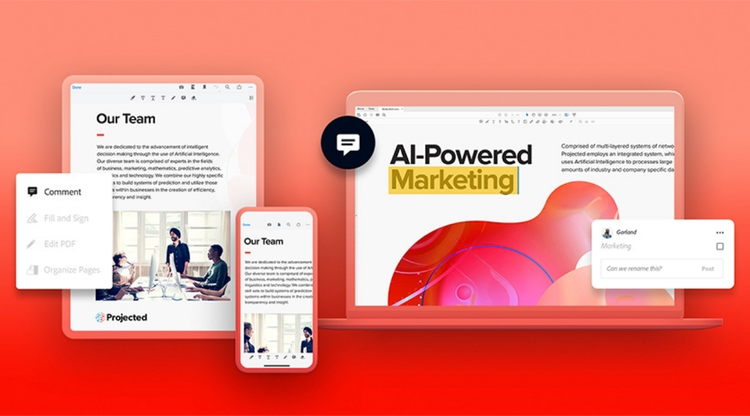
AI‑powered collaboration in Acrobat
As teams handle more documents and more complex workflows, AI becomes essential. Acrobat’s AI Assistant helps teams collaborate faster and more intelligently by allowing users to ask natural questions like (these can also be shown as a table):
- “How do I collaborate on documents with AI”
- “Summarize all comments and list action items”
- “What changes were made between these versions”
- “What tasks or approvals are still outstanding”
- “What’s the best workflow for this document”
AI can:
- Summarize long PDFs
- Extract tasks and deadlines
- Identify unresolved comments
- Suggest rewrites
- Generate quick overviews for stakeholders
- Help teams integrate document collaboration into broader workflows
This makes Acrobat one of the best AI document collaboration tools for teams that need clarity, speed, and accuracy.
Collaboration tools FAQs
Yes, collaboration tools can help companies grow by increasing the efficiency and effectiveness of a company’s team. They can help team members in different locations to seamlessly connect in real-time. They can also prevent inefficiencies like poor communication or duplicate work.
Businesses can use collaboration tools to streamline management of projects and teams. Collaboration tools can also allow different teams, like marketing and product development, to work together and easily access each other’s work. Businesses may also use collaboration tools to encourage engagement while enabling remote work.
Collaboration tools can ensure that students’ work and assignments are organized and accessible. They can also improve communication between students and encourage collaboration — a strategy long proven to help students excel.
Adobe encrypts documents for your security. You can easily encrypt a PDF, password protect it, or redact sensitive information with our PDF redactor. With cloud-based technology, your team’s work is safe from being lost.
Keep exploring
title
Use digital collaboration tools for better workflows.
cardImageAltText
A person sitting at a table using their laptop while talking on their phone
cardImage

Tags
caas:content-type/article,caas:business-unit/document-cloud,caas:products/acrobat,caas:topic/edit-pdf,caas:topic/frictionless,caas:topic/digital-transformation,caas:topic/add-pdf-page-numbers

