How to cite a website in different formats
Master website citations in MLA, APA, and Chicago formats. Learn the essential elements, see examples, and discover how AI tools can streamline your research workflow.

When to cite a website?
Every time you incorporate information from an online source into your writing, you need to cite it properly. This practice goes beyond following academic rules—it represents a fundamental commitment to intellectual honesty and scholarly integrity.

Website citations matter for several critical reasons. First, they prevent plagiarism by clearly distinguishing your original ideas from information gathered elsewhere. Second, citations give credit to the original content creators, acknowledging their research, expertise, and effort in producing valuable information. Third, citing your sources builds credibility with your readers. When you include proper citations in a research paper, you demonstrate thorough research practices and allow readers to verify your claims independently. This transparency strengthens your arguments and positions you as a trustworthy source of information.
You must cite a website whenever you use specific facts, statistics, or data from online sources. Direct quotes require citation, but so do paraphrased ideas—even when you've completely reworded someone else's concept, the original source deserves acknowledgment.
Common situations requiring website citations include referencing news articles, government reports, organizational publications, online encyclopedias, and digital versions of print materials. When in doubt, err on the side of caution and include a citation.
Citation styles for websites
Three major citation formats dominate academic and professional writing, each with distinct conventions for citing websites. MLA format is commonly used in humanities disciplines, APA format prevails in social sciences, and Chicago style appears frequently in history, business, and fine arts publications.
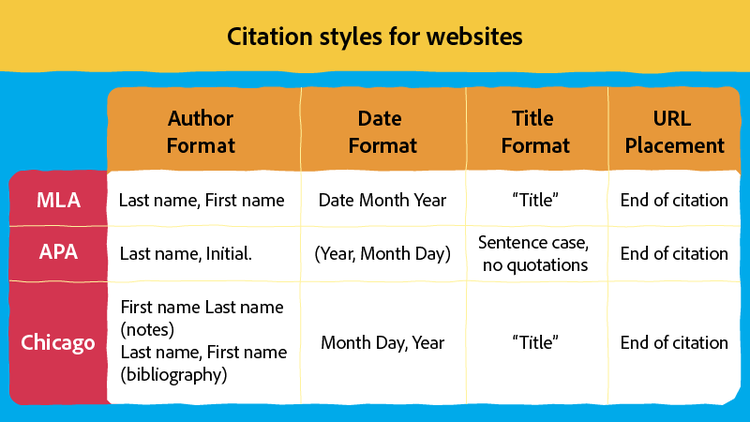
MLA format for website citations
The Modern Language Association format emphasizes authorship and publication context. Follow these steps to cite a website correctly in MLA style.
- Identify the author. Look for an individual author name first. If none exists, use the organization name. If the organization name matches the website name, skip the author element entirely.
- Format the page title. Place the specific page or article title in quotation marks, using title case capitalization. End with a period inside the closing quotation mark.
- Include the website name. Italicize the overall website or publication name. Follow it with a comma.
- Add the publisher. If the publisher differs from the website name, include it after the site name. Many websites don't require a separate publisher notation.
- Include the publication date. Format as Day Month Year (e.g., 15 Mar. 2024). If no date is available, you may skip this element.
- Provide the URL. Include the full URL without "https://" at the beginning. End with a period.
Smith, John. "Understanding Climate Change." Environmental Science Today, 12 Sept. 2024, www.environmentalsciencetoday.org/climate-change.
"Mental Health Resources for Students." National Institute of Mental Health, U.S. Department of Health and Human Services, 5 Jan. 2024, www.nimh.nih.gov/student-resources.
For in-text citations in MLA, include the author's last name in parentheses: (Smith). If you mention the author in your sentence, no parenthetical citation is needed. When citing PDF documents found online, follow the same format while noting the PDF format when relevant.
APA format for website citations
The American Psychological Association format emphasizes publication dates, reflecting the social sciences' focus on current research. Here's how to cite a website in APA style.
- Start with the author. List the author's last name followed by first and middle initials. For organizational authors, spell out the full organization name.
- Add the date. Place the publication date in parentheses, formatted as (Year, Month Day). Use (n.d.) if no date is available.
- Format the title. Write the page title in sentence case (only capitalize the first word and proper nouns). Do not use quotation marks or italics for webpage titles.
- Include the site name. Italicize the website name unless the author and site name are the same.
- Add the URL. Write "Retrieved from" only if the content may change. Otherwise, provide the URL directly.
Smith, J. (2024, September 12). Understanding climate change. Environmental Science Today. https://www.environmentalsciencetoday.org/climate-change
World Health Organization. (2024, January 15). Mental health in the workplace. https://www.who.int/news-room/fact-sheets/detail/mental-health-at-work
For in-text citations in APA, include the author's last name and year: (Smith, 2024). For direct quotes, add the paragraph number: (Smith, 2024, para. 3).
Chicago format for website citations
Chicago style offers two systems: notes-bibliography (common in humanities) and author-date (common in sciences). The notes-bibliography style uses footnotes or endnotes with a corresponding bibliography. Here's how to cite a website using this approach.
- Identify the author. List the author's first name followed by last name for footnotes. Reverse the order (last name, first name) for bibliography entries.
- Format the page title. Place the title in quotation marks using headline-style capitalization.
- Include the website name. Italicize the site name.
- Add the publication or modification date. Format as Month Day, Year.
- Provide the URL. Include the complete URL at the end.
Footnote: John Smith, "Understanding Climate Change," Environmental Science Today, September 12, 2024, https://www.environmentalsciencetoday.org/climate-change.
Bibliography: Smith, John. "Understanding Climate Change." Environmental Science Today. September 12, 2024. https://www.environmentalsciencetoday.org/climate-change.
How to cite a website using AI
Artificial intelligence tools have transformed how researchers gather and organize information. While AI can significantly streamline your citation workflow, understanding how to use these tools effectively—and ethically—ensures accurate, properly attributed references.
1. Gather source information from the website. Before using any AI tool, collect the essential citation elements yourself: author name, publication date, page title, website name, and URL. This information forms the foundation of your citation regardless of which tool you use.
2. Use AI tools to help format citations. AI assistants can help you arrange citation elements according to specific style requirements. Provide the source details and specify your required format (MLA, APA, or Chicago), and the AI can generate a properly formatted citation.
3. Verify AI-generated citations for accuracy. Always double-check AI-generated citations against official style guides. AI tools occasionally make formatting errors, misinterpret style requirements, or generate incorrect information.
4. Cite the original source, not the AI tool. When you use AI to help format a citation, you're still citing the original website—not the AI. The AI serves as a formatting assistant, similar to using a citation generator. Understanding guidelines for citing AI-generated content becomes important when AI actually contributes to your content creation.
5. Cross-reference with style guides. Keep official style manuals or reliable online guides handy to verify your citations meet current standards. Style guides update periodically, and AI tools may not always reflect the most recent changes.
Best practices for citing a website
Navigating the complexities of website citations requires attention to detail and consistent application of style rules. These best practices help you handle common challenges effectively.
When no author is listed, use the organization responsible for the content. If the organization name is the same as the website name, MLA style begins the citation with the page title instead. APA style uses the organization name as author even when it matches the site name. For example, a page on the Centers for Disease Control and Prevention (CDC) website with no individual author would use "Centers for Disease Control and Prevention" as the author in APA or start with the page title in MLA if the site name is also CDC.
Handling missing dates varies by citation style. In APA, use "n.d." (no date) in place of the publication year. MLA allows you to omit the date entirely if unavailable. Chicago style recommends including an access date when no publication date exists, formatted as "accessed Month Day, Year."
When an organization serves as the author, spell out the full name on first reference. Some styles allow abbreviations in subsequent citations if you've established the abbreviation clearly. Check your specific style guide for guidance on organizational authors.
Citing an entire website differs from citing a specific page. Generally, you only need to mention the website name and URL in your text when referencing an entire site, without creating a formal reference list entry. However, when citing a specific page or article, create a complete citation with all required elements.
For multiple pages from the same website, create separate citations for each page. While the website name remains consistent, each page has its own title, potential author, and publication date. Some styles allow shortened references for subsequent citations from the same source.
Consistency matters throughout your document. Once you choose a citation style, apply it uniformly to every source. Mixing formats confuses readers and suggests careless research practices. Many student resources offer citation guides and examples to help maintain consistency.
Retrieval dates are generally required only for content that changes frequently, such as wikis or social media posts. Most static webpages don't require access dates in current style guide editions, though Chicago style sometimes recommends them when publication dates are unavailable.
Frequently asked questions
How do you cite a website in MLA format?
How do you reference a website example?
Do I need to include the access date when citing a website?
How do I cite a website with no author?
What's the difference between a reference list and a works cited page?
Can I use URL shorteners in my citations?
You may also like