How to use AI tools for data analysis
Transform raw data into actionable insights using AI. Learn how to analyze datasets, automate tasks, and visualize patterns across industries with the right tools.

How to use AI for data analysis in different industries
AI for data analysis extends across virtually every sector, with each industry leveraging these tools to address unique challenges. Financial institutions may rely on AI to detect anomalies in transaction data, while researchers can use it to synthesize findings from thousands of academic papers. Healthcare organizations apply machine learning to patient records, and marketing teams analyze customer behavior at scale. Even individuals can harness AI for everyday concerns like personal finances. Understanding how different sectors approach AI-powered analysis helps identify the techniques most relevant to your needs.
Finance
Financial institutions use AI for data analysis to detect fraudulent transactions by analyzing patterns across millions of data points in real time. Beyond fraud detection, AI automates financial reporting, identifies market trends, and forecasts revenue with greater accuracy than traditional methods. Risk assessment models powered by machine learning can evaluate loan applications, predict market volatility, and flag anomalies in trading activity. Investment firms rely on AI to process earnings reports, news articles, and economic indicators simultaneously, generating insights that inform trading strategies and portfolio management decisions.
Research
Academic and scientific researchers increasingly depend on AI to manage the overwhelming volume of published literature. AI tools can synthesize findings from hundreds of studies, identify contradictions between papers, and highlight gaps in existing research. Pattern recognition algorithms help scientists discover connections across disparate datasets, accelerating the pace of discovery. Many researchers now rely on AI research assistants to extract key findings from lengthy documents, compare methodologies across studies, and generate literature reviews in a fraction of the time.
Healthcare
Healthcare organizations apply AI to analyze patient data at scale, supporting diagnostic accuracy and treatment optimization. Machine learning models can identify subtle patterns in medical imaging, lab results, and electronic health records that human analysts might miss. Clinical trial analysis benefits from AI's ability to process vast datasets and detect statistically significant outcomes. Predictive models help hospitals anticipate patient admissions, optimize staffing, and identify individuals at risk for specific conditions based on their medical history and demographic factors.
Marketing
Marketing teams use AI to understand customer behavior, measure campaign performance, and predict future purchasing patterns. Sentiment analysis algorithms process social media posts, reviews, and customer feedback to gauge brand perception. AI-powered segmentation identifies distinct customer groups based on behavior patterns, enabling more targeted messaging. Predictive modeling helps marketers allocate budgets more effectively by forecasting which channels and campaigns will deliver the strongest return on investment. Attribution analysis powered by AI clarifies which touchpoints contribute most to conversions.
Personal use
AI data analysis is not limited to enterprise applications. Individuals can use these tools to manage household budgets, track expenses, and optimize spending habits. Family financial planning becomes more manageable when AI categorizes transactions, identifies recurring costs, and highlights opportunities to save. Grocery shopping benefits from AI tools that analyze purchase history and suggest cost-effective alternatives. Personal financial forecasting tools help individuals plan for major expenses, estimate retirement savings needs, and make informed decisions about investments without requiring advanced analytical skills.
Data analysis AI tools
The landscape of AI-powered analysis tools continues to expand, offering solutions for every skill level and use case. From intelligent document features that create reports and summaries to conversational assistants that respond to natural language queries, these tools transform how people interact with data. Understanding how to use AI for data analysis starts with knowing the different categories of tools available and selecting the right solution for your specific needs.
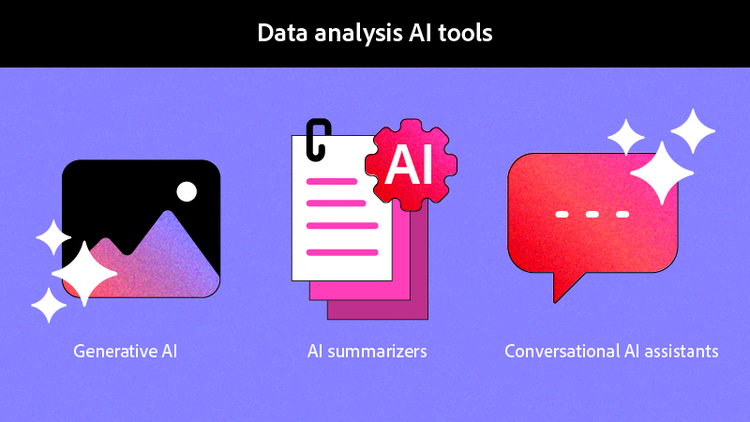
Generative AI
Generative AI tools create new content based on the data they analyze. These systems can produce written summaries, generate reports, and draft recommendations based on patterns they identify in your datasets. When you upload financial statements, generative AI can synthesize the key metrics and produce an executive report highlighting trends and anomalies. These tools excel at transforming raw numbers into narrative explanations that stakeholders can understand without deep analytical expertise.
AI summarizers
Summarization tools condense lengthy documents, reports, and datasets into digestible overviews. Rather than reading through hundreds of pages of research findings or quarterly reports, AI summarizers extract the essential information and present it in a concise format. These tools identify the most important data points, key conclusions, and actionable recommendations, saving hours of manual review time while ensuring you capture the critical insights.
Conversational AI assistants
Natural language interfaces allow users to query their data using everyday questions rather than complex formulas or programming languages. You can interact with documents conversationally to ask questions about their content, request specific calculations, or explore relationships between data points. Conversational AI assistants make data analysis accessible to users without technical backgrounds, democratizing insights that previously required specialized skills.
How AI presents data
AI tools present analytical findings through multiple formats designed to maximize comprehension and actionability. Summary reports distill complex datasets into key takeaways written in clear language. Visualization capabilities transform numbers into charts, graphs, and dashboards that reveal trends at a glance. Error detection algorithms flag inconsistencies, outliers, and potential data quality issues before they compromise your analysis. Trend identification highlights patterns over time, while predictive capabilities forecast future outcomes based on historical data. The most effective AI tools combine these presentation methods, allowing users to explore their data through whichever format best suits their needs.
How to analyze data with Acrobat AI Assistant
Adobe Acrobat AI Assistant enables users to extract insights from documents and spreadsheets through an intuitive conversational interface. Whether you need to analyze financial reports, research papers, or operational data, AI Assistant can help you identify patterns, summarize findings, and answer specific questions about your documents.
1. Open your document or spreadsheet as a PDF to begin the analysis process.
2. Access the AI Assistant panel from the toolbar on the right side of your screen; or, for multiple documents, upload your files into a PDF Space to begin analyzing.
3. Craft your analysis prompt by asking specific questions about the data. Writing effective prompts improves the quality and relevance of the insights you receive.
4. Review the generated insights, noting key findings, patterns, and recommendations.
5. Refine your prompts for deeper analysis if the initial results suggest additional areas to explore.
6. Export or share your findings with colleagues or save them for future reference.
How to implement AI for data analysis
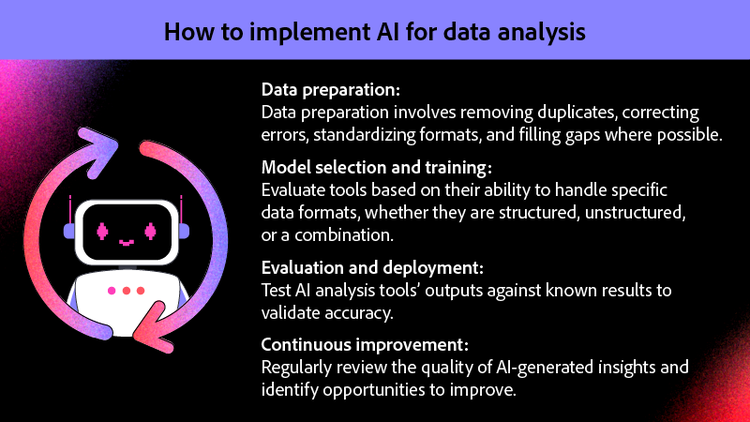
Successful AI implementation requires a structured approach that addresses data quality, tool selection, and ongoing optimization. Organizations and individuals who follow a systematic process achieve better results than those who adopt AI tools without proper preparation. The four phases of implementation—data preparation, model selection, deployment, and continuous improvement—provide a framework for maximizing the value of AI-powered analysis.
Data preparation
Quality analysis depends on quality data. Before applying AI tools, ensure your datasets are clean, properly formatted, and well-organized. Data preparation involves removing duplicates, correcting errors, standardizing formats, and filling gaps where possible. Inconsistent data leads to unreliable insights, making preparation the foundation of effective AI analysis. Establish data quality standards and validation processes that ensure your information meets the requirements of your chosen AI tools. Time invested in preparation pays dividends through more accurate and actionable results.
Model selection and training
Choosing the right AI tool depends on your data type, analysis goals, and technical capabilities. Consider whether you need generative capabilities, summarization, visualization, or conversational interfaces. Evaluate tools based on their ability to handle your specific data formats, whether structured spreadsheets, unstructured documents, or a combination. Some tools require training on your specific data to deliver optimal results, while others work effectively out of the box. Match your selection to your team's technical skills and the complexity of the analysis you need to perform.
Evaluation and deployment
Before rolling out AI analysis tools across your organization, test their outputs against known results to validate accuracy. Pilot programs allow you to identify issues and refine your approach before full deployment. Once validated, deploy solutions that enable teams to share insights and work together on analysis projects. Establish clear workflows that define how AI-generated insights integrate with existing decision-making processes. Training and evangelizing ensures team members understand how to use the tools effectively and are excited to integrate them into their work.
Continuous improvement
AI implementation is not a one-time project but an ongoing process of refinement. Regularly review the quality of AI-generated insights and identify opportunities to improve prompts, workflows, and data preparation practices. Stay current with new AI capabilities as tools evolve rapidly, adding features that may address previously unmet needs. Gather feedback from users about what works well and where they encounter limitations. Iterative improvement ensures your AI analysis capabilities grow more valuable over time rather than becoming stagnant.
Frequently asked questions
Is there an AI that can analyze Excel data?
Can I use AI to analyze data?
What types of data can AI analyze most effectively?
How accurate is AI data analysis?
Do I need technical skills to use AI for data analysis?
You may also like