



Artificial intelligence tools have transformed how we work with documents, research information, and complete everyday tasks. But getting the most from these tools depends on one critical skill: knowing how to write a prompt effectively.
How to write a prompt for AI
An AI prompt is a text instruction or question that tells an AI system what you want it to do. Think of it as giving directions to a very capable assistant who needs clear guidance to help you effectively. The quality of your prompt directly affects the quality of the response you receive. A vague or unclear prompt may produce generic, unhelpful results, while a well-crafted prompt generates precise, actionable information.
Understanding how to write AI prompts starts with recognizing how AI systems interpret your words. They take words literally and don't read between the lines or make assumptions about what you really mean. This is why learning how to prompt AI effectively requires a shift in how you communicate your needs.

Start with a clear objective
Before you type a single word, ask yourself what you actually want to accomplish. Are you trying to summarize a document? Extract specific data? Generate ideas? The clearer your objective, the better your prompt will be.
Consider the difference between these two prompts:
Vague prompt: "Tell me about this document."
Clear prompt: "Summarize the main findings from this research report in three bullet points, focusing on the conclusions and recommendations."
The second prompt tells the AI exactly what to produce, how to format it, and what to prioritize. This specificity leads to responses that match your actual needs. When you're asking questions effectively, clarity is your greatest asset.
Use specific, descriptive language
Vague prompts lead to vague results. When you want something specific, say so explicitly. Instead of asking the AI to "look at" a document, tell it exactly what to look for and what to do with that information.
For example, if you're working with a quarterly report and need key metrics, try this approach:
Generic prompt: "What's in this report?"
Specific prompt: "Extract the five most important financial metrics from this quarterly report, including any year-over-year percentage changes mentioned."
The specific prompt guides the AI toward exactly the information you need. Adobe Acrobat AI Assistant helps users interact with documents by understanding these detailed requests and delivering focused responses based on the actual content of your files.
Understanding these fundamentals is essential, but effective AI prompt writing involves several additional considerations that can dramatically improve your results.
Things to consider for AI prompt writing
Writing effective prompts requires more than just being specific. Several key factors influence how well AI interprets and responds to your requests. Understanding how to write prompts for AI means considering context, format, and the iterative nature of AI interactions.
Context matters
AI systems work best when they understand the broader picture. Providing context helps the AI frame its response appropriately and deliver more relevant information.
Consider how context changes the output:
Without context: "Summarize this document."
With context: "I'm preparing a presentation for executives who have five minutes to review this material. Summarize this document, highlighting only the strategic implications and recommended actions."
The second prompt gives the AI crucial information about your audience and purpose, resulting in a summary tailored to your specific situation. When working with document prompts, context transforms generic responses into genuinely useful outputs.
Context can include information about your role, your audience, the purpose of your request, relevant background information, or constraints you're working within. The more relevant context you provide, the better the AI can tailor its response.
Output format specification
Telling AI how you want information presented is just as important as telling it what information you need. Different formats serve different purposes, and specifying your preferred format upfront saves time and produces more usable results.
For instance, if you need to document meeting notes, compare these approaches:
Unformatted request: "What were the key points from this meeting transcript?"
Formatted request: "From this meeting transcript, create organized meeting notes with these sections: Attendees, Key Decisions Made, Action Items with owners and deadlines, and Topics for Follow-up."
By specifying the exact structure you need, you get output that's ready to use immediately rather than requiring additional editing and reorganization.
Iteration and refinement
Effective prompts often evolve through refinement. Your first attempt might not produce perfect results, and that's completely normal. Treat prompt writing as an iterative process where each response helps you improve your next request.
Common mistakes to avoid include:
- Being too vague about what you want
- Overloading a single prompt with multiple unrelated requests
- Assuming the AI knows context you haven't provided
- Not specifying the format or length of the response you need
When working with a document summarizer, you might start with a general request and then follow up with more targeted questions based on the initial response. This back-and-forth approach often yields better results than trying to craft one perfect prompt from the start.
With these considerations in mind, let's explore specific techniques you can apply immediately to improve your prompts.
4 tips for effective prompts
These actionable techniques will help you write better prompts starting today. Each tip addresses a common challenge and provides a practical solution you can use across different AI tools and use cases.
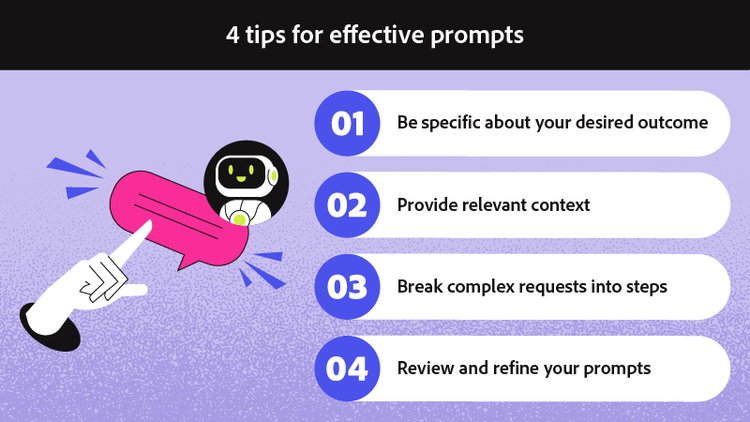
1. Be specific about your desired outcome
The more precisely you describe what you want, the closer the AI response will match your needs. Instead of asking for a general summary, specify exactly what aspects matter most and how detailed the response should be.
Compare these two approaches:
General: "Summarize this."
Specific: "Summarize the main arguments in this proposal in three bullet points, each no longer than two sentences, focusing on the cost-benefit analysis."
The specific version tells the AI exactly what to focus on, how many points to include, and how long each should be. This level of detail consistently produces more useful results.
2. Provide relevant context
Context shapes how AI interprets your request. Include information about your audience, purpose, and any constraints that affect what you need.
When using prompts to chat with your documents, adding context like "I'm a project manager reviewing this contract for timeline risks" helps the AI prioritize information relevant to your specific role and concerns.
Context can be as simple as stating who will use the information or as detailed as explaining the broader project the request supports. Either way, it helps the AI deliver more targeted responses.
3. Break complex requests into steps
When you need something complicated, resist the urge to cram everything into one massive prompt. Sequential prompts work better than overloaded single requests.
For example, if you're analyzing a contract for specific terms, try this approach:
Step 1: "Identify all sections in this contract that mention payment terms or financial obligations."
Step 2: "For each payment-related section you identified, summarize the key terms including amounts, due dates, and any penalties for late payment."
Step 3: "Based on your analysis, list any potential risks or unusual terms I should review more carefully."
Breaking the task into steps allows you to verify the AI's understanding at each stage and adjust your approach if needed.
4. Review and refine your prompts
Treat your prompts as iterative drafts rather than one-time instructions. If the first response doesn't quite hit the mark, analyze what was missing and adjust your prompt accordingly. You might ask for more detail on a specific point, request a different format, or provide additional context that helps narrow the focus.
Over time, you'll develop a sense for what works and build a personal library of effective prompts for your common tasks.
These tips apply whether you're summarizing research papers, extracting data from financial reports, or generating content for presentations. The underlying principles of clarity, context, and specificity remain constant across different AI tools and use cases.
Frequently asked questions
Creating an AI prompt starts with identifying your goal. Decide what specific outcome you need, then write a clear instruction that tells the AI exactly what to do. Include relevant context about your purpose or audience, specify the format you want for the response, and be explicit about any constraints like length or focus areas. Start simple and refine based on the results you receive. Adobe Acrobat AI Assistant makes this process intuitive by allowing you to interact naturally with your documents while applying these principles.
Effective prompts vary based on your task.
- For document summarization: "Summarize the executive summary of this report in five bullet points highlighting key recommendations."
- For data extraction: "List all dates and deadlines mentioned in this contract, organized chronologically."
- For content analysis: "Identify the three strongest arguments made in this proposal and explain why each is persuasive."
- For research assistance: "Compare the methodology sections of these two studies and highlight key differences in approach."
Yes, AI tools can work directly with PDF documents to help you summarize content, extract specific information, answer questions about the material, and identify key points. When you chat with your PDF, you can ask questions about the document's content, request summaries of specific sections, or have the AI locate particular information within lengthy files. Adobe Acrobat AI Assistant is designed with document chat in mind, making reviewing contracts, reports, and research papers faster and more efficient.
Prompt length should match the complexity of your request. Simple tasks might need only one or two sentences, while complex analysis could require a detailed paragraph. Focus on including all necessary information—your goal, relevant context, and format preferences—without adding unnecessary words. A concise, well-structured prompt often outperforms a lengthy, rambling one. Aim for completeness over brevity, but eliminate redundancy. The best prompts are as long as they need to be and no longer.
Ineffective prompts typically share common problems: they're too vague, lack context, don't specify desired output format, or try to accomplish too many things at once. Asking "What does this say?" gives the AI no direction, while asking "Tell me everything about this document" overwhelms it with an impossibly broad request. Other issues include using ambiguous language, assuming the AI has background knowledge it doesn't possess, and failing to clarify what success looks like. Effective prompt writing avoids these pitfalls by being intentional about every element of your request.
You may also like
title
How to write a prompt
cardImageAltText
Guide to writing effective AI prompts
cardImage
Tags
caas:content-type/article,caas:products/acrobat,caas:topic/ai-chat-pdf

