



As artificial intelligence (AI) tools become increasingly accessible, students face a new reality in academic settings. The rise of generative AI has transformed how people approach writing, research, and learning. In response, colleges and universities have implemented detection measures to maintain academic integrity and ensure students develop genuine skills.
Understanding what AI detectors colleges use—and how they work—has become essential knowledge for today's students. Whether you're curious about the technology behind these tools or want to ensure your authentic work isn't mistakenly flagged, this guide covers everything you need to know about the AI detection landscape in higher education.
The consequences of being flagged for AI-generated content vary by institution but can include failing grades, academic probation, or even expulsion in severe cases. What happens if college finds out you use AI without proper authorization? Most schools treat unauthorized AI use similarly to plagiarism, with penalties ranging from assignment failures to disciplinary hearings. Many colleges outline their AI policies in their academic integrity guidelines, making it crucial to understand both the rules and the technology designed to enforce them.
How do AI detectors work?
AI detection tools analyze text using sophisticated pattern recognition and statistical analysis methods. These systems are trained on vast datasets of both human-written and AI-generated content, learning to identify subtle differences between the two. At their core, most detectors evaluate two key metrics: perplexity and burstiness.
- Perplexity measures how predictable the text is—AI-generated content tends to follow more predictable patterns, while human writing often takes unexpected turns.
- Burstiness refers to the variation in sentence structure and length. Humans naturally write with more variation, mixing short punchy sentences with longer, more complex ones. AI tends to produce more uniform text.
Understanding how AI detectors work helps students recognize both the capabilities and limitations of these tools. No detector is perfect, and false positives do occur. Factors like writing style, subject matter, and even non-native English usage can influence results. Many educators use these tools as starting points for conversations rather than definitive judgments.
Detection algorithms also analyze vocabulary patterns, looking for word choices that appear statistically likely based on AI training data. They examine transition patterns, paragraph structure, and even punctuation usage. The combination of these factors produces a probability score indicating how likely the content is to be AI-generated.
Common AI detectors colleges use
Do colleges use AI detectors? The short answer is yes—overwhelmingly so. A recent survey found that over 60% of higher education institutions have implemented some form of AI detection technology, with that number growing rapidly. Understanding what colleges use to detect AI gives you the knowledge to navigate this environment successfully while maintaining your academic integrity.
It's worth noting that detection technology continues to evolve alongside AI writing tools. What AI detector do most professors use? The answer depends largely on institutional subscriptions and individual preferences, but Turnitin remains the most commonly integrated platform due to its established presence in academic settings. Most professors and admissions offices use these tools as one component of a broader academic integrity strategy rather than relying on them exclusively.
What do universities use to detect AI? The following tools represent the most common solutions deployed across higher education institutions today.
1. Turnitin
Turnitin remains one of the most widely recognized names in academic integrity software. Originally designed for plagiarism detection, the platform has expanded to include AI writing detection capabilities. Many students encounter Turnitin through their institution's learning management system, where it's often integrated directly into assignment submission workflows.
The platform's AI detection feature analyzes submissions and provides an AI writing indicator score, showing what percentage of the text may be AI-generated. Turnitin's strength lies in its extensive database and established relationships with educational institutions worldwide. The company reports that their AI detection tool has been trained on millions of documents, giving it a broad foundation for identifying AI-generated patterns.
Can Turnitin actually detect AI? While the tool has demonstrated reasonable accuracy in identifying AI-generated content, it's not infallible. The company acknowledges that detection becomes more challenging when AI content is heavily edited or mixed with human writing. Turnitin has stated they maintain a less than 1% false positive rate by only flagging content when their system shows high confidence. However, professors typically use Turnitin's results as a starting point for further investigation rather than conclusive proof. The platform also provides sentence-by-sentence highlighting, allowing instructors to see exactly which portions raised flags.
2. GPTZero
GPTZero emerged as one of the first dedicated AI detection tools, created by a Princeton University student in response to the release of ChatGPT. The platform has since evolved into a comprehensive solution used by educators at thousands of institutions across the country and internationally.
The tool analyzes text at both sentence and document levels, providing detailed breakdowns of which portions may be AI-generated. GPTZero offers features specifically designed for educators, including batch processing for multiple submissions and integration with learning management systems. The platform uses a combination of perplexity scoring and other proprietary metrics to generate its assessments.
Which AI detector do college admissions use? College admissions offices have increasingly adopted GPTZero and similar tools to evaluate application essays. As AI writing tools become more sophisticated, admissions committees are increasingly vigilant about ensuring applicants submit authentic work that reflects their genuine voice and experiences. GPTZero's accessibility and educator-focused features have made it particularly popular in admissions contexts, where authenticity carries significant weight in holistic review processes.
3. Originality.ai
Originality.ai positions itself as a comprehensive content verification platform, combining AI detection with plagiarism checking. The tool claims high accuracy rates and provides detailed analysis of submitted text, breaking down results by paragraph for granular review.
What sets Originality.ai apart is its focus on content creators and publishers alongside educators. The platform regularly updates its detection models to keep pace with new AI writing tools, including the latest versions of ChatGPT, Claude, Gemini, and other large language models. This commitment to staying current has earned it a reputation for detecting content from newer AI systems that other tools might miss.
For academic users, Originality.ai offers team features that allow departments or institutions to manage detection across multiple users. The tool also provides an API for integration with existing educational technology systems. The platform's ability to detect AI content even after paraphrasing or light editing makes it a valuable tool for institutions seeking robust detection capabilities.
4. Copyleaks
Copyleaks offers AI detection as part of its broader plagiarism prevention platform. The tool supports over 100 languages, making it particularly valuable for institutions with diverse student populations or international programs where students may write in their native languages.
The platform's AI detection capabilities analyze writing patterns, sentence structure, and vocabulary usage to identify potentially AI-generated content. Copyleaks integrates with popular learning management systems including Canvas, Blackboard, and Moodle, and offers browser extensions for convenient access during grading workflows.
Educational institutions appreciate Copyleaks for its comprehensive approach to content verification. The platform can detect content from various AI models while also checking for traditional plagiarism, providing a unified solution for academic integrity. Their AI Content Detector specifically identifies text generated by GPT-4, Gemini, Claude, and other popular AI models, with the company claiming a 99.1% accuracy rate in their testing.
5. ZeroGPT
ZeroGPT has gained popularity partly due to its free accessibility, making it a common choice for students who want to check their own work before submission and educators who may not have access to institutional subscriptions. The tool provides quick analysis and percentage-based results indicating the likelihood of AI generation.
While convenient, ZeroGPT's accuracy has limitations. The tool may struggle with certain writing styles or heavily edited content. It also has difficulty distinguishing between AI-generated text and human writing that incorporates paraphrasing techniques or follows structured formats common in academic writing.
Students sometimes use ZeroGPT to pre-screen their work, though this approach has limitations. A clean result from one detector doesn't guarantee the same outcome from others, as each tool uses different detection methods and thresholds. However, ZeroGPT's DeepAnalyze feature provides sentence-level analysis that can help identify specific portions of text that might raise concerns.
6. Sapling AI Detector
Sapling's AI content detector has emerged as another tool in the academic integrity toolkit. Originally developed for business applications, the platform has found adoption in educational settings due to its straightforward interface and detailed probability scoring.
The tool analyzes text and provides a percentage likelihood that content was AI-generated, along with highlighted sections showing which portions triggered detection flags. Sapling's detector works with content from ChatGPT, GPT-4, and other major language models, updating regularly to account for new AI systems.
What makes Sapling notable is its API availability, allowing institutions to build AI detection directly into their existing workflows. The platform also offers browser extensions that enable quick checks without leaving the grading interface. For educators who want flexibility in how they implement detection, Sapling provides options that more integrated solutions may lack.
Understanding the landscape of AI detection tools helps students make informed decisions about their writing process. As these technologies continue to evolve, maintaining authentic writing practices remains the most reliable approach to academic success. What AI detector do teachers use most frequently may vary by department or institution, but the underlying goal remains consistent: ensuring academic work represents genuine student learning and effort.
How to avoid being flagged by AI detectors
Navigating AI detection in academic settings requires understanding both the technology and your institution's expectations. The goal isn't to evade detection but to use AI tools responsibly while developing your authentic voice as a writer. Knowing what AI detectors teachers use helps you approach assignments with appropriate awareness.
Here are key strategies for students who want to use AI responsibly while avoiding detection issues:
- Understand your institution's AI policy thoroughly. Before using any AI tool, review your college's academic integrity guidelines. Policies vary significantly—some institutions prohibit AI use entirely, while others allow it with proper disclosure. Some professors have course-specific policies that may differ from university-wide rules, so check syllabi carefully and ask questions when policies aren't clear.
- Know the difference between AI assistance and AI generation. Using AI to brainstorm ideas, check grammar, or understand complex concepts differs substantially from having AI write your paper. Most academic policies focus on prohibiting the latter while permitting the former. Understanding this distinction helps you leverage AI's benefits without crossing ethical lines.
- Maintain your authentic voice throughout your writing. Your unique perspective, experiences, and analytical approach are what make your writing valuable. AI can support your process, but it shouldn't replace your voice. Include personal anecdotes, specific examples from your life, and original insights that only you could provide.
- Document AI usage when your institution requires it. Many institutions now require disclosure of AI tool usage. Understanding how to cite AI properly ensures you meet these requirements while maintaining academic integrity. Keep records of how you used AI tools during your research and writing process.
- Vary your sentence structure naturally. One hallmark of AI-generated text is uniform sentence length and structure. Consciously vary your writing rhythm—mix short sentences with longer, more complex ones. Start sentences with different words and use transitions that feel natural to your writing style.
- Include specific details and current examples. AI models have knowledge cutoffs and may produce generic examples. Including specific, current, or personal examples demonstrates authentic engagement with your topic. Reference recent events, specific course discussions, or personal observations that AI wouldn't have access to.
- Write multiple drafts and revise thoroughly. Genuine academic writing involves iteration. Create outlines, write rough drafts, and revise multiple times. This process not only produces better work but also creates a paper trail demonstrating authentic engagement with the writing process.
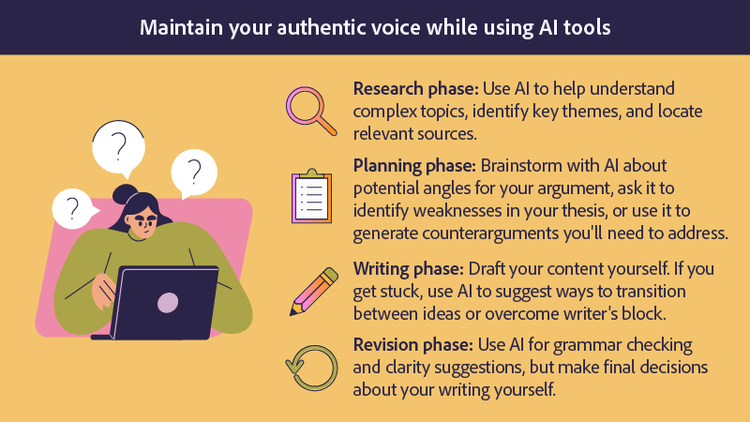
Using AI tools while maintaining your authentic voice
The most effective approach involves using AI to help you explore topics, organize thoughts, and overcome writer's block. AI tools excel at brainstorming, suggesting research directions, and explaining complex concepts—use them for these purposes.
When conducting research, generative AI tools for PDFs can help you quickly extract key information from lengthy documents. Tools like an AI summary generator streamline the research process by condensing complex academic papers into digestible overviews, while the ability to chat with PDF documents helps you engage more deeply with source materials and ask targeted questions about the content you're studying.
The key is transforming AI-assisted research into your own words and analysis. Learn to paraphrase quotes effectively, synthesizing information from multiple sources into original arguments. Add your personal insights, connect concepts to your experiences, and develop conclusions that reflect your genuine understanding of the material.
Consider developing a workflow that incorporates AI tools at appropriate stages:
- Research phase: Use AI to help understand complex topics, identify key themes, and locate relevant sources. Ask AI to explain difficult concepts in simpler terms or suggest search terms for academic databases.
- Planning phase: Brainstorm with AI about potential angles for your argument, ask it to identify weaknesses in your thesis, or use it to generate counterarguments you'll need to address.
- Writing phase: Draft your content yourself, drawing on the understanding you've developed. If you get stuck, use AI to suggest ways to transition between ideas or overcome writer's block.
- Revision phase: Use AI for grammar checking and clarity suggestions, but make final decisions about your writing yourself.
Frequently asked questions
Universities employ a variety of AI detection tools, with Turnitin being the most widely integrated due to its established presence in academic integrity systems. Other common tools include GPTZero, Originality.ai, Copyleaks, and ZeroGPT. Many institutions use multiple detection methods and combine technological tools with educational approaches like honor codes and integrity training. The specific tools vary by institution—check with your school's academic integrity office for information about which systems they use.
Using AI for research assistance is generally acceptable at most institutions and unlikely to trigger detection issues. AI tools can help you understand complex topics, identify relevant sources, and organize your thinking. The content you submit, however, should be written in your own words. Focus on using AI to enhance your research process rather than generate your final text, and always verify information from AI tools against authoritative sources. Many students successfully use AI assistants to summarize research papers, explain difficult concepts, or brainstorm ideas without academic consequences.
AI detector accuracy varies significantly depending on the tool, the type of content analyzed, and how much the text has been edited. Most tools report accuracy rates between 70% and 99%, but independent testing often shows lower real-world performance. False positives—flagging human-written content as AI-generated—remain a concern, particularly for non-native English speakers or writers with certain stylistic patterns. Studies have shown false positive rates can range from 1% to over 10% depending on the tool and content type.
No, colleges use various approaches to AI detection. Some institutions rely on Turnitin's integrated AI detection, while others use specialized tools like GPTZero or Copyleaks. Many schools use multiple tools or allow individual instructors to choose their preferred method. Some institutions focus more on educational approaches and honor codes rather than technological detection. The landscape is fragmented, with no single industry standard. Check your specific institution's policies for guidance on which tools they employ.
Editing AI-generated content may reduce detection likelihood, but it doesn't guarantee avoiding flags. Detectors analyze patterns throughout text, and traces of AI writing style often persist despite surface-level changes. More importantly, submitting edited AI content as your own work typically violates academic integrity policies regardless of detection. The ethical approach is using AI for assistance while ensuring your submitted work genuinely represents your ideas and writing. Heavy editing required to evade detection often takes more time than simply writing the content yourself.
If you believe you've been incorrectly flagged, remain calm and follow your institution's appeal process. Gather evidence of your writing process, such as drafts, research notes, outlines, or browser history showing your work progression. Request a meeting with your instructor to discuss the flagged content and explain your writing process. Many institutions recognize that detectors produce false positives and have procedures for addressing disputed results. Document everything and advocate for yourself professionally. Consider bringing previous writing samples that demonstrate your typical style to support your case.
Consequences for unauthorized AI use vary by institution and the severity of the violation. Minor first-time offenses might result in a warning, required resubmission, or a reduced grade on the assignment. More serious violations can lead to failing the assignment or course, academic probation, notation on your academic record, or in severe cases, suspension or expulsion. Many institutions treat AI misuse similarly to plagiarism under their academic integrity policies. The specific outcome depends on your school's policies, the instructor's discretion, and whether you've had previous integrity violations. Understanding and following your institution's AI policy is the best way to avoid these consequences.
College admissions offices are increasingly implementing AI detection tools to evaluate application essays. GPTZero has seen significant adoption in admissions contexts due to its educator-focused features and accessibility. Some admissions offices use Turnitin or other commercial tools, while others rely on trained readers who can identify AI-generated content through experience. Many admissions professionals combine technological tools with human review, as application essays require evaluation of voice, authenticity, and personal insight that detection software alone cannot fully assess.
You may also like
title
What AI detectors do colleges use?
cardImageAltText
Illustration representing how AI detectors analyze writing patterns and statistical signals in student work
cardImage
primaryTag
caas:content-type/article
Tags
caas:content-type/article,caas:products/acrobat,caas:topic/students,caas:topic/chat-pdf,caas:topic/edit-pdf,caas:topic/ai-assistant

