
1. En la barra de herramientas, selecciona la herramienta Pluma y dibuja dos líneas. Haz clic para crear el punto de inicio de la línea y, luego, vuelve a hacer clic para definir el punto final. Al hacer clic y arrastrar mientras mantienes pulsado el botón del ratón, aparecerán los controles para doblar la línea. Pulsa la tecla Retroceso o Intro cuando termines.
Consejo: Puedes ajustar la posición y la curvatura de las líneas con la herramienta Selección directa de la barra de herramientas. Haz clic en los puntos de la línea y arrástralos a la posición que quieras. También puedes hacer clic en los controles para ajustar la curvatura.
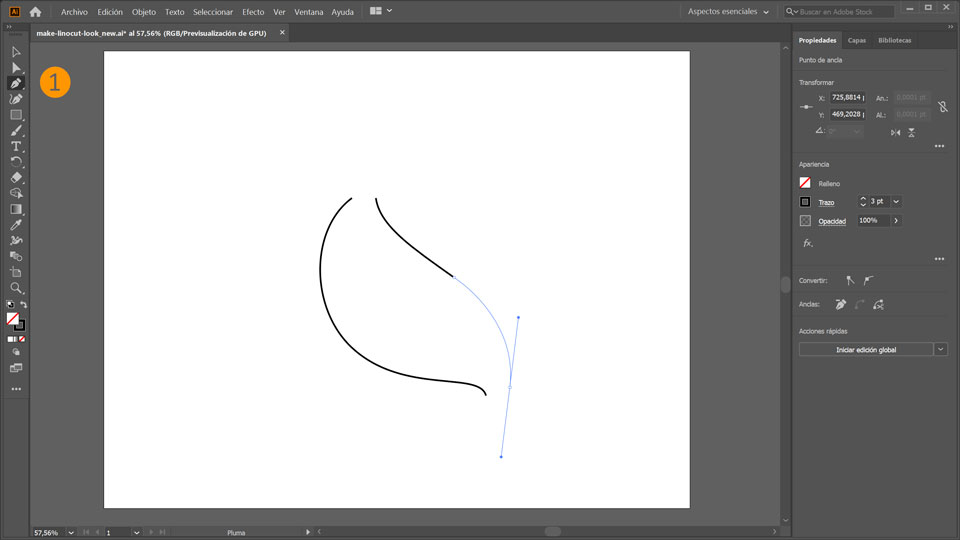
2. Utiliza la herramienta Selección directa + Mayús para seleccionar las dos líneas.
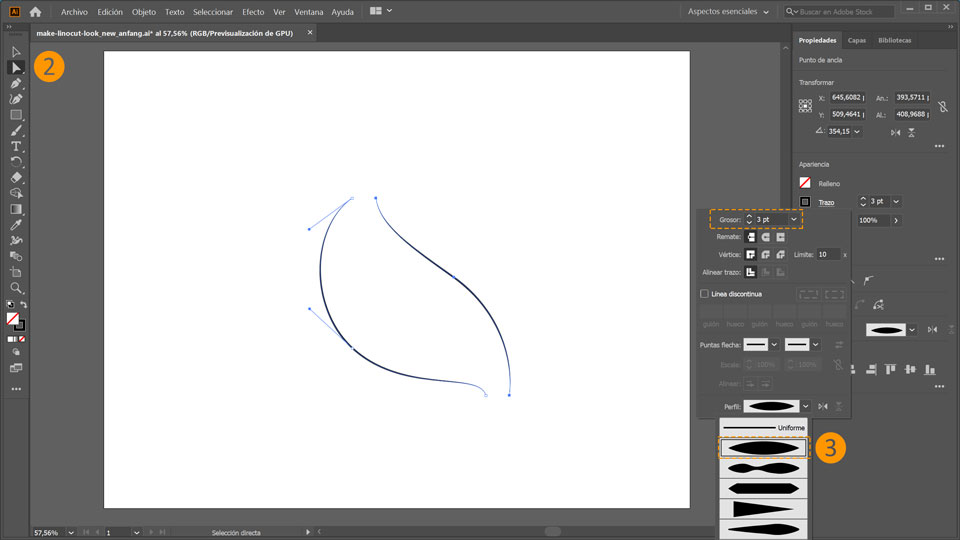
3. Haz clic en Trazo en la sección Apariencia del panel Propiedades. Cambia el grosor a 3puntos y selecciona el perfil de ancho 1 en el menú desplegable Perfil.
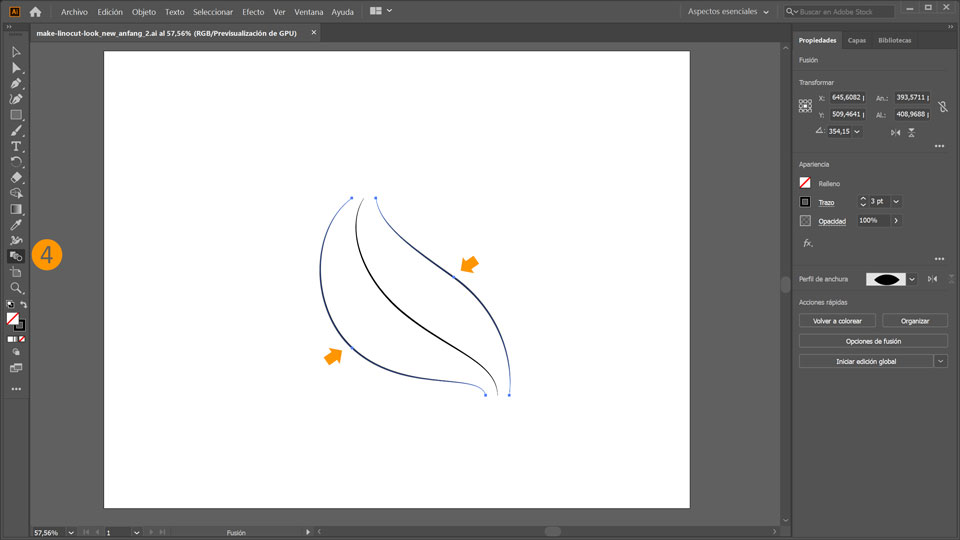
4. Selecciona la herramienta
Fusión en la barra de herramientas y, a continuación, haz clic en ambas líneas. De esta forma, aparecerá una tercera línea.
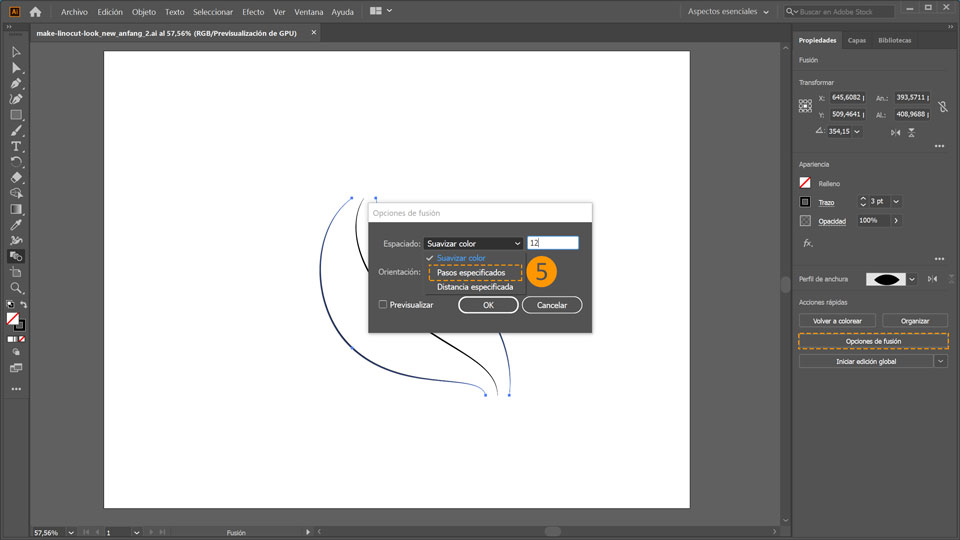
5. Haz clic en Opciones de fusión en la sección Acciones rápidas. Selecciona Pasos especificados en el menú desplegable Espaciado y cambia el número de pasos a 12.
Consejo: Activa Previsualizar en el menú Opciones de fusión para obtener una vista previa actual de la configuración.
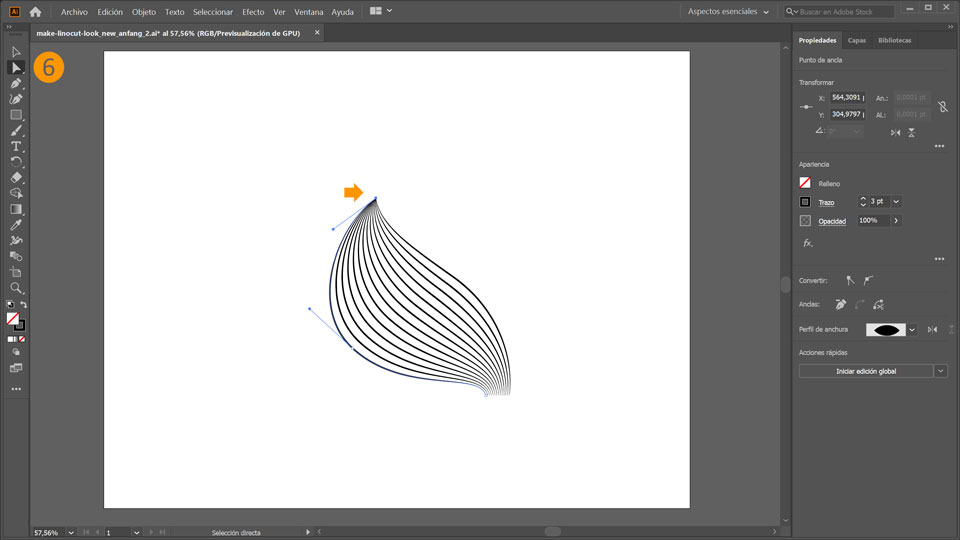
6. Utiliza la herramienta Selección directa para fusionar el punto superior de la línea izquierda con el punto superior de la línea derecha. Cuando la parte superior esté unida, repite el procedimiento con los extremos inferiores.
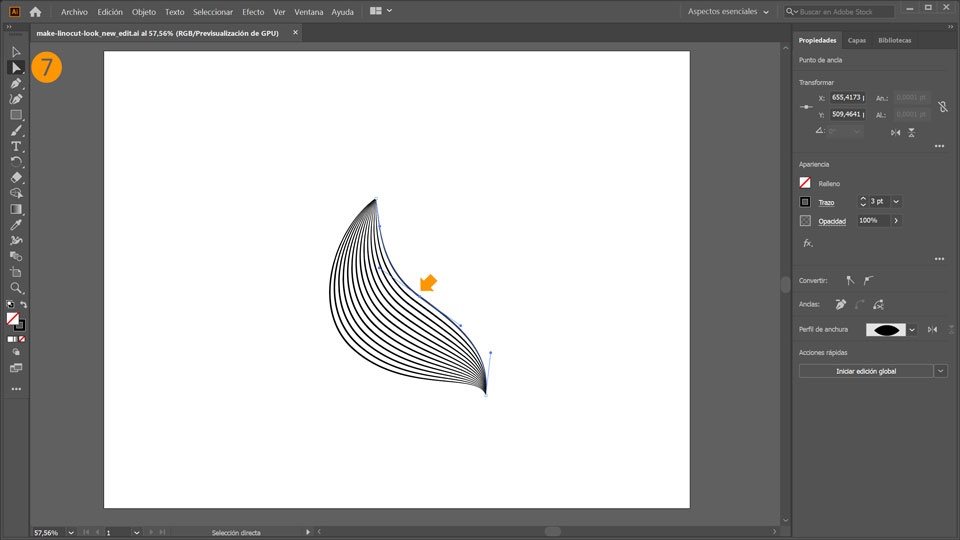
7. Con la herramienta Selección directa seleccionada, haz clic en el medio de una línea y arrástrala hacia las demás líneas.
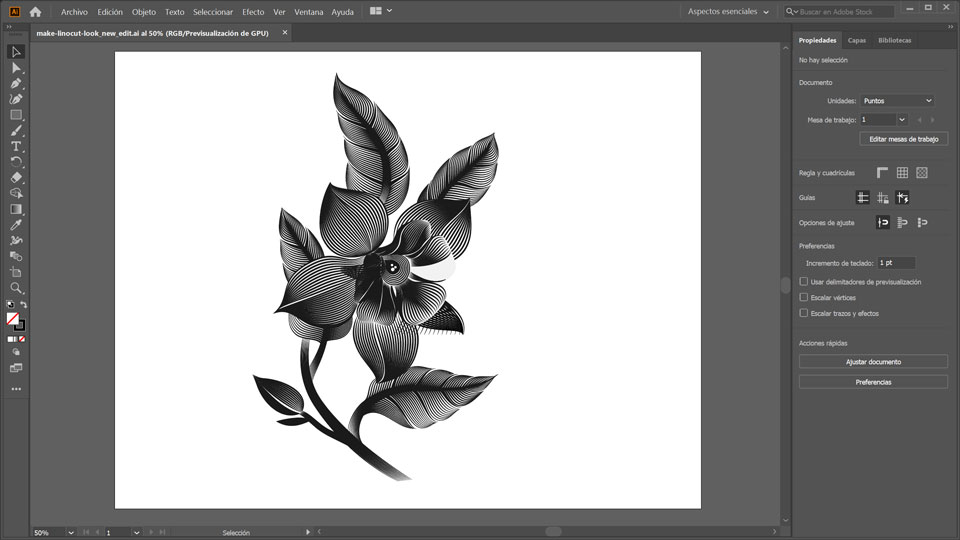
8. De este modo, has creado la primera parte de una hoja. Repite los pasos desde el principio para crear una flor como la de la imagen de abajo.
¡Ya está! Ahora es tu turno: crea un efecto de linograbado en 60 segundos con Illustrator. Descarga los recursos o utiliza los tuyos propios y comparte tu imagen en Facebook, Twitter e Instagram con #MadewithIllustrator para recibir comentarios y conectar con otras mentes creativas.
Behance:https://www.behance.net/live Únete a nuestras retransmisiones en directo con profesionales y proyectos de verdad en tiempo real, y encuentra inspiración.

You can control how Adobe websites use cookies and similar technologies by making choices below. But note that if you disable cookies and similar technologies entirely, Adobe websites may not function properly.
Cookies are small text files stored by your web browser when you use websites. There are also other technologies that can be used for similar purposes like HTML5 Local Storage and local shared objects, web beacons, and embedded scripts. These technologies help us do things like remembering you and your preferences when you return to our sites, measure how you use the website, conduct market research, and gather information about the ads you see and interact with.
You can make choices in the menu below about what cookies and other technologies you want us to use on Adobe sites when you visit them from this browser. You can always change those choices later by clicking on the Cookie Preferences link at the bottom of the page.
If enabled:
We can improve your experience by tailoring the site and the content to things we think might be of interest
We can better keep track of your preferences — like what language you prefer to use
We will better understand your likely interests so we can provide you more relevant Adobe ads and content on non-Adobe websites and in non-Adobe apps
It will help us improve the performance of our website and those of our partners who use the Adobe Experience Cloud
If disabled:
We won’t be able to remember you from session to session so the experience may not be tailored to your interests
You’ll still have access to the content of the site but certain features that depend on cookies may not function
You’ll still see ads, they just may not be as relevant to you
General information
You can control how Adobe websites use cookies and similar technologies by making choices below. But note that if you disable cookies and similar technologies entirely, Adobe websites may not function properly.
Cookies are small text files stored by your web browser when you use websites. There are also other technologies that can be used for similar purposes like HTML5 Local Storage, web beacons, and embedded scripts. These technologies help us do things like remembering you and your preferences when you return to our sites, measure how you use the website, conduct market research, and gather information about the ads you see and interact with.
You can make choices in the menu below about what cookies and other technologies you want us to use on Adobe sites when you visit them from this browser. You can always change those choices later by clicking on the Cookie Preferences link at the bottom of the page.
If enabled:
We can improve your experience by tailoring the site and the content to things we think might be of interest
We can better keep track of your preferences — like what language you prefer to use
We will better understand your likely interests so we can provide you more relevant Adobe ads and content on non-Adobe websites and in non-Adobe apps
It will help us improve the performance of our website and those of our partners who use the Adobe Experience Cloud
If disabled:
We won’t be able to remember you from session to session so the experience may not be tailored to your interests
We’ll still count your use of our site and services
You’ll still have access to the content of the site but certain features that depend on cookies may not function
You’ll still see ads, they just may not be as relevant to you
Operate the site and core servicesOperate site and measure engagement
Always active
These cookies are required, and they are used to enable the site and related services core functionality. Without them the site could not operate, so they cannot be disabled.
These cookies enable the site and related services’ core functionality and collect statistics about user engagement, such as counting active use to help us understand trends. These cookies cannot be disabled.
Measure performance
These cookies are used to analyze site usage to measure and improve performance. Without them Adobe cannot know what content is most valued and how often unique visitors return to the site, making it hard to improve information we offer to you.
These cookies are used to analyze site usage to measure and improve performance. Without them Adobe cannot know what content is most valued, making it hard to improve information we offer to you.
Extend functionality
These cookies are used to enhance the functionality of Adobe sites such as remembering your settings and preferences to deliver a personalized experience; for example, your username, your repeated visits, preferred language, your country, or any other saved preference.
Personalize advertising
These cookies are used to enable Adobe and our partners to serve ads more relevant to your interests. Without them you will still see ads, but they might not be as relevant to you.
Personalize advertising
These cookies are used to enable Adobe and our partners to serve ads more relevant to your interests. Without them you will still see ads, but they might not be as relevant to you.