
1. Descárgate losarchivos de práctica y abre “poster.psd” en Photoshop. Verás una imagen de fondo que simula el aspecto de grano de papel y una capa con otra textura.
Fusiona texturas
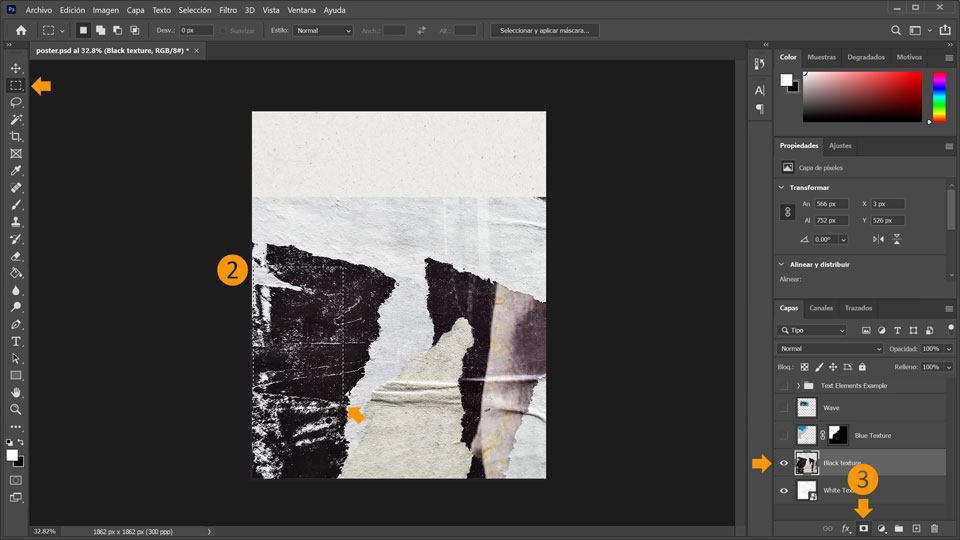
2. Selecciona la capa “Black Texture” y luego haz clic en la Herramienta Marco rectangular (M) y selecciona parte de la textura negra.
3. Haz clic en Añadir máscara de capa en la parte inferior del panel de capas para crear una máscara.
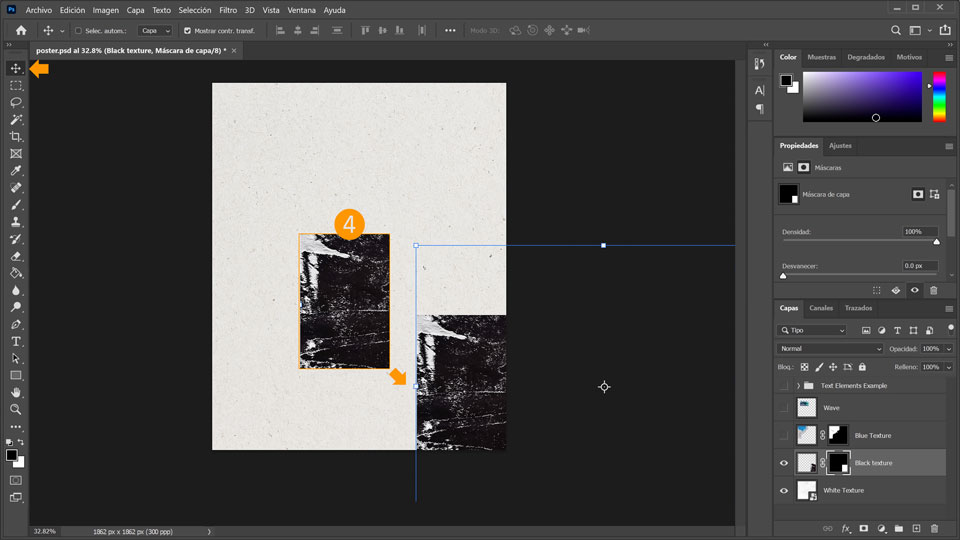
4. Selecciona la herramienta Mover (V) y coloca el rectángulo de la textura negra en la esquina inferior derecha.
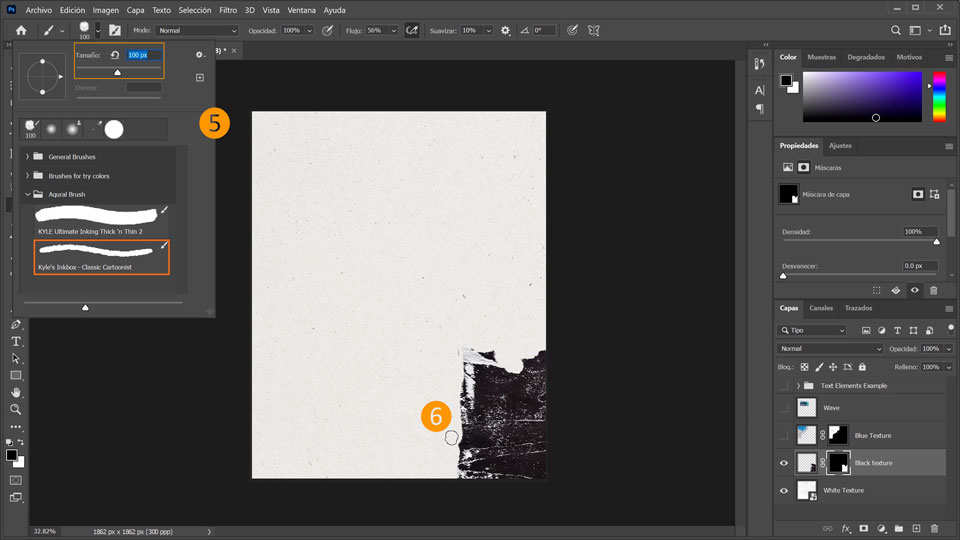
5. Con la Miniatura de máscara de capa todavía seleccionada, haz clic en el Pincel (B) y luego en la flechita situada junto al icono del pincel en la barra superior para configurar el pincel. Selecciona “Kyles Inkbox – Classic cartoonist” en la carpeta Aquarel brush y define un tamaño de 100 px. Comprueba que el color frontal esté definido en negro.
6. Ahora pinta con el pincel de textura negra para ocultar partes de la textura y crear un borde irregular.
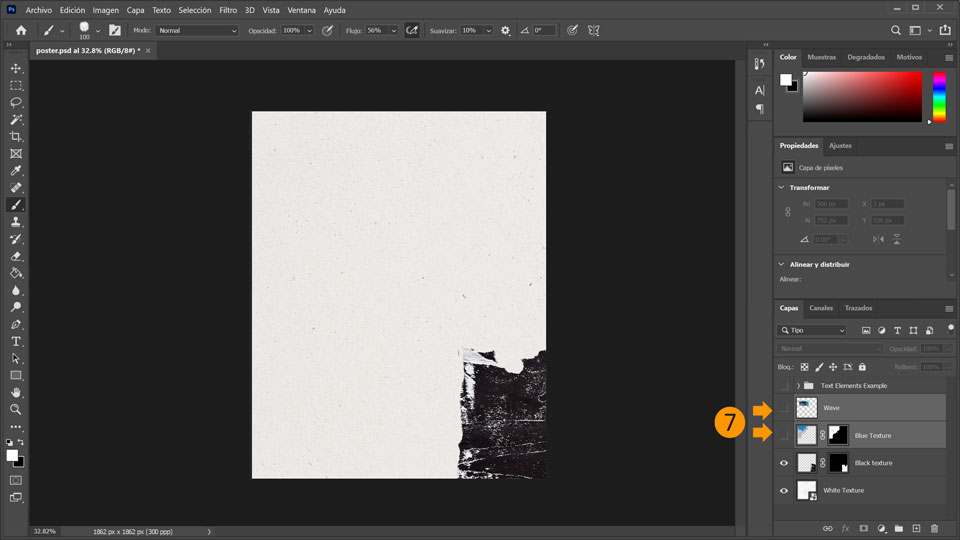
7. Selecciona la capa “Blue Texture”, y luego haz clic en el recuadro situado junto a la miniatura de la capa para visibilizar la capa. Haz lo mismo con la capa “Wave” (aparecerá el icono del ojo, que indica la visibilidad de la capa).
Escribe por encima
8. Ahora, incorpora texto a la composición. Elige la herramienta Texto (T) y luego elige una fuente que te guste. Araújo sincronizó “Henderson Slab ” desde Adobe Fonts. Define el tamaño de la fuente en 550 px y escribe la palabra “ÁGUA”.
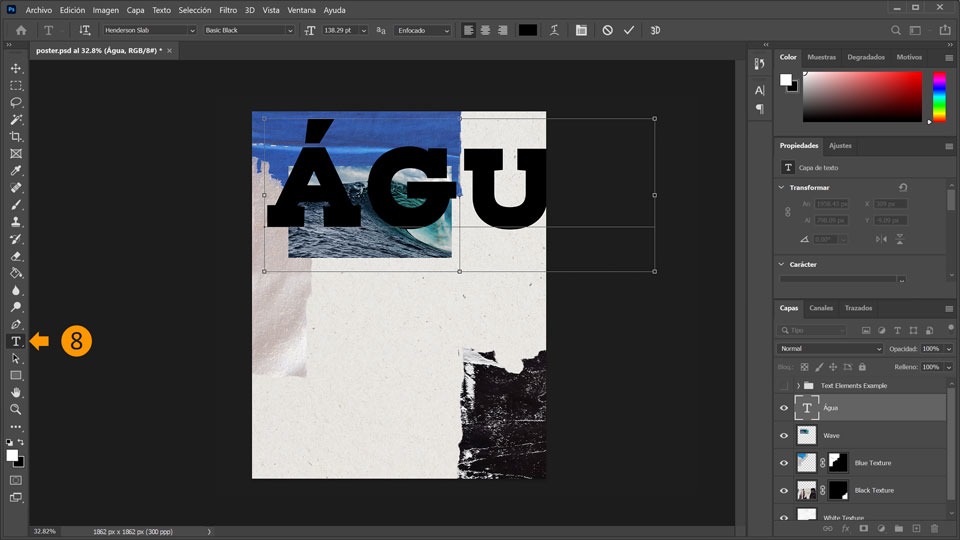
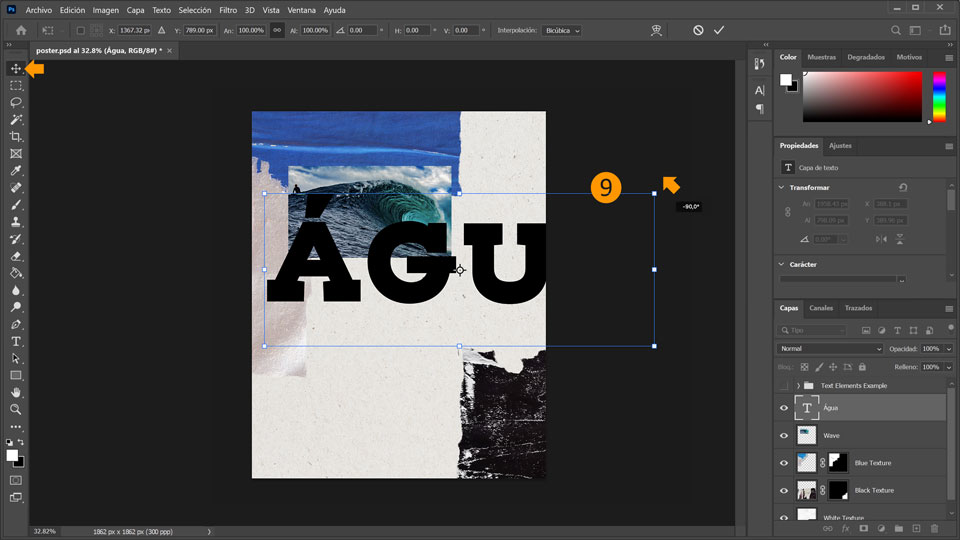
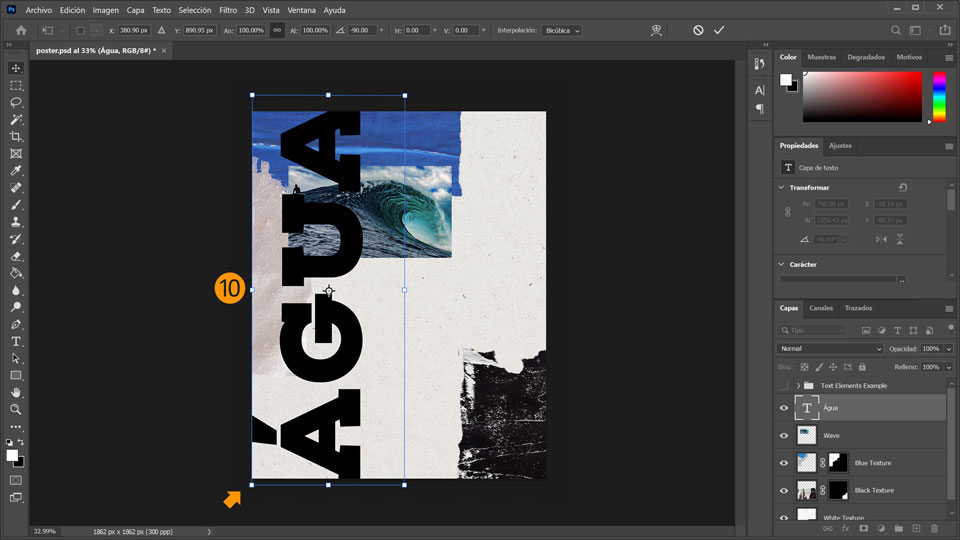
9. Haz clic en la herramienta Mover (V) y desplaza el texto hacia el medio del póster. Después, coloca el ratón junto a la esquina superior derecha del bloque de texto hasta que se convierta en un cursor curvo de dos flechas. Ahora, mantén pulsada la tecla Mayús y gira el texto 90 grados.
10. Coloca el texto a la izquierda.
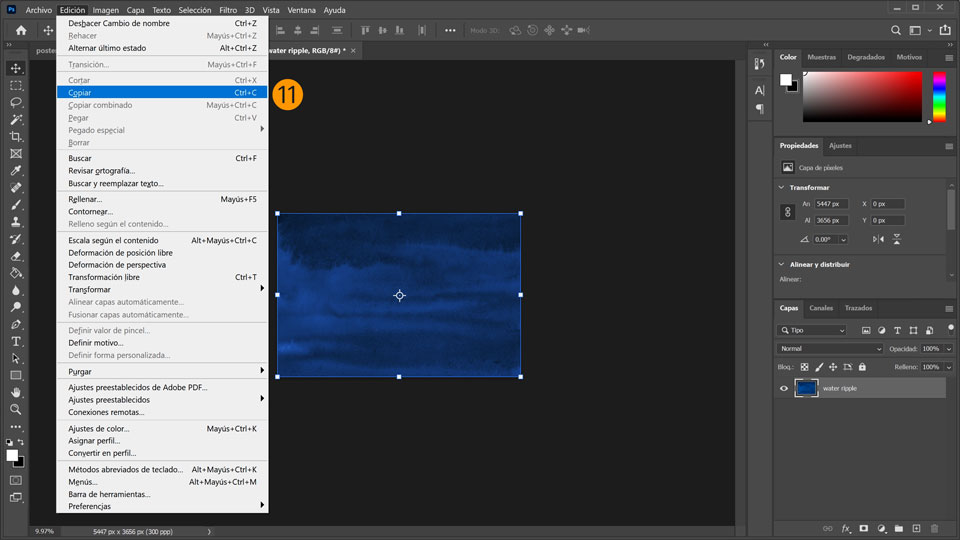
11. Después, abre el archivo “water ripple.psd” y selecciona Edición > Copiar.
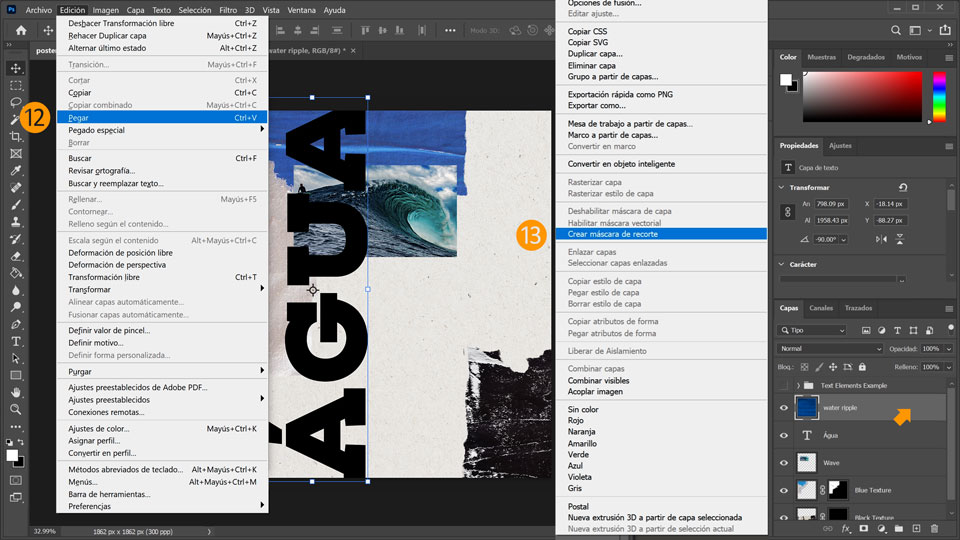
12. Vuelve a “poster.psd” y selecciona Edición > Pegar.
13. Haz clic con el botón secundario en la capa Water Ripple y selecciona Crear máscara de recorte para darle al texto un efecto de ondulación.
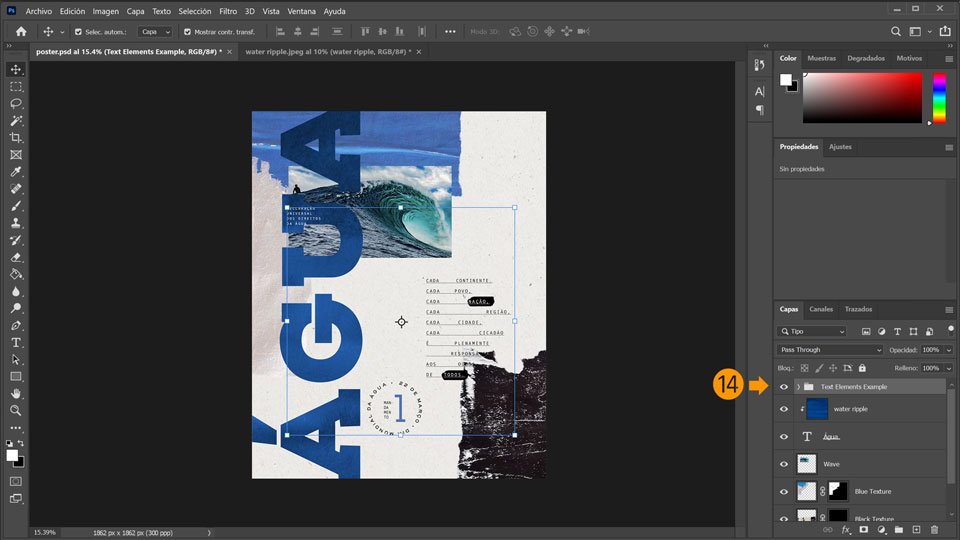
14. Complementa la composición añadiendo texto y experimentando con el tamaño, el interlineado, la ubicación y otros efectos decorativos. Echa un vistazo al siguiente ejemplo: Haz clic en el recuadro situado junto a la flecha y en el icono de la carpeta de “Text Elements Example” para visibilizar el grupo.
¡Ya está!
Ahora te toca a ti crear un póster con Photoshop. Descárgate los activos o utiliza los tuyos propios, y comparte el resultado en Facebook, Twitter e Instagram con #MadewithPhotosho p para obtener comentarios y conectar con otras mentes creativas.
Behance:https://www.behance.net/live Únete a nuestras retransmisiones en directo con profesionales y proyectos de verdad en tiempo real, y encuentra inspiración.

22 de julio de 2022
Prueba estos tutoriales con Photoshop
Edita fotos para crear nuevas imágenes y gráficos.
You can control how Adobe websites use cookies and similar technologies by making choices below. But note that if you disable cookies and similar technologies entirely, Adobe websites may not function properly.
Cookies are small text files stored by your web browser when you use websites. There are also other technologies that can be used for similar purposes like HTML5 Local Storage and local shared objects, web beacons, and embedded scripts. These technologies help us do things like remembering you and your preferences when you return to our sites, measure how you use the website, conduct market research, and gather information about the ads you see and interact with.
You can make choices in the menu below about what cookies and other technologies you want us to use on Adobe sites when you visit them from this browser. You can always change those choices later by clicking on the Cookie Preferences link at the bottom of the page.
If enabled:
We can improve your experience by tailoring the site and the content to things we think might be of interest
We can better keep track of your preferences — like what language you prefer to use
We will better understand your likely interests so we can provide you more relevant Adobe ads and content on non-Adobe websites and in non-Adobe apps
It will help us improve the performance of our website and those of our partners who use the Adobe Experience Cloud
If disabled:
We won’t be able to remember you from session to session so the experience may not be tailored to your interests
You’ll still have access to the content of the site but certain features that depend on cookies may not function
You’ll still see ads, they just may not be as relevant to you
General information
You can control how Adobe websites use cookies and similar technologies by making choices below. But note that if you disable cookies and similar technologies entirely, Adobe websites may not function properly.
Cookies are small text files stored by your web browser when you use websites. There are also other technologies that can be used for similar purposes like HTML5 Local Storage, web beacons, and embedded scripts. These technologies help us do things like remembering you and your preferences when you return to our sites, measure how you use the website, conduct market research, and gather information about the ads you see and interact with.
You can make choices in the menu below about what cookies and other technologies you want us to use on Adobe sites when you visit them from this browser. You can always change those choices later by clicking on the Cookie Preferences link at the bottom of the page.
If enabled:
We can improve your experience by tailoring the site and the content to things we think might be of interest
We can better keep track of your preferences — like what language you prefer to use
We will better understand your likely interests so we can provide you more relevant Adobe ads and content on non-Adobe websites and in non-Adobe apps
It will help us improve the performance of our website and those of our partners who use the Adobe Experience Cloud
If disabled:
We won’t be able to remember you from session to session so the experience may not be tailored to your interests
We’ll still count your use of our site and services
You’ll still have access to the content of the site but certain features that depend on cookies may not function
You’ll still see ads, they just may not be as relevant to you
Operate the site and core servicesOperate site and measure engagement
Always active
These cookies are required, and they are used to enable the site and related services core functionality. Without them the site could not operate, so they cannot be disabled.
These cookies enable the site and related services’ core functionality and collect statistics about user engagement, such as counting active use to help us understand trends. These cookies cannot be disabled.
Measure performance
These cookies are used to analyze site usage to measure and improve performance. Without them Adobe cannot know what content is most valued and how often unique visitors return to the site, making it hard to improve information we offer to you.
These cookies are used to analyze site usage to measure and improve performance. Without them Adobe cannot know what content is most valued, making it hard to improve information we offer to you.
Extend functionality
These cookies are used to enhance the functionality of Adobe sites such as remembering your settings and preferences to deliver a personalized experience; for example, your username, your repeated visits, preferred language, your country, or any other saved preference.
Personalize advertising
These cookies are used to enable Adobe and our partners to serve ads more relevant to your interests. Without them you will still see ads, but they might not be as relevant to you.
Personalize advertising
These cookies are used to enable Adobe and our partners to serve ads more relevant to your interests. Without them you will still see ads, but they might not be as relevant to you.