Consejo: Es importante utilizar activos que funcionen bien juntos. El diseño de la página que hemos suministrado coincide a grandes rasgos con las dimensiones del modelo a escala de libro de Adobe Stock.
Inserta el diseño en la composición del libro
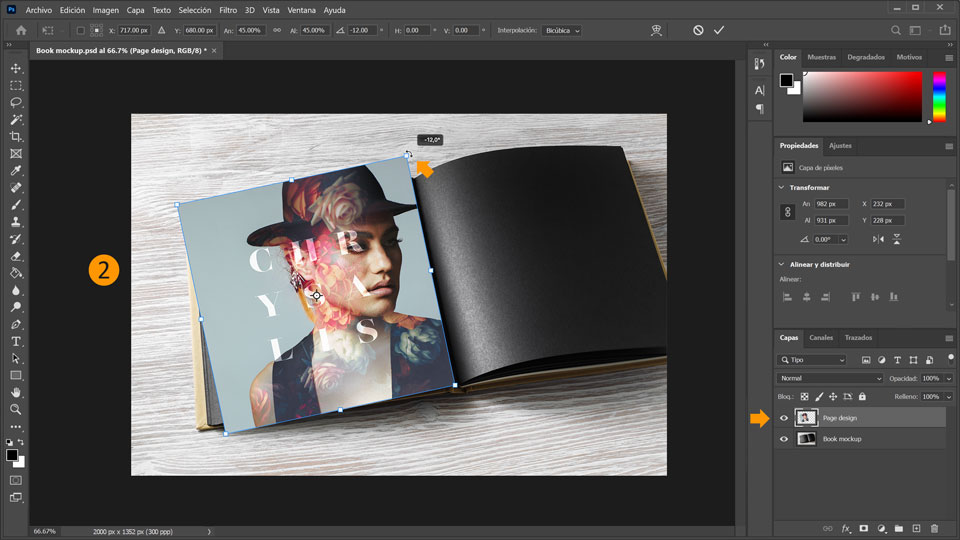
2. Selecciona la capa “Page design” y usa Control+T (Windows) o Comando+T (macOS) para abrir la herramienta Transformar. Arrastra el diseño de la página a la página de la izquierda del libro abierto y gira el diseño de la página unos 12 grados para que coincida a grandes rasgos con el ángulo de la página.
Consejo: Si mueves el puntero del ratón un poquito fuera del diseño de la página, el cursor se convierte en un cursor de dos flechas curvas que te permite girar un objeto arrastrándolo.
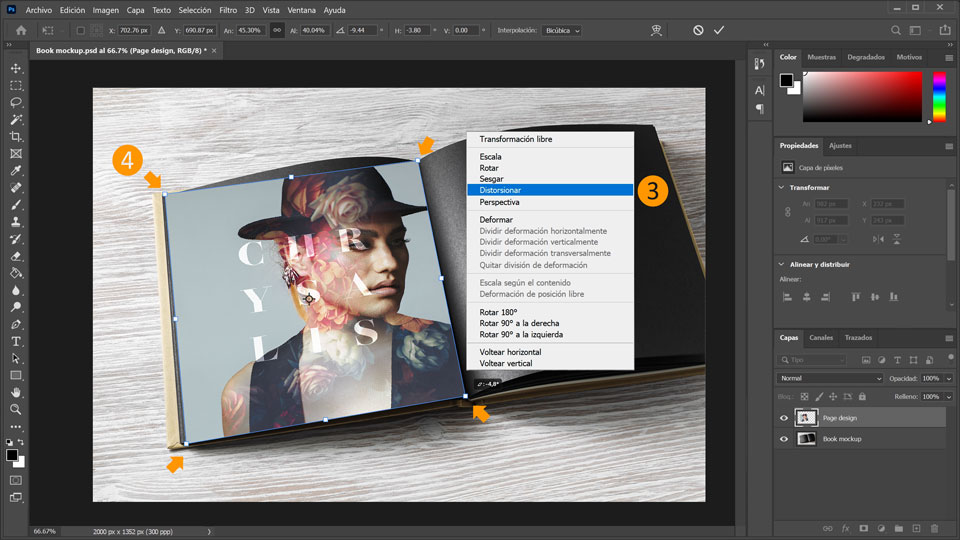
3. Después, transforma el diseño de la página. Con la capa de diseño de la página seleccionada, haz clic con el botón derecho en el diseño de la página y selecciona Distorsionar.
4. Arrastra todas las esquinas del diseño de la página para alinearlas con las esquinas de la página izquierda.
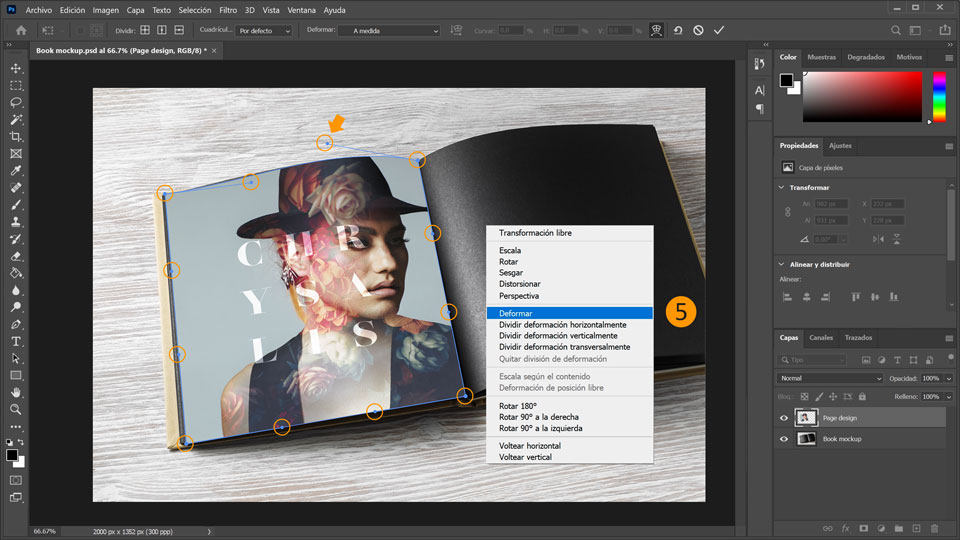
5. Ahora, ajusta las curvas. Haz clic con el botón secundario en el diseño de la página y selecciona Deformar. Aparecerán 12 puntos/controles. Ajusta los controles para alinear los bordes con las curvas de la página. Pulsa Entrar cuando hayas terminado.
Crea iluminación
6. Para darle el mayor realismo posible al modelo a escala, tenemos que crear iluminación. Para ello, haz doble clic en la capa del diseño de página para abrir el cuadro de diálogo Estilos de capa. Haz clic en la Superposición de degradado en el lado izquierdo y haz clic en el campo Degradado y selecciona el degradado blanco y negro en la categoría Aspectos básicos. Selecciona los siguientes parámetros:
a. Modo de fusión: Multiplicar
b. Opacidad: 90 %
c. Ángulo: –170
d. Escala: 15 %
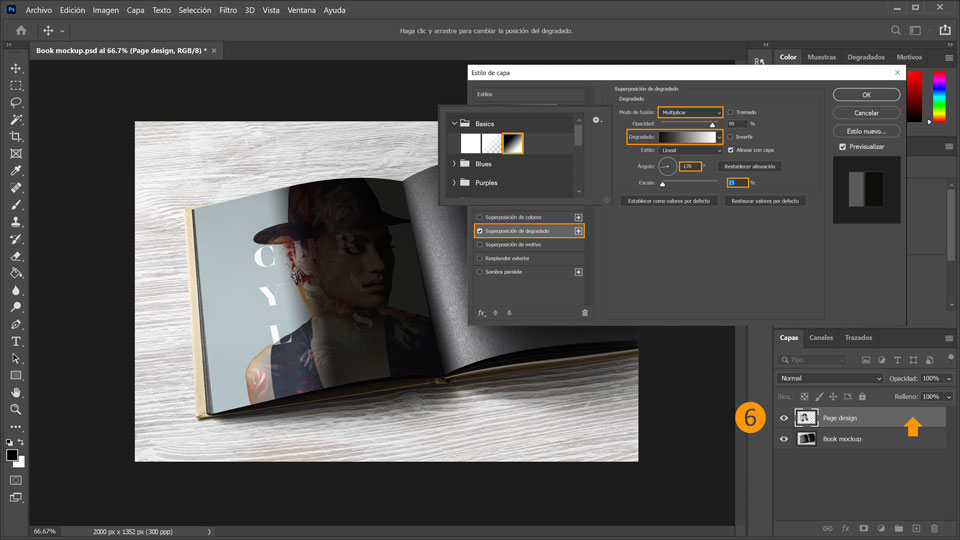
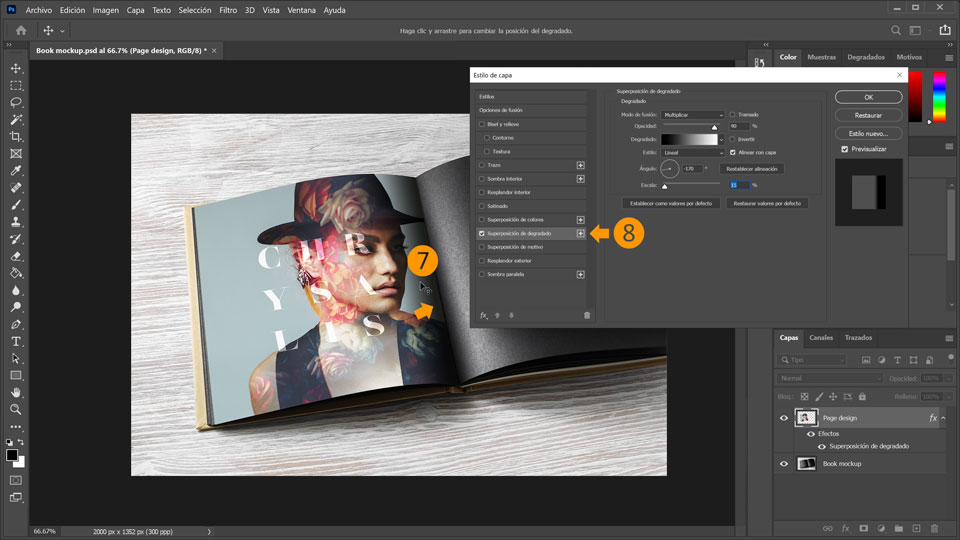
7. Con el cuadro de diálogo Estilo de capa aún abierto, usa la herramienta Selección para arrastrar el degradado y recolocarlo a lo largo de la costura de la página. Su aspecto es bastante realista cuando creas una sombra en la costura de la página.
8. Después, haz clic en el icono del signo + situado junto a Superposición de degradado para añadir un segundo degradado.
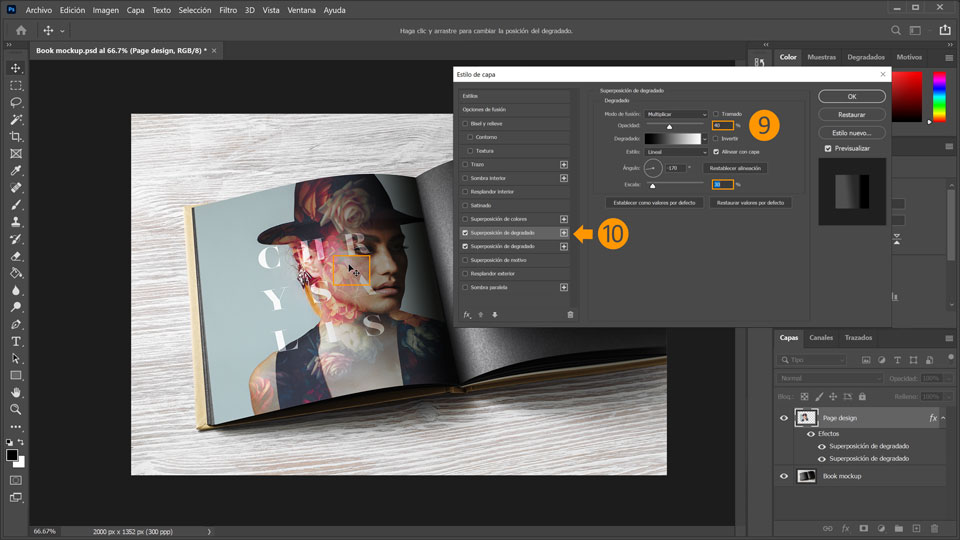
9. Ajusta Opacidad en un 40 % y Escala en un 30 %. Deja el resto con los valores que hayas definido antes. Vuelve a utilizar la herramienta Selección para arrastrar el degradado ligeramente hacia la izquierda, alejándolo de la costura de la página.
10. Haz clic otra vez en el icono del signo + situado junto a Superposición de degradado para añadir una tercera Superposición de degradado.
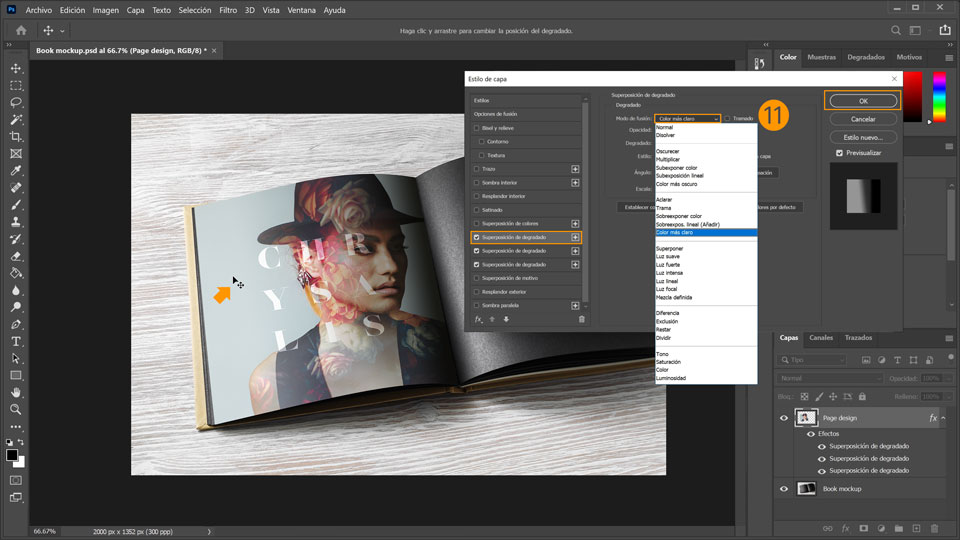
11. Configura Modo de fusión con el valor Trama. Arrastra el degradado de la ilustración para recolocar el resalte sobre el lado izquierdo de la página. Haz clic en Aceptar
cuando termines.
Fusiona el diseño con el grano del papel
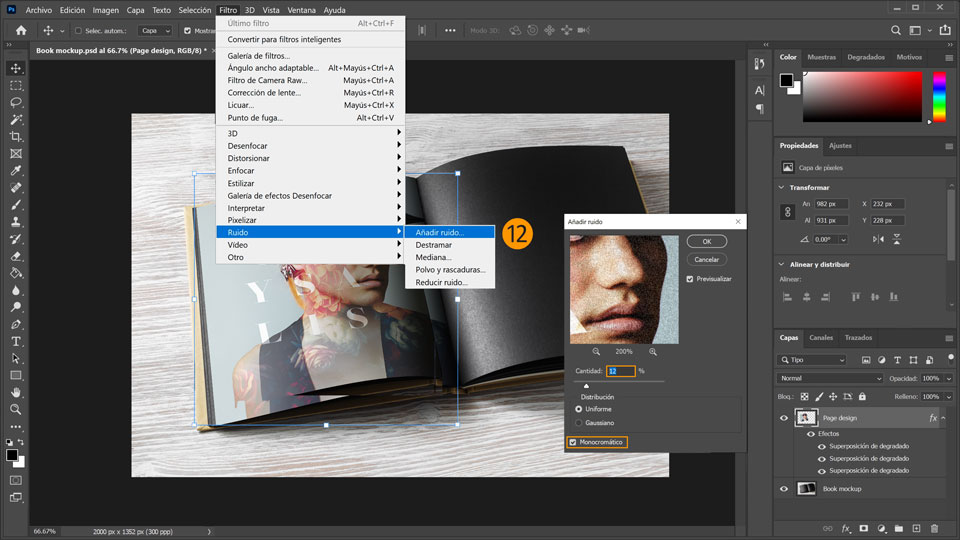
12. Por último, fusionaremos el diseño con el grano del papel. Para ello, selecciona Filtro > Ruido > Añadir ruido. Se abrirá la ventana Añadir ruido. En ella, cambia el valor de Cantidad a 12 % y activa la casilla Monocromo.
¡Ya está! Ahora te toca a ti crear un modelo a escala de impresión con Photoshop. Descárgate los activos o utiliza los tuyos propios, y comparte el resultado en Facebook, Twitter e Instagram con #MadewithPhotoshop para obtener comentarios y conectar con otras mentes creativas.
Behance:https://www.behance.net/live Únete a nuestras retransmisiones en directo con profesionales y proyectos de verdad en tiempo real, y encuentra inspiración.

22 de julio de 2022
Prueba estos tutoriales con Photoshop
Edita fotos para crear nuevas imágenes y gráficos.
You can control how Adobe websites use cookies and similar technologies by making choices below. But note that if you disable cookies and similar technologies entirely, Adobe websites may not function properly.
Cookies are small text files stored by your web browser when you use websites. There are also other technologies that can be used for similar purposes like HTML5 Local Storage and local shared objects, web beacons, and embedded scripts. These technologies help us do things like remembering you and your preferences when you return to our sites, measure how you use the website, conduct market research, and gather information about the ads you see and interact with.
You can make choices in the menu below about what cookies and other technologies you want us to use on Adobe sites when you visit them from this browser. You can always change those choices later by clicking on the Cookie Preferences link at the bottom of the page.
If enabled:
We can improve your experience by tailoring the site and the content to things we think might be of interest
We can better keep track of your preferences — like what language you prefer to use
We will better understand your likely interests so we can provide you more relevant Adobe ads and content on non-Adobe websites and in non-Adobe apps
It will help us improve the performance of our website and those of our partners who use the Adobe Experience Cloud
If disabled:
We won’t be able to remember you from session to session so the experience may not be tailored to your interests
You’ll still have access to the content of the site but certain features that depend on cookies may not function
You’ll still see ads, they just may not be as relevant to you
General information
You can control how Adobe websites use cookies and similar technologies by making choices below. But note that if you disable cookies and similar technologies entirely, Adobe websites may not function properly.
Cookies are small text files stored by your web browser when you use websites. There are also other technologies that can be used for similar purposes like HTML5 Local Storage, web beacons, and embedded scripts. These technologies help us do things like remembering you and your preferences when you return to our sites, measure how you use the website, conduct market research, and gather information about the ads you see and interact with.
You can make choices in the menu below about what cookies and other technologies you want us to use on Adobe sites when you visit them from this browser. You can always change those choices later by clicking on the Cookie Preferences link at the bottom of the page.
If enabled:
We can improve your experience by tailoring the site and the content to things we think might be of interest
We can better keep track of your preferences — like what language you prefer to use
We will better understand your likely interests so we can provide you more relevant Adobe ads and content on non-Adobe websites and in non-Adobe apps
It will help us improve the performance of our website and those of our partners who use the Adobe Experience Cloud
If disabled:
We won’t be able to remember you from session to session so the experience may not be tailored to your interests
We’ll still count your use of our site and services
You’ll still have access to the content of the site but certain features that depend on cookies may not function
You’ll still see ads, they just may not be as relevant to you
Operate the site and core servicesOperate site and measure engagement
Always active
These cookies are required, and they are used to enable the site and related services core functionality. Without them the site could not operate, so they cannot be disabled.
These cookies enable the site and related services’ core functionality and collect statistics about user engagement, such as counting active use to help us understand trends. These cookies cannot be disabled.
Measure performance
These cookies are used to analyze site usage to measure and improve performance. Without them Adobe cannot know what content is most valued and how often unique visitors return to the site, making it hard to improve information we offer to you.
These cookies are used to analyze site usage to measure and improve performance. Without them Adobe cannot know what content is most valued, making it hard to improve information we offer to you.
Extend functionality
These cookies are used to enhance the functionality of Adobe sites such as remembering your settings and preferences to deliver a personalized experience; for example, your username, your repeated visits, preferred language, your country, or any other saved preference.
Personalize advertising
These cookies are used to enable Adobe and our partners to serve ads more relevant to your interests. Without them you will still see ads, but they might not be as relevant to you.
Personalize advertising
These cookies are used to enable Adobe and our partners to serve ads more relevant to your interests. Without them you will still see ads, but they might not be as relevant to you.