
1. Descarga elarchivo de práctica y abre “3d-model-wrapping.psd” en Photoshop.
Aplica la imagen sobre el producto
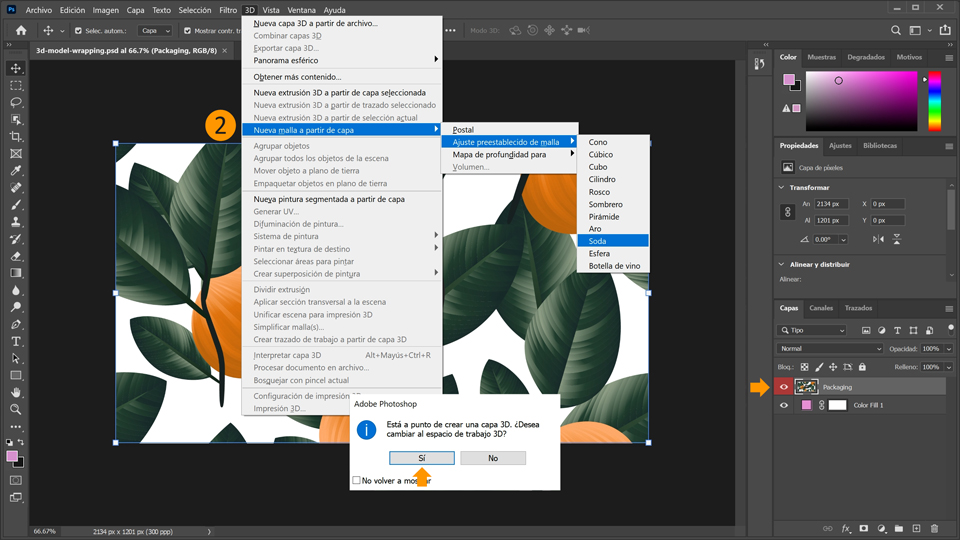
2. Teniendo seleccionada la capa llamada “Gráfico de empaquetado”, ve a 3D > Nueva malla a partir de capa > Ajuste preestablecido Malla > Refresco para montar el gráfico de empaquetado sobre una lata en 3D. Photoshop te preguntará si quieres cambiar al espacio de trabajo en 3D > Haz clic en Sí para continuar.
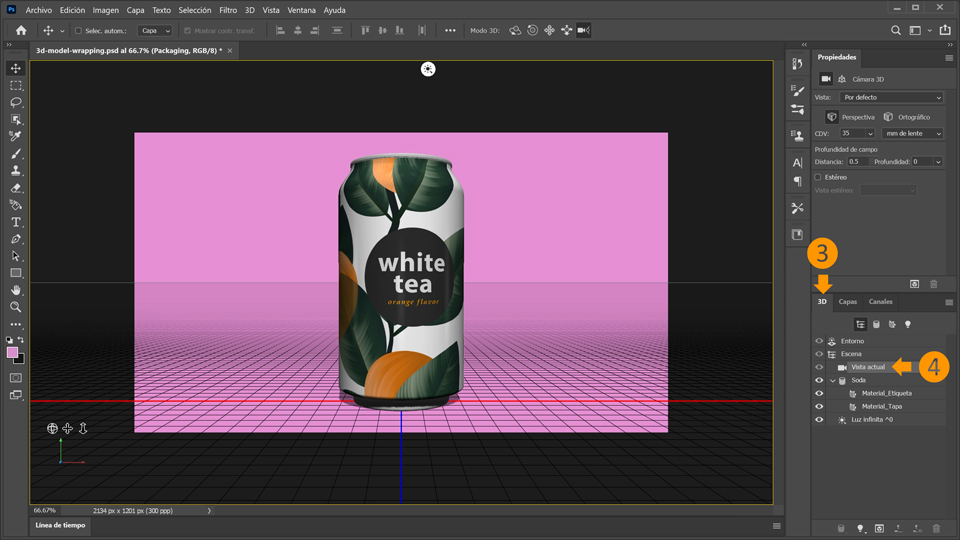
3. Cambia del panel de capas a 3D. En caso de que no puedas ver el panel en 3D, elige Ventana > 3D.
4. Establece la escena en Vista actual en el panel en 3D.
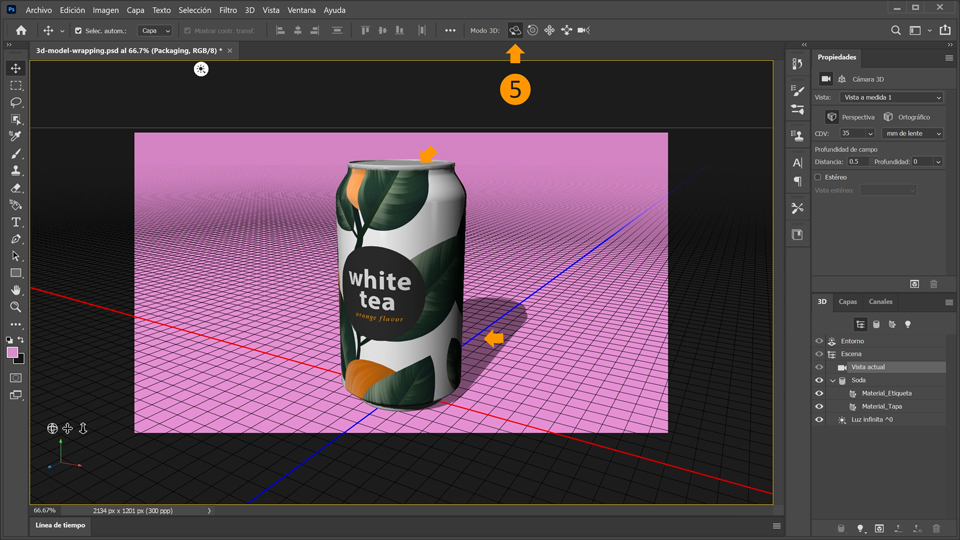
5. Selecciona Orbitar la cámara 3D en la barra superior. El cursor muestra una pequeña órbita que te permite darle la vuelta al modelo en 3D. Ya puedes arrastrar distintas direcciones para cambiar la vista de la lata dentro del espacio. Elige una vista que muestre una parte de la parte superior de la lata y la sombra inferior.
6. A continuación, gira la lata para que la etiqueta interior esté directamente frente al usuario. Para ello, haz clic en la lata para mostrar el eje 3D. Pasa el cursor sobre el marcador rojo del eje Y hasta que aparezca el círculo amarillo.
7. Arrastra para girar la lata hasta que se centre la etiqueta.
Aplica un material realista
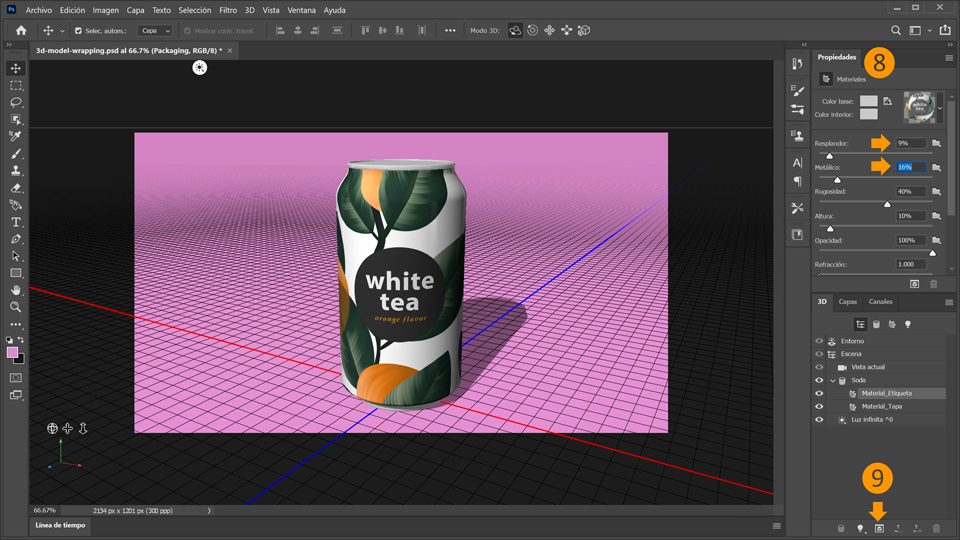
8. Para finalizar tu boceto, puedes ajustar la configuración del material de la lata. Selecciona Material_etiqueta en la categoría Refresco en el panel 3D y ajusta las propiedades en el panel de arriba. Establece Brillo en 9 % y Metálico en 16 %.
9. Haz clic en el icono del cubo 3D en la parte inferior del panel 3D para procesar el boceto. El procesamiento tardará un rato, según la potencia del ordenador. Cuando acabe el procesamiento, puedes guardar el boceto.
¡Ya está! Ahora te toca a ti aplicar una imagen en 2D a un boceto de productos en 3D con Photoshop. Descarga los activos o utiliza los tuyos propios y comparte el resultado en Facebook, Twitter e Instagram con #MadewithPhotoshop para obtener comentarios y conectar con otras mentes creativas.
Behance:https://www.behance.net/live Únete a nuestras retransmisiones en directo con profesionales y proyectos de verdad en tiempo real, y encuentra inspiración.

22 de julio de 2022
Prueba estos tutoriales con Photoshop
Edita fotos para crear nuevas imágenes y gráficos.
You can control how Adobe websites use cookies and similar technologies by making choices below. But note that if you disable cookies and similar technologies entirely, Adobe websites may not function properly.
Cookies are small text files stored by your web browser when you use websites. There are also other technologies that can be used for similar purposes like HTML5 Local Storage and local shared objects, web beacons, and embedded scripts. These technologies help us do things like remembering you and your preferences when you return to our sites, measure how you use the website, conduct market research, and gather information about the ads you see and interact with.
You can make choices in the menu below about what cookies and other technologies you want us to use on Adobe sites when you visit them from this browser. You can always change those choices later by clicking on the Cookie Preferences link at the bottom of the page.
If enabled:
We can improve your experience by tailoring the site and the content to things we think might be of interest
We can better keep track of your preferences — like what language you prefer to use
We will better understand your likely interests so we can provide you more relevant Adobe ads and content on non-Adobe websites and in non-Adobe apps
It will help us improve the performance of our website and those of our partners who use the Adobe Experience Cloud
If disabled:
We won’t be able to remember you from session to session so the experience may not be tailored to your interests
You’ll still have access to the content of the site but certain features that depend on cookies may not function
You’ll still see ads, they just may not be as relevant to you
General information
You can control how Adobe websites use cookies and similar technologies by making choices below. But note that if you disable cookies and similar technologies entirely, Adobe websites may not function properly.
Cookies are small text files stored by your web browser when you use websites. There are also other technologies that can be used for similar purposes like HTML5 Local Storage, web beacons, and embedded scripts. These technologies help us do things like remembering you and your preferences when you return to our sites, measure how you use the website, conduct market research, and gather information about the ads you see and interact with.
You can make choices in the menu below about what cookies and other technologies you want us to use on Adobe sites when you visit them from this browser. You can always change those choices later by clicking on the Cookie Preferences link at the bottom of the page.
If enabled:
We can improve your experience by tailoring the site and the content to things we think might be of interest
We can better keep track of your preferences — like what language you prefer to use
We will better understand your likely interests so we can provide you more relevant Adobe ads and content on non-Adobe websites and in non-Adobe apps
It will help us improve the performance of our website and those of our partners who use the Adobe Experience Cloud
If disabled:
We won’t be able to remember you from session to session so the experience may not be tailored to your interests
We’ll still count your use of our site and services
You’ll still have access to the content of the site but certain features that depend on cookies may not function
You’ll still see ads, they just may not be as relevant to you
Operate the site and core servicesOperate site and measure engagement
Always active
These cookies are required, and they are used to enable the site and related services core functionality. Without them the site could not operate, so they cannot be disabled.
These cookies enable the site and related services’ core functionality and collect statistics about user engagement, such as counting active use to help us understand trends. These cookies cannot be disabled.
Measure performance
These cookies are used to analyze site usage to measure and improve performance. Without them Adobe cannot know what content is most valued and how often unique visitors return to the site, making it hard to improve information we offer to you.
These cookies are used to analyze site usage to measure and improve performance. Without them Adobe cannot know what content is most valued, making it hard to improve information we offer to you.
Extend functionality
These cookies are used to enhance the functionality of Adobe sites such as remembering your settings and preferences to deliver a personalized experience; for example, your username, your repeated visits, preferred language, your country, or any other saved preference.
Personalize advertising
These cookies are used to enable Adobe and our partners to serve ads more relevant to your interests. Without them you will still see ads, but they might not be as relevant to you.
Personalize advertising
These cookies are used to enable Adobe and our partners to serve ads more relevant to your interests. Without them you will still see ads, but they might not be as relevant to you.