

La diseñadora Nicole Jacek nos habla de la importancia de los errores y cómo definir un “buen diseño”.

Elementos que necesitarás
Practicar en la aplicación
Nota: Este archivo está hecho para su uso en el equipo de escritorio. Comparte el enlace para acceder después.
“El hecho de disponer de Adobe Fonts, que nos permite activar o desactivar fuentes fácilmente, es increíble”.
Cómo crear una portada de revista con Adobe Photoshop e Illustrator.
Nicole comparte sus consejos para ahorrar tiempo a la hora de unir texto e imagen.
Céntrate en el primer plano.
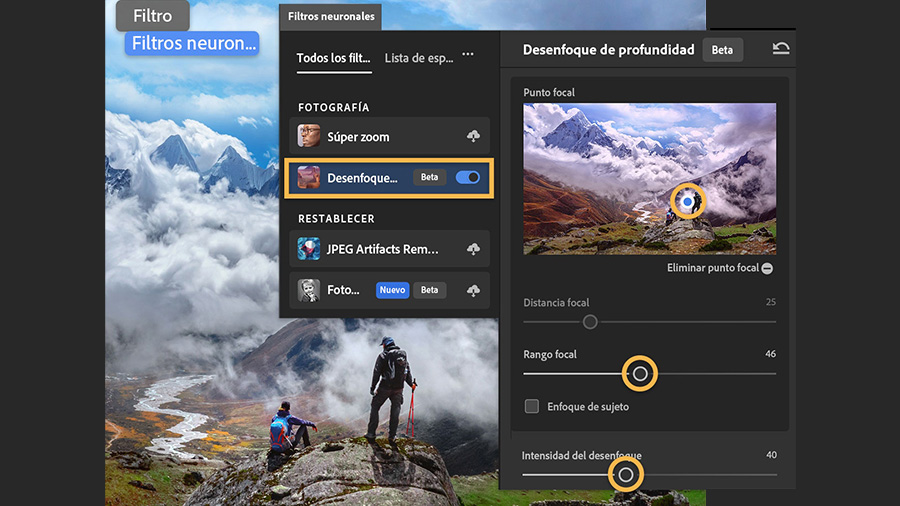
Abre el archivo de práctica en Photoshop. Después, ve a Filtro > Filtros neuronales y selecciona Desenfoque de profundidad.
Nota: Deberás descargarte cada filtro neuronal antes de utilizarlo por primera vez. Si ya has descargado el filtro de Desenfoque de profundidad, simplemente actívalo.
Arrastra para mover el punto focal en la vista previa de la imagen a la parte de la foto que deseas enfocar. Después, utiliza los controles deslizantes para ajustar el efecto de desenfoque.
Guárdalo para el futuro.
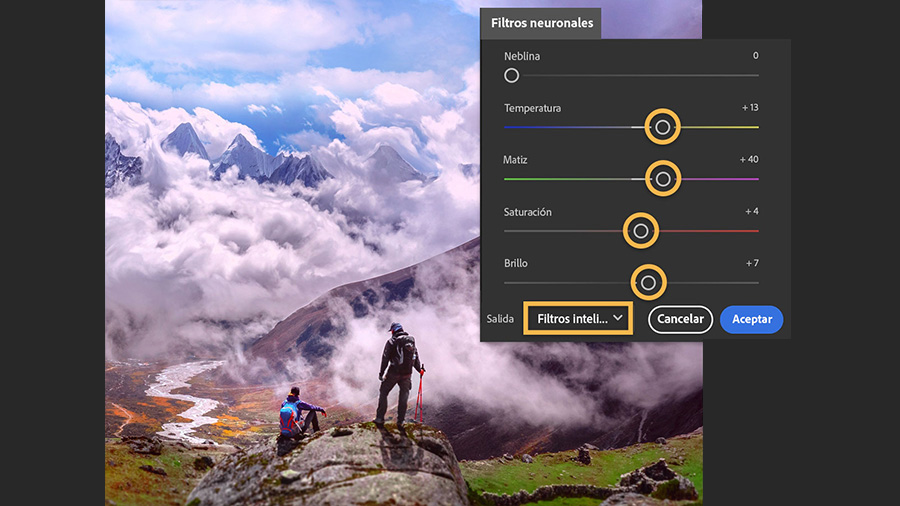
Crea un tinte de color en toda la escena utilizando los demás controles deslizantes. A continuación, establece el ajuste de salida en Filtro inteligente para guardar los ajustes del filtro en el panel Capas y haz clic en Aceptar.
Ve a Archivo > Guardar como y selecciona Photoshop como formato. Esta opción te permite guardar tu archivo en formato PSD y conservar las capas y sus ajustes de filtro inteligente para poder editarlos más tarde.
Consejo profesional: Los filtros inteligentes incluyen una máscara de capas para que personalices la zona en la que se aplica el filtro. Haz clic en la miniatura de la máscara de capa blanca y pinta con negro para eliminar las zonas desenfocadas, o bien pinta con blanco para mostrar las zonas que antes estaban ocultas.
Cambia la portada.
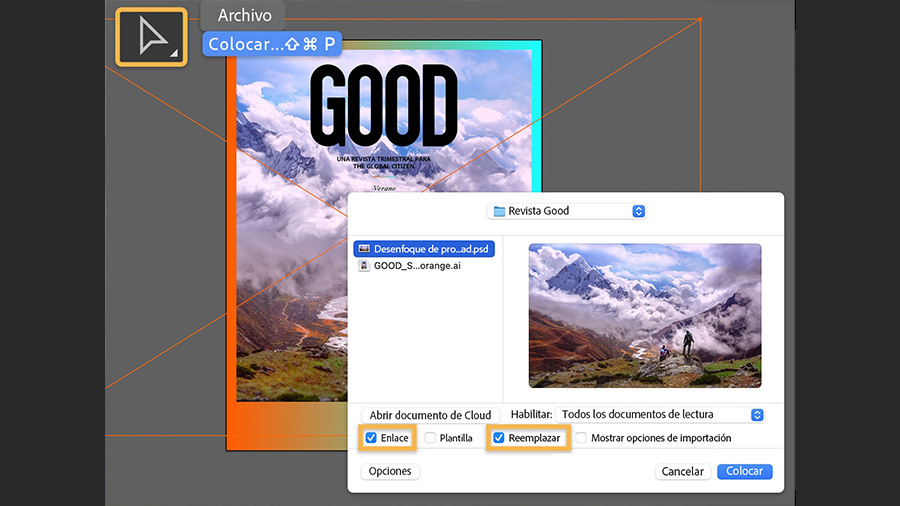
En Illustrator,abre el archivo de práctica con la plantilla de la revista y haz clic en el marcador de posición rosa con la herramienta Selección. A continuación, selecciona Archivo > Colocar y busca el archivo en formato PSD que creaste en el paso anterior. Asegúrate de que las casillas Vincular y Reemplazar estén marcadas y haz clic en Colocar.
Sin dejar de seleccionar la imagen, mantén pulsada la tecla Mayús mientras arrastras una de las esquinas para cambiar el tamaño. También puedes arrastrar la imagen para recolocarla dentro del cuadro.
Consejo profesional:
Si el archivo PSD está vinculado, todos los cambios que hagas en él en Photoshop se actualizarán automáticamente en el diseño de Illustrator.
Retoca el texto.
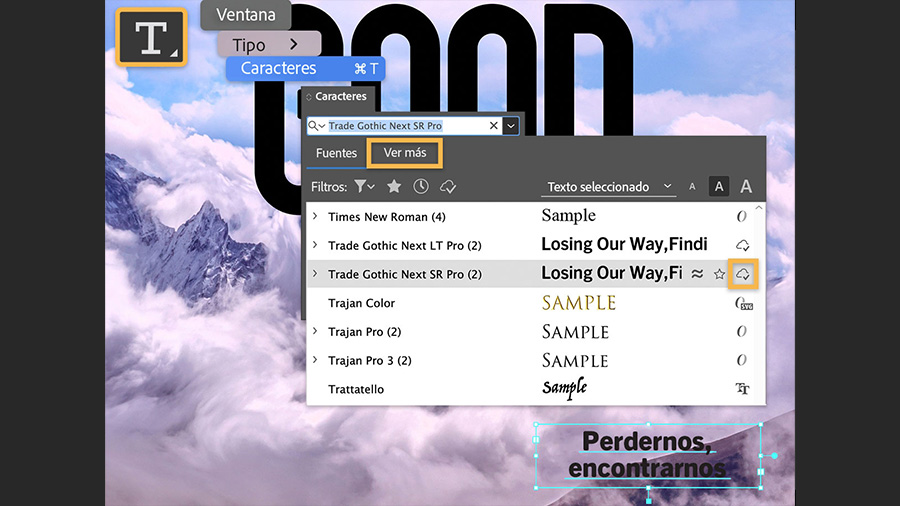
Arrastra para seleccionar el texto del marcador de posición del subtítulo con la herramienta Texto. Después, haz clic en el menú desplegable del panel Caracteres (Ventana > Texto > Caracteres) y selecciona Ver más para acceder a Adobe Fonts. Pasa el ratón sobre las distintas fuentes para obtener una vista previa.
Si encuentras una fuente que te guste, haz clic en el icono de la nube para activarla y aplicarla al texto seleccionado. Ahora ya tienes disponible la fuente para que la uses en todos tus diseños.
Añade contraste de color.
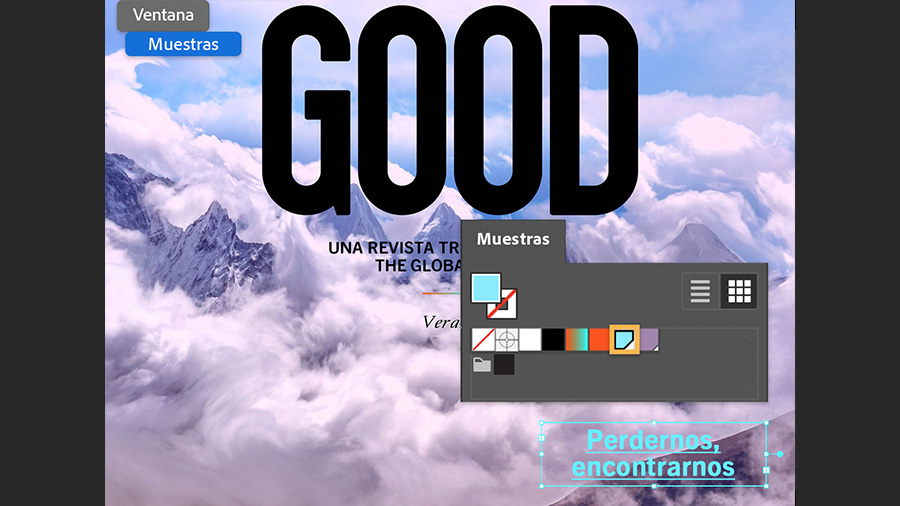
Utiliza la configuración del panel Caracteres para ajustar el tamaño y espaciado del texto. También puedes abrir el panel Muestras (Ventana > Muestras) y, con el texto seleccionado, haz clic en una muestra de color para cambiarlo.
Prueba estos tutoriales con Photoshop
Edita fotos para crear nuevas imágenes y gráficos.
You can control how Adobe websites use cookies and similar technologies by making choices below. But note that if you disable cookies and similar technologies entirely, Adobe websites may not function properly.
Cookies are small text files stored by your web browser when you use websites. There are also other technologies that can be used for similar purposes like HTML5 Local Storage and local shared objects, web beacons, and embedded scripts. These technologies help us do things like remembering you and your preferences when you return to our sites, measure how you use the website, conduct market research, and gather information about the ads you see and interact with.
You can make choices in the menu below about what cookies and other technologies you want us to use on Adobe sites when you visit them from this browser. You can always change those choices later by clicking on the Cookie Preferences link at the bottom of the page.
If enabled:
We can improve your experience by tailoring the site and the content to things we think might be of interest
We can better keep track of your preferences — like what language you prefer to use
We will better understand your likely interests so we can provide you more relevant Adobe ads and content on non-Adobe websites and in non-Adobe apps
It will help us improve the performance of our website and those of our partners who use the Adobe Experience Cloud
If disabled:
We won’t be able to remember you from session to session so the experience may not be tailored to your interests
You’ll still have access to the content of the site but certain features that depend on cookies may not function
You’ll still see ads, they just may not be as relevant to you
General information
You can control how Adobe websites use cookies and similar technologies by making choices below. But note that if you disable cookies and similar technologies entirely, Adobe websites may not function properly.
Cookies are small text files stored by your web browser when you use websites. There are also other technologies that can be used for similar purposes like HTML5 Local Storage, web beacons, and embedded scripts. These technologies help us do things like remembering you and your preferences when you return to our sites, measure how you use the website, conduct market research, and gather information about the ads you see and interact with.
You can make choices in the menu below about what cookies and other technologies you want us to use on Adobe sites when you visit them from this browser. You can always change those choices later by clicking on the Cookie Preferences link at the bottom of the page.
If enabled:
We can improve your experience by tailoring the site and the content to things we think might be of interest
We can better keep track of your preferences — like what language you prefer to use
We will better understand your likely interests so we can provide you more relevant Adobe ads and content on non-Adobe websites and in non-Adobe apps
It will help us improve the performance of our website and those of our partners who use the Adobe Experience Cloud
If disabled:
We won’t be able to remember you from session to session so the experience may not be tailored to your interests
We’ll still count your use of our site and services
You’ll still have access to the content of the site but certain features that depend on cookies may not function
You’ll still see ads, they just may not be as relevant to you
Operate the site and core servicesOperate site and measure engagement
Always active
These cookies are required, and they are used to enable the site and related services core functionality. Without them the site could not operate, so they cannot be disabled.
These cookies enable the site and related services’ core functionality and collect statistics about user engagement, such as counting active use to help us understand trends. These cookies cannot be disabled.
Measure performance
These cookies are used to analyze site usage to measure and improve performance. Without them Adobe cannot know what content is most valued and how often unique visitors return to the site, making it hard to improve information we offer to you.
These cookies are used to analyze site usage to measure and improve performance. Without them Adobe cannot know what content is most valued, making it hard to improve information we offer to you.
Extend functionality
These cookies are used to enhance the functionality of Adobe sites such as remembering your settings and preferences to deliver a personalized experience; for example, your username, your repeated visits, preferred language, your country, or any other saved preference.
Personalize advertising
These cookies are used to enable Adobe and our partners to serve ads more relevant to your interests. Without them you will still see ads, but they might not be as relevant to you.
Personalize advertising
These cookies are used to enable Adobe and our partners to serve ads more relevant to your interests. Without them you will still see ads, but they might not be as relevant to you.