40 Newsletter ideas that people will look forward to reading.
Creative newsletter ideas you can design with Adobe Express.
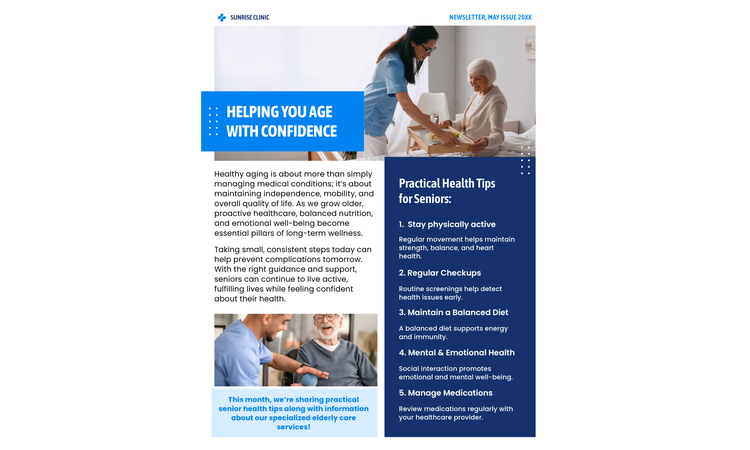


Smart ways to turn simple updates into engaging newsletters.
A newsletter is one of the best and most direct ways to reach your audience. But the challenge isn’t just about how often you should send one; instead it’s figuring out what to actually include, issue after issue, without your content feeling stale or repetitive. These newsletter ideas, with design tips, will help you get started. And with Adobe Express, you get professionally designed, fully customizable templates so you can bring any of these ideas to life quickly, regardless of your design background.
Newsletter ideas to engage any audience.
If you’re like me, your newsletters — even the ones you signed up for — end up in your Trash folder most of the time, without even as much as a second thought. That’s going to be a problem if you’re the one who’s making the newsletters.
Newsletters that get read share a few traits in common. They’re relevant to the reader and offer high-value, not to mention that they have attention-grabbing designs. Plus, their content is something that people actually want to read. Don’t know how or where to start?
Whether you’re publishing your first issue or refreshing a format that has gone flat, the ideas below give you a proven editorial foundation to build from. Pair them with a consistent visual template in Adobe Express and your newsletter will look as good as it reads.
Share key updates, achievements, and upcoming events.
A monthly highlights section gives readers a single, consolidated view of what happened and what’s coming. Keep it to three to five items per issue, and use the beginner-friendly photo collage maker to design a color-coded or icon-driven layout that makes each highlight instantly scannable.
Feature a person, project, or success story in each issue.
Feature a person, project, or success story to make your content more human, pairing short text with a bold image or quote card created using the online card maker for stronger visual impact.
Provide helpful advice or hacks related to your audience's interests.
Share practical advice your audience can use immediately, while keeping each tip concise and using icons or visual markers in your layout to make the sections easier to digest.
Offer a glimpse into the processes or people behind your organization.
Transparency builds trust, and behind-the-scenes content is particularly good at creating it because it shows the real effort behind the finished result. Pair the story with photos and use the Adobe Express photo collage maker to give the section an editorial, polished feel without spending hours on design.
Answer frequently asked questions or feature an expert interview.
Including this section lets you directly address your audience’s questions, making your content feel more useful and giving your readers a better experience overall. Gather questions from readers or customers before publishing a new issue, and use different visual styles in Adobe Express to keep this section visually appealing, while still being easy to follow.
Summarize recent events with photos and key takeaways.
Use a timeline-style layout in Adobe Express to guide readers through what happened step by step. Include two to three concrete takeaways and at least one photograph, framed in a clean, visually balanced layout.
Share links to articles, tools, or resources your audience will find useful.
Organize them into categories so readers can quickly find what’s relevant. Consider adding three to five well-chosen links with a single-sentence rationale to add value without overwhelming the issue.
Engage readers by asking for their opinions or feedback.
Embed a clear call-to-action button designed using the online banner maker to encourage participation. You could also use the beginner-friendly flyer maker to design bold graphics to promote your polls and surveys.
Create newsletters around specific themes, like holidays or industry trends.
When designing themed issues, use consistent design elements, such as colors and typography, to reinforce the theme visually.
Include a clear CTA, such as signing up for an event, downloading a resource, or providing feedback.
Every newsletter should guide the reader toward one next step. Highlight your CTA using contrast and spacing so it stands out clearly.
recipe
Company newsletter ideas that keep your team on the same page.
Strong company newsletters go beyond distributing updates. They actively shape your culture and align teams. They also make people feel truly invested in where the organization is heading. The best company newsletter ideas balance operational information with storytelling, turning what could be a dry bulletin into something employees actually look forward to.
Adobe Express makes it easy to craft a professional, on-brand newsletter template that your team can update each issue without starting from scratch.
Include a personal note from the CEO about company goals or updates.
Use this space to anchor the newsletter and give employees a high-level perspective on organizational direction, which is particularly valuable during periods of change. Instead of a wall of text, frame this note in a distinct letter-style layout using the letter maker to separate leadership’s vision from tactical updates.
Highlight team members and their contributions.
Focusing on the person, instead of their title, helps add a human touch to your brand. For instance, adding a brief three-question interview, paired with a high-quality headshot, makes these newsletter features feel personal instead of corporate.
Share progress on major company initiatives or milestones.
Avoid dense paragraphs here. Instead, use visual progress bars or milestone markers to show exactly where a project stands. It also helps to be specific about what has been achieved and what comes next, using the poster maker to design a simple graphic.
Provide insights or trends relevant to your business sector.
Don’t just share links. Add a “Why it matters” sentence to each item, which helps position your company as a thought leader while allowing your team to better understand the broader market context.
Announce upcoming workshops, webinars, or learning resources.
Treat these like internal advertisements and design a flyer-style layout using the flyer maker to make them stand out. Include important information, such as dates, descriptions of what participants can expect, and a direct registration link or functional QR code.
Showcase how your product or service has helped clients.
Remind the team why their work matters by highlighting a specific client outcome. Pull a powerful quote from the client and present it as a visual pull-quote to give the section immediate emotional impact.
Introduce new team members or celebrate promotions.
Use a welcome card template to help employees feel connected across departments. Highlighting a fun fact about a new hire can help make them more approachable on their first day.
Share advice on work-life balance, mental health, or physical wellness.
Stick to one micro-habit per issue, like a 60-second breathing exercise, because short, realistic advice is much more likely to be adopted than a long article on general health.
Highlight eco-friendly initiatives or achievements.
Transparency is key here. Use simple icons or data visualization to show the real impact of your eco-friendly initiatives, which helps ground your company’s values in real, verifiable numbers. The easy-to-use poster maker or photo collage maker is great for this, letting you design eye-catching visuals that complement your data and make outcomes easier to understand.
Celebrate anniversaries, awards, or outstanding performance.
A public “thank you” goes a long way. Use bold typography and generous white space to make these shout-outs stand out, ensuring the recognized employee feels truly seen by the whole organization.
recipe
Employee newsletter ideas that boost engagement.
The most effective employee newsletter ideas go well beyond keeping people informed. At their best, they create real moments of connection, give team members a clear feeling of belonging, and help maintain your shared culture.
A consistent, professional visual identity, built and maintained in Adobe Express, also signals that the newsletter is worth reading before employees have even reached the first line.
Celebrate team wins, big or small, to boost morale.
Here, consistency and specificity matter more than scale. Name the specific accomplishment and the people involved, and use branded templates to keep your newsletter design consistent.
Announce team-building activities, company outings, or training sessions.
List team activities and important dates. Use a calendar-style layout to keep everything organized.
Recognize special dates to foster a sense of community.
When crafting creative employee newsletter ideas like this, remember to include the date, time, location or access link, and a single-sentence description of what to expect, presenting it in a clean event-card layout for easy scanning.
Include a section where employees can thank or recognize their peers.
Collect submissions via a short form before each issue, do a brief editorial review, and present each shout-out in a quote-card format so every entry feels distinct and well-thought-out, keeping the tone light and celebratory throughout.
Communicate changes in company policies or procedures.
For this newsletter idea, it’s best to avoid long blocks of text and use bullet-style formatting instead for easier scanning. Keep each update focused by highlighting key aspects, such as what’s changing and what employees need to do, and presenting them with a clear header and a short, plain-language summary.
Introduce friendly competitions, like step challenges or trivia quizzes.
Clearly outline how progress is measured and what counts as completion to avoid confusion. Adding visual trackers or progress bars can help make involvement visible, which can encourage more people to participate.
Share articles, books, or courses for professional development.
Instead of listing multiple resources, consider highlighting a few high-value options and explaining what someone can realistically gain from each. Structuring this section into scannable cards makes it easier for readers to decide where to invest their time.
Highlight initiatives or stories that promote inclusivity.
Specific examples, such as team-led programs or collaborative efforts, make your content more credible and actionable. Plus, pairing short narratives with simple visual elements can help reinforce the message without overwhelming the reader.
Feature a fun or meaningful photo submitted by employees.
Pick an image that tells a story or captures a meaningful moment, pairing it with a short explanation to add context. Consider rotating between single-image highlights and multi-image photo collage layouts to keep the section visually interesting over time.
Encourage employees to share ideas or suggestions for improvement.
Reduce friction by clearly stating how readers can respond and what kind of input is most helpful. A visually distinct call-to-action, such as a button or highlighted section, helps draw attention to this area.
recipe
School newsletter ideas to connect families and the community.
A school newsletter is one of the most important communication touchpoints a school has with its families, and the best school newsletter ideas balance practical logistics with the kind of storytelling that helps parents feel truly connected to campus life. Clear, consistent design matters more than most schools realize.
A well-presented newsletter signals professionalism and care, while a cluttered layout causes readers to disengage before they’ve even found the relevant section. Adobe Express offers school-friendly templates and design tools that allow teachers and administrators to produce polished, on-brand communication materials without needing a dedicated designer.
Include a note from the principal about school updates or goals.
Use this section to provide direction and clarity rather than lengthy updates. Focus on what’s changing, what to expect next, and why it matters to the school community. A clean, letter-style layout in Adobe Express helps keep the message structured and easy to read.
Highlight achievements, projects, or extracurricular activities.
Highlight specific accomplishments while giving a bit of context about the effort behind them. Using a consistent format helps maintain clarity across multiple features.
Share details about school events, like parent-teacher meetings or sports days.
Present key details in a way that minimizes confusion for both students and parents. Try grouping events logically and include only essential information to keep the section concise.
Feature a different class or teacher in each issue.
Showcase what’s happening inside different learning environments to give readers a better sense of day-to-day activities. Focus on projects or experiences that reflect how students are learning.
Provide tips or resources to help parents support their children’s learning.
Focus on clarity and usefulness instead of volume, and avoid overwhelming readers with too much information. Breaking content into short sections or visual cards makes it more approachable.
Announce ways parents or community members can get involved.
Clearly explain how people can contribute, what’s required, and why their involvement matters. Including specific instructions in flyer-style layouts can help reduce hesitation and make it easier for readers to take action. Highlighting deadlines or next steps visually can also improve response rates.
Share updates from school clubs, sports teams, or arts programs.
Give updates that show progress or upcoming plans, helping your audience understand the value of each activity and encourage them to get involved. Including visuals or summaries is a good practice that keeps different sections engaging.
Include tips or updates on school safety policies.
Communicate important information in a way that’s clear and easy to follow. Focus on what actions need to be taken instead of just listing policies in full (no one wants to read a wall of jargon-filled text). Visual cues such as icons or highlighted sections designed in Adobe Express can help emphasize important points.
Showcase creative work submitted by students.
To make this school newsletter idea effective, it’s best to keep the layout clean and uncluttered so the work speaks for itself. You could also add a brief description or context to help readers better understand and appreciate the piece.
Share partnerships, donations, or local events relevant to the school.
Do you have shareworthy news that’s directly connected to your school? Use your school newsletter to share these updates, focusing on their relevance to the school and students. To make this section easier to follow, try structuring it with clear headings or grouped showcases.
recipe
How to make the most of these newsletter ideas.

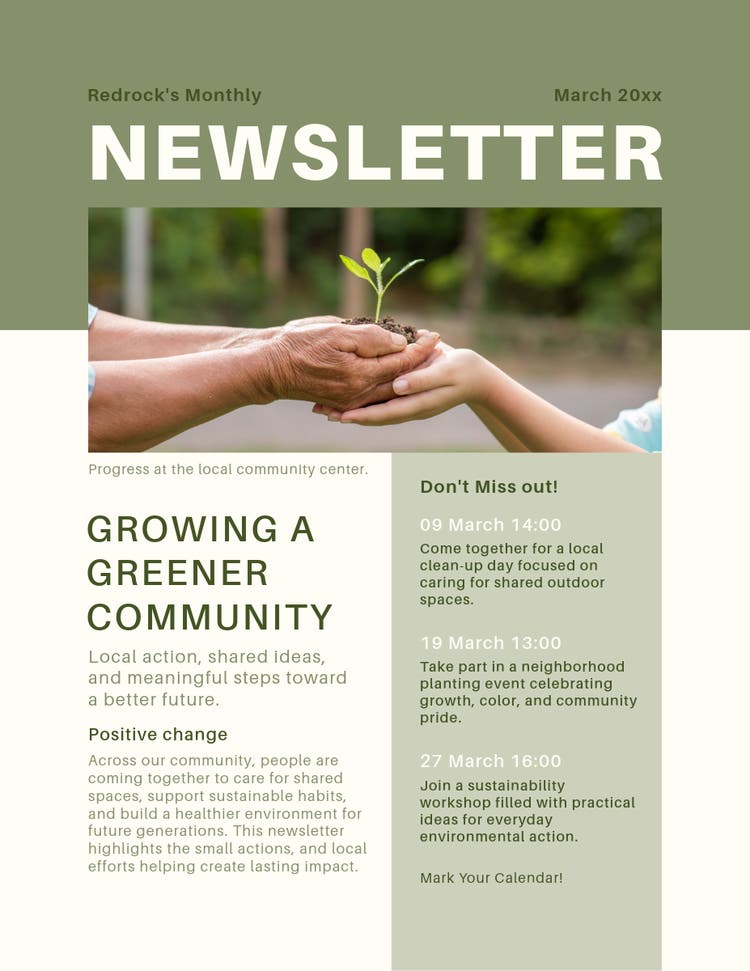
How to turn newsletter ideas into effective designs.
Strong newsletter ideas still need thoughtful design to deliver their full value. Readers decide within seconds whether to keep reading, which means your visual presentation is doing a significant share of the persuasion work before a single word registers.
Per a Pew Research Report, 62% of newsletter readers end up not reading the newsletters they get, while only 38% read them in part or in full, indicating only moderate engagement.
The steps below apply across every newsletter category in this article and can be put to work immediately in Adobe Express.
Step 1: Design for scanning.
Most readers skim before they commit to reading. Use clear headings, subheadings, and short sections to guide attention, and avoid long, dense paragraphs that slow readers down.
In Adobe Express, you can use pre-built layouts to create natural reading paths that help readers quickly identify what matters most. Browse Adobe Express poster templates and social media post templates for design ideas that’ll inspire you to craft high-performing layouts for newsletters.
Step 2: Prioritize one main goal.
Each newsletter should have a single, clear objective, whether that’s driving sign-ups, sharing updates, or encouraging feedback. When multiple goals compete for attention, engagement drops because readers aren’t sure what action to take. Design your layout so the primary goal is visually dominant, especially through a clear call-to-action placement.
Step 3: Use visual hierarchy.
Visual hierarchy helps readers process information in the right order. Use larger text for headlines, bold styles for key points, and spacing to separate sections so nothing feels crowded. Adobe Express templates simplify this by giving you structured layouts where emphasis and flow are already built in.
Step 4: Keep your content concise.
Focus on delivering one idea per section and remove anything that doesn’t directly support your message. Short, focused content improves comprehension and makes it more likely that readers will reach the end of your newsletter.
Step 5: Maintain consistency.
Consistency builds familiarity, which increases trust over time. Use the same color palette, typography, and layout structure across issues so readers instantly recognize your newsletter. With Adobe Express, you can save brand styles and reuse templates to keep every edition visually aligned without starting from scratch.
With brand kits, Adobe Express lets you save brand colors, fonts, logos, and other brand assets as a reusable kit within the platform, so every contributor to the newsletter is working from exactly the same visual foundation. Note that brand kits are a premium feature.
More ways to use newsletters, not just for updates.
If you want your newsletter ideas to go beyond the usual formats or use cases, these concepts help you craft more engaging and memorable content.
- Before-and-after features. Show transformation stories or progress over time. This works especially well with visual comparisons.
- Mini case studies. Break down a specific success story in a structured format, keeping it concise but still informative.
- “What we learned” sections. Share lessons from recent projects or experiences to help add depth and credibility to your newsletters.
- Weekly or monthly challenges. Encourage readers to participate with clear goals or outcomes. Then, you could track progress visually to maintain their interest.
- Interactive quizzes. Add simple quizzes to increase audience engagement, pairing them with clear CTAs to encourage them to respond.
- Behind-the-decision insights. Explain why certain decisions were made to help reinforce transparency and build trust.
- Future outlook. Share what’s coming next, but keep it realistic and focused on what your readers can expect from your company. This builds anticipation and allows your community to feel like they’re insiders who are part of the journey.
- Curated guest contributions. Invite a different team member or community partner to share a “Top 3” list of their favorite tools or books. This diversifies the voice of your newsletter and introduces your audience to new perspectives without requiring a heavy editorial lift from you.
If you’re looking for more newsletter examples, this guide covers a wide variety of types that you can design in Adobe Express in minutes. To help you get started, explore thousands of fully customizable newsletter templates here.
Turning newsletter ideas into compelling reads with Adobe Express.
Beyond being just creative, the best newsletter ideas are structured and intentional. Whether you’re making company updates or a school digest, the goal is to make every section useful and engaging. By combining strong ideas with clear design using Adobe Express, you can craft newsletters that people actually look forward to reading.