




.
Black Friday offer - Get Premium access for 30-days, on us. No credit card required. Ends Dec 07.
Claim offer

14 Brochure ideas for design inspiration.

Explore a collection of our favorite eye-catching brochure designs.

Design with your idea

1. Use images to make an impression on your audience.

As the old saying goes, a picture is worth a thousand words. The right image can instantly draw attention and set the tone for your message. Select high-quality, relevant images that align with your brand identity and the brochure’s purpose.

Consider using professional photography, carefully curated stock images, or even custom illustrations that showcase your brand’s personality. The goal is to create a strong visual connection with your audience at first glance.

White Brown Hospitality Brochure
Edit this template
Brown Illustrative Camera Photo Brochure
Edit this template

2. Mix different types of imagery.

While photographs are a powerful communication tool, other forms of imagery—such as illustrations, icons, and abstract graphics—can add depth and versatility to your design. Combining different types of visuals can enhance engagement and reinforce your message.

For instance, an educational brochure might use infographics to present complex information, while a creative event brochure could blend photography with artistic illustrations for a more dynamic look.

Red and Orange Professional Services Brochure
Edit this template
Orange & Blue Colorful Teaching Tips Brochure
Edit this template

3. Make icons your primary imagery.

Icons offer a clean, modern, and versatile approach to visual storytelling. They are particularly effective for conveying ideas concisely and can be easily customized to match your brand colors and overall design aesthetic.

Icons work well in instructional brochures, minimalist designs, and professional materials where simplicity and clarity are key. Experiment with different icon styles to complement your brand’s look and feel.

Blue and Red Simple Modern Seafood Restaurant Trifold Menu Brochure
Edit this template
Blue and Yellow Transport Brochure
Edit this template
Green Campervan Hire Brochure A4 Horizontal
Edit this template

4. Feature a full-bleed image.

A full-bleed image—one that extends across the entire design—can create a bold and immersive visual effect. This technique works particularly well for brochures showcasing landscapes, products, or aspirational lifestyle imagery.

When using full-bleed images, consider how text and additional design elements will overlay the image to maintain readability and aesthetic balance.

Green Travel Tourism Brochure
Edit this template
Green Pink Holi Brochure
Edit this template
Blue Marine Manufacturing Brochure
Edit this template

5. Crop creatively with daring designs.

Creative cropping can transform standard images into striking visual elements. Using unique borders, unconventional shapes, or partial image reveals can add intrigue and sophistication to your brochure.

Experiment with framing techniques, such as circular or diagonal crops, to create a fresh and modern look that captures attention.

Red and White  Fashion Brochure
Edit this template
Yellow Art And Technology Project Trifold Brochure
Edit this template
Green Digital Technology Conference Brochure A4
Edit this template

6. Divide up your design with color-blocking.

Color-blocking is an effective way to structure content while adding visual appeal. By using complementary or contrasting colors to separate sections, you can enhance readability and create a well-organized layout.

This technique is particularly useful for breaking up large sections of text, highlighting key messages, or distinguishing different categories of information within your brochure.

Pink Fashion Club Trifold Brochure
Edit this template
Blue Yellow Educational Institute Brochure
Edit this template

7. Try cohesive color-blocking with filters.

Applying color filters to images and text boxes can create a unified, polished look. Filters can enhance brand consistency by ensuring all elements share a similar tone or aesthetic.

Soft pastel overlays can create a subtle and sophisticated feel, while bold, vibrant filters can add energy and excitement to your design.

Pink & Cream New Forest Campervan Adventure Brochure
Edit this template
Blue Beach Surf Camp Schedule Brochure A4
Edit this template

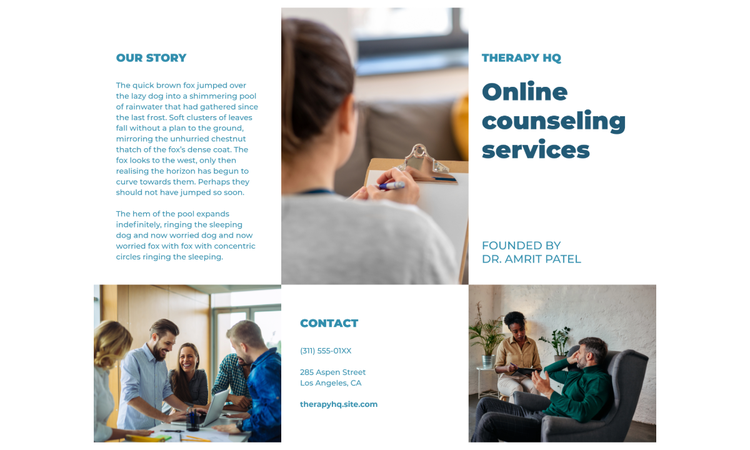
8. Play with grid-like layouts.

A structured grid layout ensures content is presented in an organized and visually balanced way. This method is especially helpful for brochures with multiple sections or a significant amount of text.

Grids help establish a clear reading path, guiding the viewer through the information in a logical sequence. Use varying grid sizes to add visual interest while maintaining coherence.

Blue and Orange Beach Clean Up Brochure
Edit this template
Blue and White Counseling Services Brochure
Edit this template

9. Create patterns with layouts.

Repetitive patterns and structured layouts can create a cohesive and aesthetically pleasing design. Whether using geometric patterns, organic motifs, or abstract arrangements, incorporating patterns can reinforce branding and enhance visual flow.

For example, a corporate brochure might use clean, symmetrical layouts, while an artistic or lifestyle brochure could incorporate fluid, asymmetrical patterns for a more dynamic effect.

Black & Orange Cargo Service Brochure
Edit this template

10. Play with exciting shapes and angles.

Straight lines and traditional layouts aren’t your only options. Incorporating bold shapes, slanted text boxes, or diagonal lines can add a sense of movement and energy to your brochure.

This technique is especially effective for brands that want to project a modern, innovative, or edgy image. Experiment with different shapes and angles to guide the viewer’s eye naturally through the content.

Blue Rowing Team Trifold Brochure
Edit this template

11. Choose bold, impactful fonts and colors.

Typography plays a crucial role in setting the tone of your brochure. Select fonts that align with your brand’s personality—serif fonts for a classic, professional look, sans-serif for a modern, clean aesthetic, and script or decorative fonts for a more artistic approach.

Pair bold typography with strong color choices to make headlines stand out while maintaining readability across all design elements.

Red Gaming Tournament Brochure
Edit this template
Black and Orange Fashion Store Trend Brochure
Edit this template

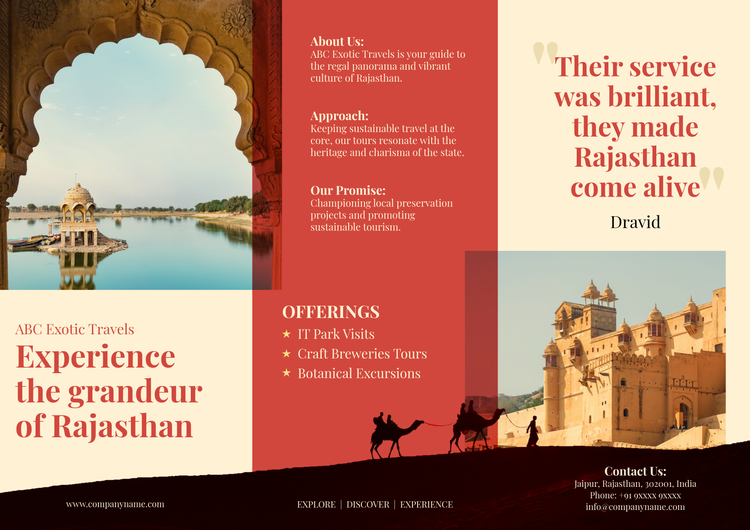
12. Showcase a quote, slogan, or motto.

A compelling quote, tagline, or motto can reinforce your message and create an emotional connection with your audience. Consider placing an inspiring statement in a bold, eye-catching format to emphasize key takeaways.

For marketing brochures, a catchy slogan can reinforce brand identity. For informational brochures, a thought-provoking quote can add depth and relatability.

Green and Blue Tech Company Brochure
Edit this template
Pink  Photo Thailand Travel Promotional Trifold Brochure
Edit this template

13. Be bold by layering images, text, and graphics.

Layering multiple design elements can create depth and visual complexity while making the layout more engaging. Try overlapping images with text boxes or using subtle transparency effects to blend graphics seamlessly.

Be mindful of readability—ensure that important text remains clear and unobstructed by background elements.

Orange And Black Rise Above Challenges Event Brochure
Edit this template
Blue Hostel Brochure
Edit this template
Blue Oil Painting Art School Workshop Brochure
Edit this template

14. Design with a motif, theme, or intention.

A well-thought-out design theme creates consistency and enhances storytelling. Just as a written narrative flows logically, a well-designed brochure should have a cohesive look and feel.

Choose a theme that aligns with your message—whether sleek and professional, playful and vibrant, or minimal and elegant. Every design choice should contribute to the overall impact of the brochure.

Planet Travel Brochure Guided Activity
Edit this template
Red Beige Travel Brochure
Edit this template

How to make a brochure with Adobe Express.

1

Start with inspiration.

Browse thousands of professionally designed templates to find inspiration. Search by platform, theme, or aesthetic to spark creativity and get started with a well-structured layout.

2

Customize your design.

Personalize the layout by modifying text, images, and colors. Use high-quality visuals, bold typography, and engaging graphics to create a unique and compelling design.

3

Add extra flair.

Enhance your brochure with creative elements like text animations, artistic overlays, or decorative accents. Experiment with design tools to make your layout stand out.

4

Resize for different formats.

Ensure your design adapts seamlessly across print and digital formats. Resize elements for different brochure dimensions, social media sharing, or online viewing.

5

Save and share.

Once your brochure is finalized, download and distribute it effortlessly. Adobe Express saves your designs, allowing you to revisit and update them anytime.