Generate custom templates with Adobe Express's AI template generator.
Describe what you want to create and Adobe Express's template generator will produce fully editable, custom templates for social posts, flyers, posters, presentations, cards, and more. Choose the design you like best, customize with your own branding and text, and download when you're done. Designed to be commercially safe.

pastel coffee shop Instagram post with centered iced coffee cup
Use this prompt
Prompt used
announcement by yoga studio for new seasonal class calendar
Use this prompt
How to make a template with AI.
Use Adobe Express's AI template generator to go straight from a text prompt to a fully editable template for any design project.
1
Get started for free.
Go to Adobe Express and sign into your Adobe account. If you don’t have an account, you can quickly create one for free.
2
Enter your prompt.
Type a description of what you want to see in the prompt field. Start with 5 words or more, such as “promotional poster for plant-themed coffee shop.” The more descriptive, the better.
3
Generate your template.
Click Generate. Your new flyer, poster, presentation, card, or social post template results will appear in a few moments. Click Generate more results to see more options.
4
Customize your new template.
Generate variations or choose the AI-generated template you like best and customize with your own branding, fonts, and text. No previous design experience is required. Download and share your project anywhere when you're done.
The world's leading businesses use Adobe Express.
Designed to be commercially safe.

The Adobe Express AI template generator is designed to be commercially safe, so you can use your generated designs for business, marketing, and professional projects with confidence. Enter a text prompt and the template generator produces high-quality templates tailored to your description. Explore styles from bold to minimalistic by refining your prompt until you find the right fit.
The more design options, the better.
Choose from high-quality templates tailored to your prompt. Click Generate more results to explore additional options. Once you've found the right template, customize with your own fonts, colors, logos, and photos. With Adobe Express it's easy to create, save, and share your designs within minutes.
Use photos to enhance and inspire.
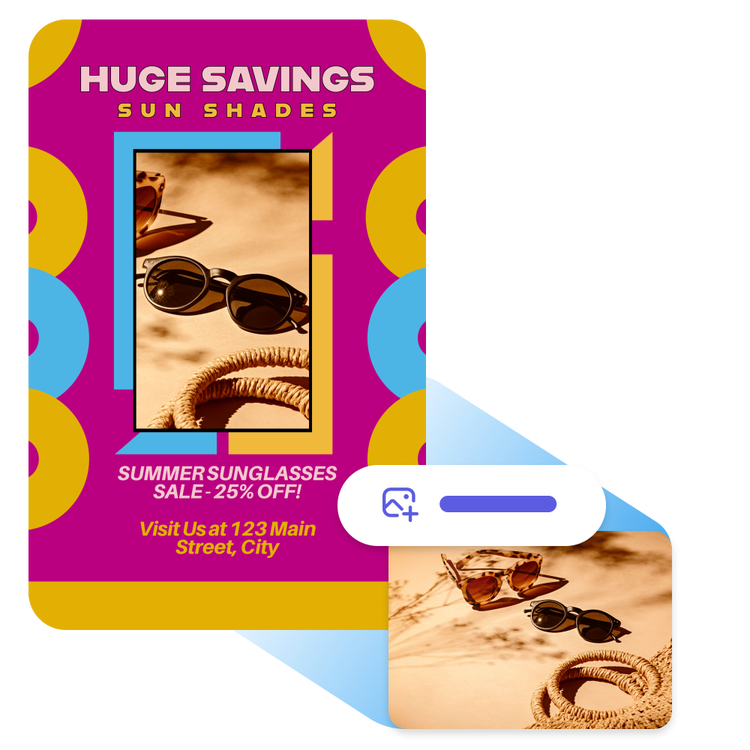
Upload an image, graphic, or illustration alongside your text prompt and the AI template generator will incorporate your media into multiple template designs. It's a fast way to create on-brand templates that include your own visuals from the start.
Easily create standout content with the Adobe Express AI template generator.
Frequently asked questions.
Is the Adobe Express AI template generator safe for commercial use?
The Adobe Express AI template generator is designed to be commercially safe, meaning the templates it produces can be used for business, marketing, and professional projects.
What is an AI template generator?
An AI template generator is a tool that uses generative AI to create fully editable design templates from a text description. In Adobe Express, you describe what you want, the style, topic, format, or industry, and the AI generates multiple template options you can customize with your own branding, text, and images.
How can I best use the template generator?
The more specific you can be in your template generator prompt, the more likely you will get results that match what you want. If you don’t like the first templates generated, try tweaking the word choice in your prompt. The best practice is to include style, topic and/or industry in your prompt.
What can I create with the Adobe Express AI template generator?
The AI template generator can produce templates for a wide range of design formats, including social media posts for Facebook and Instagram, flyers, posters, cards, presentations, and more. You can also use it alongside an uploaded image to generate templates that incorporate your own media.
How is the AI template generator different from the AI presentation generator in Adobe Express?
The AI template generator creates a single customizable design template from a text prompt across a range of formats including social posts, flyers, posters, and presentations. The AI presentation generator, on the other hand, builds a complete multi-slide presentation deck from your prompt or an uploaded file, including an outline, slide layouts, and content. Both tools are available in Adobe Express and can be used together: generate a presentation template to start from, or use the presentation generator for a full deck built automatically.
Can I get Adobe Express for free? If so, what’s included?
Yes, we have a free plan available for anyone. Enjoy everything you need to stand out, including thousands of templates, hundreds of Adobe Stock images, photo editing and effects, and much more. Visit our plans and pricing for details.
You can control how Adobe websites use cookies and similar technologies by making choices below. But note that if you disable cookies and similar technologies entirely, Adobe websites may not function properly.
Cookies are small text files stored by your web browser when you use websites. There are also other technologies that can be used for similar purposes like HTML5 Local Storage and local shared objects, web beacons, and embedded scripts. These technologies help us do things like remembering you and your preferences when you return to our sites, measure how you use the website, conduct market research, and gather information about the ads you see and interact with.
You can make choices in the menu below about what cookies and other technologies you want us to use on Adobe sites when you visit them from this browser. You can always change those choices later by clicking on the Cookie Preferences link at the bottom of the page.
If enabled:
We can improve your experience by tailoring the site and the content to things we think might be of interest
We can better keep track of your preferences — like what language you prefer to use
We will better understand your likely interests so we can provide you more relevant Adobe ads and content on non-Adobe websites and in non-Adobe apps
It will help us improve the performance of our website and those of our partners who use the Adobe Experience Cloud
If disabled:
We won’t be able to remember you from session to session so the experience may not be tailored to your interests
You’ll still have access to the content of the site but certain features that depend on cookies may not function
You’ll still see ads, they just may not be as relevant to you
General information
You can control how Adobe websites use cookies and similar technologies by making choices below. But note that if you disable cookies and similar technologies entirely, Adobe websites may not function properly.
Cookies are small text files stored by your web browser when you use websites. There are also other technologies that can be used for similar purposes like HTML5 Local Storage, web beacons, and embedded scripts. These technologies help us do things like remembering you and your preferences when you return to our sites, measure how you use the website, conduct market research, and gather information about the ads you see and interact with.
You can make choices in the menu below about what cookies and other technologies you want us to use on Adobe sites when you visit them from this browser. You can always change those choices later by clicking on the Cookie Preferences link at the bottom of the page.
If enabled:
We can improve your experience by tailoring the site and the content to things we think might be of interest
We can better keep track of your preferences — like what language you prefer to use
We will better understand your likely interests so we can provide you more relevant Adobe ads and content on non-Adobe websites and in non-Adobe apps
It will help us improve the performance of our website and those of our partners who use the Adobe Experience Cloud
If disabled:
We won’t be able to remember you from session to session so the experience may not be tailored to your interests
We’ll still count your use of our site and services
You’ll still have access to the content of the site but certain features that depend on cookies may not function
You’ll still see ads, they just may not be as relevant to you
Operate the site and core servicesOperate site and measure engagement
Always active
These cookies are required, and they are used to enable the site and related services core functionality. Without them the site could not operate, so they cannot be disabled.
These cookies enable the site and related services’ core functionality and collect statistics about user engagement, such as counting active use to help us understand trends. These cookies cannot be disabled.
Measure performance
These cookies are used to analyze site usage to measure and improve performance. Without them Adobe cannot know what content is most valued and how often unique visitors return to the site, making it hard to improve information we offer to you.
These cookies are used to analyze site usage to measure and improve performance. Without them Adobe cannot know what content is most valued, making it hard to improve information we offer to you.
Extend functionality
These cookies are used to enhance the functionality of Adobe sites such as remembering your settings and preferences to deliver a personalized experience; for example, your username, your repeated visits, preferred language, your country, or any other saved preference.
Personalize advertising
These cookies are used to enable Adobe and our partners to serve ads more relevant to your interests. Without them you will still see ads, but they might not be as relevant to you.