


여래 작가의 Adobe Photoshop 튜토리얼입니다. 감성과 상상력을 더한 초현실적인 콜라주 튜토리얼을 여래(YRAPIC)와 함께 배워보세요.
필요한 사항
앱에서 연습
Adobe Photoshop: 앱에서 콜라주 만들기 자습서를 단계별로 따라 해보세요
여래(YRAPIC) 작가의 ‘시계탑 위에 핀 꽃들’ 튜토리얼은 별도의 준비물이 필요 없습니다. 위의 버튼을 클릭, 포토샵에서 지금 열어보세요. 단계별 영상, 만드는 방법, 시작 파일과 완성본이 함께 제공되어 바로 따라 하며 쉽게 만들 수 있습니다.
배울 내용
감성에 맞게 색감 다듬기 색상/채도 조절, 곡선(Curves) 조정 등 포토샵의 기본적인 색 보정 도구들로 각 이미지들의 색감을 통일하거나 강조할 수 있습니다.
필요한 부분만 분리하고 마스킹하기 하늘 선택을 사용해 하늘만 선택하고 레이어 마스크로 하늘을 제거할 수 있습니다.
이미지 뒤틀기 : 뒤틀기(Warp) 사용 뒤틀기(Warp) 기능을 사용하여 건물과 같은 구조물을 종이와 천처럼 보이도록 유연하게 변형해보세요. 딱딱한 구조물에 흐름을 더해 초현실주의적인 시각적 재미와 상상력이 돋보이는 콜라주를 만들 수 있습니다
추가 이미지 색상 보정: 색상 칠 레이어, 레이어 혼합 옵션 활용 색상 칠 레이어를 활용해 전체적인 색감을 정돈하는 과정입니다. 이를 통해 아트웍의 분위기를 자연스럽고 따뜻하게 담을 수 있습니다.
단계 1 – 보정 & 하늘 제거
먼저 시계탑 사진 이미지를 불러와 캔버스에 배치합니다.
상단 메뉴에서 이미지 > 조정 > 곡선(Curves) 값을 조절해 톤을 다듬습니다.
이어서 이미지 > 조정 > 색조/채도(Hue/Saturation)를 활용해 색감을 조정합니다.
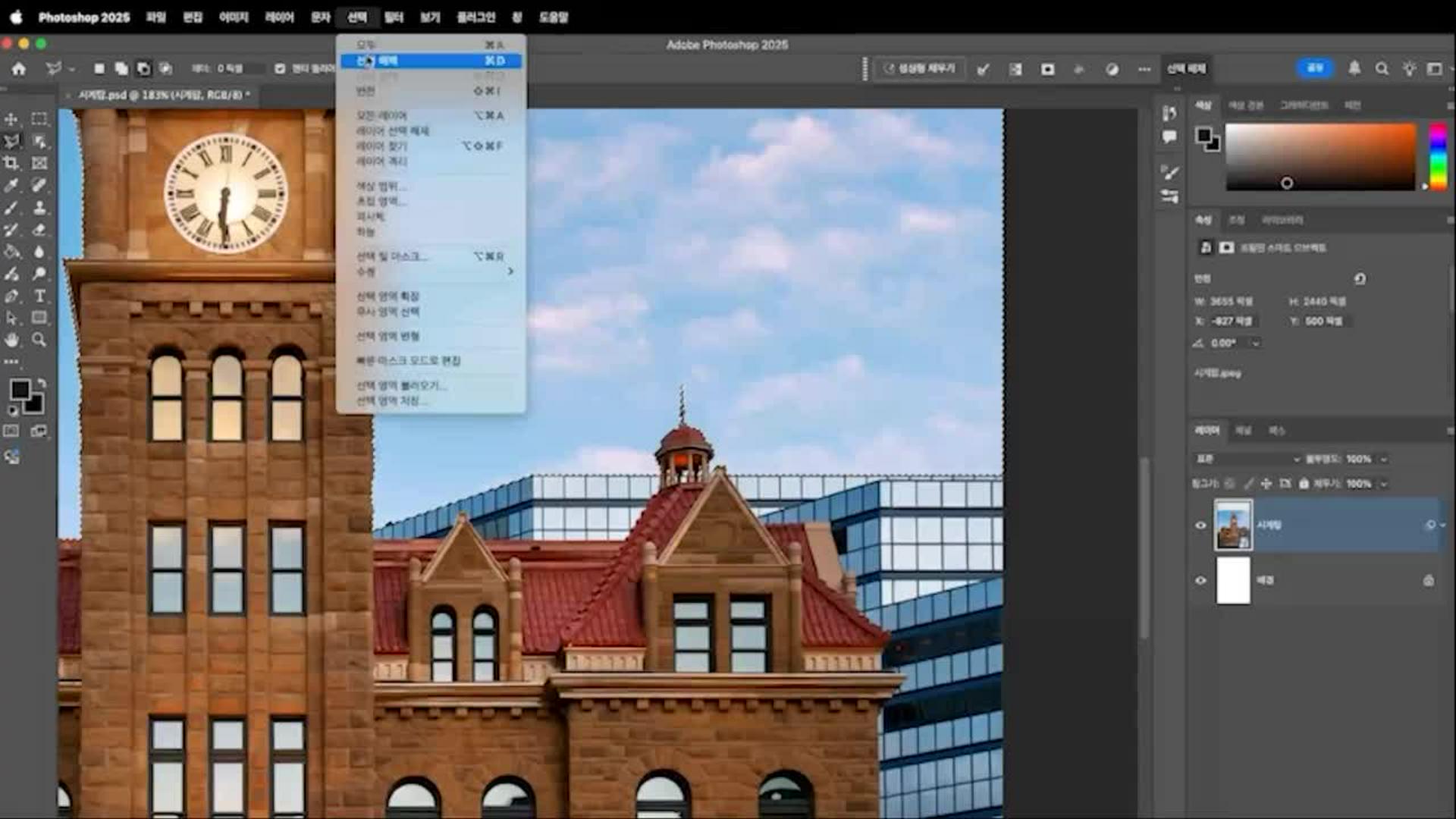
사진이 선택된 상태에서 선택 > 하늘을 눌러 하늘 부분을 지정합니다.
그 후 올가미 도구로 선택 영역을 반전시킵니다.
다음, 레이어 > 레이어 마스크 > 선택 항목 숨기기를 눌러 하늘을 완전히 제거합니다.
이제 새로운 꽃 사진과 하늘 이미지를 불러와 시계탑 위에 배치합니다.
필요한 경우 곡선 조정으로 색감을 맞춰 작품의 톤을 통일합니다.
단계 2 – 뒤틀기로 형태 변형
이번에는 시계탑 이미지를 변형해 독특한 분위기를 연출합니다.
먼저 시계탑 레이어를 선택하고, 사각형 선택 윤곽 도구로 탑의 중앙 부분만 복사해 새로운 레이어에 붙여 넣습니다.
복사한 레이어를 스마트 오브젝트로 변환한 후, 편집 > 변형 > 뒤틀기(Warp) 기능을 적용합니다.
건축물이 자연스럽게 휘어지는 느낌을 줄 수 있으며, 원하는 형태로 조정한 후 확인을 눌러 적용합니다.
마지막으로 레이어에 경사와 엠보스(레이어 스타일) 효과를 추가하면, 입체적이고 초현실적인 질감을 더할 수 있습니다.
단계 3 – 부드러운 무드 완성
마지막 단계에서는 전체적인 분위기를 완성합니다.
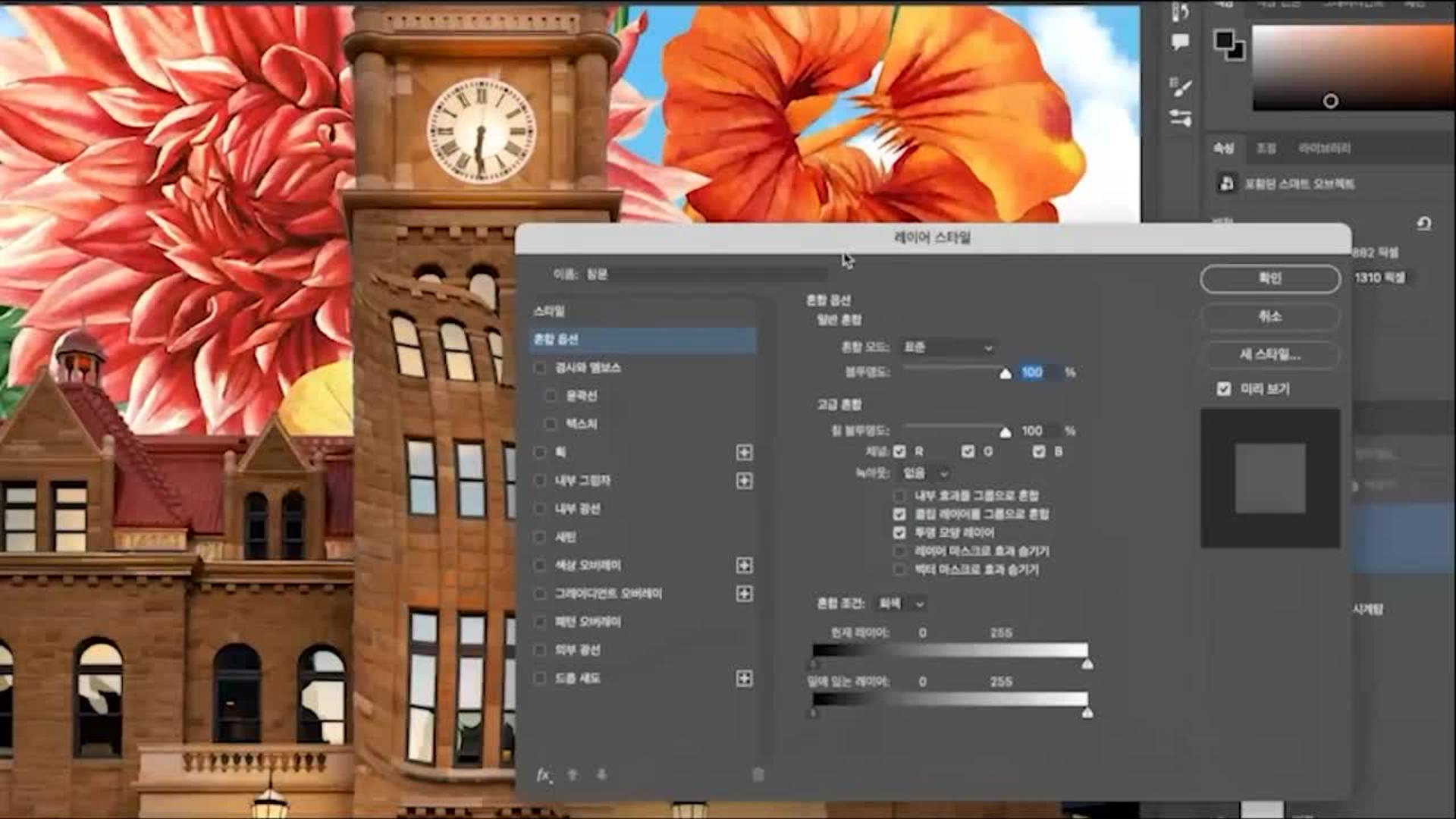
레이어 > 새 칠 레이어 > 단색을 선택해 따뜻한 색상의 단색 레이어를 생성합니다.
이후 레이어 스타일 > 혼합 옵션에서 모드를 소프트 라이트로 바꾸고, 투명도를 약 43% 정도로 낮추면 은은하면서도 감성적인 무드가 더해집니다.
이 과정을 통해 단순한 합성 이미지가 아닌, 예술적인 감각이 살아있는 콜라주 작품을 완성할 수 있습니다.

마무리하며
Photoshop을 사용해 기본적인 이미지 편집과 보정 기법을 익히고, 감성적인 콜라주 작품을 만드는 과정을 배울 수 있습니다. 실습을 통해 나만의 독창적인 콜라주 스타일을 완성하고, 다양한 디자인 프로젝트에 응용해 보세요.
자주 묻는 질문 (FAQ)
Q. Photoshop 콜라주 작업은 처음인데, 따라 할 수 있을까요?
A. 네, 가능합니다. 이 튜토리얼은 포토샵의 기본 기능부터 단계별로 차근차근 설명하기 때문에 초보자도 쉽게 따라 할 수 있습니다.
Q. Photoshop 콜라주에 사용할 이미지는 직접 준비해야 하나요?
A. 예제에 사용된 이미지는 Adobe Stock에서 다운로드할 수 있으며, 직접 촬영한 사진이나 생성형 AI 기능 을 활용한 이미지도 사용할 수 있습니다. 즉, 작업자가 원하는 스타일에 맞게 자유롭게 선택할 수 있습니다.
Q. Photoshop 콜라주 작품을 상업적으로 활용해도 되나요?
A. 상업적 활용 여부는 사용하는 이미지의 라이선스 조건에 따라 달라집니다. 직접 제작하거나 정식 라이선스를 구매한 이미지는 상업적 사용이 가능하지만, 무료 이미지나 AI 생성 이미지는 반드시 해당 플랫폼의 이용 약관을 확인해야 합니다.

Photoshop 강사: 여래 (YRAPIC)
다양한 오브제를 새로운 맥락으로 재배치해 감성적이고 시각적인 즐거움을 전하는 디지털 콜라주 작가, 여래(YRAPIC)입니다. 일상에서 마주한 생각과 감정을 시각적으로 연결해, 현실과 비현실의 경계를 자유롭게 넘나드는 화면을 만듭니다. 비주얼로 감정을 이야기하고, 보는 이에게 다정한 위로와 긍정적인 에너지를 건네는 작업을 지향합니다. 현재 개인 작업 및 미디어 아트 전시 참여는 물론, 국내외 여러 기업과도 활발히 협업하고 있습니다.
프로의 레이어에는 어떤 비밀이 숨어 있을까요? 개성 넘치는 국내 아티스트들의 실제 작업 과정을 따라가며 그들만의 독창적인 노하우를 만나 보세요. 기획부터 완성까지 아티스트의 시선과 디자인 프로세스를 그대로 경험하는 동안 포토샵의 무한한 가능성을 발견하게 됩니다. 툴을 다루는 스킬을 넘어, 나만의 시각적 언어를 한 차원 더 확장하는 특별한 여정을 시작해 보세요.
You can control how Adobe websites use cookies and similar technologies by making choices below. But note that if you disable cookies and similar technologies entirely, Adobe websites may not function properly.
Cookies are small text files stored by your web browser when you use websites. There are also other technologies that can be used for similar purposes like HTML5 Local Storage and local shared objects, web beacons, and embedded scripts. These technologies help us do things like remembering you and your preferences when you return to our sites, measure how you use the website, conduct market research, and gather information about the ads you see and interact with.
You can make choices in the menu below about what cookies and other technologies you want us to use on Adobe sites when you visit them from this browser. You can always change those choices later by clicking on the Cookie Preferences link at the bottom of the page.
If enabled:
We can improve your experience by tailoring the site and the content to things we think might be of interest
We can better keep track of your preferences — like what language you prefer to use
We will better understand your likely interests so we can provide you more relevant Adobe ads and content on non-Adobe websites and in non-Adobe apps
It will help us improve the performance of our website and those of our partners who use the Adobe Experience Cloud
If disabled:
We won’t be able to remember you from session to session so the experience may not be tailored to your interests
You’ll still have access to the content of the site but certain features that depend on cookies may not function
You’ll still see ads, they just may not be as relevant to you
General information
You can control how Adobe websites use cookies and similar technologies by making choices below. But note that if you disable cookies and similar technologies entirely, Adobe websites may not function properly.
Cookies are small text files stored by your web browser when you use websites. There are also other technologies that can be used for similar purposes like HTML5 Local Storage, web beacons, and embedded scripts. These technologies help us do things like remembering you and your preferences when you return to our sites, measure how you use the website, conduct market research, and gather information about the ads you see and interact with.
You can make choices in the menu below about what cookies and other technologies you want us to use on Adobe sites when you visit them from this browser. You can always change those choices later by clicking on the Cookie Preferences link at the bottom of the page.
If enabled:
We can improve your experience by tailoring the site and the content to things we think might be of interest
We can better keep track of your preferences — like what language you prefer to use
We will better understand your likely interests so we can provide you more relevant Adobe ads and content on non-Adobe websites and in non-Adobe apps
It will help us improve the performance of our website and those of our partners who use the Adobe Experience Cloud
If disabled:
We won’t be able to remember you from session to session so the experience may not be tailored to your interests
We’ll still count your use of our site and services
You’ll still have access to the content of the site but certain features that depend on cookies may not function
You’ll still see ads, they just may not be as relevant to you
Operate the site and core servicesOperate site and measure engagement
Always active
These cookies are required, and they are used to enable the site and related services core functionality. Without them the site could not operate, so they cannot be disabled.
These cookies enable the site and related services’ core functionality and collect statistics about user engagement, such as counting active use to help us understand trends. These cookies cannot be disabled.
Measure performance
These cookies are used to analyze site usage to measure and improve performance. Without them Adobe cannot know what content is most valued and how often unique visitors return to the site, making it hard to improve information we offer to you.
These cookies are used to analyze site usage to measure and improve performance. Without them Adobe cannot know what content is most valued, making it hard to improve information we offer to you.
Extend functionality
These cookies are used to enhance the functionality of Adobe sites such as remembering your settings and preferences to deliver a personalized experience; for example, your username, your repeated visits, preferred language, your country, or any other saved preference.
Personalize advertising
These cookies are used to enable Adobe and our partners to serve ads more relevant to your interests. Without them you will still see ads, but they might not be as relevant to you.
Personalize advertising
These cookies are used to enable Adobe and our partners to serve ads more relevant to your interests. Without them you will still see ads, but they might not be as relevant to you.