
1. Скачайтематериалы к уроку и откройте файл 3d-model-wrapping.psd в Photoshop.
Оформление продукта
2. Выбрав слой под названием Packaging graphic, перейдите к 3D > Новая сетка из слоя > Стиль сетки > Газированная вода, чтобы разместить на 3D-упаковке изображение. Photoshop спросит, хотите ли вы переключиться в трехмерное рабочее пространство. Нажмите Да, чтобы продолжить.
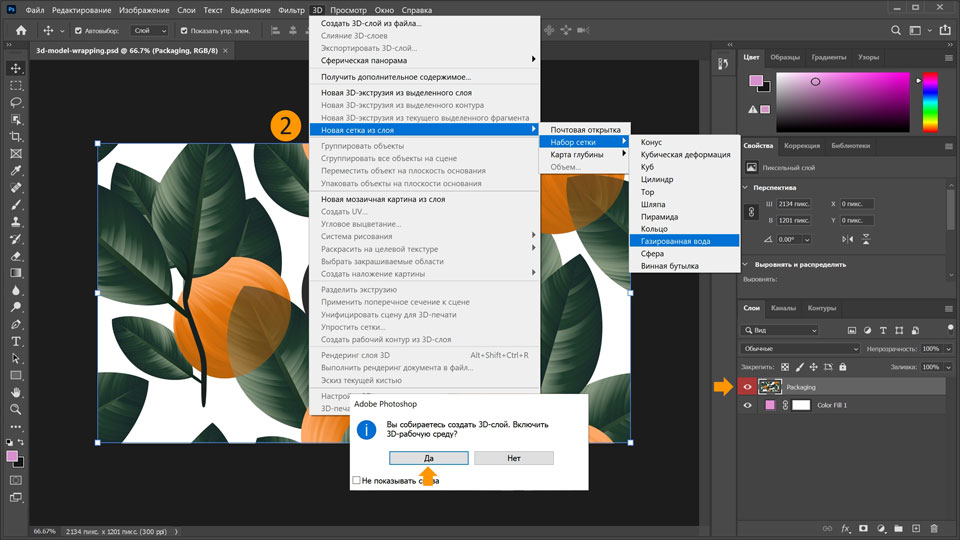
3. Переключитесь с панели слоев в 3D. Если панель 3D не отображается, выберите Окно > 3D.
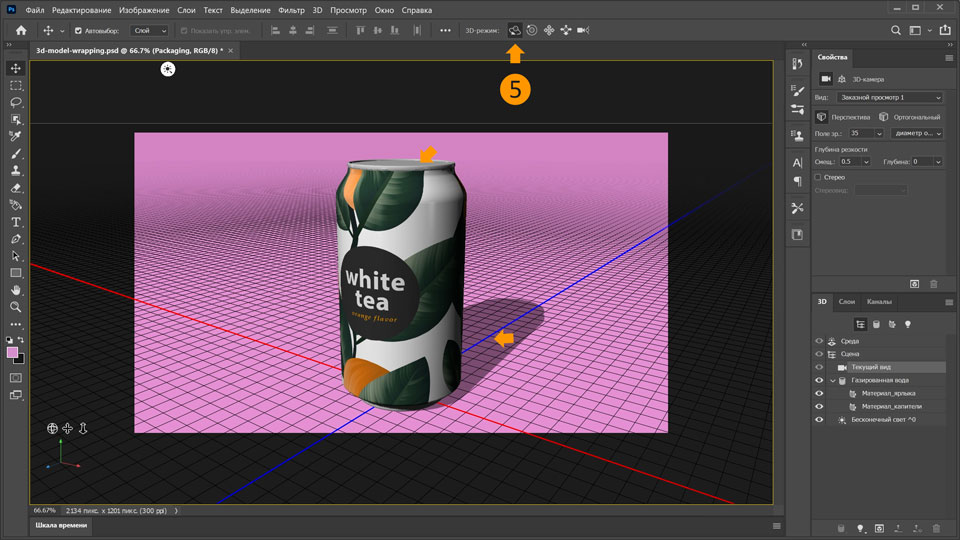
4. Установите для сцены Текущий вид на панели 3D.
5. Выберите Переместить 3D-камеру по дуге на верхней панели. Курсор примет вид миниатюрной орбиты, с помощью которой вы сможете вращать трехмерную модель. Теперь можно вращать экран в разных направлениях, чтобы изменить вид банки в пространстве. Выберите вид, при котором частично видны верхняя часть банки и отбрасываемая ею тень.
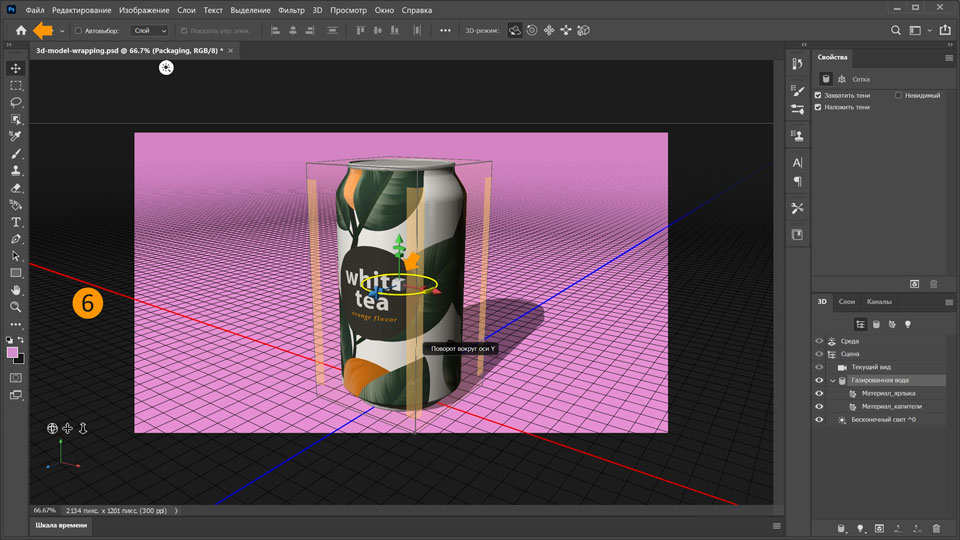
6. Теперь поверните банку так, чтобы этикетка была обращена на зрителя. Для этого нажмите на банку, чтобы отобразить ось 3D. Наведите курсор на красный маркер оси y, так чтобы отобразился желтый круг.
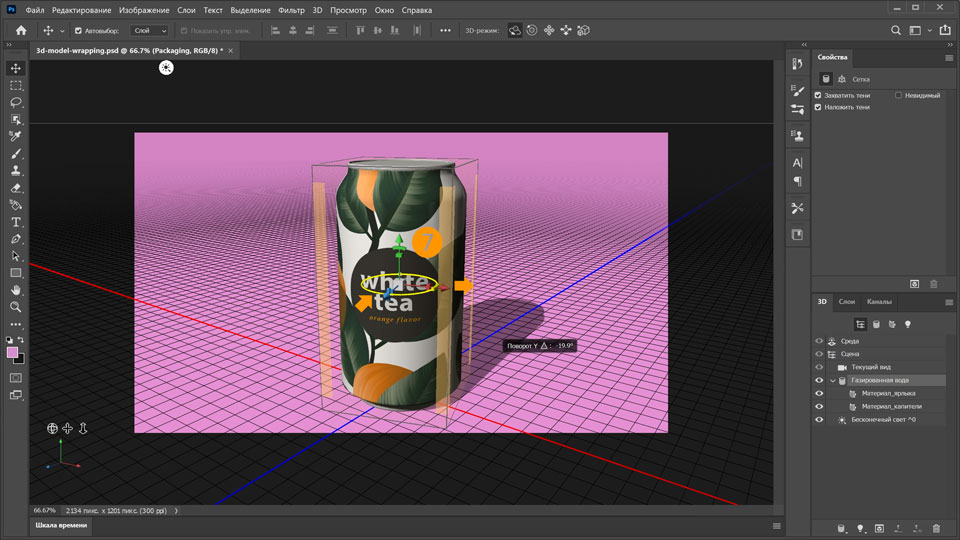
7. Вращайте банку перетаскиванием до тех пор, пока этикетка не окажется посередине.
Применение реалистичного материала
8. В качестве финального штриха на макете можно настроить параметры материала банки. Выберите Label_Material в категории Газированная вода на панели 3D и настройте свойства на панели выше. Установите Свечение на 9%, а Металлические свойства — на 16%.
9. Нажмите на значок трехмерного куба
в нижней части панели 3D для рендеринга макета. Рендеринг может занять некоторое время — в зависимости от мощности компьютера. После завершения рендеринга можно сохранить макет.
Вот и всё! Теперь ваша очередь. Разместите 2D-изображение на 3D-макете продукта в Photoshop. Скачайте наши материалы или используйте собственные. Опубликуйте готовую работу в Facebook, Twitter или Instagram с хештегом #MadewithPhotoshop. Получайте отзывы и общайтесь с другими творческими людьми.
You can control how Adobe websites use cookies and similar technologies by making choices below. But note that if you disable cookies and similar technologies entirely, Adobe websites may not function properly.
Cookies are small text files stored by your web browser when you use websites. There are also other technologies that can be used for similar purposes like HTML5 Local Storage and local shared objects, web beacons, and embedded scripts. These technologies help us do things like remembering you and your preferences when you return to our sites, measure how you use the website, conduct market research, and gather information about the ads you see and interact with.
You can make choices in the menu below about what cookies and other technologies you want us to use on Adobe sites when you visit them from this browser. You can always change those choices later by clicking on the Cookie Preferences link at the bottom of the page.
If enabled:
We can improve your experience by tailoring the site and the content to things we think might be of interest
We can better keep track of your preferences — like what language you prefer to use
We will better understand your likely interests so we can provide you more relevant Adobe ads and content on non-Adobe websites and in non-Adobe apps
It will help us improve the performance of our website and those of our partners who use the Adobe Experience Cloud
If disabled:
We won’t be able to remember you from session to session so the experience may not be tailored to your interests
You’ll still have access to the content of the site but certain features that depend on cookies may not function
You’ll still see ads, they just may not be as relevant to you
General information
You can control how Adobe websites use cookies and similar technologies by making choices below. But note that if you disable cookies and similar technologies entirely, Adobe websites may not function properly.
Cookies are small text files stored by your web browser when you use websites. There are also other technologies that can be used for similar purposes like HTML5 Local Storage, web beacons, and embedded scripts. These technologies help us do things like remembering you and your preferences when you return to our sites, measure how you use the website, conduct market research, and gather information about the ads you see and interact with.
You can make choices in the menu below about what cookies and other technologies you want us to use on Adobe sites when you visit them from this browser. You can always change those choices later by clicking on the Cookie Preferences link at the bottom of the page.
If enabled:
We can improve your experience by tailoring the site and the content to things we think might be of interest
We can better keep track of your preferences — like what language you prefer to use
We will better understand your likely interests so we can provide you more relevant Adobe ads and content on non-Adobe websites and in non-Adobe apps
It will help us improve the performance of our website and those of our partners who use the Adobe Experience Cloud
If disabled:
We won’t be able to remember you from session to session so the experience may not be tailored to your interests
We’ll still count your use of our site and services
You’ll still have access to the content of the site but certain features that depend on cookies may not function
You’ll still see ads, they just may not be as relevant to you
Operate the site and core servicesOperate site and measure engagement
Always active
These cookies are required, and they are used to enable the site and related services core functionality. Without them the site could not operate, so they cannot be disabled.
These cookies enable the site and related services’ core functionality and collect statistics about user engagement, such as counting active use to help us understand trends. These cookies cannot be disabled.
Measure performance
These cookies are used to analyze site usage to measure and improve performance. Without them Adobe cannot know what content is most valued and how often unique visitors return to the site, making it hard to improve information we offer to you.
These cookies are used to analyze site usage to measure and improve performance. Without them Adobe cannot know what content is most valued, making it hard to improve information we offer to you.
Extend functionality
These cookies are used to enhance the functionality of Adobe sites such as remembering your settings and preferences to deliver a personalized experience; for example, your username, your repeated visits, preferred language, your country, or any other saved preference.
Personalize advertising
These cookies are used to enable Adobe and our partners to serve ads more relevant to your interests. Without them you will still see ads, but they might not be as relevant to you.
Personalize advertising
These cookies are used to enable Adobe and our partners to serve ads more relevant to your interests. Without them you will still see ads, but they might not be as relevant to you.