Chuyển lời nói trong video thành văn bản ngay lập tức.
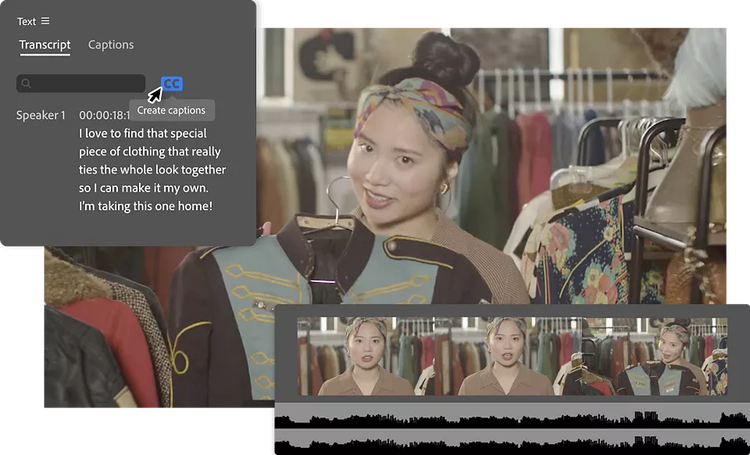
Tự động tạo phụ đề, chú thích và bản chép lời video bằng tính năng Chuyển giọng nói thành văn bản. Và nhanh chóng dịch phụ đề sang 27 ngôn ngữ bằng AI ngay trong Adobe Premiere.
Tăng tương tác với công nghệ chép lời video bằng AI.
Sử dụng công nghệ chuyển giọng nói thành văn bản với sức mạnh AI để chép lời video theo thời gian thực, sau đó chỉnh sửa video trực tiếp từ bản chép lời bằng tính năng chỉnh sửa dựa trên chép lời của Premiere. Tự động thêm phụ đề, nâng cao khả năng tiếp cận, tăng sự gắn kết của người xem và mở rộng phạm vi tiếp cận khán giả.
style
Grid width 8
Tạo bản chép lời video để chỉnh sửa dựa trên văn bản.
Chuyển lời nói trong video thành văn bản nhanh hơn bao giờ hết bằng trí tuệ nhân tạo và tạo chú thích, phụ đề và bản chép lời chính xác bằng 18 ngôn ngữ.
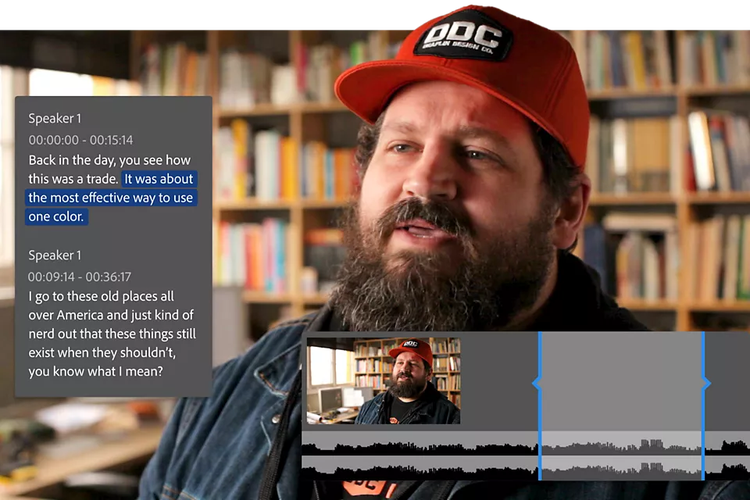
Tạo bản cắt thô bằng cách sao chép và dán văn bản.
Dễ dàng chuyển bản chép lời video thành bản cắt thô nhờ công nghệ chỉnh sửa văn bản tích hợp AI. Cắt, dán các đoạn văn bản để di chuyển clip, tìm kiếm từ khóa và tự động phát hiện, xóa các khoảng dừng hoặc khoảng trống. Sắp xếp các đoạn clip nhanh chóng hơn bao giờ hết.
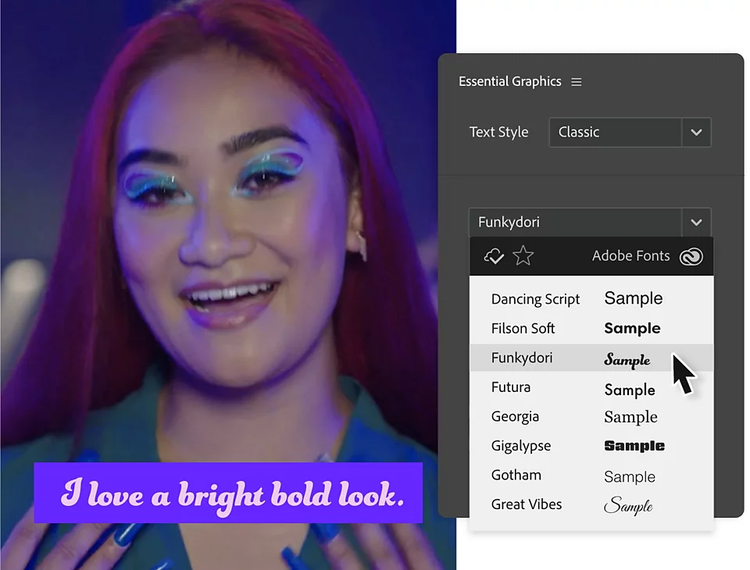
Cách điệu phụ đề của bạn.
Định dạng chú thích và phụ đề để phù hợp với phong cách của bạn hoặc chuyển đổi phụ đề thành hình đồ họa. Điều chỉnh phông chữ, vị trí, màu sắc và hơn thế nữa. Sau đó lưu cài đặt và sử dụng cài đặt đó làm mẫu phụ đề cho các dự án khác.
style
container
style
M spacing
style
grid width 10, L spacing
Bạn có thắc mắc? Chúng tôi có thể giải đáp.
Mở dự án của bạn trong Premiere và nhập tệp video của bạn. Vào bảng Văn bản và chọn Transcribe Sequence (Phiên âm trình tự). Premiere sử dụng công nghệ AI để chuyển giọng nói thành văn bản, giúp chép lời từ âm thanh trong video của bạn theo thời gian thực.
Bạn có thể dễ dàng chuyển đổi video thành văn bản trong Adobe Premiere nhờ các tính năng chuyển lời nói thành văn bản và chép lời.
Tính năng Chuyển lời nói thành văn bản khả dụng cho: tiếng Anh, tiếng Anh (Anh), tiếng Trung giản thể (tiếng Quan Thoại), tiếng Trung phồn thể (tiếng Quan Thoại), tiếng Quảng Đông phồn thể, tiếng Tây Ban Nha, tiếng Đức, tiếng Pháp, tiếng Nhật, tiếng Bồ Đào Nha, tiếng Hàn, tiếng Ý, tiếng Nga, tiếng Hindi, tiếng Hà Lan, tiếng Na Uy, tiếng Thụy Điển và tiếng Đan Mạch.
Không, tính năng Chuyển lời nói thành văn bản được bao gồm trong gói đăng ký Premiere của bạn. Hiện tại không có giới hạn nào được đặt ra cho việc sử dụng hợp lý của mỗi khách hàng đăng ký, cho các dự án của riêng họ.
Với Premiere 22.2 (và phiên bản mới hơn), bạn có thể sử dụng tính năng Chuyển lời nói thành văn bản khi ngoại tuyến. Premiere bao gồm gói ngôn ngữ tiếng Anh để chép lời. Bạn có thể tải xuống các gói ngôn ngữ bổ sung riêng lẻ. Sau khi cài đặt gói ngôn ngữ, bạn có thể tạo bản chép lời cho video của mình mà không cần kết nối Internet.
Có. Tính năng Chuyển lời nói thành văn bản tận dụng công nghệ AI để tạo bản chép lời và đặt phụ đề trên dòng thời gian sao cho khớp với nhịp độ và nhịp điệu của lời nói.
Xuất tệp SCC, MCC, STL và DFXMP hoặc nhúng phụ đề vào video khi xuất.
Để chỉnh sửa video có văn bản trong Adobe Premiere, hãy tạo clip Tiêu đề mới, thêm văn bản theo ý bạn và tùy chỉnh hình thức của văn bản. Đặt clip Tiêu đề lên Dòng thời gian phía trên các video clip của bạn. Sử dụng Công cụ Tiêu đề để định vị lại hoặc tạo hiệu ứng hoạt ảnh cho lớp phủ văn bản. Ngoài ra, bạn có thể nhập các mẫu tiêu đề được tạo sẵn từ Adobe Stock.
Chỉnh sửa dựa trên bản chép lời trong Adobe Premiere dùng để chỉ khả năng tạo bản chép lời văn bản từ âm thanh trong video clip. Sau đó, bạn có thể chỉnh sửa văn bản chép lời và để Premiere tự động điều chỉnh các video clip cũng như âm thanh tương ứng dựa trên bản chép lời đã chỉnh sửa. Việc này giúp hợp lý hóa quy trình chỉnh sửa cho các dự án chuyên về hội thoại.
Để bật tính năng chỉnh sửa dựa trên văn bản trong Adobe Premiere, hãy truy cập không gian làm việc Workflow và chọn công cụ Chép lời. Sau đó, bạn có thể chép lời âm thanh từ các video clip của mình hoặc nhập tệp chép lời hiện có. Sau khi có bản chép lời, bạn có thể chỉnh sửa văn bản trực tiếp và Premiere sẽ tự động cập nhật các phân đoạn video cũng như âm thanh tương ứng dựa trên các chỉnh sửa văn bản của bạn.
Trong lúc nhập tệp, bạn có thể bật tính năng Automatic transcription (Tự động chép lời) trong Import settings (Cài đặt nhập). Ngoài ra, bạn có thể nhấp phải vào tệp video trong bảng Project (Dự án) và chọn Transcribe (Chép lời). Hoặc nếu mở bảng Text (Văn bản), bạn sẽ thấy nút để chép lời cho đoạn clip.
Cách nhanh nhất để tạo phụ đề là bắt đầu bằng bản chép lời video của bạn. Sau khi chép lời xong, hãy nhấp vào nút Create Captions (Tạo phụ đề) trong bảng Text (Văn bản). Sau đó, trong tab Captions (Phụ đề), bạn có thể điều chỉnh kiểu và thời gian của phụ đề.
Sau khi tạo phụ đề, hãy tìm đến tab Captions (Phụ đề) trong bảng Text (Văn bản). Ở đầu tab Phụ đề, bấm vào nút Translate Captions (Dịch phụ đề). Chọn ngôn ngữ rồi bấm vào Translate (Dịch).
Tăng tốc quy trình làm video với AI tạo sinh của Adobe Firefly.
Hình dung trước cảnh quay và hiệu ứng trước khi bấm máy, tạo thêm các tài nguyên bị thiếu trong quá trình sản xuất để hoàn thiện bản dựng, và giảm bớt những tác vụ thủ công để tập trung vào ý tưởng sáng tạo.
Tento web společnosti Adobe neodpovídá vaší geografické poloze
Na základě vaší polohy si myslíme, že by pro vás mohly být vhodnější webové stránky pro tuto zemi: Česká republika. Mohli byste tak využít regionální obsah, nabídky a ceny.
You can control how Adobe websites use cookies and similar technologies by making choices below. But note that if you disable cookies and similar technologies entirely, Adobe websites may not function properly.
Cookies are small text files stored by your web browser when you use websites. There are also other technologies that can be used for similar purposes like HTML5 Local Storage and local shared objects, web beacons, and embedded scripts. These technologies help us do things like remembering you and your preferences when you return to our sites, measure how you use the website, conduct market research, and gather information about the ads you see and interact with.
You can make choices in the menu below about what cookies and other technologies you want us to use on Adobe sites when you visit them from this browser. You can always change those choices later by clicking on the Cookie Preferences link at the bottom of the page.
If enabled:
We can improve your experience by tailoring the site and the content to things we think might be of interest
We can better keep track of your preferences — like what language you prefer to use
We will better understand your likely interests so we can provide you more relevant Adobe ads and content on non-Adobe websites and in non-Adobe apps
It will help us improve the performance of our website and those of our partners who use the Adobe Experience Cloud
If disabled:
We won’t be able to remember you from session to session so the experience may not be tailored to your interests
You’ll still have access to the content of the site but certain features that depend on cookies may not function
You’ll still see ads, they just may not be as relevant to you
General information
You can control how Adobe websites use cookies and similar technologies by making choices below. But note that if you disable cookies and similar technologies entirely, Adobe websites may not function properly.
Cookies are small text files stored by your web browser when you use websites. There are also other technologies that can be used for similar purposes like HTML5 Local Storage, web beacons, and embedded scripts. These technologies help us do things like remembering you and your preferences when you return to our sites, measure how you use the website, conduct market research, and gather information about the ads you see and interact with.
You can make choices in the menu below about what cookies and other technologies you want us to use on Adobe sites when you visit them from this browser. You can always change those choices later by clicking on the Cookie Preferences link at the bottom of the page.
If enabled:
We can improve your experience by tailoring the site and the content to things we think might be of interest
We can better keep track of your preferences — like what language you prefer to use
We will better understand your likely interests so we can provide you more relevant Adobe ads and content on non-Adobe websites and in non-Adobe apps
It will help us improve the performance of our website and those of our partners who use the Adobe Experience Cloud
If disabled:
We won’t be able to remember you from session to session so the experience may not be tailored to your interests
We’ll still count your use of our site and services
You’ll still have access to the content of the site but certain features that depend on cookies may not function
You’ll still see ads, they just may not be as relevant to you
Operate the site and core servicesOperate site and measure engagement
Always active
These cookies are required, and they are used to enable the site and related services core functionality. Without them the site could not operate, so they cannot be disabled.
These cookies enable the site and related services’ core functionality and collect statistics about user engagement, such as counting active use to help us understand trends. These cookies cannot be disabled.
Measure performance
These cookies are used to analyze site usage to measure and improve performance. Without them Adobe cannot know what content is most valued and how often unique visitors return to the site, making it hard to improve information we offer to you.
These cookies are used to analyze site usage to measure and improve performance. Without them Adobe cannot know what content is most valued, making it hard to improve information we offer to you.
Extend functionality
These cookies are used to enhance the functionality of Adobe sites such as remembering your settings and preferences to deliver a personalized experience; for example, your username, your repeated visits, preferred language, your country, or any other saved preference.
Personalize advertising
These cookies are used to enable Adobe and our partners to serve ads more relevant to your interests. Without them you will still see ads, but they might not be as relevant to you.