How to do APA in-text citation with no author
Master APA in-text citations when no author is available. This guide provides clear examples and simple steps to properly cite sources missing an author.

Rules for APA in-text citations with no author
Encountering sources without clear author attribution is one of the most common challenges students face when writing academic papers. Whether you're working on a research paper, literature review, or class assignment, knowing how to reference a source with no author in-text will make your process smoother. That’s because government reports, organizational publications, news articles, and web content frequently lack individual author names.
This comprehensive guide walks you through the rules and conventions for APA in-text citation scenarios when no author is available, providing clear examples and practical steps.
Using shortened titles in citations
The core rule for citing sources without authors is straightforward: use the first few words of the title in place of the author name. However, the formatting of that shortened title depends on the type of source you are citing.
For articles, chapters, and web pages, place the shortened title in quotation marks. These are works that appear within larger publications or websites. If you are citing a news article titled "New Developments in Renewable Energy Technology," your in-text citation would appear as ("New Developments," 2024). Notice that you only need enough words to clearly identify the source—typically two to four words from the beginning of the title.
For books, reports, periodicals, and other standalone works, use italics instead of quotation marks. A report titled "Annual Assessment of Global Health Initiatives" would be cited as (Annual Assessment, 2023). The italics signal to readers that this is a complete, independent work rather than a piece within a larger publication.
When shortening titles, begin with the first word unless it is an article such as "A," "An," or "The." In those cases, include the article but also add the next significant word. A title like "The Impact of Social Media on Teen Mental Health" would be shortened to ("The Impact," 2022) rather than just ("The," 2022).
Maintain the same capitalization in your shortened title that appears in the original. If the original title uses title case, your shortened version should as well. This consistency helps readers match your citation to the correct reference list entry.
When to use an organization as author
Before defaulting to a title-based citation, check whether an organization or group can serve as the author. Many sources that appear authorless have corporate or institutional authors. Government agencies, research institutions, nonprofit organizations, and companies often publish content under their organizational name rather than individual authors.
When an organization is listed as the author or publisher of content, use the organization name as the author in your citation. The first citation should spell out the full organization name, followed by an abbreviation in brackets if you plan to use it again. Subsequent citations can use just the abbreviation.
For example, if citing a report from the World Health Organization (WHO), your first citation would read (World Health Organization [WHO], 2024). Later citations in the same paper can simply use (WHO, 2024).
The distinction matters because organizational authorship provides clearer attribution than a shortened title. If a source lists "Published by the National Institute of Mental Health" or shows an organization logo prominently, that organization likely functions as the author. Only use the title-substitution method when no individual or organizational author can be identified.
When you need to cite an article from a professional organization or government body, look carefully at the publication information to determine whether the organization should be credited as author.
Handling special formatting situations
Several special situations require additional attention when creating an APA citation with no author. Understanding these nuances helps you handle complex citation scenarios with confidence.
When a source has no date in addition to no author, use "n.d." (meaning "no date") in place of the year. Your citation would appear as ("Article Title," n.d.). This situation commonly occurs with undated web pages or documents without clear publication information.
For sources with the same shortened title and year, add lowercase letters after the year to distinguish them, such as ("Research Summary," 2024a) and ("Research Summary," 2024b). Assign letters based on the alphabetical order of the full titles in your reference list.
If you're citing a specific page or section, include that information after the year, separated by a comma. A citation might read ("Climate Report," 2023, p. 15) or ("Climate Report," 2023, para. 3) for sources without page numbers.
Citing common source types with no author
Different source types present unique challenges when author information is missing. Understanding the specific conventions for each type helps you create accurate citations that guide readers to your sources.
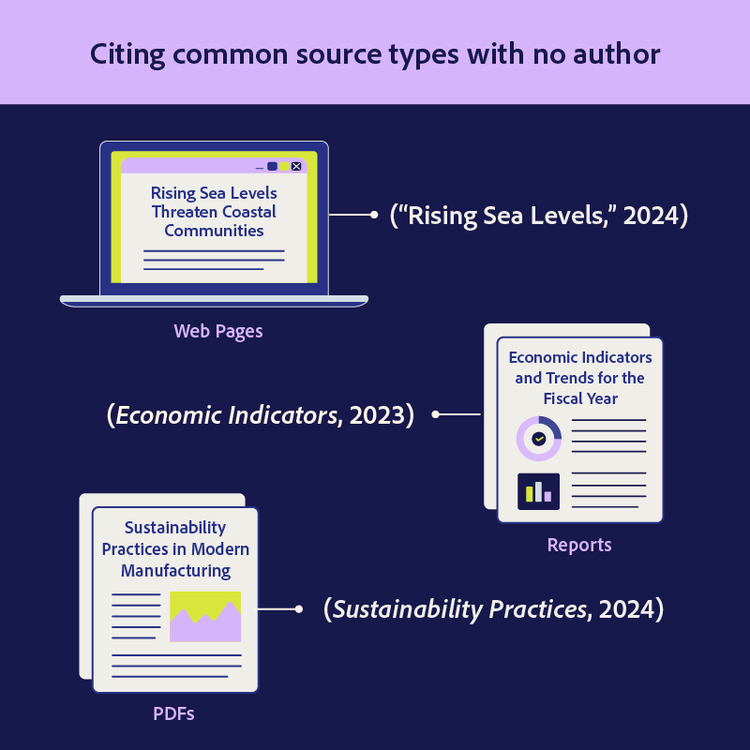
Articles and web pages with no author
Online articles and web pages are among the most common sources lacking clear authorship. News websites, informational pages, and blog posts frequently publish content without bylines.
For a web article titled "Rising Sea Levels Threaten Coastal Communities," your in-text citation would appear as ("Rising Sea Levels," 2024). Include the year the article was published or last updated. If the page shows only a specific date, use just the year in the in-text citation while including the full date in your reference list.
News articles from major publications sometimes lack individual author attribution, especially for breaking news or wire service content. A news story titled "Federal Reserve Announces Interest Rate Decision" would be cited as ("Federal Reserve Announces," 2024).
Blog posts follow the same conventions. Even if a blog has a general author or owner, individual posts without specific attribution should be cited using the shortened title method.
When conducting research for a literature review you may encounter numerous web sources without authors. Maintaining consistent citation formatting across all these sources strengthens your paper's credibility.
Books and reports with no author
Books and reports without authors require italicized shortened titles in your citations. These standalone works are distinguished from articles and web pages through this formatting difference.
A dictionary entry, for example, might be cited as (Merriam-Webster's Collegiate Dictionary, 2020). Reference books commonly lack individual author attribution since they represent collective editorial efforts.
Government reports frequently fall into this category. A report titled "Economic Indicators and Trends for the Fiscal Year" would be cited as (Economic Indicators, 2023). Many government publications list only the issuing agency, which should be treated as a corporate author rather than using the title.
Technical manuals and style guides also commonly appear without individual authors. The Publication Manual of the American Psychological Association itself is typically cited with the APA as the corporate author: (American Psychological Association, 2020).
When a book lists editors rather than authors, the editors receive author credit with their role indicated. Only use the title-substitution method when no individuals or organizations are credited with creating the work.
PDFs and digital documents with no author
PDF documents present particular challenges because author information may be embedded in document properties rather than displayed on the document itself. Before assuming a PDF has no author, check the document properties through your PDF reader.
When you cite a PDF, the citation format follows the same rules as the underlying source type. A PDF of a journal article follows article citation rules, while a PDF of a report follows report citation rules.
Using a PDF editor allows you to access document metadata that may reveal author information not visible on the document pages. Check the file properties for author, title, and creation date fields that can inform your citation.
If the PDF truly lacks author information even in its metadata, apply the appropriate title-based citation format. A PDF report titled "Sustainability Practices in Modern Manufacturing" would be cited as (Sustainability Practices, 2024).
AI-generated content citations
The APA 7th edition provides guidance for citing artificial intelligence (AI) tools and AI-generated content. When AI generates text that you quote or reference, the AI tool is cited as software rather than as an author.
AI-generated content follows a specific format that includes the AI tool name, version, the company that created it, and the date the content was generated. An in-text citation for AI-generated content typically appears as (OpenAI, 2024) with the reference list entry providing full details about the specific tool and prompt used.
When using AI to help with paraphrasing or summarizing sources, remember that the original source still requires proper citation. AI assistance with writing does not change the attribution requirements for the underlying information.
The key distinction is between citing AI as a tool you used versus citing content the AI generated. If you asked an AI to explain a concept and then quoted that explanation, you cite the AI. If you used AI to help locate or understand a source written by humans, you cite the human source.
Using AI to generate APA no-author citations
Modern AI tools can significantly streamline the citation process, helping you format complex citations correctly while saving time on manual formatting. These tools work best when you provide accurate source information and verify the output against current APA guidelines. Learning to leverage these resources effectively can transform how you approach research and citation management.
Steps for using AI citation tools
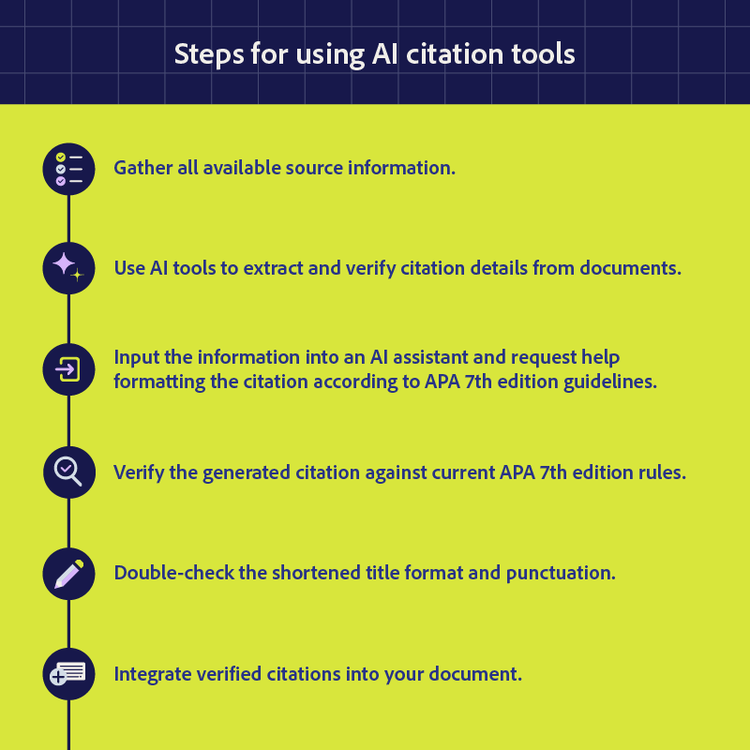
1. Gather all available source information before starting. This includes the complete title, publication date, URL for online sources, publisher information, and any organizational affiliations. Even without an author, these details are essential for creating accurate citations. Take time to thoroughly examine your source for any attribution information you might have initially missed.
2. Use AI tools to extract and verify citation details from documents. When working with PDFs or digital documents, AI can help identify publication information that might be difficult to locate manually. Upload the document and ask the AI to identify key citation elements such as publication dates, organizational affiliations, and full titles.
3. Input the gathered information into an AI assistant and request help formatting the citation according to APA 7th edition guidelines. Be specific about the source type and mention that no author is available. The AI can then apply the appropriate title-substitution formatting based on whether you're citing an article, book, report, or other source type.
4. Verify the generated citation against current APA 7th edition rules. AI tools occasionally make errors or may be trained on outdated guidelines. Cross-reference the output with official APA resources or your institution's writing center guidelines to ensure accuracy.
5. Double-check the shortened title format and punctuation. Confirm that quotation marks or italics are applied correctly based on source type. Verify that the title is shortened appropriately and that the year appears in the correct position.
6. Integrate verified citations into your document consistently. Once you've confirmed the accuracy of your citations, apply the same careful process to all sources lacking authors. Consistency across your paper demonstrates attention to detail and strengthens your academic credibility.
Leveraging Acrobat AI for citation research
Adobe Acrobat offers several features that support academic research and citation work. These tools help you organize sources, extract information, and manage the research process more efficiently.
The AI Assistant feature allows you to interact with PDF documents through natural conversation. You can ask questions about document content, request summaries of specific sections, or have the AI identify key information relevant to your research. This proves particularly valuable when working with lengthy reports or technical documents where citation information may be buried within the text.
Exploring AI research tools helps streamline the process of gathering and organizing source material. Rather than manually searching through documents for publication details, you can use AI to quickly extract the information needed for citations.
The student workspace provides a dedicated environment for organizing research materials. Keeping your sources organized makes it easier to track which documents require no-author citations and ensures you have all necessary information when creating your reference list.
When you need to quickly understand a source's main arguments or findings, the AI summary generator can provide concise overviews. This helps you determine the relevance of a source before investing time in detailed reading and citation.
Frequently asked questions
How do I reference a website with no author in APA format?
What if a source has no author, date, or title?
Can I use "Anonymous" as the author in APA citations?
How do I format the reference list entry when there is no author?
What punctuation goes around shortened titles in citations?
How do I cite multiple works with no author in the same parentheses?
Should I follow my instructor’s requirements if they differ from APA?
You may also like