>> Adobe Premiere Pro has multiple workspaces for multiple purposes.
And you're probably already familiar with this editing workspace.
But if we switch over to the color workspace, we've got quick access to useful tools like the Lumetri Color Panel and the Lumetri Scopes.
And the layout is focused on making our color adjustments.
The first thing I'm gonna do here is right-click on the Lumetri Scopes Panel and I'm gonna go to my Presets and I'm gonna choose the Vectorscope YUV, the Parade RGB and Waveform YC.
I find this combination of the Vectorscope RGB Parade and YC Waveform to be a pretty good starting point for color adjustments.
And this is a good moment to mention the difference between, I suppose, what you'd call color correction and color adjustment.
Here, for example, I've got a shot and I could maybe make a very simple Temperature adjustment to this to make it look more interesting.
You'll notice that with a lot of these controls in the Lumetri Color panel, you can learn about what they do even if you are not that familiar with them.
Simply by dragging the slider from one extreme to the other.
You can see it pretty clearly what's going on here.
It's common if you are shooting between interiors and exteriors to have the calibration on the camera wrong and have a little bit too much orange or a little bit too much blue in the shot.
And that's just because tungsten lighting which is common inside has more of an orange hue.
I kind of like this extreme orange look here but maybe if I dull this in a little bit, I get something a bit more nuanced.
Now this is a color adjustment, I'm doing this for creative reasons.
If we look over here at another shot, it's quite clear that there is a strong calibration issue with the camera.
Now your eye adjusts to images really, really fast.
So within a couple of seconds or so looking at this, you'll start to think perhaps that those shoes are if not white then white enough.
But look what happens if I take this automated with balance eye dropper and click on the white of the shoe, let's just click right here and immediately you'll see that we've not got a much more natural looking scene and also the Temperature and Tint controls have been adjusted in the Lumetri Color Panel.
This is really helpful because just as with a lot of automated adjustments you find in applications like Premiere Pro, it helps us to learn the kinds of adjustments we need to make to have this effect.
So take a look at the changes that occur when you use these kinds of tools.
I've got another instance of a part of this clip over here, a little bit later in my sequence.
And I'm just gonna right-click here and I'm gonna choose Copy and then I'm gonna go to the other shot, I'm gonna right-click and I'm gonna choose Paste Attributes.
And I'm happy with the all the settings here, I don't need to be too selective because no other adjustments have been made.
So I'm gonna click OK and we got the same adjustments.
And of course, this works because it really is the same clip.
You need to be a little bit careful about copying and pasting color adjustments when you are not sure that the media was shot in the same lighting conditions.
While your eyes have probably adjusted to the shot already and it looks like it has a reasonable level of contrast.
If we look over here at our waveform, we can see actually there's very little contrast in the shot.
We've got pretty good shadows but you can see, we are not quite hitting our zero point, so our blacks aren't really clean and we're missing a lot of highlights.
So we don't have that much dynamic range.
If I want to I can just crank up the exposure a little bit to pull this into the mid-tone range and then increase my contrast and you can see the effect that it has on my waveform.
You can see it's now pulling down the shadows a little and extending the highlights.
That hasn't done really enough for me, you can see we've topped out of the 100% in the Contrast and I'd like a little bit more.
So I'm gonna pull down my blacks, this is the darkest part of my image.
There we go, really strong dark shadows and I think I'm gonna pull down the shadows here as well, this isn't the fully dark pixels, it's the kind of mid-range darks.
And I think we are a little heavy on the color saturation, we're getting a lot more color having lifted the luma, so I'm gonna pull that down a little bit and this gives me an interesting result, I'm getting the lot more of the green but I'm also getting strong shadows and highlights.
Because our eyes adjust so quickly to changes in our visual field, it's helpful to toggle effects like this off and on to see the before and after.
So here everything we've done is in the basic correction section of the Lumetri Color Panel.
I'm just gonna turn the correction off and back on gain.
You can see it really is a dramatic change and with those white balance adjustments, the temperature in particular, we've brought in a lot more color information from a shot that was otherwise looking pretty monochrome.
So I'm pretty happy with that result.
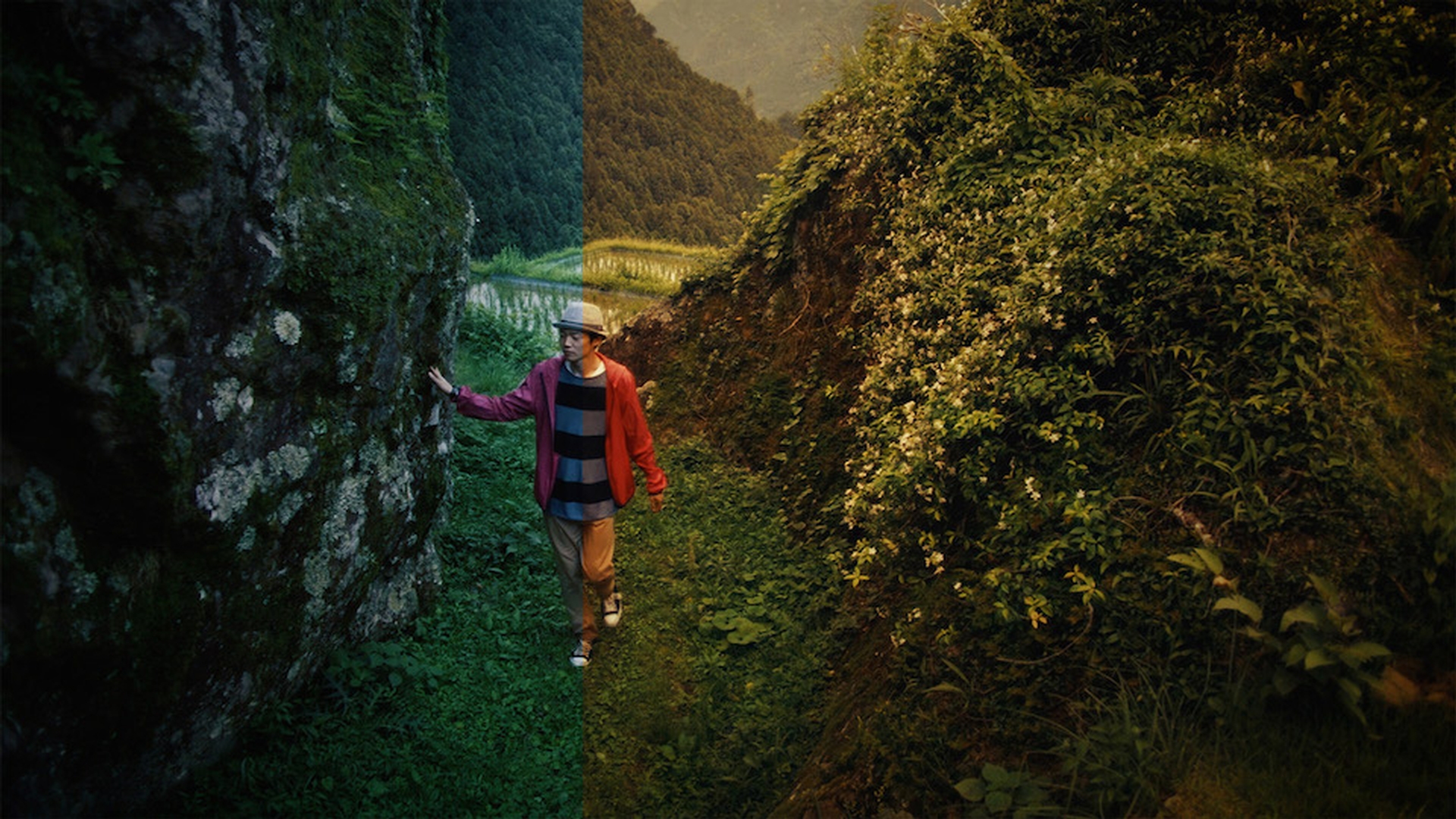
We've got a lot of shots to choose from here but I'd like to just start with this shot right here, just to see if we can give this a bit more of a filmic look.
The first thing I'm gonna do with this clip is increase the contrast a little and you can see immediately, this pulls out the foreground from the background and this is simply because the foreground elements are bit brighter, so they get even brighter related to that dark background, the dark pixels get even darker and we get this much greater sense of depth information in the picture.
I really want these shadows to stand out, so I'm gonna pull down the Black level here, let's just pull this right down.
So I get a strong, deep shadows, you see this dark areas in the trees and I'm pretty happy with the highlight level because a lot of this is skin tone and we can see from the waveform that we are already pretty high up there, we are hitting about 70 or 80 IRE and that's enough for skin tones.
We don't have any specula highlights here to worry about.
Now I'm gonna go to the creative section of the Lumetri Color Panel and I'm going to re-size a little bit, I'm gonna pull this over.
So we get a larger preview of the creative looks that we can apply.
We can toggle through each of these to see the result.
You see here we're getting the name of the film stock type or the emulation at the bottom of the image.
And choose something that really just adds a bit more texture and nuance.
We can also click on the look menu right at the top and I think what I'm gonna go for is this one right here, SL CLEAN KODAK B.
This just gives me nice, rich greens, there's a little bit more red in there, makes them look a little bit more lifeful but it's doing a good job of protecting the skin tones of the color on the jacket.
Let me resize this panel again a little bit, so we get that smaller thumbnail, I can see a bit more of the main image.
And I want to make some adjustments here to the creative look that I've applied, so the first thing I'm gonna do is reduce the intensity, I'm just gonna pull this back a little bit, so we don't have such a strong effect applied.
Then I'm gonna turn down the Sharpen, I'm looking here to create something like a filmed look and you'll notice that film stocks rarely have that really, pin sharp clarity that you get from video.
I'm gonna turn up the Vibrance which increases color saturation for non skin tone pixels, let's just pull this up a little.
And I'm gonna pull back the saturation over all, let's just adjust that about here.
This means that relative to the skin tones my Vibrance adjustment is giving me the strong, punchy colors but the skin tones themselves don't look over worked.
And as whole, we're not getting a really intense over saturated image.
Now I'm pretty happy with this result and I want to apply this to a lot of clips in the sequence.
In fact, what I really like to do is apply this to everything.
So I'm gonna go to File, New, Adjustment Layer.
The settings for the Adjustment Layer are taken from my current sequence and that's OK.
Here's my new Adjustment Layer and I'm gonna drag like this like any graphic up on to the top of my sequence, I'm putting this in front of video one and video two.
I'll just resize a little and I'm going to trim this out to cover my entire sequence.
And the effect I want is around about...
Let's scroll over a little.
Here we go, I can see from this icon that the clip has an effect on it.
I'm going to select this clip, I'm gonna go to my effect controls and I want to move this effect from the individual clip to the Adjustment Layer that covers the whole sequence.
And I'm gonna be pretty lazy here, I'm gonna select the effect and I'm gonna choose copy, that's Ctrl + C here on Windows, and it'll be Command + C on Mac OS.
Now that I've copied that effect to the clipboard, I'm gonna select it and hit backspace to delete it.
Now I'm gonna select the adjustment layer and I'm gonna press Ctrl + V or Command + V to paste.
So now I've pasted that effect straight from the effect controls panel on to a new clip.
And now let's just zoom out a little so we can see the whole sequence.
If I click through a few of these shots, we can see that this has given us a really strong nuanced look for a lot of our media.
And I think the next thing is going to be to apply a little bit of vignette and the reason we use vignettes for filmed looks is because particularly in the old school days of cinematography, we tended to get little darkening around the edge of the lens cause by just the amount of glass and the way it was seated inside the casing, particularly for longer lenses.
So I'm just going to increase the amount the vignetteing on here.
I'm gonna feather this quite a bit because I don't want it to be too intense.
And again, if I turn this off and on there's the clean version, there's the vignetted version, you can see that even with quite a subtle effect, it creates this much more filmic look.
If you apply this simple adjustments, pull down the shadows, increase the contrast a little, start with a creative preset look and make adjustments from there, you can get some powerful and nuanced results.
So that's making adjustments to your video footage to make it look more like a film in Adobe Premiere Pro CC.