


Choose the right photo editing software for your photography style.
Depending on your photography needs, different editing apps can help any photo editor either quickly edit and post photos or make finely tuned edits and manage hundreds of shots.
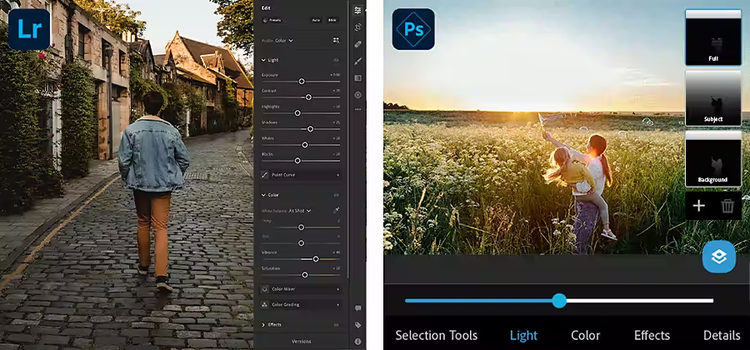
Adobe Lightroom is a professional image editing programme that runs on any device. It offers easy-to-use editing and retouching tools and presets that encourage photographers to try out new techniques and expand their skills.
Adobe Photoshop Express is a free downloadable mobile app for budding photographers who use their phones to take pictures, edit them and upload them to social media channels.
Explore the ways each app excels and learn how you can use both in your journey to better photo editing.
Photo editing and organisation tools for any device.
Lightroom is an editing programme that specialises in helping you to organise images and reduce bottlenecks in your editing workflow.
As a web-based editing app, Lightroom also delivers the go-anywhere functionality that professional photographers need. You can upload, access and edit your images anywhere, from iOS devices like the iPad and iPhone to Android devices and Windows desktops. Once your images are in Lightroom they automatically sync to Adobe Creative Cloud. Plus, you have access to your whole photo library — up to 1 TB — wherever you go.
With a wide array of image editing tools, Lightroom has built-in tutorials to help you quickly master new features. You can also invite anyone to share, download or add photos. And you can ask collaborators and colleagues to provide feedback about your images on the fly.

Presets and editing
Lightroom makes it easy to expand your photo editing skills and experiment with new post-processing techniques. The app is full of preset editing effects, called presets, that can help you to edit and improve the quality of your images. Professional photographers created many of these filters for Adobe based on techniques they use to edit their own work.
You can also open and observe the levels in any preset to better understand how each edit was created.
Uploading photos
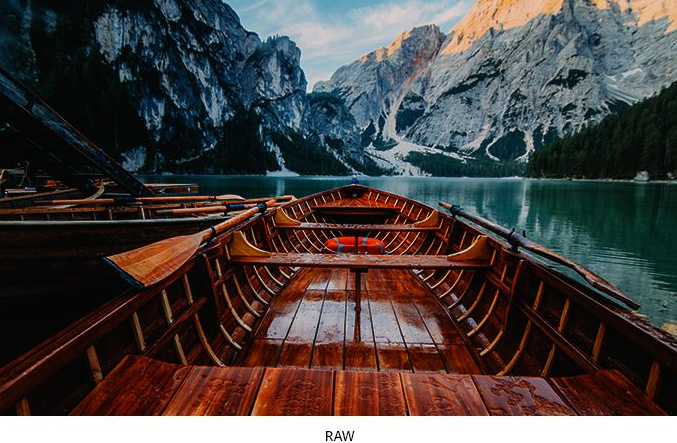
When you need to import RAW files, Lightroom recognises the type of camera and lens you use and allows you to apply specific lens corrections that were designed specifically for them. You can also make non-destructive changes to raw images and JPGs, so you never have to worry about losing your original file.

Workflow and photo management
The photographer on the go can use Lightroom to make uploading full-resolution images easy. Send them quickly to the cloud where they sync and back up automatically. Customise the image import settings and management features to meet your specific requirements.
Keep track of all your best photos with an image management system that lets you tag images with keywords and metadata to quickly catalogue, organise, track, write, watermark and embed other data in your images.
Lightroom also uses Adobe Sensei, an AI technology, to help you to find and organise your photos. Within Lightroom, Sensei automatically recognises faces and elements within images. It can suggest relevant tags for easy searching. Sensei can even autocorrect images by whitening teeth and reducing red eye.
The mobile editing app for digital storytellers.
Adobe Photoshop Express is the perfect editing programme for digital storytellers who regularly post images on social media. This free downloadable app is great for any mobile device and even works with Windows desktop computers and in web browsers — ideal to quickly edit your images and post them to Instagram, Facebook, Flickr, Twitter and other channels.
Templates and smart filters for novice photographers
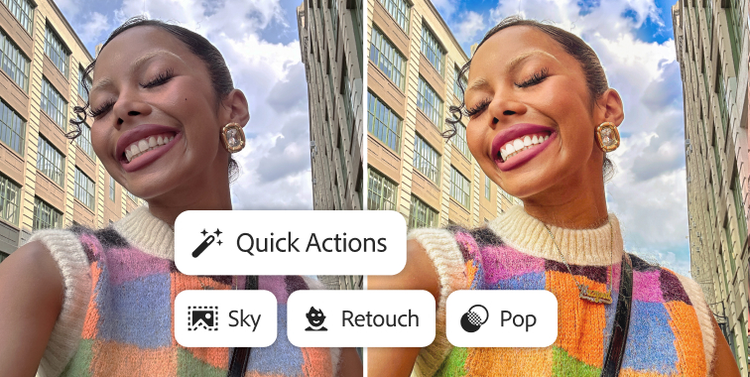
If you primarily use a mobile device to take photographs, Photoshop Express makes editing a snap. Choose from a wide range of templates to make fast edits, overlay text on your photos and have fun with special effects.
Create single or multi-image collages with collage templates. Add your own signature style with tools that allow you to change image positions, aspect ratio and background colour. Use smart filters to automatically correct common problems such as colour temperature and more.
Editing and special effects
Alongside editing tools like cropping and adjustments to brightness, contrast and saturation, you can add bokeh overlays, light leaks, cutouts, raindrops, smoke, noise, flares and borders to your shots in Photoshop Express. Plus, make tonal adjustments to Exposure, Contrast, Shadows, Dehaze and Highlights tools with adjustment sliders. You can also automatically generate scrapbooks and create customised stickers with your favourite photos.
Photoshop Express Premium is a paid subscription version with expanded features such as advanced healing edits, RAW image editing and manipulation and HSL sliders.

How Adobe photo editing apps work together.
Adobe image editing programmes work together seamlessly due to Creative Cloud. You can import and export images back and forth between Adobe Photoshop, Lightroom and other Creative Cloud apps allowing you to fine-tune, enhance and modify your images. And while Photoshop Express is not a Creative Cloud app, you can export Photoshop Express PSD files from your mobile device directly to Photoshop or Lightroom to make advanced edits.
Many creative professionals use more than one Adobe editor because each offers features for different specialities. By getting hands-on with Adobe editing tools, you can assess your current and future needs as a photographer to ensure you’re equipped with the apps you need.
Featured products

Lightroom
Desktop + Mobile
Make your photos amazing anywhere you are with powerful photo editing software. Learn more

Photoshop Express
Mobile
Quickly edit, collage and retouch photos so they stand out on social and everywhere else. Learn more
Find the Creative Cloud plan that’s right for you.
Photography (1TB)
₹638.38/moincl. GST
Annual, billed monthly
Lightroom for desktop, mobile and web plus Lightroom Classic and Photoshop on desktop and iPad.
Adobe Photoshop Single App
Annual, billed monthly
₹733.96/moincl. GST
Get Photoshop on desktop and iPad as part of Creative Cloud.
Creative Cloud Pro
Annual, billed monthly
₹2,714.00/moincl. GST
Get 20+ Creative Cloud apps, including Photoshop on desktop and iPad.
Students and Teachers
Regularly at ₹699.01/mo
Alternatively at ₹398.99/moincl. GST
Annual, billed monthly
Save on 20+ Creative Cloud Pro.


