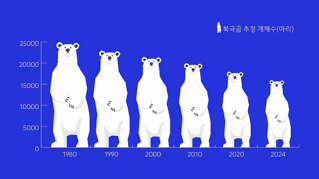
인포그래픽은 데이터 또는 리서치의 내용을 한눈에 확인할 수 있는 그래픽입니다. 인포그래픽에는 막대 그래프, 파이 차트, 히스토그램, 선 그래프 등과 같은 요소가 포함됩니다.
최고의 인포그래픽은 데이터를 쉽게 이해할 수 있도록 시각적으로 표현한 것입니다. 호소력 있는 인포그래픽을 디자인하려면 유용한 정보를 명확하게 전달할 수 있어야 합니다. 매력적인 인포그래픽을 만들기 위한 기본 디자인 원칙은 다음과 같습니다.
정보 계층 구조 구성
인포그래픽 제작을 위한 특정 기능이 포함된 Illustrator와 같은 툴 사용
프로젝트에 적합한 인포그래픽 유형 선택
어울리는 색상 팔레트 선택
빠른 시작
Illustrator에서 먼저 다양한 스타일과 색상 팔레트로 미리 만들어진 Adobe Stock 템플릿을 살펴보세요. 강력한 템플릿은 다양한 아이디어와 디자인을 위한 영감을 제공하므로 인포그래픽 프로젝트를 빠르게 시작할 수 있습니다.
크리에이티브 요구에 맞는 그래프 툴
Illustrator에서 다양한 유형의 그래프를 만들고 요구에 맞게 자유롭게 변경할 수 있습니다. Illustrator에는 막대 그래프 툴과 영역 그래프 툴부터 레이더 그래프 툴과 산포 그래프 툴에 이르기까지 다양한 그래프 툴이 있습니다. 그래프 데이터 창에 바로 데이터를 입력하여 데이터를 그래프로 정확하게 나타낼 수 있습니다.
그래프 디자인을 사용하여 일러스트레이션을 열과 마커에 추가할 수 있습니다. 그래프 디자인에는 간단한 그림, 로고, 아이콘 또는 기타 심볼을 포함할 수 있습니다. Illustrator의 사전 설정 그래프 디자인을 사용하거나 그래프 디자인 대화 상자에서 나만의 그래프 디자인을 만들 수 있습니다.
팁
: 그래프 그룹을 해제하면 디자인을 자유롭게 변경할 수 있지만 추가 데이터를 편집할 수는 없습니다.
데이터 병합으로 완성도 높이기
Illustrator에서 데이터 소스 파일과 그래픽을 병합하여 다양한 버전의 인포그래픽을 만들 수 있습니다. 예를 들어 일련의 차트 콘텐츠를 수동으로 변경하지 않고 데이터 병합 기능을 사용하여 다양한 버전을 만듭니다.
포인트 강조 및 공유
펜, 연필 및 도형 구성 툴로 인포그래픽을 자유롭게 변경하고 세밀하게 조정하여 원하는 모양을 만든 다음 인포그래픽을 PDF 등 인쇄 및 디지털 포맷으로 내보내 다른 사람과 공유할 수 있습니다.
You can control how Adobe websites use cookies and similar technologies by making choices below. But note that if you disable cookies and similar technologies entirely, Adobe websites may not function properly.
Cookies are small text files stored by your web browser when you use websites. There are also other technologies that can be used for similar purposes like HTML5 Local Storage and local shared objects, web beacons, and embedded scripts. These technologies help us do things like remembering you and your preferences when you return to our sites, measure how you use the website, conduct market research, and gather information about the ads you see and interact with.
You can make choices in the menu below about what cookies and other technologies you want us to use on Adobe sites when you visit them from this browser. You can always change those choices later by clicking on the Cookie Preferences link at the bottom of the page.
If enabled:
We can improve your experience by tailoring the site and the content to things we think might be of interest
We can better keep track of your preferences — like what language you prefer to use
We will better understand your likely interests so we can provide you more relevant Adobe ads and content on non-Adobe websites and in non-Adobe apps
It will help us improve the performance of our website and those of our partners who use the Adobe Experience Cloud
If disabled:
We won’t be able to remember you from session to session so the experience may not be tailored to your interests
You’ll still have access to the content of the site but certain features that depend on cookies may not function
You’ll still see ads, they just may not be as relevant to you
General information
You can control how Adobe websites use cookies and similar technologies by making choices below. But note that if you disable cookies and similar technologies entirely, Adobe websites may not function properly.
Cookies are small text files stored by your web browser when you use websites. There are also other technologies that can be used for similar purposes like HTML5 Local Storage, web beacons, and embedded scripts. These technologies help us do things like remembering you and your preferences when you return to our sites, measure how you use the website, conduct market research, and gather information about the ads you see and interact with.
You can make choices in the menu below about what cookies and other technologies you want us to use on Adobe sites when you visit them from this browser. You can always change those choices later by clicking on the Cookie Preferences link at the bottom of the page.
If enabled:
We can improve your experience by tailoring the site and the content to things we think might be of interest
We can better keep track of your preferences — like what language you prefer to use
We will better understand your likely interests so we can provide you more relevant Adobe ads and content on non-Adobe websites and in non-Adobe apps
It will help us improve the performance of our website and those of our partners who use the Adobe Experience Cloud
If disabled:
We won’t be able to remember you from session to session so the experience may not be tailored to your interests
We’ll still count your use of our site and services
You’ll still have access to the content of the site but certain features that depend on cookies may not function
You’ll still see ads, they just may not be as relevant to you
Operate the site and core servicesOperate site and measure engagement
Always active
These cookies are required, and they are used to enable the site and related services core functionality. Without them the site could not operate, so they cannot be disabled.
These cookies enable the site and related services’ core functionality and collect statistics about user engagement, such as counting active use to help us understand trends. These cookies cannot be disabled.
Measure performance
These cookies are used to analyze site usage to measure and improve performance. Without them Adobe cannot know what content is most valued and how often unique visitors return to the site, making it hard to improve information we offer to you.
These cookies are used to analyze site usage to measure and improve performance. Without them Adobe cannot know what content is most valued, making it hard to improve information we offer to you.
Extend functionality
These cookies are used to enhance the functionality of Adobe sites such as remembering your settings and preferences to deliver a personalized experience; for example, your username, your repeated visits, preferred language, your country, or any other saved preference.
Personalize advertising
These cookies are used to enable Adobe and our partners to serve ads more relevant to your interests. Without them you will still see ads, but they might not be as relevant to you.
Personalize advertising
These cookies are used to enable Adobe and our partners to serve ads more relevant to your interests. Without them you will still see ads, but they might not be as relevant to you.