How to Repair a Damaged or Corrupted PDF
PDF files can get corrupted for a variety of reasons. The file may have not downloaded properly, a hard-drive may have reached its storage capacity or there could have been a problem transferring from one device to another.
If the issue is from a download, try downloading the file again to see if this fixes the issue.
If there’s still a problem, discover how to repair a damaged or corrupted PDF in our handy guide.
Need help editing a PDF? Browse our range of products.

Quick list: How to Repair a Damaged PDF.
Check out this quick guide to repairing a damaged or corrupted PDF:
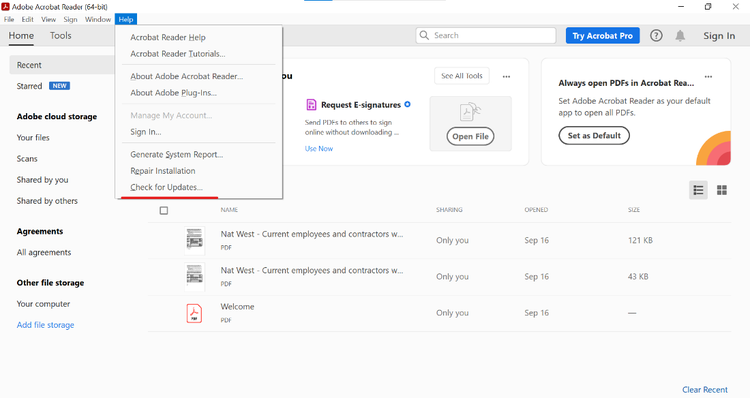
- Update Adobe Acrobat Reader. One of the reasons a PDF might not display properly is because your Adobe Acrobat Reader isn’t up to date. Launch the app and go to Help > Check for updates.
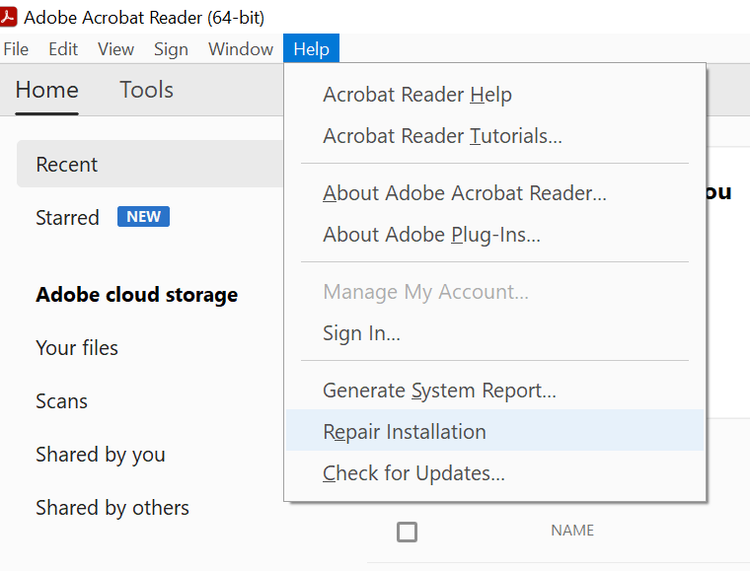
- Repair installation. If the PDF still doesn’t work after updating Acrobat Reader, go to Help > Repair installation.
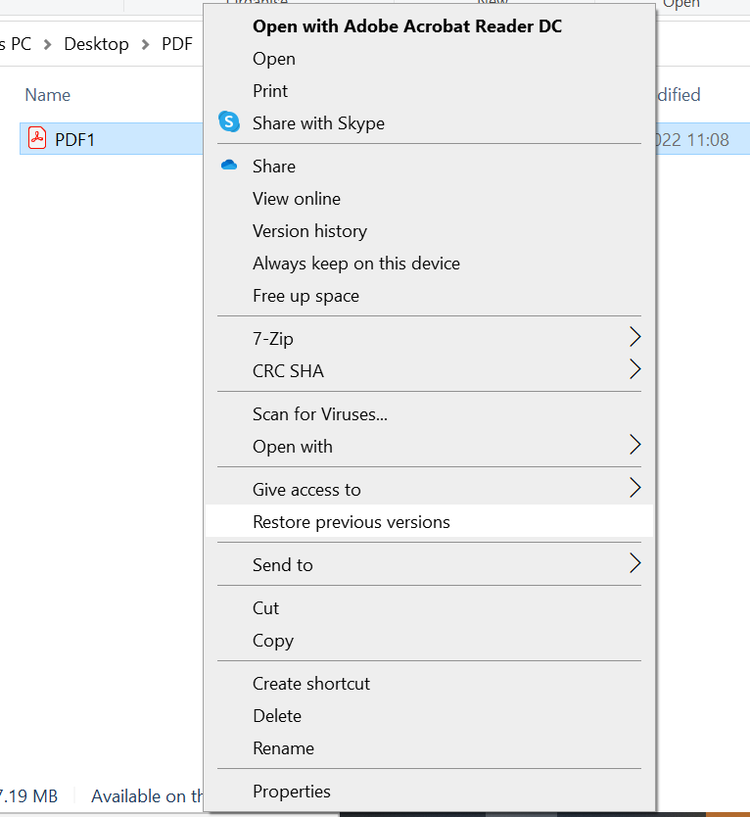
- Restore previous version. Another method to repairing a damaged PDF is restoring it to a previous version. Head to the location where the PDF is saved, right click the file and select Restore previous versions.
- Convert the PDF. if you are still having no luck with repairing a damaged PDF, you can extract the information from within, then save it into a Word document. From here you reformat the information and resave as a PDF.
In Detail: PDF Repair Step by Step.
You can repair a corrupted PDF using Adobe Acrobat Reader. Find out the full process here
1. The issue may simply be that your Adobe Acrobat Reader software is not up to date. Launch Adobe Acrobat reader and go to Help > Check for updates. If any updates are available, install them and then try re-opening your PDF on the app.
2. The files Adobe requires to run may have become corrupted. In which case, go to Help > Repair installation. If you still have no luck when opening your PDF after this has been resolved, you can still repair a corrupt PDF file online for free by uninstalling Reader, then installing the latest version.
3. If the file worked prior to becoming corrupted, you may be able to restore an older version of the document on Adobe. Find your PDF in your files, right click and select Restore previous versions. This will bring up a list of the previously saved versions that are backed up. You can select a file to open and restore, which will bring up a previous, uncorrupted version.
4. If you don’t have an older version to use, you may be able to convert the PDF to another file type or extract the information. You can easily convert a PDF to a Word document. This might not be the most effective way to repair a PDF, but it will ensure that any important information can be recovered.
Benefits of Repairing a Corrupted PDF?
There are many benefits when it comes to PDF repair.
- Recover information. Using a PDF repair tool ensures you can recover important documents and data.
- Sharing files. PDFs can be opened on a variety of apps on different operating systems, so PDF repair is vital if you have documents you need to share with others.
- Helps update software. The first step of PDF repair is checking for updates to your Adobe Acrobat Reader. Having the most up to date version of the app will help to make it easier for the service to open and read PDFs, without the need to use a PDF repair tool again.
We’re continually improving and adding features to Adobe Acrobat. And with an Adobe Acrobat subscription, you’ll always get the newest features the moment they’re released.
PDF Repair: FAQs.
Want to learn more? These are the most common questions Adobe users ask about PDF repair.
How do PDF files get corrupted?
Why can’t I open a PDF file in my email?
What tools can I use to repair a damaged PDF?
Can I repair a corrupted PDF for free?
How do I prevent PDF files from getting corrupted?
There are a few ways you can prevent PDF files from getting corrupted, including:
• Ensuring software is regularly updated to the latest version
• Checking that files download completely before closing or shutting down
• Avoid using any special characters in the file name
• Regularly checking files for and preventing viruses using virus protection software
What are the limitations of repairing a corrupted PDF?
What are alternative file formats to PDFs if repair isn't possible?
What should I do if the PDF repair process fails?
Can I recover only specific parts of a corrupted PDF (e.g., text or images)?
What are the common signs that a PDF file is corrupted?
Some common signs that a PDF might be corrupted include:
• Seeing an error message such as “Could not open file"
• Failure to open or load the PDF
• Text is missing
• Icons appearing where they shouldn’t
• Fonts are incorrect or missing
• Change in the file size, such as displaying a much smaller size or 0KB
Related Acrobat content.
Get more out of Adobe Acrobat with our tips and guides.