Exportation d’un tiers inférieur en tant que template
Partagez sous forme de template le tiers inférieur animé que vous avez créé dans Adobe After Effects afin que les monteurs puissent l’utiliser dans Adobe Premiere Pro.
Libre à vous d’utiliser notre fichier d’exemple (basé sur le tutoriel Animation d’un tiers inférieur) ou votre propre tiers inférieur multicalque.
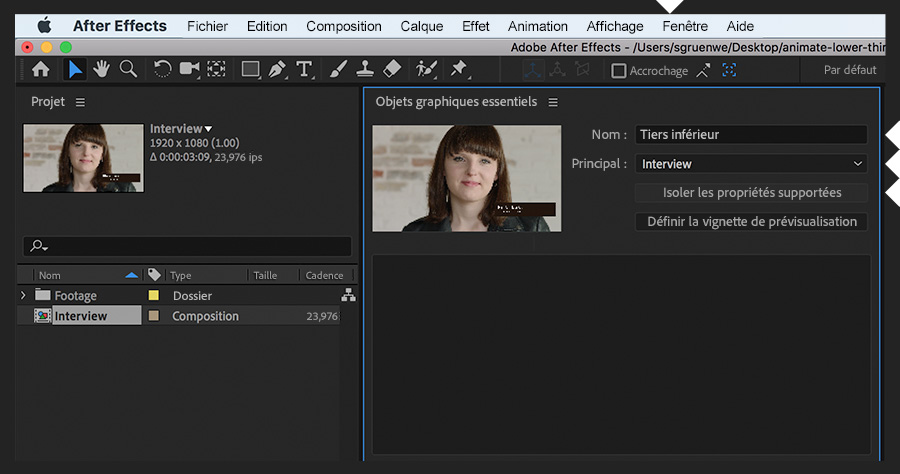
Ouvrez un tiers inférieur créé dans After Effects, puis le panneau Objets graphiques essentiels (Fenêtre > Objets graphiques essentiels). Dans ce panneau, indiquez la composition contenant les calques du design dans le champ Principal, puis sélectionnez Isoler les propriétés supportées.
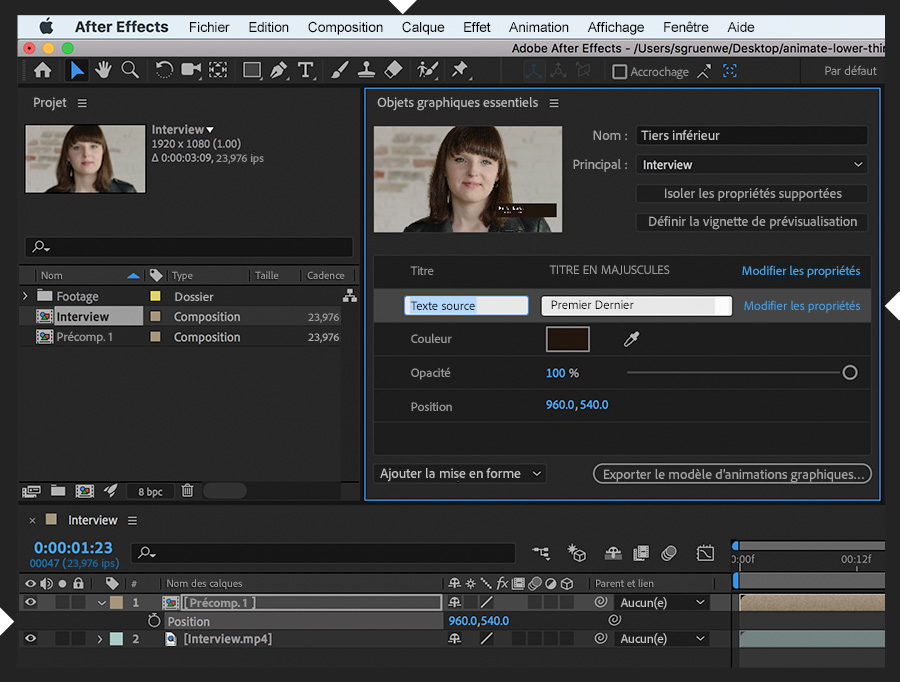
Faites glisser une propriété prise en charge que vous souhaitez inclure dans le template depuis la composition vers le panneau Objets graphiques essentiels. Par exemple, la propriété Texte source d’un calque de texte et les propriétés Couleur de fond et Opacité d’un calque de forme. Précomposez les calques (Calque > Précomposition) de manière à pouvoir inclure la propriété Position de tout le tiers inférieur. Cliquez dans l’une des propriétés que vous avez fait glisser pour la renommer. Puis, cliquez sur Modifier les propriétés pour activer d’autres options de mise en forme dans le template.
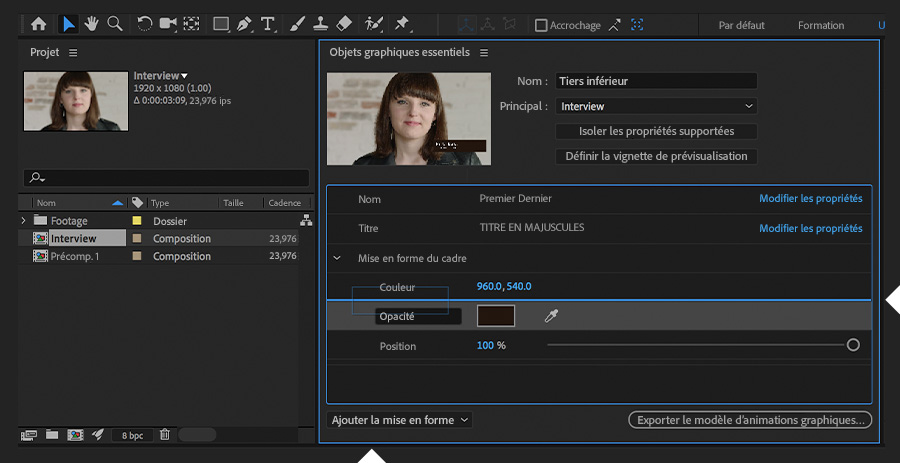
Faites glisser les propriétés vers le haut et le bas pour les repositionner dans le panneau Objets graphiques essentiels. Utilisez le menu déroulant Ajouter la mise en forme pour insérer un commentaire ou un conteneur, afin d’y regrouper plusieurs propriétés. Pour supprimer une propriété, sélectionnez-la et appuyez sur la touche Suppr.
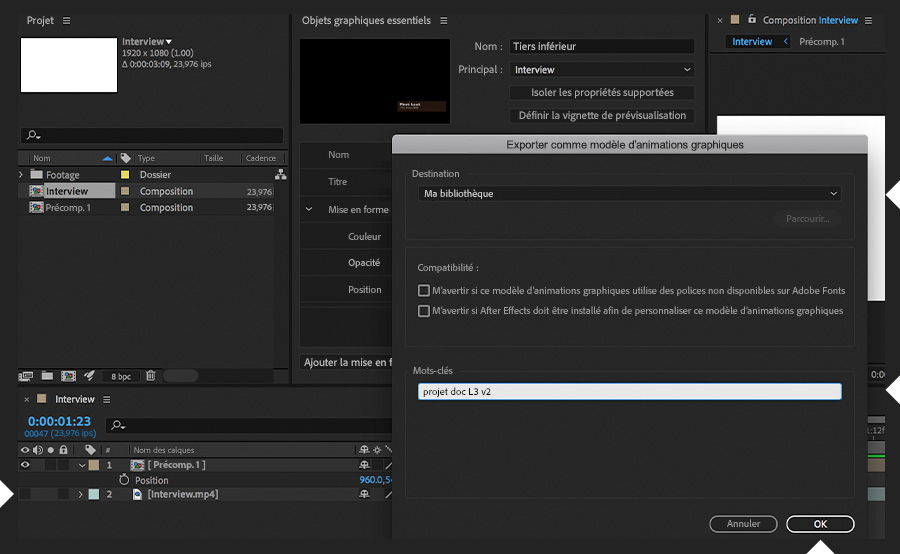
Cachez le calque vidéo pour qu’il ne soit pas assemblé avec le template. Cliquez sur le bouton Exporter le modèle d’animations graphiques dans le panneau Objets graphiques essentiels. Déterminez la destination (choisissez une bibliothèque Creative Cloud), ajoutez des mots-clés uniques et explicites si vous le souhaitez, et cliquez sur OK.
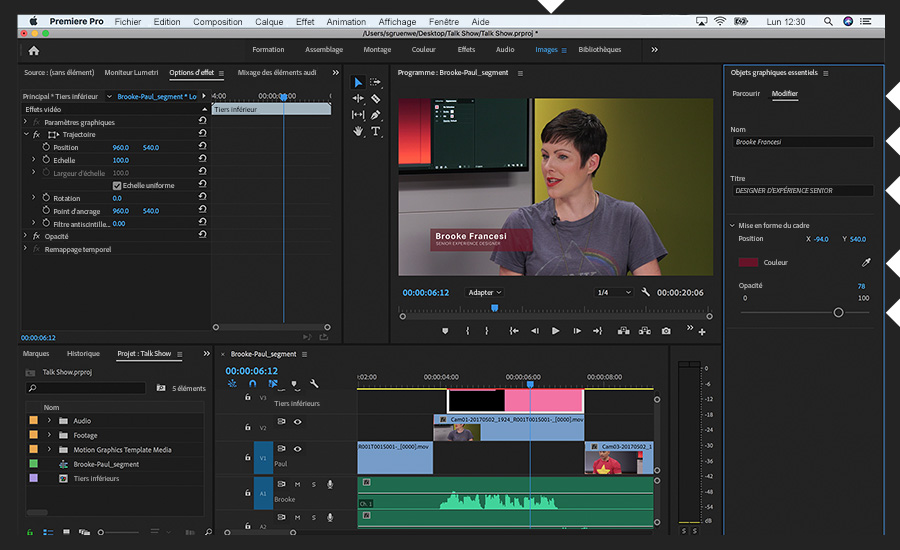
Testez votre template en lançant Premiere Pro et en basculant vers l’espace de travail Images. Cliquez sur l’onglet Parcourir du panneau Objets graphiques essentiels et recherchez le template (par nom ou mot-clé) dans la bibliothèque appropriée. Une fois que vous l’avez fait glisser sur une séquence et sélectionné, vous pouvez mettre à jour les entrées par défaut dans l’onglet Modifier et effectuer d’autres modifications permises par le template.
N’hésitez pas à modifier le design du tiers inférieur dans After Effects. Il suffira de le republier comme un template d’animation graphique pour écraser le template existant. De nouveau, faites-le glisser depuis le panneau Objets graphiques essentiels dans Premiere Pro pour voir vos modifications.
You can control how Adobe websites use cookies and similar technologies by making choices below. But note that if you disable cookies and similar technologies entirely, Adobe websites may not function properly.
Cookies are small text files stored by your web browser when you use websites. There are also other technologies that can be used for similar purposes like HTML5 Local Storage and local shared objects, web beacons, and embedded scripts. These technologies help us do things like remembering you and your preferences when you return to our sites, measure how you use the website, conduct market research, and gather information about the ads you see and interact with.
You can make choices in the menu below about what cookies and other technologies you want us to use on Adobe sites when you visit them from this browser. You can always change those choices later by clicking on the Cookie Preferences link at the bottom of the page.
If enabled:
We can improve your experience by tailoring the site and the content to things we think might be of interest
We can better keep track of your preferences — like what language you prefer to use
We will better understand your likely interests so we can provide you more relevant Adobe ads and content on non-Adobe websites and in non-Adobe apps
It will help us improve the performance of our website and those of our partners who use the Adobe Experience Cloud
If disabled:
We won’t be able to remember you from session to session so the experience may not be tailored to your interests
You’ll still have access to the content of the site but certain features that depend on cookies may not function
You’ll still see ads, they just may not be as relevant to you
General information
You can control how Adobe websites use cookies and similar technologies by making choices below. But note that if you disable cookies and similar technologies entirely, Adobe websites may not function properly.
Cookies are small text files stored by your web browser when you use websites. There are also other technologies that can be used for similar purposes like HTML5 Local Storage, web beacons, and embedded scripts. These technologies help us do things like remembering you and your preferences when you return to our sites, measure how you use the website, conduct market research, and gather information about the ads you see and interact with.
You can make choices in the menu below about what cookies and other technologies you want us to use on Adobe sites when you visit them from this browser. You can always change those choices later by clicking on the Cookie Preferences link at the bottom of the page.
If enabled:
We can improve your experience by tailoring the site and the content to things we think might be of interest
We can better keep track of your preferences — like what language you prefer to use
We will better understand your likely interests so we can provide you more relevant Adobe ads and content on non-Adobe websites and in non-Adobe apps
It will help us improve the performance of our website and those of our partners who use the Adobe Experience Cloud
If disabled:
We won’t be able to remember you from session to session so the experience may not be tailored to your interests
We’ll still count your use of our site and services
You’ll still have access to the content of the site but certain features that depend on cookies may not function
You’ll still see ads, they just may not be as relevant to you
Operate the site and core servicesOperate site and measure engagement
Always active
These cookies are required, and they are used to enable the site and related services core functionality. Without them the site could not operate, so they cannot be disabled.
These cookies enable the site and related services’ core functionality and collect statistics about user engagement, such as counting active use to help us understand trends. These cookies cannot be disabled.
Measure performance
These cookies are used to analyze site usage to measure and improve performance. Without them Adobe cannot know what content is most valued and how often unique visitors return to the site, making it hard to improve information we offer to you.
These cookies are used to analyze site usage to measure and improve performance. Without them Adobe cannot know what content is most valued, making it hard to improve information we offer to you.
Extend functionality
These cookies are used to enhance the functionality of Adobe sites such as remembering your settings and preferences to deliver a personalized experience; for example, your username, your repeated visits, preferred language, your country, or any other saved preference.
Personalize advertising
These cookies are used to enable Adobe and our partners to serve ads more relevant to your interests. Without them you will still see ads, but they might not be as relevant to you.
Personalize advertising
These cookies are used to enable Adobe and our partners to serve ads more relevant to your interests. Without them you will still see ads, but they might not be as relevant to you.