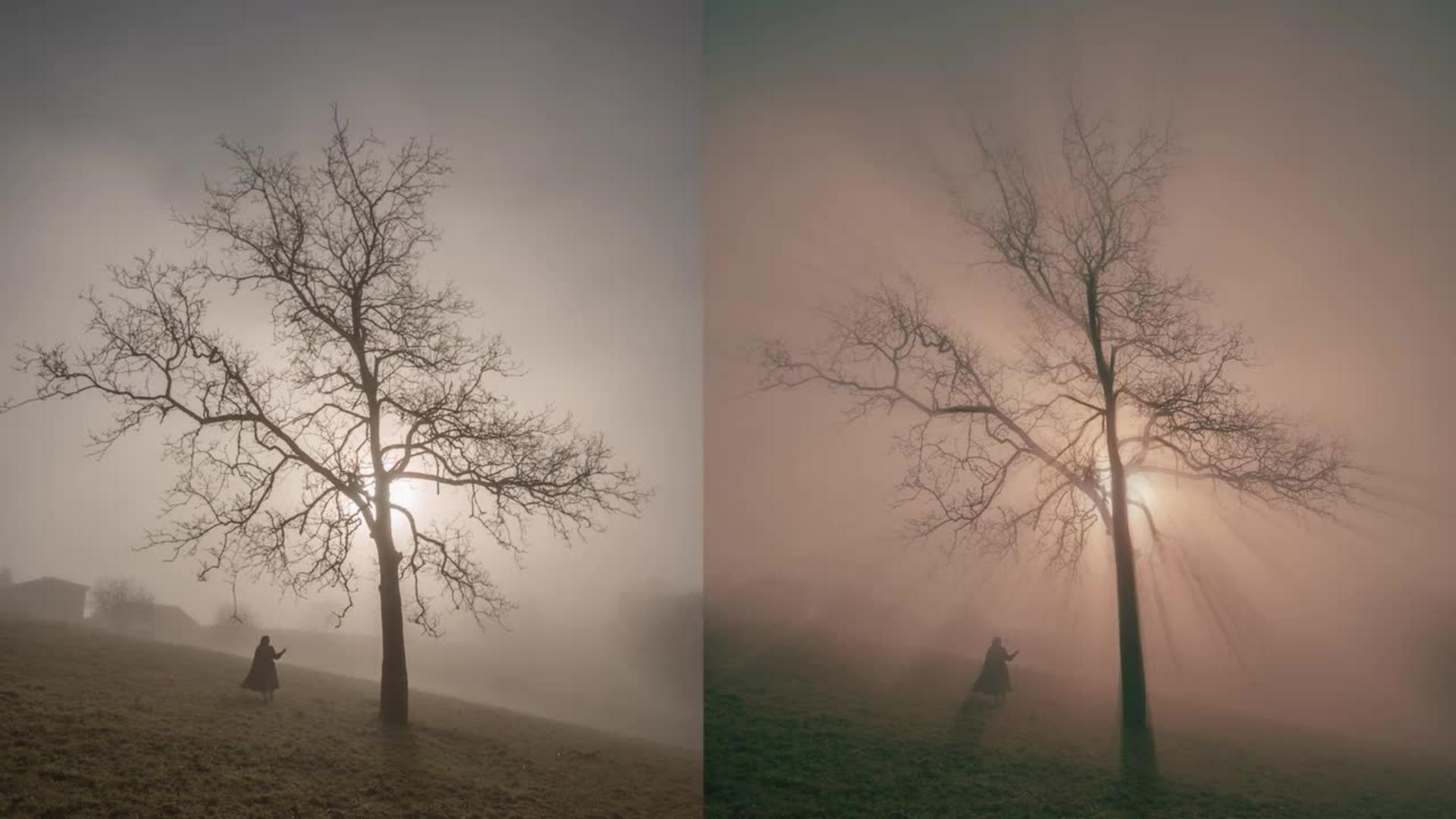
Créer des rayons lumineux à partir de zones claires
Apprenez à transformer et intégrer les zones lumineuses d’une image en rayons de lumière avec un effet flou radial.
Publié le
Bonjour à tous, je m'appelle Camille, je suis photographe et aujourd'hui vous allez apprendre à créer des rayons lumineux à partir des zones claires de votre image.
Vous commencerez par sélectionner les hautes lumières afin de les isoler puis vous utiliserez un flou radial en mode zoom pour transformer ces zones en rayons.
Vous renforcerez ensuite l'effet en dupliquant les calques.
Vous apprendrez à atténuer certaines zones à l'aide d'un masque et vous ajouterez une couleur afin de créer une ambiance plus naturelle.
Enfin vous appliquerez des réglages de luminosité et de correction colorimétrique pour harmoniser l'ensemble.
Avec cette technique vous pourrez facilement créer une ambiance magique dans vos photographies.
Créez une ambiance chaleureuse
Certaines images possèdent déjà de belles zones lumineuses, mais elles manquent parfois d’impact ou de profondeur. En isolant les tons clairs puis en leur appliquant un flou radial, il devient possible de créer des rayons lumineux réalistes qui renforcent la direction de la lumière et apportent une atmosphère plus cinématographique à la scène.
Cette technique vous permettra de donner plus de dynamisme à vos paysages, scènes de forêt ou compositions artistiques en accentuant les percées de lumière naturelles. Grâce aux masques de fusion et aux réglages colorimétriques, l’effet reste simple mais subtil et parfaitement intégré à l’image finale.
Ce que vous allez apprendre
Dans ce tutoriel pratique, vous découvrirez comment :
Sélectionner précisément les zones lumineuses d’une image avec la fonction Plage de couleurs,
Créer un calque par copier afin de travailler les effets de manière non destructive,
Appliquer un flou radial pour générer des rayons lumineux réalistes,
Renforcer l’effet grâce aux objets dynamiques et aux duplications de calques,
Utiliser un masque de fusion et un pinceau doux pour révéler certains éléments de l’image,
Ajouter une ambiance chaleureuse avec un calque de couleur unie et un masque d’écrêtage,
Finaliser l’image avec des ajustements de luminosité et une retouche colorimétrique.
À propos de l’artiste
Je m’appelle Camille, je suis créatrice de contenu lifestyle depuis plusieurs années. Je partage principalement sur Instagram, tout en développant également mon compte TikTok et ma chaîne YouTube. À travers mes contenus, je crée des images et des auto-portraits où la photographie occupe une place centrale. J’aime faire rêver ma communauté en imaginant des univers poétiques et romancés, avec une attention particulière portée à la lumière et aux ambiances.
J'aime partager de temps à autre les coulisses de mon travail ainsi que mes techniques, avec l’envie de rendre la création accessible et d’encourager chacun à explorer sa sensibilité artistique.
You can control how Adobe websites use cookies and similar technologies by making choices below. But note that if you disable cookies and similar technologies entirely, Adobe websites may not function properly.
Cookies are small text files stored by your web browser when you use websites. There are also other technologies that can be used for similar purposes like HTML5 Local Storage and local shared objects, web beacons, and embedded scripts. These technologies help us do things like remembering you and your preferences when you return to our sites, measure how you use the website, conduct market research, and gather information about the ads you see and interact with.
You can make choices in the menu below about what cookies and other technologies you want us to use on Adobe sites when you visit them from this browser. You can always change those choices later by clicking on the Cookie Preferences link at the bottom of the page.
If enabled:
We can improve your experience by tailoring the site and the content to things we think might be of interest
We can better keep track of your preferences — like what language you prefer to use
We will better understand your likely interests so we can provide you more relevant Adobe ads and content on non-Adobe websites and in non-Adobe apps
It will help us improve the performance of our website and those of our partners who use the Adobe Experience Cloud
If disabled:
We won’t be able to remember you from session to session so the experience may not be tailored to your interests
You’ll still have access to the content of the site but certain features that depend on cookies may not function
You’ll still see ads, they just may not be as relevant to you
General information
You can control how Adobe websites use cookies and similar technologies by making choices below. But note that if you disable cookies and similar technologies entirely, Adobe websites may not function properly.
Cookies are small text files stored by your web browser when you use websites. There are also other technologies that can be used for similar purposes like HTML5 Local Storage, web beacons, and embedded scripts. These technologies help us do things like remembering you and your preferences when you return to our sites, measure how you use the website, conduct market research, and gather information about the ads you see and interact with.
You can make choices in the menu below about what cookies and other technologies you want us to use on Adobe sites when you visit them from this browser. You can always change those choices later by clicking on the Cookie Preferences link at the bottom of the page.
If enabled:
We can improve your experience by tailoring the site and the content to things we think might be of interest
We can better keep track of your preferences — like what language you prefer to use
We will better understand your likely interests so we can provide you more relevant Adobe ads and content on non-Adobe websites and in non-Adobe apps
It will help us improve the performance of our website and those of our partners who use the Adobe Experience Cloud
If disabled:
We won’t be able to remember you from session to session so the experience may not be tailored to your interests
We’ll still count your use of our site and services
You’ll still have access to the content of the site but certain features that depend on cookies may not function
You’ll still see ads, they just may not be as relevant to you
Operate the site and core servicesOperate site and measure engagement
Always active
These cookies are required, and they are used to enable the site and related services core functionality. Without them the site could not operate, so they cannot be disabled.
These cookies enable the site and related services’ core functionality and collect statistics about user engagement, such as counting active use to help us understand trends. These cookies cannot be disabled.
Measure performance
These cookies are used to analyze site usage to measure and improve performance. Without them Adobe cannot know what content is most valued and how often unique visitors return to the site, making it hard to improve information we offer to you.
These cookies are used to analyze site usage to measure and improve performance. Without them Adobe cannot know what content is most valued, making it hard to improve information we offer to you.
Extend functionality
These cookies are used to enhance the functionality of Adobe sites such as remembering your settings and preferences to deliver a personalized experience; for example, your username, your repeated visits, preferred language, your country, or any other saved preference.
Personalize advertising
These cookies are used to enable Adobe and our partners to serve ads more relevant to your interests. Without them you will still see ads, but they might not be as relevant to you.
Personalize advertising
These cookies are used to enable Adobe and our partners to serve ads more relevant to your interests. Without them you will still see ads, but they might not be as relevant to you.