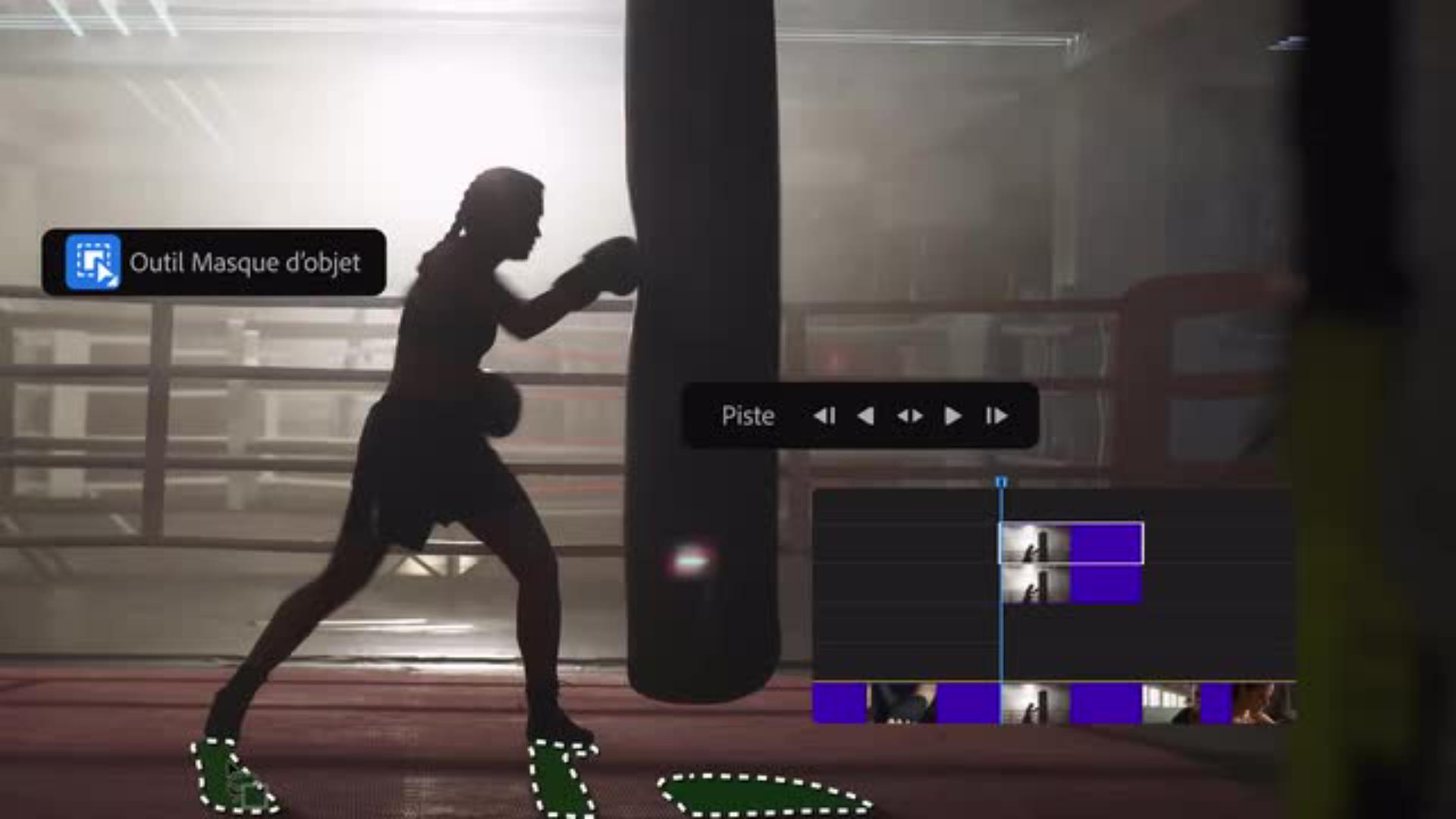
Découvrez comment Lexi Gunvaldson élève la création de génériques au rang d’art.
Lexi Gunvaldson d’Imaginary Forces explique comment elle utilise l’outil Masque d’objet optimisé par l’IA dans Premiere pour éliminer l’étape de rotoscopie et créer une vidéo de présentation très dynamique.
Je suis responsable éditoriale chez Imaginary Forces.
La société est surtout connue pour ses génériques de films et de séries TV.
Un bon générique de début prépare l'audience à ce qu’elle s’apprête à regarder.
La première fois que j'ai utilisé l'outil Masque d'objet et sélectionné un sujet dans Premiere, j'ai vraiment été impressionnée.
Je n'en croyais pas mes yeux.
La première étape consiste à choisir les objets qui doivent apparaître devant le texte.
Il suffit de dupliquer la séquence et de sélectionner la boxeuse à l'aide de l'outil Masque d'objet.
J’effectue ensuite un suivi vers l’avant et j'isole les ombres afin de créer un effet original par-dessus le texte.
Je duplique à nouveau la séquence et dispose donc de trois calques.
Je répète l'opération de suivi vers l'avant et le tour est joué !
J'importe ensuite dans Premiere le fichier texte au format PSD créé dans Photoshop par la direction artistique pour l'insérer entre les calques que je viens de générer en arrière-plan.
Je peux ainsi tester plein d'idées très rapidement afin d'être sûre de proposer la meilleure option et d'avoir tout tenté dans le délai imparti.
Et voilà !
« La rotoscopie est une tâche vraiment fastidieuse. Avec Premiere, je gagne un temps fou. Je n’en reviens pas. »
Étape 1 : Masquer le sujet
Grâce à l’outil Masque d’objet optimisé par l’IA, Lexi peut isoler les éléments à associer au texte. Elle a commencé par sélectionner la boxeuse avant d’effectuer un suivi vers l’avant pour tester différents mouvements.
Transcription non disponible
Étape 2 : Isoler les détails
Lexi a ajouté d’autres d’objets au masque, dont les ombres et le sac de boxe. Une fois le masquage effectué, elle a pu ajouter le texte.
Transcription non disponible
Étape 3 : Superposer le texte
Lexi a demandé à la personne en charge de la direction artistique de créer les textes du générique dans Photoshop, puis elle les a importés dans Premiere. Elle les a insérés entre les calques pour produire un rendu tridimensionnel.
Transcription non disponible
Étape 4 : Finaliser le tout
Une fois le texte placé, Lexi a réglé l’opacité pour que le rendu soit parfait. « L’outil Masque d’objet me donne la possibilité de tester énormément d’idées en un temps record afin de n’en écarter aucune. »
You can control how Adobe websites use cookies and similar technologies by making choices below. But note that if you disable cookies and similar technologies entirely, Adobe websites may not function properly.
Cookies are small text files stored by your web browser when you use websites. There are also other technologies that can be used for similar purposes like HTML5 Local Storage and local shared objects, web beacons, and embedded scripts. These technologies help us do things like remembering you and your preferences when you return to our sites, measure how you use the website, conduct market research, and gather information about the ads you see and interact with.
You can make choices in the menu below about what cookies and other technologies you want us to use on Adobe sites when you visit them from this browser. You can always change those choices later by clicking on the Cookie Preferences link at the bottom of the page.
If enabled:
We can improve your experience by tailoring the site and the content to things we think might be of interest
We can better keep track of your preferences — like what language you prefer to use
We will better understand your likely interests so we can provide you more relevant Adobe ads and content on non-Adobe websites and in non-Adobe apps
It will help us improve the performance of our website and those of our partners who use the Adobe Experience Cloud
If disabled:
We won’t be able to remember you from session to session so the experience may not be tailored to your interests
You’ll still have access to the content of the site but certain features that depend on cookies may not function
You’ll still see ads, they just may not be as relevant to you
General information
You can control how Adobe websites use cookies and similar technologies by making choices below. But note that if you disable cookies and similar technologies entirely, Adobe websites may not function properly.
Cookies are small text files stored by your web browser when you use websites. There are also other technologies that can be used for similar purposes like HTML5 Local Storage, web beacons, and embedded scripts. These technologies help us do things like remembering you and your preferences when you return to our sites, measure how you use the website, conduct market research, and gather information about the ads you see and interact with.
You can make choices in the menu below about what cookies and other technologies you want us to use on Adobe sites when you visit them from this browser. You can always change those choices later by clicking on the Cookie Preferences link at the bottom of the page.
If enabled:
We can improve your experience by tailoring the site and the content to things we think might be of interest
We can better keep track of your preferences — like what language you prefer to use
We will better understand your likely interests so we can provide you more relevant Adobe ads and content on non-Adobe websites and in non-Adobe apps
It will help us improve the performance of our website and those of our partners who use the Adobe Experience Cloud
If disabled:
We won’t be able to remember you from session to session so the experience may not be tailored to your interests
We’ll still count your use of our site and services
You’ll still have access to the content of the site but certain features that depend on cookies may not function
You’ll still see ads, they just may not be as relevant to you
Operate the site and core servicesOperate site and measure engagement
Always active
These cookies are required, and they are used to enable the site and related services core functionality. Without them the site could not operate, so they cannot be disabled.
These cookies enable the site and related services’ core functionality and collect statistics about user engagement, such as counting active use to help us understand trends. These cookies cannot be disabled.
Measure performance
These cookies are used to analyze site usage to measure and improve performance. Without them Adobe cannot know what content is most valued and how often unique visitors return to the site, making it hard to improve information we offer to you.
These cookies are used to analyze site usage to measure and improve performance. Without them Adobe cannot know what content is most valued, making it hard to improve information we offer to you.
Extend functionality
These cookies are used to enhance the functionality of Adobe sites such as remembering your settings and preferences to deliver a personalized experience; for example, your username, your repeated visits, preferred language, your country, or any other saved preference.
Personalize advertising
These cookies are used to enable Adobe and our partners to serve ads more relevant to your interests. Without them you will still see ads, but they might not be as relevant to you.
Personalize advertising
These cookies are used to enable Adobe and our partners to serve ads more relevant to your interests. Without them you will still see ads, but they might not be as relevant to you.