Dit voorbeeldbestand bevat Adobe Stock-assets die u kunt gebruiken om te oefenen wat u in deze zelfstudie leert. Als u het voorbeeldbestand buiten deze zelfstudie wilt gebruiken, kunt u een licentie kopen opAdobe Stock . Raadpleeg het LeesMij-bestand in de map voor de voorwaarden die van toepassing zijn op uw gebruik van dit voorbeeldbestand.
Selecteer het gereedschap Kromming op de werkbalk. Voordat u het gaat gebruiken, stelt u de vulkleur in op Geen en selecteert u een lijnkleur in het deelvenster Eigenschappen.
Oefening 1
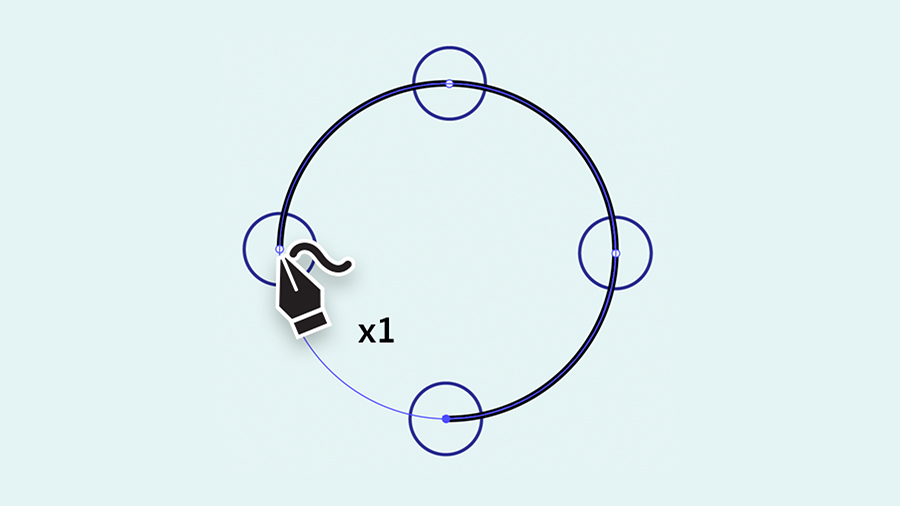
Klik eenmaal in het midden van elke ronde hulplijn. U kunt met slechts vier klikken een perfecte cirkel maken.
Oefening 2
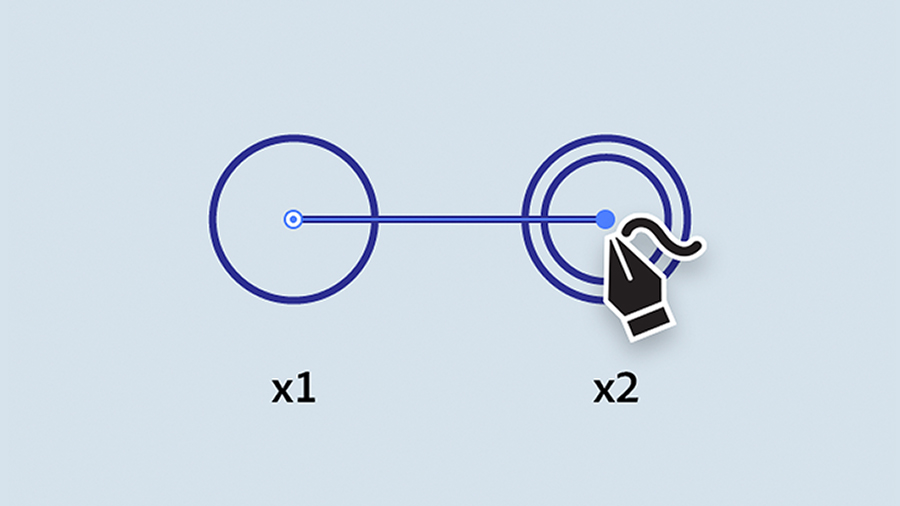
Klik eenmaal om uw eerste punt te maken. Dubbelklik daarna op het midden van elk van de andere ronde hulplijnen. Telkens wanneer u dubbelklikt, maakt u een hoekpunt met een rechte lijn ertussen. Dubbelklik op het eerste punt dat u hebt geplaatst om de vorm te voltooien.
Oefening 3
Voltooi de vorm van de gitaar door enkele malen te klikken om het hele pad te tekenen.
Oefening 4
In oefening 4 is het pad al gemaakt. Selecteer eerst het pad met het selectiegereedschap. Schakel vervolgens over naar het gereedschap Kromming en dubbelklik op het middelpunt onderaan om de hoek te veranderen in een vloeiende curve. Om te oefenen, klikt u op het rechte lijnsegment direct erboven en sleept u naar buiten om een vloeiende curve te maken. Verwijder het punt door erop te klikken om het te selecteren en daarna op Delete te drukken.
Oefening 5
In oefening 5 is het pad al gemaakt. Gebruik het selectiegereedschap om het pad te selecteren en schakel vervolgens over naar het gereedschap Kromming. Versleep de middelste punten om de curve ervan aan te passen zoals weergegeven.
U krijgt het al onder de knie. Blijf oefenen! Trek de illustratie op het onderstaande tekengebied over en probeer de vul- en lijnkleuren van de tekening te wijzigen. Gebruik deze technieken vervolgens om elegante curven en lijnen in uw eigen ontwerpen te tekenen.

You can control how Adobe websites use cookies and similar technologies by making choices below. But note that if you disable cookies and similar technologies entirely, Adobe websites may not function properly.
Cookies are small text files stored by your web browser when you use websites. There are also other technologies that can be used for similar purposes like HTML5 Local Storage and local shared objects, web beacons, and embedded scripts. These technologies help us do things like remembering you and your preferences when you return to our sites, measure how you use the website, conduct market research, and gather information about the ads you see and interact with.
You can make choices in the menu below about what cookies and other technologies you want us to use on Adobe sites when you visit them from this browser. You can always change those choices later by clicking on the Cookie Preferences link at the bottom of the page.
If enabled:
We can improve your experience by tailoring the site and the content to things we think might be of interest
We can better keep track of your preferences — like what language you prefer to use
We will better understand your likely interests so we can provide you more relevant Adobe ads and content on non-Adobe websites and in non-Adobe apps
It will help us improve the performance of our website and those of our partners who use the Adobe Experience Cloud
If disabled:
We won’t be able to remember you from session to session so the experience may not be tailored to your interests
You’ll still have access to the content of the site but certain features that depend on cookies may not function
You’ll still see ads, they just may not be as relevant to you
General information
You can control how Adobe websites use cookies and similar technologies by making choices below. But note that if you disable cookies and similar technologies entirely, Adobe websites may not function properly.
Cookies are small text files stored by your web browser when you use websites. There are also other technologies that can be used for similar purposes like HTML5 Local Storage, web beacons, and embedded scripts. These technologies help us do things like remembering you and your preferences when you return to our sites, measure how you use the website, conduct market research, and gather information about the ads you see and interact with.
You can make choices in the menu below about what cookies and other technologies you want us to use on Adobe sites when you visit them from this browser. You can always change those choices later by clicking on the Cookie Preferences link at the bottom of the page.
If enabled:
We can improve your experience by tailoring the site and the content to things we think might be of interest
We can better keep track of your preferences — like what language you prefer to use
We will better understand your likely interests so we can provide you more relevant Adobe ads and content on non-Adobe websites and in non-Adobe apps
It will help us improve the performance of our website and those of our partners who use the Adobe Experience Cloud
If disabled:
We won’t be able to remember you from session to session so the experience may not be tailored to your interests
We’ll still count your use of our site and services
You’ll still have access to the content of the site but certain features that depend on cookies may not function
You’ll still see ads, they just may not be as relevant to you
Operate the site and core servicesOperate site and measure engagement
Always active
These cookies are required, and they are used to enable the site and related services core functionality. Without them the site could not operate, so they cannot be disabled.
These cookies enable the site and related services’ core functionality and collect statistics about user engagement, such as counting active use to help us understand trends. These cookies cannot be disabled.
Measure performance
These cookies are used to analyze site usage to measure and improve performance. Without them Adobe cannot know what content is most valued and how often unique visitors return to the site, making it hard to improve information we offer to you.
These cookies are used to analyze site usage to measure and improve performance. Without them Adobe cannot know what content is most valued, making it hard to improve information we offer to you.
Extend functionality
These cookies are used to enhance the functionality of Adobe sites such as remembering your settings and preferences to deliver a personalized experience; for example, your username, your repeated visits, preferred language, your country, or any other saved preference.
Personalize advertising
These cookies are used to enable Adobe and our partners to serve ads more relevant to your interests. Without them you will still see ads, but they might not be as relevant to you.
Personalize advertising
These cookies are used to enable Adobe and our partners to serve ads more relevant to your interests. Without them you will still see ads, but they might not be as relevant to you.