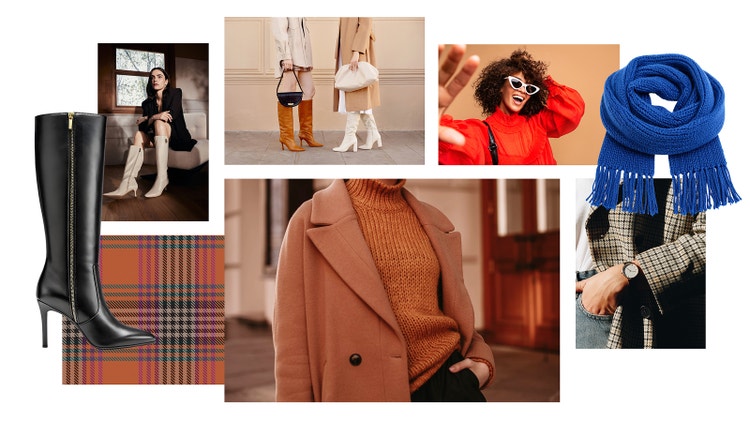
Visualise your style inspiration with a fashion mood board.
A fashion mood board can help you plan looks, layout your inspiration, and define your aesthetic. Discover how stylists and designers shape collections, campaigns, and personal style with fashion mood board templates and examples.
Generate mood board | Generate mood board - Visualise style concepts with a fashion mood board.
What is a fashion mood board?
A fashion mood board is a visual planning tool used to conceptualise a fashion project. It comprises images, textures, colours and ideas that define the project’s tone, style, and direction. Designers, stylists, and creative teams use fashion boards — or fashion lookbooks in the later stages — to gather and organise references. These can range from fabric swatches and runway looks to colour palettes and editorial images.
Fashion boards can help inspire creative direction – whether you’re pitching a concept, building a new collection, or refining your personal style. With a mood board maker, you can gather visual elements that encapsulate a certain design theme, story, or seasonal trend and turn early inspiration into a cohesive concept.
How do designers use fashion mood boards?
A fashion mood board is a powerful tool to translate ideas into clear, tangible direction — perfect for both industry professionals and everyday style lovers.
Here are some common ways designers, stylists and creative directors use mood boards for fashion:
- Researching seasonal trends. Gather inspiration from street style in your favourite cities, runway shows, and cultural shifts to identify emerging colours, fabrics, and silhouettes for the upcoming season.
- Outlining your brand identity. You can use a fashion mood board to explore styling cues, develop your logo, and find inspiration from mood-setting images that reinforce and reflect your brand’s aesthetic.
- Visual merchandising. Plan shop window displays or digital retail experiences by testing out how the different items, fabrics, and colours work together. You could even create a mock-up of the shop window in your mood board.
- Developing a collection. Collate your ideas for a new fashion collection, from initial sketches and reference imagery to fabric samples and colour palettes.
- Campaign styling. Get your creative teams onboard with your campaign vision. Use a mood board to set the tone of your photoshoots, ad campaigns, or fashion lookbooks for a cohesive feel across your different channels.
- Working out your personal style. Curate your own outfit inspiration, or use a fashion mood board to build a capsule wardrobe for the next season. This can be a great way to work out your taste and develop your personal style.
Why create a digital fashion mood board?
While physical mood boards can be helpful, creating a fashion board online can give you even more creative freedom.
Whether you’re refreshing your personal style or designing for your brand, a digital fashion mood board is easy to manage, update and refine in just a few clicks.
Here are some of the other benefits of digital fashion boards:
- Easily experiment with different layouts and styles. Just drag and drop your images, icons, swatches, colour wheels and more to quickly rearrange your mood board.
- Access an endless supply of visual inspiration. Make the most of your digital access and source inspiration from stock images, digital sketches, fashion archives, and your own photos
- No physical materials required. A digital mood board can help you save time and cut down on waste, as there’s no need for printing, cutting, and sourcing physical materials.
- Collaborate in real time. Share your fashion mood board with colleagues, clients, or friends and get them to feedback on your visuals, or even add their own.
- Edit and update your board anytime. Got a new idea for a trend or want to make a seasonal update? You can easily change creative direction in minutes. Update your visuals, change colours, or remix the layout without having to start over.
Digital fashion mood boards streamline your creative workflow, so you can spend more time designing and less time re-printing.
4 fashion mood board examples.
Just like the fashion industry, mood boards are incredibly versatile. From trend forecasting to final campaigns, each type of fashion mood board supports part of the creative process. Here are some fun fashion mood board ideas and examples for you to try.
1. Fashion trend mood board.
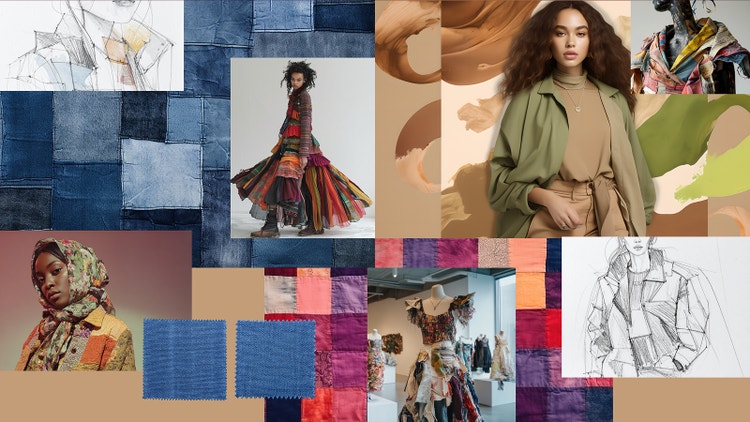
Stay ahead of the curve with a fashion trend mood board. Document your direction for the upcoming season, ready to share with your internal teams to get them onboard.
This type of mood board is often used by trend forecasters, design directors, or merchandising teams before the design phase to help guide any creative decisions for new collections, campaigns and retail updates.
Fashion trend mood boards often include:
- Forecasted colour palettes for the new season, inspired by cultural moments, natural landscapes, or street style that’s gaining popularity.
- Textures and materials, such as fabric swatches, architectural patterns, surface treatments, or other textile references.
- Silhouette inspiration to inform the designers of what is currently trending vs what garment shapes could be trending in the future.
- Cultural references, including music, travel destinations, inspiring art or videos and even social movements.
- Runway and editorial imagery , especially from the latest fashion weeks or key industry influencers. So, you can see what’s been done so far and what direction the industry is heading in – it’s up to you if you go with the trends or push against them.
2. Fashion styling mood board.
A fashion styling mood board is more commonly used by professional stylists, producers, and costume designers to plan and communicate wardrobe direction for photoshoots, editorials, film, or runway shows. But they can also be a handy tool for fashion-minded people looking to experiment with their own style.
A fashion styling mood board will usually include:
- Outfit breakdowns for different models or cast members.
- Any accessories and details that will complete the look.
- Hair and makeup references to help ensure the fashion and beauty is aligned.
- Fabric and texture pairings to experiment with different materials and see how they might look on the runway.
- Photo inspiration and settings to help guide the production element of the campaign, runway or editorial.
3. Fashion branding mood board.
Looking to shape your fashion brand identity? Whether it’s for a rebranded collection or you’re in the early stages of starting your own clothing label, a fashion mood board can help.
It captures the essence of the brand, including what your brand stands for, your key values, aesthetic and the impact you want to have.
This type of fashion board is usually helpful for founders, creative directors, or brand strategists.
Common elements include:
- Logo inspiration, such as reference logos from other retail and non-retail brands that you like or admire.
- Typeface options that suit the brand’s tone, whether it’s edgy, retro, or elegant.
- Colour palettes that reflect the brand’s aesthetic and vibes.
- Material references, such as patterns, texture swatches, packaging inspiration, or garment finishes.
- Lifestyle imagery that aligns to the audience and where they might wear the clothing or accessories.
- Quotes, headlines, or taglines that reflect your brand identity and tone of voice.
4. Fashion lookbook or campaign mood board.
A fashion lookbook or campaign mood board is another popular example. This helps guide the visual direction of a photoshoot, ad campaign, or editorial spread.
It’s mostly used by art directors, photographers, or brand teams to set the tone for a shoot. It ensures that everyone from the stylist to the lighting technician understands the tone, mood, and campaign story.
A lookbook or fashion campaign mood board covers:
- Lighting direction – do we want natural light or dramatic lighting effects?
- Posing – should the model use lots of movement or stick to a static pose?
- Composition – are we after a close-up shot or a wide-angle photo?
- Set design – do we need props, backdrops and furniture or a more minimalist staging?
- Location inspiration – does the fashion theme suit an outdoor landscape or a simple studio setting?
- Mood – should we have serious expressions or more wistful looks? How can production help reflect the mood and atmosphere?
Plan your personal style with a fashion mood board.
Fashion mood boards aren’t just for professional designers. They can also be a creative outlet for anyone looking to take control of their personal style.
It can help you refresh your wardrobe for a new season, explore a new trend or completely rebrand your personal aesthetic. Plus, it’s fun to create too. Here are some simple ways to use a fashion mood board for your personal style:
- Make a mood board for every season to see how you could transition some of your clothes and accessories throughout the year.
- Take inspiration from your favourite street style and work out where there might be gaps in your current wardrobe.
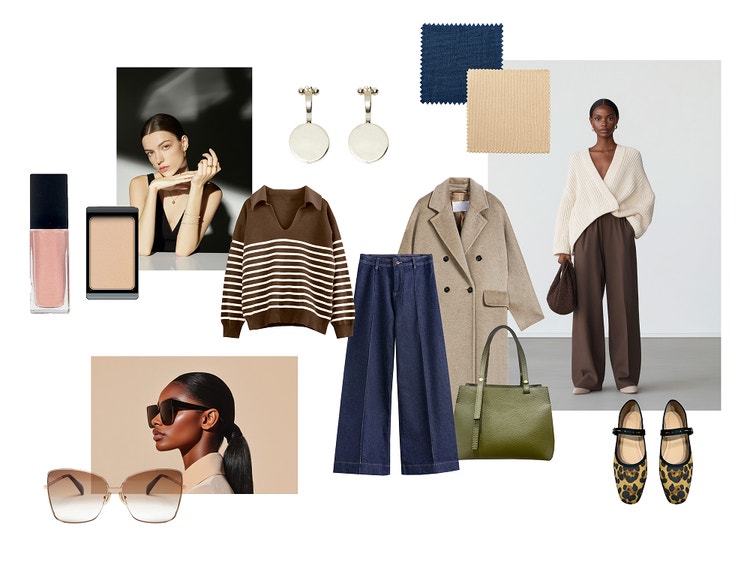
- Build your own capsule wardrobe for work or everyday and see how many outfits you can create.
- Experiment with new colour palettes to see what might work for your hair and skin tone.
- Create and collaborate on a group fashion board for an upcoming holiday or event.
Brainstorm with these fashion mood board examples.
Starting a fashion mood board can feel overwhelming, especially when you’re starting with a blank canvas. Using visual examples can spark inspiration and a framework to build on. Whether you’re designing for a brand, a client or yourself, these fashion mood board examples can help kick-start your creative process.
Styling mood board for an editorial shoot.
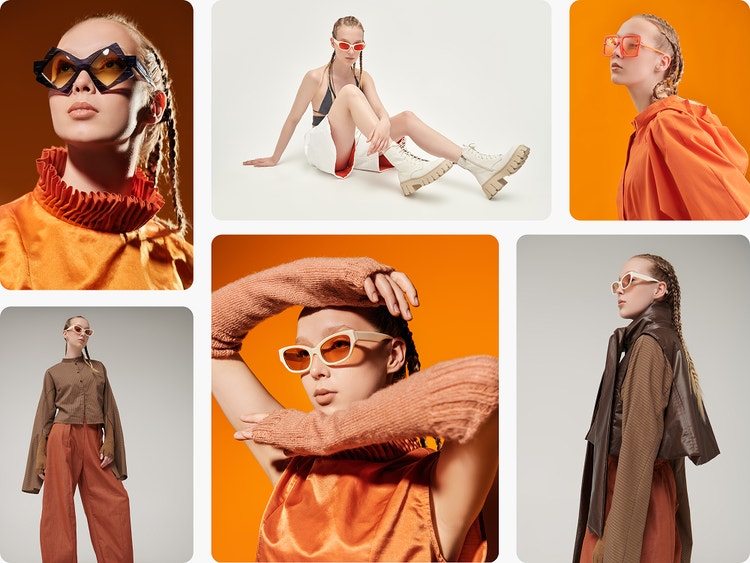
Styling mood boards combine lighting references, layered outfit ideas, accessories and makeup looks to shape an editorial aesthetic, such as prepping a concept for a winter issue feature.
Trend mood board for seasonal collections.
A fashion trend mood board focuses on emerging materials and silhouettes, often blending runway snapshots, fabric swatches and colour palettes to create a cohesive visual representation. It’s used by a design director to align the internal team around upcoming seasonal directions, like spring/summer.
Personal wardrobe planning mood board.
A personal wardrobe mood board might feature capsule pieces, mood references like cosy interiors and nature scenes and layered outfits for a minimalist fall wardrobe.
Design with these fashion mood board tips in mind.
Whether you’re designing a fashion board for professional or personal purposes, visual impact and clear direction should go hand-in-hand. Here are some tips to help ensure your fashion mood boards are both functional and aesthetic:
Set a theme or tone that defines your vision.
Whether it’s a “vintage elegance” or “90s fashion” mood board, choose visuals that support your concept to maintain a consistent creative vision.
Use high-quality images or sketches.
Whether you’re using your own photos, sketchs or Stock imagery, you should make sure each image is high-quality. You can even use the sketch-to-image AI tool in Firefly to turn your rough mock-ups into crisp, high-resolution images.
Sort your design elements.
Categorise your mood board by colour, texture or mood so you can see the key themes at a glance.
Avoid an overcrowded mood board.
Instead, leave some white space around the different elements or a clear border to that other viewers can easily process the visuals without getting overwhelmed.
Edit and refine.
No one’s expecting your fashion mood board to come out perfect first try. The best thing about a digital mood board is that you can easily edit and rearrange your design.
Create photoshoot or fashion lookbook inspiration on the go.
Whether you’re scouting locations, capturing outfit ideas or gathering visual references, with the mood board maker in Firefly Boards, you can build a digital fashion design mood board wherever you go. Create and organise mood boards from anywhere.
Ready to create your own fashion mood board?
It’s easy to get started with the Firefly mood board maker. Experiment with multiple layouts and templates, find your fashion aesthetic and align your creative ideas.
How to create a fashion mood board.
Mapping out a new clothing collection, defining your personal style, or presenting concepts to collaborators is easier with a fashion mood board.
Here’s how to get started with Firefly Boards:
- Define a fashion mood board theme.
Set the purpose and direction for your fashion board. Are you planning a seasonal collection, exploring colour theory, or building a new concept? Establishing a theme will help you build out your ideas and keep your fashion board cohesive and tangible. - Collect reference images for your fashion board.
Once you have a theme, you can start collecting reference images like fabric swatches, silhouettes, colour palettes, and cultural or aesthetic cues that reflect your fashion mood board’s intent. You can use personal photos or find high-quality images online from Adobe Stock. Struggling for inspiration? Try generating bespoke imagery with text-to-image AI in Firefly to build out your theme. - Choose a fashion mood board template.
Select a template or layout that aligns with your workflow and aesthetic. This might be something structured and minimalist, or you might want to recreate a scrapbook effect with a collage-style mood board. - Build your fashion mood board design.
Open Firefly Boards and add your reference images or generate new ones using Text to Image or other generative AI tools in Firefly. Play around with the layout, add different colour palettes, swatches and patterns, and experiment with other digital design elements until your fashion mood board aligns with your creative vision. - Edit and share your fashion mood board.
Take time to review and refine your mood board. You might want to move items to make a series of outfits or collect similar colour ways into one area of the fashion board. You can also add quotes and commentary for others that might be using the mood board as a reference. Once you’re happy, you can download and share the mood board with other team members, collaborators or clients for feedback.
Discover even more features.
AI image generator AI art generator Scene to image Image style transfer AI portrait generator Interior mood boards Vision board generator
Fashion mood board FAQs.
What is a lookbook in fashion?
Where can I create a fashion mood board?
What are the different types of fashion-themed mood boards?
There are several types of fashion mood boards you can create. For example:
- Fashion trend mood boards
- Fashion styling mood boards
- Fashion brand mood boards
- Campaign mood boards
- Capsule wardrobe mood boards
- Seasonal fashion mood boards.
Each one serves a unique role in the creative process, depending on your goals and audience.
Can I use AI to generate a fashion mood board?
Is my digital fashion mood board safe for commercial use?
Articles about art and mood board design.
What is Generative AI & How it Works
Generative AI is all over the headlines and that’s not empty hype. This new technology is likely to be part of your life soon — if it’s not already.
Learn more | Learn more - What is generative AI & how it works
What is AI art & how does it work?
Generative AI is quickly becoming a vital tool for artists. Read on to learn about what generative AI art is, how to create it and how you can use it in your practice.
Revolutionising Creation: AI Art Use Cases
Discover the many applications of AI art and how it’s transforming the creative landscape.
Learn more | Learn more - Revolutionising Creation: AI art use case
7 art styles for AI prompts
Surrealism, Cubism, Impressionism — find out how to create images in these and other art styles with generative AI.