Picture 1, Afbeelding
Picture 1481363358, Afbeelding
Con-block-row-bgcolor
#F8F8F8
con-block-row-lockup (m-icon)
https://www.adobe.com/cc-shared/assets/img/product-icons/svg/firefly-appicon-64-new.svg Adobe Firefly

Make 3D scenes into images with AI scene generator.

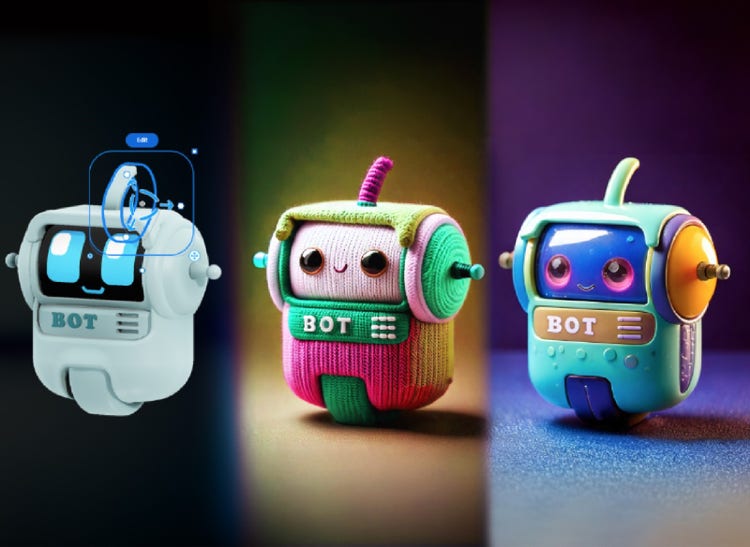
Create 3D scenes for product visualisations, architectural renders, concept art, and more, and turn them into images for easy sharing, feedback, or production. With the Scene to Image AI scene generator in Adobe Firefly, you can create a 3D scene from shapes and enter a simple text prompt to turn it into a photo, artwork, or render.

Try Scene to Image

Picture 1318110761, Afbeelding

Turn 3D scenes into photos and artwork.

You may have heard of generative AI being used to generate images from text prompts. But Adobe Firefly Scene to Image takes things further. With this AI scene generator, you can use shapes to build a 3D scene – with specific composition, camera angles, and depth. And then enter a simple text prompt to turn your 3D scene into an image. So, whether you work in product design, architecture, or are a conceptual artist, you now have a new way to quickly generate images of your 3D models.

Picture 290487858, Afbeelding

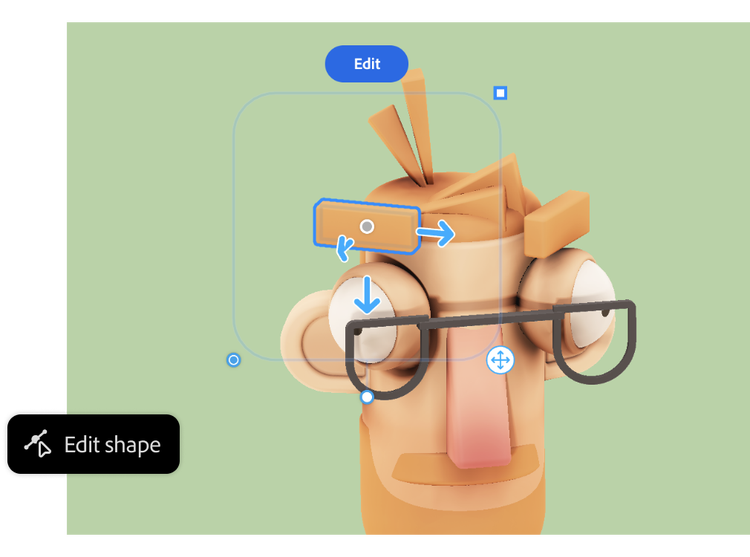
Build your 3D scene from shapes and set its composition.

Create precise spatial relationships and perspectives using simple 3D shapes powered by Adobe’s Project Neo shape-building technology in Adobe Firefly. Drag-and-drop shapes from the panel into your canvas, then use the tools to adjust their size and colour. Change lighting, angles, and rotation in real-time without needing to recomp or redraw.

Refine every detail

Whether it’s product shots, architectural concepts, or interior mockups, craft scenes with precise angles and structures that match your vision. Firefly’s AI scene generator gives you creative control.

Picture 683908086, Afbeelding
Picture 824196807, Afbeelding

Build, refine and generate all from one space.

Move fluidly from 3D design to image generation, testing different variations until you achieve the perfect Scene to Image result

How to create with Scene to Image.

Easily generate scenes with these easy steps:

  • Build your scene.
    Add shapes to build a 3D scene to guide your image generation.
  • Generate variations.
    Click the Generate button to generate images from the scene.
  • Refine your creation.
    Not 100% happy with the results? Return to Create mode to edit the scene and create more generations.
  • Export and implement.
    Export easily to PNG or SVG formats for further editing in your favourite Creative Cloud app.

Remix content from the community.

Discover Firefly prompts to remix and submit your own images to the gallery.

The ultimate in creative AI. Now with video.

Create stunning images, audio and now video, all in one place, with Adobe Firefly. Go from ideation to production seamlessly with your favourite Adobe apps and commercially safe Firefly models. Control even more details along the way so you can get to final faster.

Create with Firefly

{{questions-we-have-answers}}

How to create a scene using AI?

You can create a scene using 3D shape-building technology and generative AI tools. Adobe Firefly has its own AI scene generator technology, which enables you to build a 3D model from shapes, blending them together to create an overall scene, adjusting sizing, camera angles, and scene depth. You can then use generative AI to render and style the scene into a final image.

What is Scene to Image?

Scene to Image is Adobe’s AI scene generator tool in Firefly. It works by creating an image of a scene. This follows a two-step process in which you create a 3D model using shape-building technology and then transform that into an image.

What is Project Neo?

Project Neo is software developed by Adobe to help people create 3D designs without needing specialist technical skills. It aims to make it easy to turn ‘flat’ 2D artwork into 3D, for example, with a series of user-friendly tools. In the context of AI scene generation, it is used to build 3D models from shapes, which can then be turned into imagery within Adobe Firefly.