Fotoeffekte online hinzufügen und kostenlos außergewöhnliche Bilder erstellen.
Von Filtern und Animationseffekten bis hin zu detaillierten Retuschen – mit unserem kostenlosen Online-Fotoeditor erstellst du mit wenigen Klicks ein herausragendes Foto.
Lade Bilder von deinem Gerät hoch oder durchsuche mehrere Tausend kostenlose Adobe Stock-Bilder im Online-Editor, um das perfekte Foto für dein Projekt zu finden.
2. Effekte anwenden.
Nutze voreingestellte Filter oder optimiere dein Foto in kürzester Zeit. Ändere Kontrast, Helligkeit, Wärme und mehr, um deinen visuellen Stil umzusetzen.
3. Weiter bearbeiten.
Bearbeite dein Foto weiter und füge Animationen, Icons oder Text hinzu. Lade dein neu bearbeitetes Foto mit Effekten herunter und teile es online in deinen digitalen Kanälen und auf den Social-Media-Plattformen.
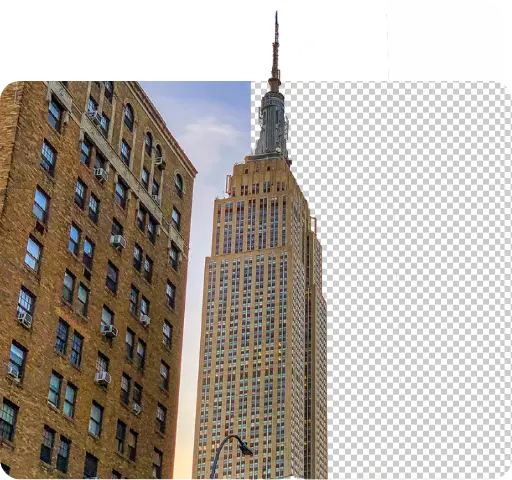
Entferne den Hintergrund von deinem Foto, um dein Motiv hervorzuheben.
Verwende das Tool zum Entfernen des Hintergrunds, um in Sekunden deinem Foto einen transparenten Hintergrund hinzuzufügen. Wähle dein Bild, die Option Hintergrund entfernen, und sieh zu, wie Adobe Express magische Veränderungen erzielt. Füge deinem neu bearbeiteten Bild einen Formzuschnitt hinzu, um es noch interessanter zu machen.
Veredele dein Bild in wenigen Augenblicken.
Öffne die Online-Tools zum Optimieren von Fotos zur weiteren Personalisierung. Passe die Lichtverhältnisse deines Fotos an, um den Kontrast festzulegen, gleiche Helligkeit, Highlights und Schatten an. Reguliere die Farbästhetik mit den Optionen zur Bildsaturierung und Farbwärme. Nutze dann die Bildschärfe, um ein unscharfes Objekt oder den Rand des Bildes zu schärfen.

Füge deinem Bild eine Animation hinzu.
Transformiere jedes Bild mit der Animierungsfunktion in einen animierten Entwurf. Wähle Animationseffekte aus einer Bibliothek aus, um dein Foto lebendig werden zu lassen. Verwende dieses Werkzeug, um die Aufmerksamkeit deines Publikums auf allen deinen digitalen Plattformen auf dich zu ziehen.
Personalisiere dein Foto online mit Filtereffekten.
Adobe Express macht professionelle Editierwerkzeuge für jeden verfügbar, sodass du selbst deine Bilder optimieren und veredeln kannst. Transformiere mit unseren kostenlosen Fotofiltern Standardbilder in hochwertige, ansprechende Entwürfe. Dann personalisierst du deinen Entwurf noch weiter, indem du Text hinzufügst und als letzten Schliff eine Animation einsetzt. Es gibt endlose Möglichkeiten, erstaunliche Inhalte für jeden Kanal und jedes Gerät zu erschaffen.

Mühelos Fotoeffekte hinzufügen – mit Adobe Express.
Häufig gestellte Fragen.
Wie kann ich Fotoeffekte für Social Media hinzufügen?
Wähle eine Arbeitsfläche aus, die zu deiner gewünschten Social-Media-Zielplattform passt -hierfür kannst du entweder eine Vorlage suchen, indem du die gewünschte Plattform als Keyword eingibst oder die Funktion zur Größenanpassung nutzen, um die Arbeitsflächengröße an die voreingestellten, beliebten Social-Media-Größen anzupassen. Füge dann ein Bild zu deinem Projekt hinzu, wende die Effekte an und lade dein fertiggestelltes Design direkt auf dein Gerät herunter, um es Online zu teilen.
Wie viele Filter hat das Tool für Fotoeffekte von Adobe Express?
Adobe Express bietet hauptsächlich acht Filterarten, und die meisten davon beinhalten dutzende Optionen. Wähle deinen Lieblingsfilter und verwende dann die Shuffle-Funktion, um verschiedene Variationen und Farben zu entdecken.
Kann ich meinem Foto auch auf meinem Handy Effekte hinzufügen?
Ja, absolut. Lade die kostenlose Adobe Express-App auf dein Gerät herunter und starte sie, so dass du das Anwenden von Fotoeffekten direkt unterwegs vornehmen und herausragende Inhalte zu jeder Zeit und von überall aus erstellen kannst.
Ändert sich die Größe oder Qualität des Fotos, nach dem Hinzufügen von Fotoeffekten?
Die Größe und Qualität sollte gleich bleiben, außer du änderst die Größe während der Bearbeitung oder wählst ein Vorlagenformat, das größer oder kleiner ist als dein Original-Foto. Wenn du die selbe Bildgröße beibehalten möchtest, mit der du die Bearbeitung begonnen hast, dann wähle die Option, die mit deinem Bild startet.
Kann ich Adobe Express kostenlos nutzen? Wenn ja, was ist darin enthalten?
Ja, Adobe Express bietet eine kostenlose Basis-Version, die Kernfunktionen wie Werkzeuge für die Bildbearbeitung, Effekte sowie mehrere Tausend kostenlose Vorlagen beinhaltet. Erfahre mehr über unsere Abos und Preise.
You can control how Adobe websites use cookies and similar technologies by making choices below. But note that if you disable cookies and similar technologies entirely, Adobe websites may not function properly.
Cookies are small text files stored by your web browser when you use websites. There are also other technologies that can be used for similar purposes like HTML5 Local Storage and local shared objects, web beacons, and embedded scripts. These technologies help us do things like remembering you and your preferences when you return to our sites, measure how you use the website, conduct market research, and gather information about the ads you see and interact with.
You can make choices in the menu below about what cookies and other technologies you want us to use on Adobe sites when you visit them from this browser. You can always change those choices later by clicking on the Cookie Preferences link at the bottom of the page.
If enabled:
We can improve your experience by tailoring the site and the content to things we think might be of interest
We can better keep track of your preferences — like what language you prefer to use
We will better understand your likely interests so we can provide you more relevant Adobe ads and content on non-Adobe websites and in non-Adobe apps
It will help us improve the performance of our website and those of our partners who use the Adobe Experience Cloud
If disabled:
We won’t be able to remember you from session to session so the experience may not be tailored to your interests
You’ll still have access to the content of the site but certain features that depend on cookies may not function
You’ll still see ads, they just may not be as relevant to you
General information
You can control how Adobe websites use cookies and similar technologies by making choices below. But note that if you disable cookies and similar technologies entirely, Adobe websites may not function properly.
Cookies are small text files stored by your web browser when you use websites. There are also other technologies that can be used for similar purposes like HTML5 Local Storage, web beacons, and embedded scripts. These technologies help us do things like remembering you and your preferences when you return to our sites, measure how you use the website, conduct market research, and gather information about the ads you see and interact with.
You can make choices in the menu below about what cookies and other technologies you want us to use on Adobe sites when you visit them from this browser. You can always change those choices later by clicking on the Cookie Preferences link at the bottom of the page.
If enabled:
We can improve your experience by tailoring the site and the content to things we think might be of interest
We can better keep track of your preferences — like what language you prefer to use
We will better understand your likely interests so we can provide you more relevant Adobe ads and content on non-Adobe websites and in non-Adobe apps
It will help us improve the performance of our website and those of our partners who use the Adobe Experience Cloud
If disabled:
We won’t be able to remember you from session to session so the experience may not be tailored to your interests
We’ll still count your use of our site and services
You’ll still have access to the content of the site but certain features that depend on cookies may not function
You’ll still see ads, they just may not be as relevant to you
Operate the site and core servicesOperate site and measure engagement
Always active
These cookies are required, and they are used to enable the site and related services core functionality. Without them the site could not operate, so they cannot be disabled.
These cookies enable the site and related services’ core functionality and collect statistics about user engagement, such as counting active use to help us understand trends. These cookies cannot be disabled.
Measure performance
These cookies are used to analyze site usage to measure and improve performance. Without them Adobe cannot know what content is most valued and how often unique visitors return to the site, making it hard to improve information we offer to you.
These cookies are used to analyze site usage to measure and improve performance. Without them Adobe cannot know what content is most valued, making it hard to improve information we offer to you.
Extend functionality
These cookies are used to enhance the functionality of Adobe sites such as remembering your settings and preferences to deliver a personalized experience; for example, your username, your repeated visits, preferred language, your country, or any other saved preference.
Personalize advertising
These cookies are used to enable Adobe and our partners to serve ads more relevant to your interests. Without them you will still see ads, but they might not be as relevant to you.