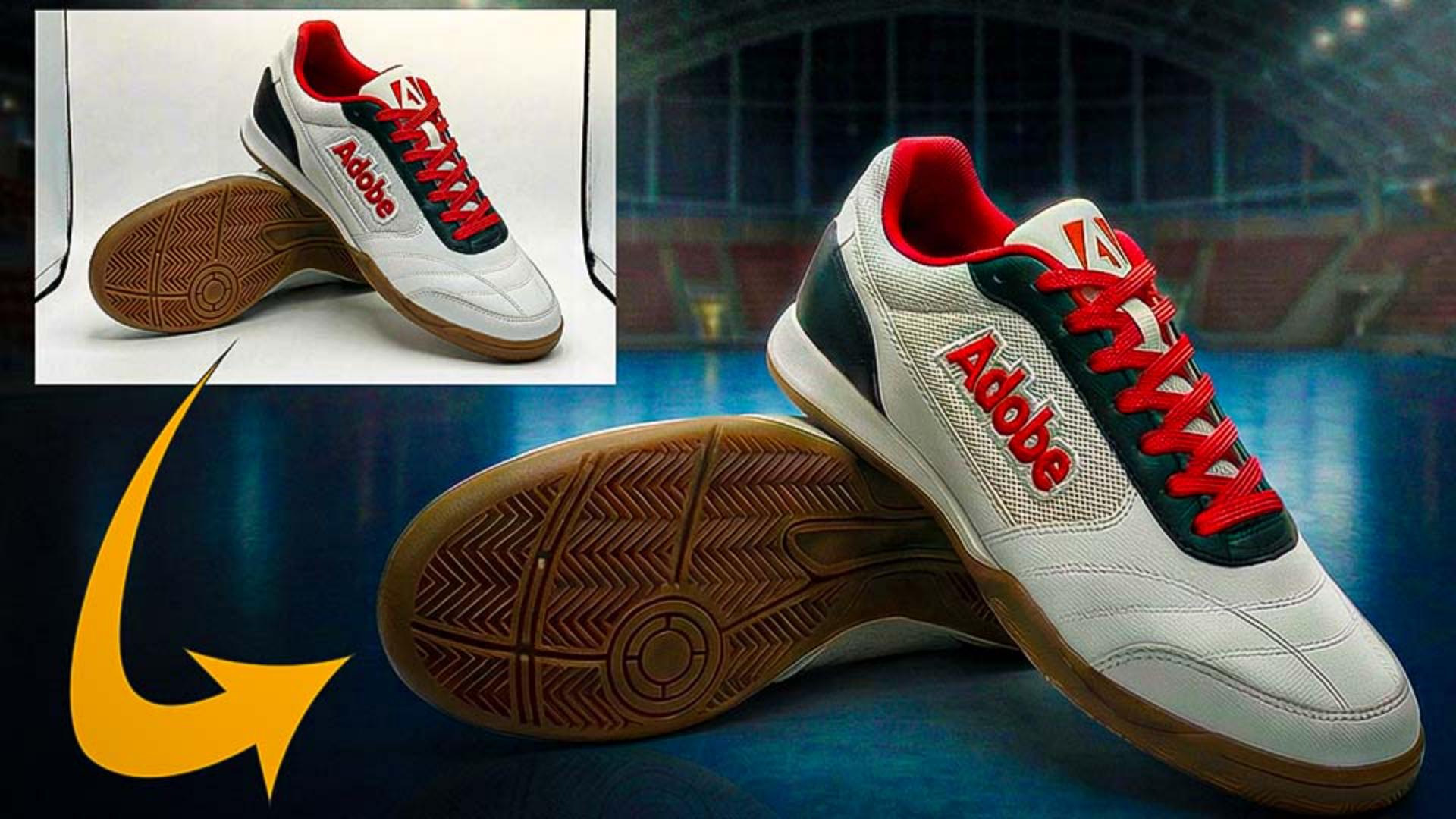
Dans un instant, je vais vous montrer comment remplacer un arrière-plan dans Adobe Firefly.
Sur le site web de Firefly à l'adresse firefly.adobe.com, en dessous du champ de prompt, je choisis Image, je clique sur le bouton Plus et je sélectionne l'onglet Modifier.
Remplacer un arrière-plan à l’aide d’une image de référence
Je peux maintenant charger une image depuis l'espace de stockage Adobe, par exemple un visuel déjà généré ou un document en ligne Photoshop.
Ici, je clique sur Votre appareil et je sélectionne ces chaussures photographiées dans une boîte à lumière.
Pour remplacer l'arrière-plan, je dois d'abord choisir un modèle.
J'opte pour Nano Banana Pro, qui est performant et peut générer des rendus en 2K.
Je clique maintenant sur Image de référence pour choisir l'arrière-plan de substitution parmi les images enregistrées sur mon appareil.
Dans le champ de prompt, je saisis « Remplace l'arrière-plan de l'image 1 par celui de l'image 2.
Conserve le contenu et l'angle de l'image 1.
» Je clique ensuite sur le bouton bleu Générer.
Firefly insère le nouvel arrière-plan en ajustant la perspective l'éclairage et les couleurs pour créer une composition réaliste.
À ce stade, je peux cliquer sur l'original dans la pellicule pour répéter l'opération et créer plusieurs variations en vue de choisir la plus adaptée à mon projet.
Générer des variations et comparer les résultats
Après avoir généré une deuxième image, je peux cliquer sur les vignettes pour comparer les variations.
Affiner les résultats avec des prompts en langage naturel
Pour aller encore plus loin, je peux peaufiner l'image en utilisant le langage naturel afin d'obtenir précisément le résultat souhaité.
Par exemple, je remplace ce prompt par le suivant : « Supprime la ligne horizontale blanche au premier plan, floute l'arrière-plan et transforme l'image en scène de nuit, avec des fenêtres sombres et l'éclairage de la salle braqué sur les chaussures.
» Je clique ensuite sur Générer.
Firefly effectue rapidement les modifications, et j'obtiens une troisième variation.
Si les résultats manquent de réalisme,
Astuce
l'option Utiliser Google Search permet de se limiter à des références concrètes : tendances actuelles, articles de marque, monuments, etc.
Elle est très utile pour les éléments qui n'existaient pas forcément lors de l'entraînement initial du modèle.
À votre tour d'essayer de remplacer l'arrière-plan d'une photo dans Adobe Firefly.
C'était Jesús Ramirez.
Merci de votre attention.
Ce que vous apprendrez
Remplacer un arrière-plan à l’aide d’une image de référence
Chargez votre visuel, choisissez un modèle, puis ajoutez une image de référence afin d’obtenir l’arrière-plan souhaité. Firefly adapte la perspective, l’éclairage et les couleurs pour produire une composition réaliste.
Générer des variations et comparer les résultats
Chargez une autre image d’arrière-plan et relancez la génération pour explorer différentes options. Comparez les variations côte à côte et choisissez celle qui vous convient.
Affiner les résultats avec des prompts en langage naturel
Rédigez des prompts simples pour supprimer les éléments indésirables, ajuster l’éclairage ou changer la scène. Firefly actualise l’image sans repartir de zéro.
Astuce : pour un maximum de précision, activez l’option Utiliser Google Search. Les résultats seront ainsi générés sur la base de références concrètes (marques, monuments, tendances actuelles, etc.).
You can control how Adobe websites use cookies and similar technologies by making choices below. But note that if you disable cookies and similar technologies entirely, Adobe websites may not function properly.
Cookies are small text files stored by your web browser when you use websites. There are also other technologies that can be used for similar purposes like HTML5 Local Storage and local shared objects, web beacons, and embedded scripts. These technologies help us do things like remembering you and your preferences when you return to our sites, measure how you use the website, conduct market research, and gather information about the ads you see and interact with.
You can make choices in the menu below about what cookies and other technologies you want us to use on Adobe sites when you visit them from this browser. You can always change those choices later by clicking on the Cookie Preferences link at the bottom of the page.
If enabled:
We can improve your experience by tailoring the site and the content to things we think might be of interest
We can better keep track of your preferences — like what language you prefer to use
We will better understand your likely interests so we can provide you more relevant Adobe ads and content on non-Adobe websites and in non-Adobe apps
It will help us improve the performance of our website and those of our partners who use the Adobe Experience Cloud
If disabled:
We won’t be able to remember you from session to session so the experience may not be tailored to your interests
You’ll still have access to the content of the site but certain features that depend on cookies may not function
You’ll still see ads, they just may not be as relevant to you
General information
You can control how Adobe websites use cookies and similar technologies by making choices below. But note that if you disable cookies and similar technologies entirely, Adobe websites may not function properly.
Cookies are small text files stored by your web browser when you use websites. There are also other technologies that can be used for similar purposes like HTML5 Local Storage, web beacons, and embedded scripts. These technologies help us do things like remembering you and your preferences when you return to our sites, measure how you use the website, conduct market research, and gather information about the ads you see and interact with.
You can make choices in the menu below about what cookies and other technologies you want us to use on Adobe sites when you visit them from this browser. You can always change those choices later by clicking on the Cookie Preferences link at the bottom of the page.
If enabled:
We can improve your experience by tailoring the site and the content to things we think might be of interest
We can better keep track of your preferences — like what language you prefer to use
We will better understand your likely interests so we can provide you more relevant Adobe ads and content on non-Adobe websites and in non-Adobe apps
It will help us improve the performance of our website and those of our partners who use the Adobe Experience Cloud
If disabled:
We won’t be able to remember you from session to session so the experience may not be tailored to your interests
We’ll still count your use of our site and services
You’ll still have access to the content of the site but certain features that depend on cookies may not function
You’ll still see ads, they just may not be as relevant to you
Operate the site and core servicesOperate site and measure engagement
Always active
These cookies are required, and they are used to enable the site and related services core functionality. Without them the site could not operate, so they cannot be disabled.
These cookies enable the site and related services’ core functionality and collect statistics about user engagement, such as counting active use to help us understand trends. These cookies cannot be disabled.
Measure performance
These cookies are used to analyze site usage to measure and improve performance. Without them Adobe cannot know what content is most valued and how often unique visitors return to the site, making it hard to improve information we offer to you.
These cookies are used to analyze site usage to measure and improve performance. Without them Adobe cannot know what content is most valued, making it hard to improve information we offer to you.
Extend functionality
These cookies are used to enhance the functionality of Adobe sites such as remembering your settings and preferences to deliver a personalized experience; for example, your username, your repeated visits, preferred language, your country, or any other saved preference.
Personalize advertising
These cookies are used to enable Adobe and our partners to serve ads more relevant to your interests. Without them you will still see ads, but they might not be as relevant to you.
Personalize advertising
These cookies are used to enable Adobe and our partners to serve ads more relevant to your interests. Without them you will still see ads, but they might not be as relevant to you.