Saviez-vous qu’il est possible de créer des illustrations vectorielles dans Illustrator grâce à des modèles d’IA tiers ?
Je m’appelle Sydney Michuda, directrice de création chez Super Creative.
Dans cette vidéo, nous allons découvrir ces modèles d’IA tiers et ainsi tester différents styles d’illustration.
C’est parti !
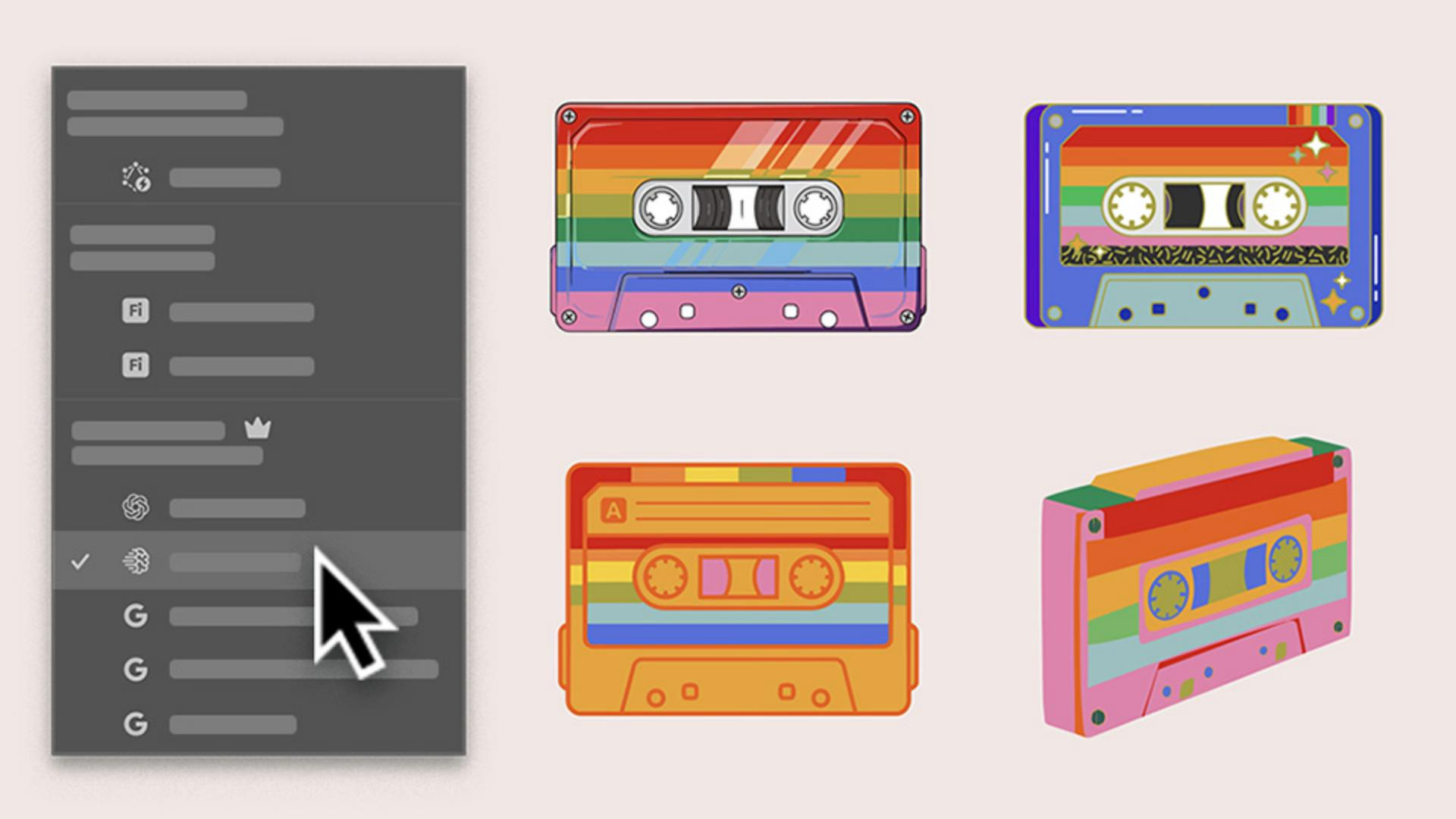
Je travaille sur des visuels destinés à un évènement musical et je souhaite créer une cassette arc-en-ciel amusante.
Avant tout, j’aimerais pouvoir proposer plusieurs pistes au client.
Pour commencer, je clique sur Fenêtre, Barre des tâches contextuelle et Générer des vecteurs.
Générer plusieurs styles d’illustration à partir d’un simple prompt
Les nouveaux modèles d’IA tiers offrent de nombreuses options, chacune avec ses propres atouts.
Voyons d’abord ce que la sélection automatique nous recommande.
Je saisis un prompt et je sélectionne Sujet.
Je conserve ce niveau de détail, j’ajoute ma palette de couleurs et je clique sur Continuer.
L’outil a choisi Imagen 4.
Voyons le résultat.
C’est une excellente option, avec un style très affirmé et presque réaliste.
Continuons à explorer d’autres pistes.
Comparer les styles et identifier la perspective la plus intéressante
Je conserve le même prompt, mais je choisis Gemini 3.
C’est très intéressant aussi, bien que différent de la première option.
C’est plus simple et plus ludique.
Testons maintenant le modèle GPT Image 4o.
Là encore, c'est très réussi, avec des détails plus originaux et insolites.
Développer des concepts à partir d’un croquis avec l’outil Remplissage génératif de la forme
J’aimerais voir la cassette sous un angle plus incliné.
J’utilise l’outil Remplissage génératif de la forme, qui permet également d'accéder aux modèles tiers.
Je sélectionne mon croquis, j’active l’outil et j’ouvre les paramètres.
Je reprends le même prompt, je diminue la précision de la forme et je clique sur Générer.
Parfait.
Le résultat est original, surtout sans les contours.
Je peux donc proposer au client quatre visuels aux styles variés, puis créer et peaufiner une série complète dans Illustrator, le tout grâce aux modèles d’IA tiers.
Je m’appelle Sydney Michuda, de Super Creative.
Merci de votre attention.
Ce que vous apprendrez
Générer plusieurs styles d’illustration à partir d’un simple prompt
Sélectionnez la fonctionnalité Générer des vecteurs et rédigez un prompt court afin d’obtenir rapidement différentes variations de style. Activez la sélection automatique pour qu’Illustrator choisisse le modèle le plus adapté et vous propose une première piste.
Comparer les styles et identifier la perspective la plus intéressante
Testez le même prompt avec plusieurs modèles pour observer comment chacun l’interprète. Comparez les résultats côte à côte et repérez les pistes à approfondir.
Développer des concepts à partir d’un croquis avec l’outil Remplissage génératif de la forme
Grâce à l’outil Remplissage génératif de la forme, appliquez le même prompt à votre croquis et explorez différents styles en fonction des modèles. Présentez plusieurs concepts à votre clientèle, puis affinez la version retenue dans votre propre style vectoriel.
You can control how Adobe websites use cookies and similar technologies by making choices below. But note that if you disable cookies and similar technologies entirely, Adobe websites may not function properly.
Cookies are small text files stored by your web browser when you use websites. There are also other technologies that can be used for similar purposes like HTML5 Local Storage and local shared objects, web beacons, and embedded scripts. These technologies help us do things like remembering you and your preferences when you return to our sites, measure how you use the website, conduct market research, and gather information about the ads you see and interact with.
You can make choices in the menu below about what cookies and other technologies you want us to use on Adobe sites when you visit them from this browser. You can always change those choices later by clicking on the Cookie Preferences link at the bottom of the page.
If enabled:
We can improve your experience by tailoring the site and the content to things we think might be of interest
We can better keep track of your preferences — like what language you prefer to use
We will better understand your likely interests so we can provide you more relevant Adobe ads and content on non-Adobe websites and in non-Adobe apps
It will help us improve the performance of our website and those of our partners who use the Adobe Experience Cloud
If disabled:
We won’t be able to remember you from session to session so the experience may not be tailored to your interests
You’ll still have access to the content of the site but certain features that depend on cookies may not function
You’ll still see ads, they just may not be as relevant to you
General information
You can control how Adobe websites use cookies and similar technologies by making choices below. But note that if you disable cookies and similar technologies entirely, Adobe websites may not function properly.
Cookies are small text files stored by your web browser when you use websites. There are also other technologies that can be used for similar purposes like HTML5 Local Storage, web beacons, and embedded scripts. These technologies help us do things like remembering you and your preferences when you return to our sites, measure how you use the website, conduct market research, and gather information about the ads you see and interact with.
You can make choices in the menu below about what cookies and other technologies you want us to use on Adobe sites when you visit them from this browser. You can always change those choices later by clicking on the Cookie Preferences link at the bottom of the page.
If enabled:
We can improve your experience by tailoring the site and the content to things we think might be of interest
We can better keep track of your preferences — like what language you prefer to use
We will better understand your likely interests so we can provide you more relevant Adobe ads and content on non-Adobe websites and in non-Adobe apps
It will help us improve the performance of our website and those of our partners who use the Adobe Experience Cloud
If disabled:
We won’t be able to remember you from session to session so the experience may not be tailored to your interests
We’ll still count your use of our site and services
You’ll still have access to the content of the site but certain features that depend on cookies may not function
You’ll still see ads, they just may not be as relevant to you
Operate the site and core servicesOperate site and measure engagement
Always active
These cookies are required, and they are used to enable the site and related services core functionality. Without them the site could not operate, so they cannot be disabled.
These cookies enable the site and related services’ core functionality and collect statistics about user engagement, such as counting active use to help us understand trends. These cookies cannot be disabled.
Measure performance
These cookies are used to analyze site usage to measure and improve performance. Without them Adobe cannot know what content is most valued and how often unique visitors return to the site, making it hard to improve information we offer to you.
These cookies are used to analyze site usage to measure and improve performance. Without them Adobe cannot know what content is most valued, making it hard to improve information we offer to you.
Extend functionality
These cookies are used to enhance the functionality of Adobe sites such as remembering your settings and preferences to deliver a personalized experience; for example, your username, your repeated visits, preferred language, your country, or any other saved preference.
Personalize advertising
These cookies are used to enable Adobe and our partners to serve ads more relevant to your interests. Without them you will still see ads, but they might not be as relevant to you.
Personalize advertising
These cookies are used to enable Adobe and our partners to serve ads more relevant to your interests. Without them you will still see ads, but they might not be as relevant to you.