Adobe Acrobat
What is a prompt? Exploring different types of AI prompts.
Prompts are the foundation of how generative AI works. Learn what prompts are, why they matter, and how to use them effectively to get better AI-generated results.

Published by Adobe Acrobat India on 16 March 2026
Generative AI tools are becoming an essential part of how people write, design, code, and analyse information. Be it for work, education, or creative projects, everything starts with one crucial element: the AI prompt.
Prompts shape how AI responds. This article explains what a prompt is, explores the different types of prompts in AI, and shares practical AI prompt examples you can use right away. By the end, you will have a strong foundation for writing more effective prompts and getting better results from generative AI tools.
What is a prompt?
A prompt is the input or instruction provided to an AI model to generate a response. This input can be a question, a sentence, a paragraph, or even structured data. In generative AI, prompts act as guidance that tells the system what kind of output you want, such as text, images, summaries, or code.
For example, “What is a prompt? Explain it in simple terms.” is a prompt. The AI uses this instruction to understand the topic, tone, and level of detail expected.
Why are prompts important in generative AI?
Prompts matter because they define how AI interprets your request. Generative AI does not think independently; it responds based on the instructions and context you provide. A well-written prompt can save time, reduce revisions, and improve accuracy across tasks such as writing, marketing, research, or software development.
In professional and educational settings, especially in fast-growing digital markets like India, effective prompts help users work more efficiently. They enable AI to deliver responses that align closely with real-world needs, whether for business content, learning materials, or creative ideas.
Types of prompts in AI.
There are several types of prompts in AI, each designed to guide the model in a specific way. Choosing the right prompt type depends on your goal and the level of control you want over the output. Here are some of the most common types of prompts used in generative AI.
Instruction-based prompts.
Instruction-based prompts tell the AI exactly what to do. They are direct and task-focused, making them ideal for writing, summarising, or transforming content. Adding details such as tone, format, or audience helps reduce ambiguity and improves accuracy, especially for first-time AI users.
AI prompt examples:
- “Write a 200-word introduction about generative AI for beginners.”
- “Create a 150-word summary of this document. Do not use any industry jargon.”
- “Simplify this document into 5 bullet points.”
Question-based prompts.
Question-based prompts are framed as questions and are commonly used for explanations, research, and idea generation. These prompts encourage the AI to provide informative or analytical responses, which is useful for learning and exploration.
AI prompt examples:
- “What are the types of prompts in AI?”
- “What are some of the main literary themes in this guide?”
- “What was the main purpose of this research?”
Contextual prompts.
Contextual prompts provide background information to help the AI generate more relevant and accurate outputs. These prompts clarify audience, purpose, or format, and they are especially effective for summarising, editing, and working with complex topics.
AI prompt examples:
- “Summarise this article for a non-technical audience in under 100 words.”
- “Offer ideas for using this information in a professional development program.”
- “Act as my professor — what are some test questions I should be prepared to answer?”
Zero-shot and few-shot prompts.
Zero-shot prompts ask the AI to perform a task without providing examples, meaning the AI relies entirely on its training to complete the task. Few-shot prompts, on the other hand, include one or more examples to guide the output.
AI prompt examples:
- “Translate this sentence into Hindi: How are you?”
- “List the ingredients required for a chocolate cookie recipe?”
- “Write a short paragraph about generative AI.”
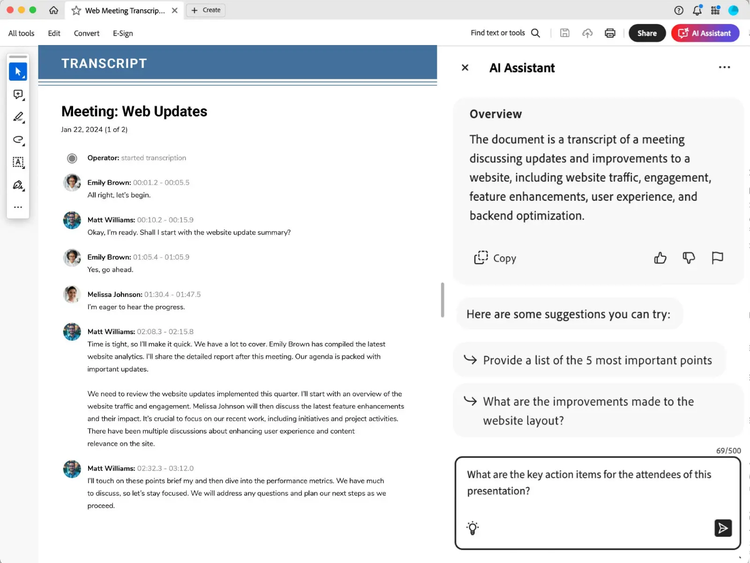
Adobe Acrobat Studio’s generative AI solutions.
It’s one thing to understand how prompts shape AI outputs, it’s another to successfully apply them in real-world workflows. For instance, you can leverage Adobe Acrobat Studio’s generative AI to make document tasks faster and smarter. Using natural language prompts, you can get answers to many document-related questions, improve your draft, find insights in a flash, spark new ideas, create fresh content, and the list goes on.
How to use AI Assistant prompts:
- Open your document in Adobe Acrobat.
- Click the AI Assistant.
- Type or paste a prompt into the message box.
- Enter and unlock AI-driven capabilities.
You can also use Acrobat’s online AI chat tool to ask questions directly from your PDF and get instant responses using natural‑language prompts.
Prompt tips to ask, analyse, and brainstorm with AI Assistant.
See how the right prompts can transform the way you work with documents. Using prompt approaches like asking, analysing, and brainstorming allows you to uncover insights, focus on key details, and spark new ideas. With Adobe’s AI Assistant, you can interact with your documents more intuitively and generate content that’s both relevant and actionable.
https://video.tv.adobe.com/v/3435767?captions=eng&hidetitle=true
Best practices when writing AI prompts.
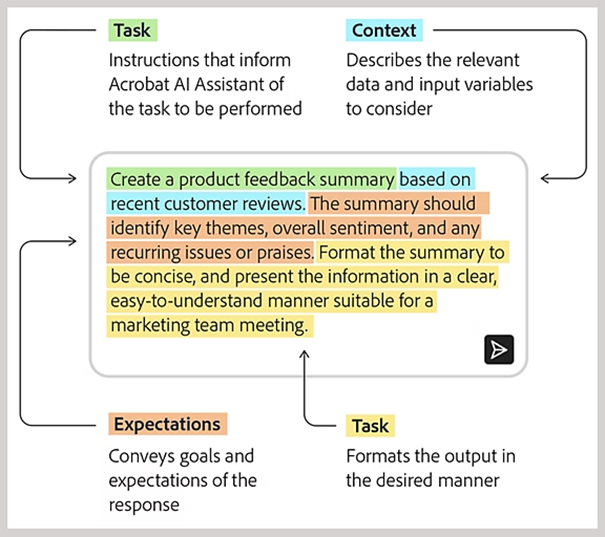
Writing effective AI prompts helps you get clearer, more accurate results from generative AI tools. To create the perfect prompt, be sure to include a succinct task, context, and expectations to get the best possible results.
Here’s a quick reference for what to do—and what to avoid—when creating prompts.
- Define your objective before writing the prompt.
- Write in a natural, conversational tone.
- Build on previous AI responses for better results.
- Keep prompts short and easy to follow.
- Add examples to show the expected output.
- Review outputs to confirm factual accuracy.
- Be specific about format, tone, or length.
- Organise ideas before submitting the prompt.
- Refine and test prompts to improve results over time.
- Don’t use vague or unclear instructions.
- Avoid giving conflicting or mixed directions.
- Don’t request sensitive, unsafe, or inappropriate content.
- Avoid making prompts unnecessarily complex.
- Don’t rely on jargon or unexplained technical terms.
Frequently asked questions.
More resources