#1e1e1e

VIDEO

How to create a realistic animation walk cycle.

Learn step-by-step how to craft believable walk cycles with perfect timing, weight distribution and personality.

Explore Animate

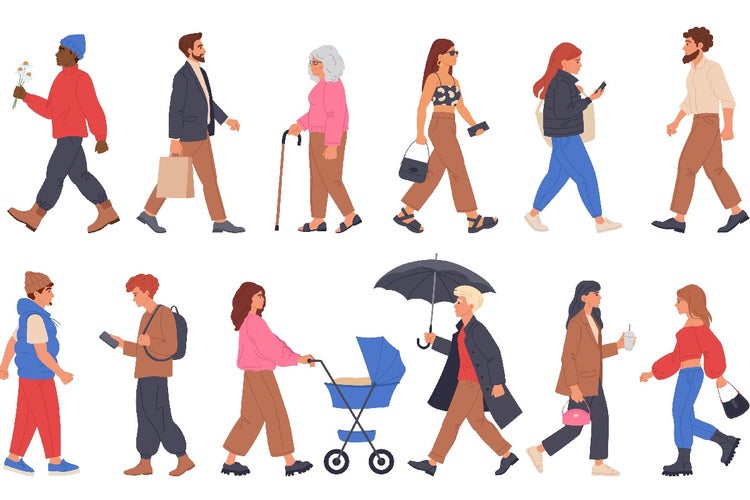
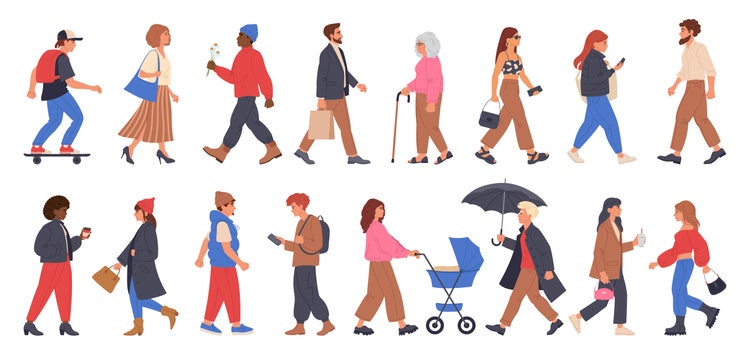
Animation walk cycle showing a group of people walking in sequence.
#FFFFFF

A convincing walk cycle animation is a cornerstone skill for animators. Whether you are crafting a character for a social media video, a narrated client proposal or an immersive game, nailing the fundamentals of a walk cycle will bring your creations to life.

In this guide, we explain what a walking animation entails, why realism matters, and offer a detailed, step-by-step approach to animating each phase, contact, recoil, passing and high point. You will learn how to balance timing, spacing and weight distribution, add personality and troubleshoot common issues. We also explore creative use cases from short-form branded content to remote collaboration and show how Adobe Creative Cloud can help freelancers, micro businesses, desktop publishers, video producers, animators, graphic designers and multimedia artists work smarter.

What is a walk cycle?

A walk cycle is a sequence of frames that loop to depict a character walking in place. Rather than animating an entire scene, animators focus on one stride, then repeat it to simulate continuous motion.

  • Looped animation: The last frame seamlessly returns to the first, creating an infinite walk
  • Key poses: Defined positions such as the contact and passing poses
  • In-betweens: Frames that smoothly transition between key poses
  • Character rig or artwork: Can be hand-drawn frames, vector puppets in Adobe Animate or rigged models in After Effects
#F5F5F5

Why is realistic walking animation crucial?

Realism in a walking cycle enhances believability and emotional engagement. Audiences readily detect lifelike movement, and subtle inaccuracies can break immersion.

  1. Credibility: Natural motion fosters trust in character performance
  2. Emotional connection: A confident stride or weary shuffle conveys attitude and back-story
  3. Professionalism: Clients and stakeholders expect polished walking animation that reflects technical excellence
  4. Versatility: A well-crafted cycle can be adapted for different characters and contexts
  5. Efficiency: Realistic cycles reduce revision requests, accelerating project delivery

Example: A desktop publisher includes a walking character in an online tutorial. A smooth walk cycle keeps learners focused, whereas a choppy cycle distracts and reduces perceived quality.

What are the key stages of a walk cycle?

A complete walking cycle consists of four principal poses. Understanding each stage is essential for realistic motion.

1. Contact.

  • Leading foot makes contact with the ground heel-first
  • Trailing foot prepares to lift
  • Shoulders and hips tilt slightly towards the leading leg

2. Recoil (Down).

  • Body weight shifts as the leading leg absorbs impact
  • Knees bend slightly to cushion the step
  • Spine flexes to accommodate vertical motion

3. Passing.

  • Trailing foot passes the stationary leg
  • Hips and shoulders counter-rotate to maintain balance
  • Centre of gravity reaches its lowest point before rising

4. High point (Up).

  • Body rises on the toes of the leading foot
  • Trailing leg prepares to swing forward
  • Arms switch positions to counterbalance leg movement

5. Return to contact.

  • The cycle repeats as the opposite foot becomes the leading foot
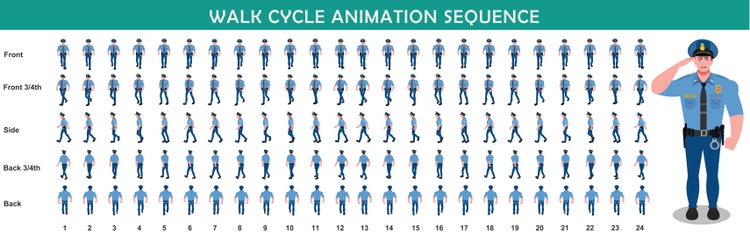
Police walk cycle animation sequence, shown frame by frame to illustrate the progression of animated movement.

Detailed breakdown.

Stage
Description
Key Considerations
Contact
Heel of leading foot touches ground. Hip on trailing side slightly higher.
Ensure heel strikes first. Check hip tilt and shoulder counter-rotation.
Recoil
Body drops as knee bends. Spine compresses.
Keep motion subtle; avoid excessive bounce.
Passing
Trailing leg moves past standing leg. Torso rotates opposite to hips.
Align arms in opposite directions to legs for natural counterbalance.
High point
Body extends to toes; highest vertical position. Trailing foot reaches maximum forward extension.
Stretch spine; ensure lead leg straightens gradually.
Loop
Return to contact with roles reversed.
Confirm seamless transition by matching first and last frames exactly.
Tip: Use onion-skin displays in your software to compare adjacent frames and ensure smooth transitions.
#F5F5F5

How to capture timing, spacing and weight distribution in a walk cycle.

Achieving a lifelike walking animation requires careful control of timing and spacing to convey weight and momentum.

Timing.

  • Number of frames per cycle
    • A typical walk cycle uses 24 frames for one full stride at 24 fps, resulting in two steps per second
  • Adjust for mood
    • Faster cycles (12–16 frames) suggest urgency or haste
    • Slower cycles (28–32 frames) imply weariness or deliberation

Spacing.

  • Even versus uneven spacing
    • Even spacing creates a mechanical feel
    • Uneven spacing places more frames at extremes to emphasise ease-in and ease-out

Weight distribution.

  • Vertical motion
    • Slight up and down movement of the torso indicates weight shift
  • Horizontal shift
    • Centre of gravity moves from one foot to the other trace a slight S-curve path
  • Arm swing
    • Arms should swing opposite to the legs; amplitude reflects character personality
#F5F5F5

Step-by-step timing guide.

  1. Contact – Frame 1 and frame 13 (heel strike)
  2. Recoil – Frame 3 and frame 15 (lowest point)
  3. Passing – Frame 7 and frame 19 (midpoint)
  4. High Point – Frame 10 and frame 22 (highest point)
  5. Loop – Frame 25 matches frame 1 exactly for seamless cycling

Troubleshooting advice: If the cycle appears floaty, increase frames at the passing pose. If it feels heavy, reduce frames between recoil and passing.

How to add personality and variation to your walk cycle.

While a standard walk cycle defines basic mechanics, subtle tweaks infuse character and style.

  • Posture adjustments: Lean forward for determination or backward for arrogance
  • Arm and hand gestures: Add hand flicks, thumbs-up or object-holding to convey occupation or mood
  • Foot roll: Emphasise toe-to-heel roll for elegant characters; flat foot plants for heavyset figures
  • Stride length: Longer strides for confident characters; short, shuffling steps for timid ones
  • Head and eye movement: Slight nod or glance to suggest interaction with the environment

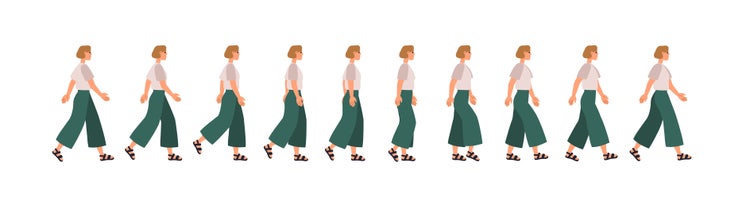
Flat vector of a woman’s side-view animation walk cycle showing step-by-step motion phases.

Example variations.

Below are the various character types and their variations:

  • Confident hero: Tall posture, long stride, minimal vertical bounce, arms swing robustly
  • Sneaky thief: Hunched posture, short steps, paused glances, slow cadence
  • Casual freelancer: Relaxed shoulders, medium stride, hands in pockets during some cycles
  • Energetic animator: Bouncy recoil, pronounced high point, arm flourishes matching enthusiasm

Tip: Create separate layer or channel for secondary actions (hand waves, head tilts) and loop them independently for easy adjustment.

#F5F5F5

What troubleshooting steps help refine your walk cycle animation?

Even experienced animators face challenges; below is a list of issues along with two solutions.

#F5F5F5

1. Jitter between loops.

  • Ensure first and last frames match exactly
  • Use “loop preview” feature to test continuous playback

2. Stiff leg movement.

  • Add a slight knee bend on passing pose
  • Introduce a small hip rotation to soften the angle

3. Floating or sliding feet.

  • Anchor foot planting on ground by holding it one extra frame
  • Check spacing in horizontal axis

4. Over-rotated torso or shoulders.

  • Reduce rotation on passing pose
  • Align upper body rotation with lower body for balance

5. Lack of weight shift.

  • Increase vertical motion during recoil and high point
  • Verify centre of gravity moves realistically along an S-curve path

6. Uneven arm swing.

  • Match keyframes of arms to opposite leg positions
  • Mirror timing between left and right sides

Tip: Record a reference video of yourself walking and overlay it in After Effects as a guide for timing and spacing.

Creative ways to use walk cycle animation in storytelling and design.

A well-crafted walking cycle finds application across many formats. Below are some scenarios relevant to creative professionals:

1. Social media videos.

  • Use case: Animate branded mascot walking through product scenes in Instagram Reels
  • Benefit: Engages viewers with playful character movement without complex scene changes

2. Voiceovers for reels or animations.

  • Use case: Synchronise walk cycle to narration describing a journey or process in {{premiere}}
  • Benefit: Reinforces story progression with visual motion

3. Short-form branded content.

  • Use case: Create animated logo that walks in and stops at centre stage for YouTube bumper ads
  • Benefit: Leaves memorable impression in minimal time

4. Narrated client proposals.

  • Use case: Embed a looped character guide walking through key proposal sections in PowerPoint
  • Benefit: Maintains viewer attention and adds visual interest to often static slides

Example: A micro business owner uses a walking character in an animated explainer video to lead viewers through subscription tiers, making the content feel more personable.

#F5F5F5

A practical guide to walk cycle animation in Adobe Creative Cloud.

Leveraging Adobe Creative Cloud apps ensures efficiency and consistency in walk animation projects.

  1. Create character rig or asset: Use Photoshop or Illustrator to design body parts on separate layers
  2. Import into Animate or After Effects: Set up a simple puppet in Animate or convert layers to Shape Layers in After Effects
  3. Block key poses: Place the contact, recoil, passing and high point poses at correct frames using stopwatch and keyframes
  4. Add in-betweens: Use motion tweening in Animate or automatic in-betweens in After Effects for preliminary smoothing
  5. Refine timing and spacing: Open Graph Editor in After Effects to adjust speed curves or tweak frame spacing in Animate
  6. Add secondary actions: Animate arms, head and accessories on separate layers to maintain clarity
  7. Preview and loop: Use the Timeline Loop option for continuous playback; adjust frames as needed
  8. Export: Export as animated GIF for quick reviews or render a ProRes MOV for high-quality final delivery

Tip: Save your walk cycle as a reusable motion preset or Animate symbol to accelerate future character animations.

Bring your characters to life with a mastered walk cycle animation.

A realistic walk cycle is an indispensable skill for animators and multimedia artists. By understanding the fundamentals - key poses, timing, spacing and weight distribution and applying practical tips for personality and troubleshooting, you can craft convincing walking animation that elevates any project. Integrating these techniques within Adobe Creative Cloud not only streamlines your process but also demonstrates professionalism, reduces revisions and delivers clear ROI. Whether you are a freelancer, micro business owner, desktop publisher, video producer or graphic designer, mastering the walk cycle animation will help you work faster, impress clients and bring your characters to life.

Frequently asked questions.

What are some common mistakes Indian animators make when starting out with character animation?

Beginners often overlook consistency in limb movement or exaggerate steps unnaturally. It is also common to rush through the planning phase instead of observing real-life references, which affects the realism of the animation.

Which Adobe software is best suited for animating frame-by-frame character motion?

Adobe Animate is ideal for creating detailed 2D walk cycles. It allows frame-by-frame drawing and supports onion skinning, which helps maintain continuity across frames. It is part of Adobe's suite of professional animation software designed to cater to everything from simple loops to full character sequences.

How can Indian animators get feedback on their walk cycle animations?

You can join local online communities, participate in animation challenges on platforms like Instagram or Behance, or seek critique from professional animators through animation forums and LinkedIn groups.

What is the advantage of using Adobe After Effects for refining animation timing?

Adobe After Effects offers precise timeline control, easing options and motion blur settings that help refine the rhythm and pacing of your walk cycles.

Are there any Indian character references that animators can study for diverse walking styles?

Yes. Studying Bollywood films, traditional dance forms and street scenes in cities like Mumbai or Kolkata offers a range of walking styles that reflect various personalities and cultural nuances.

Can Adobe Character Animator help speed up the animation process?

Adobe Character Animator uses real-time facial tracking and body movement to animate characters. It is especially useful for creators who want quick and responsive animation workflows. You can explore this app and others through Creative Cloud, which gives access to Adobe's complete suite for animation, video editing, illustration and more.

Is it necessary to animate walk cycles from scratch every time?

Not always. You can create reusable templates or use reference rigs. However, customisation is important to add personality and match the character’s mood, purpose and story context.

How can Adobe Photoshop assist in planning animation poses?

Adobe Photoshop is excellent for sketching key poses and thumbnails before moving to animation. Its layer system and brush controls make it easy to block out a character’s movement path. Photoshop files are saved in the widely supported PSD file format, making it easier to transfer your work between different Adobe apps.

Are walk cycles used in Indian video games and mobile applications?

Yes. Indian game developers use walk cycles in 2D and 3D games to give life to playable characters and NPCs. A well-crafted walk cycle enhances the realism and immersion of interactive experiences.

What are good resources for Indian students to learn animation walk cycles?

Many Indian institutions offer online animation courses. Additionally, platforms like YouTube, Coursera and Skillshare feature tutorials from both Indian and global creators. Pairing these with practice using Adobe apps enhances learning. Students can also benefit from special pricing through Adobe’s student plans, making it more affordable to access industry-standard software.

https://www.adobe.com/in/cc-shared/fragments/creativity-for-all/default

You may also like

Content as a Service v3 - video - Friday 18 July 2025 at 12:40

https://main--cc--adobecom.aem.page/cc-shared/fragments/seo-articles/do-more-animate-color-blade