Learn how to organize pages and edit text in PDF files with Adobe Acrobat mobile.
1
Open a PDF file
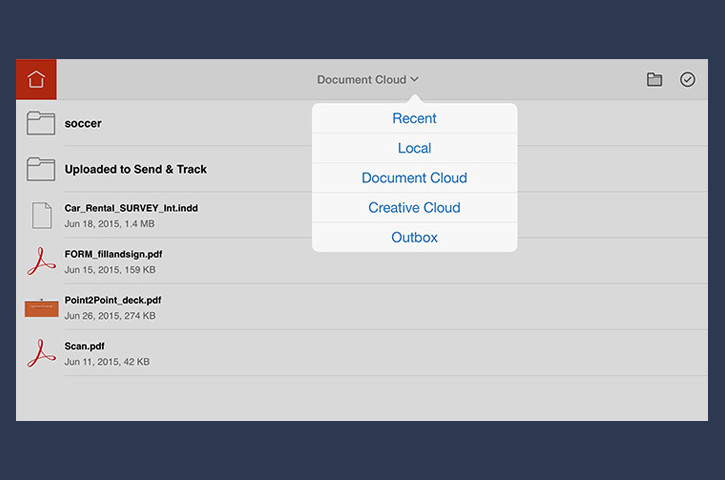
On your mobile device (iPad shown here), open Adobe Acrobat and navigate to the location of the PDF file you want to edit. You can open a PDF file from the following locations:
Recent (files you have recently opened on any device with Mobile Link turned on)
Local
Document Cloud (shown here; need your Adobe ID to sign in)
Creative Cloud (need your Adobe ID to sign in)
Outbox (files recently created or exported on your mobile device)
2
Organize the pages of the PDF file
After the PDF file opens
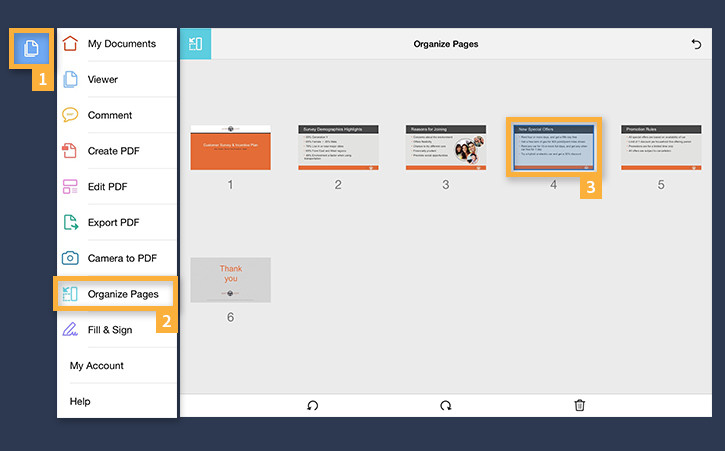
Open the Tools pane by tapping the blue Page icon in the upper left corner.
Select Organize Pages.
Tap and hold the thumbnail of the page you want to rearrange. Drag the highlighted selected page to the desired location.
Note: You can rotate or delete a page while it is selected.
3
Edit text in the PDF file
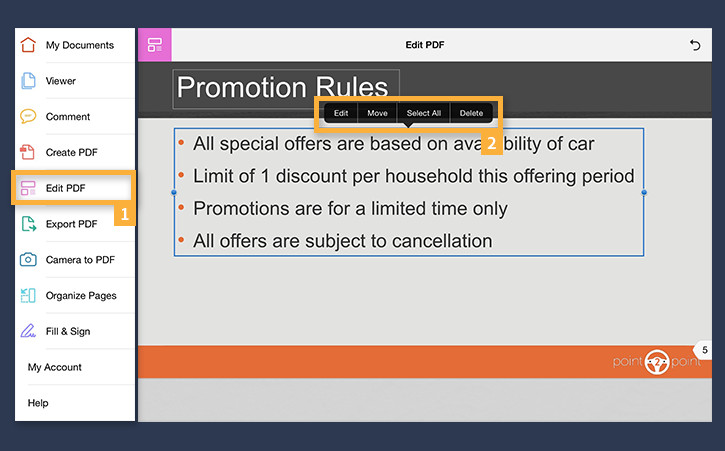
From the Tools pane, choose Edit PDF. Note that all the editable text is highlighted.
Tap once inside the text box that you want to edit. A pop-up menu appears with options to Edit, Move, Select All or Delete text. Tap Edit.
To edit text, tap on the word you want to edit. An insertion point appears. As you type, the text will reflow in response to your edits. Tap above the keyboard to dismiss it.
Tap on the text box, and drag the sides of the selected text box to change its size. When finished, tap outside the box.
4
Change text font, size, style, and color
Tap and hold inside the text box. From the pop-up menu, choose Select or Select All to select the text you want to change. From the selection strip above the keyboard, select the desired font, size, style and color.
When you are done, tap outside the box.
5
Move text boxes
To move an entire text box, tap inside the box. From the pop-up menu select Move, and then drag the box to the desired location. Select Done when you are satisfied with the new position.
6
Share the PDF file
To share the file, return to the Viewer Mode (from the left toolbar).
Tap the Export icon at the bottom of the screen.
You can share the PDF file in a number of ways: by print, email, or by opening it in another app.
You can control how Adobe websites use cookies and similar technologies by making choices below. But note that if you disable cookies and similar technologies entirely, Adobe websites may not function properly.
Cookies are small text files stored by your web browser when you use websites. There are also other technologies that can be used for similar purposes like HTML5 Local Storage and local shared objects, web beacons, and embedded scripts. These technologies help us do things like remembering you and your preferences when you return to our sites, measure how you use the website, conduct market research, and gather information about the ads you see and interact with.
You can make choices in the menu below about what cookies and other technologies you want us to use on Adobe sites when you visit them from this browser. You can always change those choices later by clicking on the Cookie Preferences link at the bottom of the page.
If enabled:
We can improve your experience by tailoring the site and the content to things we think might be of interest
We can better keep track of your preferences — like what language you prefer to use
We will better understand your likely interests so we can provide you more relevant Adobe ads and content on non-Adobe websites and in non-Adobe apps
It will help us improve the performance of our website and those of our partners who use the Adobe Experience Cloud
If disabled:
We won’t be able to remember you from session to session so the experience may not be tailored to your interests
You’ll still have access to the content of the site but certain features that depend on cookies may not function
You’ll still see ads, they just may not be as relevant to you
General information
You can control how Adobe websites use cookies and similar technologies by making choices below. But note that if you disable cookies and similar technologies entirely, Adobe websites may not function properly.
Cookies are small text files stored by your web browser when you use websites. There are also other technologies that can be used for similar purposes like HTML5 Local Storage, web beacons, and embedded scripts. These technologies help us do things like remembering you and your preferences when you return to our sites, measure how you use the website, conduct market research, and gather information about the ads you see and interact with.
You can make choices in the menu below about what cookies and other technologies you want us to use on Adobe sites when you visit them from this browser. You can always change those choices later by clicking on the Cookie Preferences link at the bottom of the page.
If enabled:
We can improve your experience by tailoring the site and the content to things we think might be of interest
We can better keep track of your preferences — like what language you prefer to use
We will better understand your likely interests so we can provide you more relevant Adobe ads and content on non-Adobe websites and in non-Adobe apps
It will help us improve the performance of our website and those of our partners who use the Adobe Experience Cloud
If disabled:
We won’t be able to remember you from session to session so the experience may not be tailored to your interests
We’ll still count your use of our site and services
You’ll still have access to the content of the site but certain features that depend on cookies may not function
You’ll still see ads, they just may not be as relevant to you
Operate the site and core servicesOperate site and measure engagement
Always active
These cookies are required, and they are used to enable the site and related services core functionality. Without them the site could not operate, so they cannot be disabled.
These cookies enable the site and related services’ core functionality and collect statistics about user engagement, such as counting active use to help us understand trends. These cookies cannot be disabled.
Measure performance
These cookies are used to analyze site usage to measure and improve performance. Without them Adobe cannot know what content is most valued and how often unique visitors return to the site, making it hard to improve information we offer to you.
These cookies are used to analyze site usage to measure and improve performance. Without them Adobe cannot know what content is most valued, making it hard to improve information we offer to you.
Extend functionality
These cookies are used to enhance the functionality of Adobe sites such as remembering your settings and preferences to deliver a personalized experience; for example, your username, your repeated visits, preferred language, your country, or any other saved preference.
Personalize advertising
These cookies are used to enable Adobe and our partners to serve ads more relevant to your interests. Without them you will still see ads, but they might not be as relevant to you.
Personalize advertising
These cookies are used to enable Adobe and our partners to serve ads more relevant to your interests. Without them you will still see ads, but they might not be as relevant to you.