40 Quinceañera invitation ideas worth stealing for the big day.
Design unforgettable quinceañera invitations with Adobe Express.
Design with your idea
One-click edits from any device
Fast creation with generative AI
Thousands of professionally-designed templates
toc-title
Table of contents:
toc-aria-label
table of contents links
content-1
Set the tone for a celebration everyone will remember.
content-2
Quinceañera invitation ideas that pack a punch.
content-3
Quinceañera invitation wording ideas to help set the tone.
content-4
How to make the most of these Quinceañera invitation ideas.
content-5
Elegant Quinceañera invitation ideas.
content-6
Quinceañera theme invitation ideas for some quick inspiration.
content-7
More creative ways to use your Quinceañera invitation ideas.
Set the tone for a celebration everyone will remember.
Your quinceañera invitation gives guests the first hint of what’s coming, long before they RSVP. It can lean traditional with foil script and calligraphy, or go bold with a masquerade mask and jewel-tone card stock. Some families want bilingual wording that speaks to every guest at the table, while others want a photo of the honoree in her dress front and center. Whatever direction you’re leaning, these 40 quinceañera invitation ideas cover wording and themes, plus how you can use Adobe Express to bring them to life.
Quinceañera invitation ideas that pack a punch.
The invitation is often the first keepsake guests receive, so thoughtful design makes a lasting difference. A foil accent catches light differently than a matte finish, while die-cut accents change how the card feels in someone’s hand. While design trends come and go, the strongest invitations usually combine timeless design with personal touches that reflect the birthday girl’s style and family traditions.
If you’re working with a photo of the birthday girl, skip the heavy borders and busy patterns. Let the photo be the focal point and keep decorative touches along the edges. Bilingual invites, meanwhile, need careful spacing because cramming two languages onto one card, without adjusting the hierarchy, makes both versions look cluttered and harder to read. A glitter or metallic accent works best against a solid, uncluttered background, not a busy one, or it starts looking cluttered instead of festive.
Adobe Express makes it easy to experiment with different quinceañera invitation ideas before committing to a final design. Try different color palettes, swap fonts, upload family photos, or remix professionally designed templates in just a few clicks.
Foil-stamped invitation with the honoree's name in script.
Open a card template in Adobe Express and search the font library for a script style that reads clean at a small size, since some scripts can blur once printed. Set the honoree's name as the largest text element, then layer a metallic gold or rose gold color swatch behind it to mimic a foil effect. Adjust letter spacing slightly wider than default for a more formal, engraved look before exporting for print.
Acrylic invitation with floral printing and gold detailing.
Clear acrylic invitations create a modern, luxurious look that stands out from traditional cardstock. Design the artwork in Adobe Express first by layering delicate botanical illustrations and gold-colored accents over a transparent background. The finished artwork can then be professionally printed onto acrylic while preserving your layout.
Pocketfold invitation with a tiara die-cut accent.
Adobe Express won't cut physical die-cuts, but you can design the printable insert that goes inside the pocketfold. Design the layout in a portrait card size, add a tiara icon or shape from the asset library near the top, and keep text centered below it. Save the file as a print-ready PDF sized to fit inside a pre-purchased pocketfold shell.
Watercolor floral suite with matching RSVP card.
Start with a card template, then upload a watercolor floral image or choose one from the built-in stock library under backgrounds. Duplicate the design and resize the text elements to build a matching RSVP card, keeping the floral border consistent across both so the suite reads as one cohesive set. Adobe Express lets you save this as a reusable template, useful if you're also designing thank-you cards later.
Vellum overlay invitation with a ribbon tie.
Laser-cut invitation with a lace-style border.
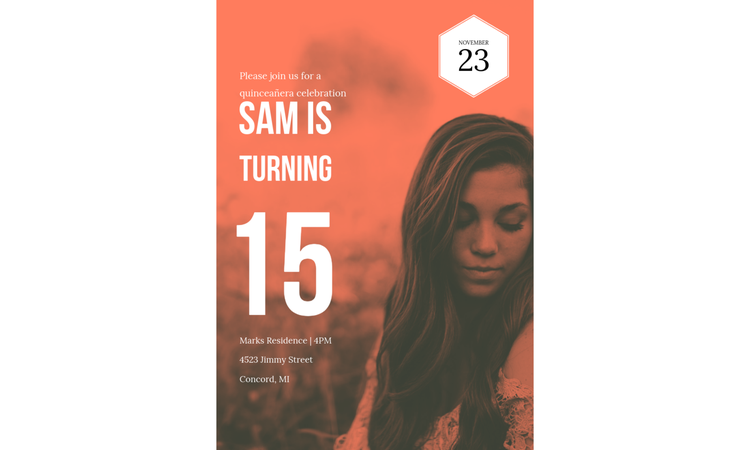
Photo invitation featuring the honoree in her dress.
Upload a high-resolution photo directly into a
card template, then use the built-in
photo editing tools to adjust brightness and crop the image to fit the card dimensions. Place the event details in a text box along the bottom third of the card so the photo stays the visual focus. A soft color overlay behind the text block helps keep the wording legible without covering the image.
Bilingual invitation suite in Spanish and English.
Set up two text boxes stacked on the card, one for Spanish and one for English, using a slightly smaller font size for the second language so the layout doesn't feel cramped. Keep both languages in the same font family for visual consistency. The alignment guides in Adobe Express help you keep both blocks centered and evenly spaced as you adjust the wording.
Glitter-accented invitation with a custom monogram.
Layered invitation card with a sheer organza pocket.
Quinceañera invitation wording ideas to help set the tone.
Your invitation wording carries as much weight as the design itself, since it’s what actually tells guests why they’re being invited and what kind of celebration to expect. It also shouldn’t feel like it was copied from someone else’s card.
Many families balance formal etiquette with heartfelt language. Bilingual wording helps everyone feel included. Before choosing your final text, think about your celebration’s tone. If you’re going for a traditional church ceremony, then that usually pairs well with classic quinceañera invitation wording ideas. For modern celebrations, friendlier language can be a good option.
Now, if the wording runs long, break it into several visual blocks. Don’t try to shrink the font just so that everything fits. Test a few font pairings side by side, and adjust elements like spacing and text alignment before finalizing your design.
"With great joy, we invite you to celebrate [Name]'s Quinceañera."
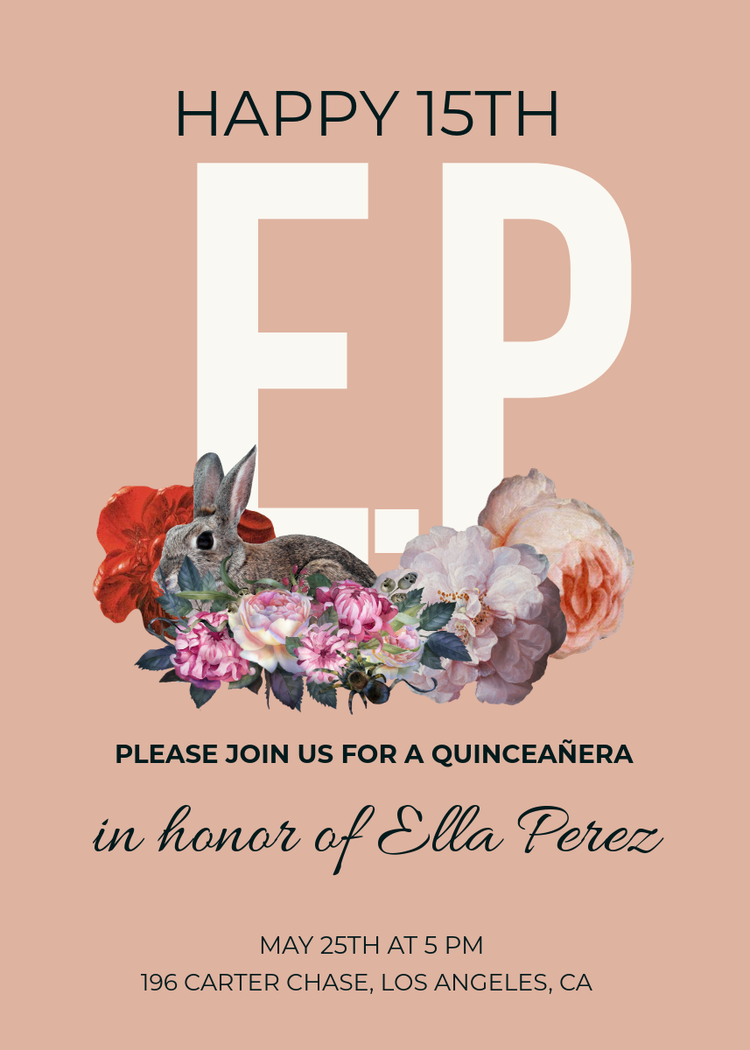
This traditional opening feels timeless and works with nearly every invitation style. Highlight the honoree's name using a decorative script font while keeping the remaining wording in an elegant serif typeface for readability. Adobe Express lets you preview multiple font combinations before settling on the one that best matches your invitation.
"Please join us as [Name] becomes a young woman."
"You are cordially invited to share in [Name]'s 15th birthday celebration."
Formal wording pairs beautifully with classic invitation layouts. Keep generous spacing around the text and use subtle decorative flourishes instead of large graphics so the wording remains the centerpiece.
Adobe Express templates make it simple to maintain clean alignment across every section.
"Together with her family, [Name] invites you to her Quinceañera."
"Fifteen years of dreams, one unforgettable celebration."
Shorter wording leaves more room for decorative artwork. Create a statement layout by placing this line prominently near the top of your invitation, then organize the event details below in a structured hierarchy. With beginner-friendly tools, Adobe Express simplifies how you resize text blocks so your composition feels balanced.
"Join us in celebrating the womanhood of [Name]."
"A celebration of faith, family, and fifteen years."
If the celebration includes a religious Mass, this wording pairs naturally with a
card layout that features a subtle cross or floral motif near the top. In Adobe Express, keep this phrase in a smaller font size positioned above the honoree's name, functioning more like a subheading than the main headline.
"Our princess turns fifteen, please join the celebration."
"We joyfully request your presence at [Name]'s Quinceañera Mass and reception."
This wording covers two separate events, so structure the card with two clearly separated sections in Adobe Express, one for Mass details and one for the reception. Use a bolded label like "Mass" and "Reception" above each block of text so guests can scan the card quickly for the information relevant to them.
"Celebrate this milestone with [Name] and her family."
How to make the most of these Quinceañera invitation ideas.
Choose a starting template.
Pick an invitation style that fits the celebration, whether that’s a formal Mass and reception or a themed party.
Add details that help tell your story.
Personalize the invitation with your favorite colors, meaningful symbols, a unique pattern tied to your heritage, or a portrait in your quinceañera dress. Adobe Express makes it easy to customize templates so the finished design reflects your personality instead of looking generic.
Design around the details.
Adjust text placement and spacing in Adobe Express so the wording stays legible next to graphics.
Make a matching stationery collection.
Once your invitation is finished, reuse the same fonts, graphics, and colors to make
welcome banners, thank-you cards,
photo collages, and ceremony programs for a consistent look.
Export and share.
Save a print-ready file for physical invitations, and a digital version for sharing via email or social media.
Elegant Quinceañera invitation ideas.
When we say “elegant” here, we don’t mean more decoration. It usually means less, but done with intention and better materials. A wax seal or wax seal graphic is usually associated with elegance, but it only works if the background color gives it room to stand out. If you’re planning to use some form of wax seal closure, you might want to skip the busy patterns on the letter or envelope.
Gold text against a cream or ivory background comes across as formal, but use the same gold against a pure white background and your text can look flat or washed out. If you’re making a monogram-style design, resist the urge to add extra text near it. Let the initials become the focal point.
If you’re planning to make sophisticated designs to go with these elegant quinceañera invitation ideas, start with a clean template so they don’t end up looking overly decorated. From there, refine the template with subtle borders and premium-looking fonts.
If you want to extend the use of your design beyond invites, reuse the same elements across welcome posters, reception signage, and ceremony programs. This helps make every printed piece feel like it’s part of one carefully planned collection.
Black and gold invitation with embossed monogram.
Black and gold remain one of the most striking color combinations for
formal celebrations.
Design a bold monogram featuring the birthday girl's initials, then pair it with delicate gold-inspired flourishes and plenty of white space. In Adobe Express, duplicate your monogram to create matching envelope seals, menu cards, or event signage for a cohesive collection.
Champagne-toned card stock with metallic foil script.
Build your layout in Adobe Express using cream, beige, and soft gold tones before choosing elegant script fonts for names and headings. A subtle floral frame or fine line border keeps the invitation polished while allowing the typography to remain the focal point.
Classic ivory invitation with a wax seal closure.
Choose an ivory or cream background color rather than pure white, since it reads warmer and more traditional in print. Adobe Express includes circular badge and seal-style graphic elements you can recolor to a deep red or gold to mimic a wax seal, placed near the top or bottom corner of the card layout.
Velvet-textured invitation with gold ribbon trim.
Minimalist white invitation with delicate gold filigree.
Keep the background clean and mostly empty, then add a thin gold filigree border or corner accents from the shape library rather than covering the whole card. You can easily adjust the opacity of these accents in Adobe Express, so keep them subtle enough that they frame the text without competing with it.
Crystal-accented invitation tucked into a satin envelope.
Deep emerald invitation with gold leaf detailing.
Set the background to a deep emerald green tone and layer gold text and border elements on top for contrast. The easy-to-use tools in Adobe Express let you match the gold across every text element precisely, which matters here since inconsistent gold tones can make the design look mismatched rather than intentional.
Pearl-white card with calligraphy-style lettering.
Rose gold foil invitation with a sheer vellum wrap.
Design the main card in a soft blush or rose gold color scheme, then think of the vellum wrap as a separate translucent overlay that would physically sit on top of it. In Adobe Express, you can preview this effect digitally by lowering the opacity of a light overlay layer to see how text would look once semi-obscured.
Classic damask pattern invitation in soft neutrals.
Quinceañera theme invitation ideas for some quick inspiration.
A themed quinceañera changes how you approach designing the invites. That’s because your design needs to hint at what’s coming without giving away every detail. Once you have a theme, everything else becomes much easier to design once you’ve settled on a color palette and decorative motifs.
When designing, keep theme graphics limited to a corner or a border. Covering the whole card in palm leaves or snowflakes buries the actual invitation details underneath all the decoration.
If you’re pressed for time or think that designing invites from scratch is too complicated, you can rely on the remixable templates from Adobe Express. They can be easily customized to match your vision. For example, replace the illustrations or remix layouts in minutes. You can also easily adjust colors and upload your own graphics.
Enchanted garden theme with botanical illustrations.
Garden-inspired invitations pair soft greens with watercolor flowers, climbing vines, and delicate butterflies. In Adobe Express, combine botanical graphics with elegant script fonts and subtle textured backgrounds to create invitations that feel romantic without becoming crowded. Extend the same artwork to
event programs and floral-themed
thank-you cards after the celebration.
Masquerade ball theme with mask-shaped die-cuts.
While Adobe Express can’t physically die-cut a mask shape, you can
design a card where a mask graphic becomes the visual centerpiece. Place a mask icon or illustration off to one side of the card, with event details arranged around it. Then, choose a deep jewel-tone background like burgundy or navy blue to reinforce the formal masquerade mood.
Princess theme with a tiara and castle motif.
Under the sea theme with shimmering blue tones.
Make a custom gradient by layering a few different shades of blue in Adobe Express. You could also do a layered shape approach to mimic water depth. You can easily find wave or bubble graphics in Adobe Express that you can tweak and place along the bottom edge of a card to create a subtle underwater feel.
Hollywood glam theme with a star-studded border.
Celebrate with vintage movie-inspired elegance using black, gold, ivory, and sparkling star graphics. Design invitations that resemble award show invites by combining bold typography with subtle art deco accents in Adobe Express. You can easily
adapt the finished artwork into event posters,
menu flyers,
seating charts, photo backdrop signage, and guest passes.
Parisian theme featuring the Eiffel Tower silhouette.
Use a simple black silhouette graphic of the Eiffel Tower as a focal point, positioned in the lower third of the card so it doesn’t interfere with the text above it. A soft pink or gold color palette pairs naturally with this theme and keeps the overall design feeling romantic instead of cluttered.
Butterfly garden theme with pastel watercolor wings.
Casino night theme with playing card accents.
Tropical paradise theme with palm leaf illustrations.
Add palm leaf graphics along one or two corners of the card rather than scattering them across the whole layout, which keeps the design feeling clean. Warm colors like coral or yellow for the text work well against a lighter background, and Adobe Express makes it easy to test a few color combinations side by side before settling on one.
Winter wonderland theme with snowflake foil detailing.
More creative ways to use your Quinceañera invitation ideas.
A well-designed quinceañera invitation can become the foundation for dozens of coordinated pieces throughout your event. Here are a few ideas that help you get more from your original design:
- Write a heartfelt letter to the birthday girl using matching colors and decorative elements as a keepsake she’ll definitely treasure.
- Make digital thank-you messages to send after the event while keeping the invitation’s visual style.
- Craft a printed memory book cover that makes use of the invitation’s floral motifs, color palette, monogram, or theme graphics.
Keeping these pieces visually connected gives guests a consistent experience from the moment they receive the invite until they leave the celebration.
Make your invitations part of the celebration with Adobe Express.
A quinceañera deserves an invitation that reflects the excitement of the celebration ahead. Adding thoughtful details helps guests feel connected before the festivities even begin, whether your style leans toward elegant florals or modern minimalist designs.
With quinceañera invitation ideas spanning wording and full themes, there’s a direction here for nearly any creative vision. Adobe Express keeps the entire process, from picking a template to sharing finished designs, all in one place, so the design part of planning doesn’t have to compete with everything else on your to-do list.
What should a quinceañera invitation include?
Every invitation should clearly list the honoree’s name, the date, ceremony and reception locations, start time, RSVP information, and dress code if applicable. Also include any additional details guests need before attending.
When should quinceañera invitations be sent?
Many families mail invitations about six to eight weeks or up to three months before the celebration. Larger events, holiday weekends, or celebrations with many out-of-town guests often benefit from giving guests additional notice so they have time to make travel arrangements.
Can I make bilingual quinceañera invitations in Adobe Express?
Yes. You can add multiple text boxes for different languages within the same card layout, adjusting font size and spacing for legibility. You could also duplicate your invitation, replace the wording, and keep the overall design consistent across both versions.
Can I order printed invitations directly through Adobe Express?
The
print-to-order feature is currently only available in the US, the UK, Canada, and Australia on desktop and mobile devices.
The quick and easy create-anything app.
Make stunning social posts, images, videos, flyers, and more with Adobe Express. Dream it. Make it. Easy.
Get started for free
- Home
- Quinceañera Invitation Ideas