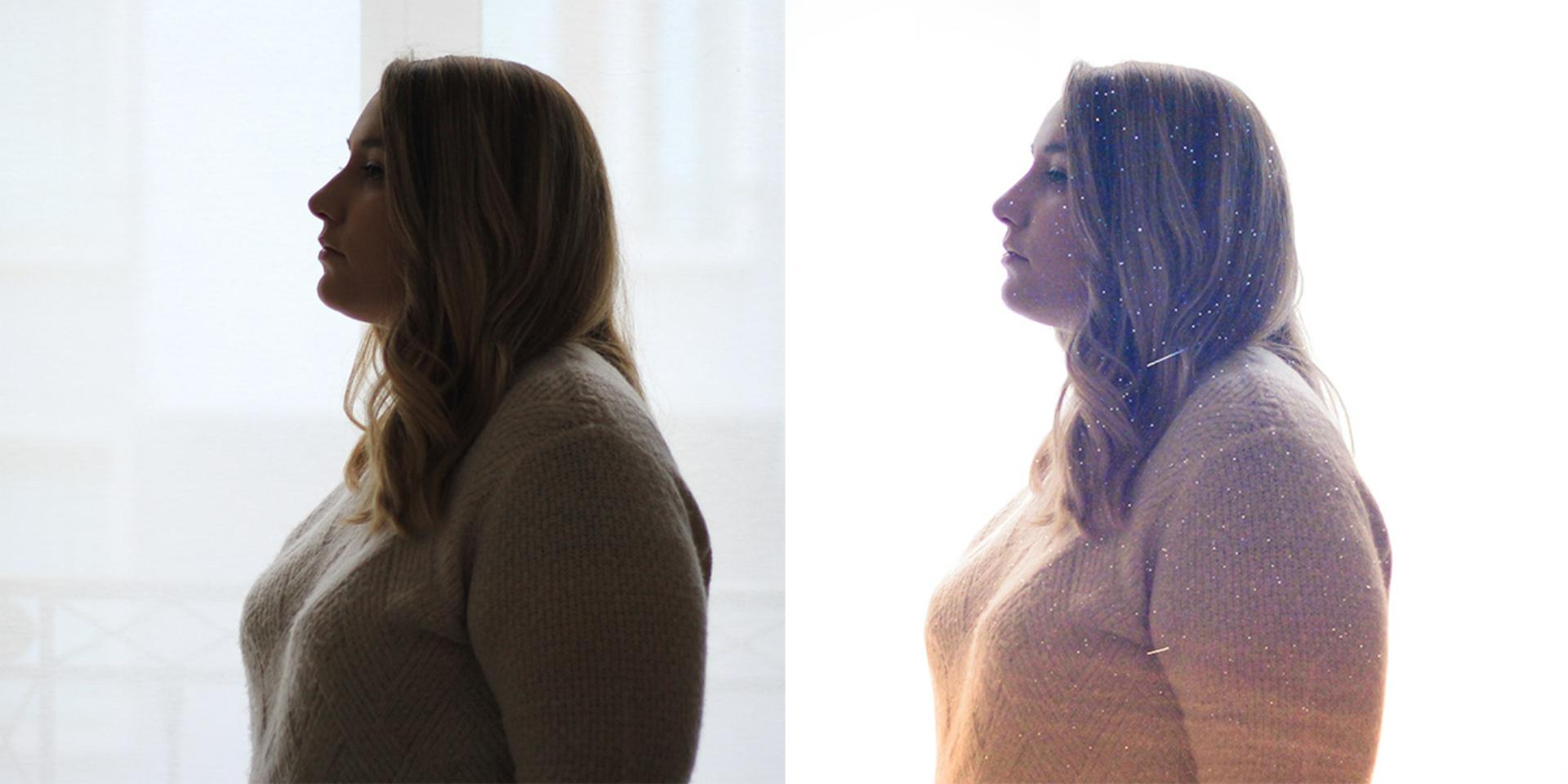
Créer une double exposition avec une texture étoilée
Apprenez à créer un effet de double exposition dans Photoshop en combinant un portrait et une photo d'étoiles.
Publié le
Bonjour à tous, je m'appelle Camille, je suis photographe et aujourd'hui vous allez apprendre à créer une double exposition en combinant un portrait et une photo d'étoile dans Photoshop.
Vous commencerez par préparer le portrait en uniformisant son arrière-plan et en ajustant sa composition.
Vous augmenterez ensuite la luminosité du sujet afin de mieux faire ressortir l'effet final.
Vous renforcerez les détails de la texture étoilée avant de l'intégrer au portrait pour créer la double exposition.
Enfin, vous harmoniserez les couleurs de l'image à l'aide d'un filtre photo et d'un masque de fusion pour obtenir un rendu plus créatif.
Et voilà, vous saurez désormais comment créer une double exposition avec une texture étoilée dans Photoshop.
Donnez une nouvelle atmosphère à une image grâce à une double exposition
La double exposition permet de fusionner deux images pour obtenir un rendu plus graphique, poétique et atmosphérique. En combinant un portrait de profil avec une texture différente, vous pouvez créer une composition lumineuse où le sujet semble se fondre progressivement dans un décor.
Dans ce tutoriel, vous allez préparer le portrait, nettoyer son arrière-plan, renforcer la texture des étoiles, puis intégrer cette seconde image grâce aux calques, aux modes de fusion et aux masques. Les réglages de luminosité et de couleur permettront ensuite d’harmoniser l’ensemble pour obtenir un effet plus doux et cohérent.
Ce que vous allez apprendre
Dans ce tutoriel pratique, vous découvrirez comment :
Uniformiser un arrière-plan avec le remplissage génératif,
Éclaircir une image à l’aide de calques de réglage Courbes et Exposition,
Améliorer la visibilité d’une texture avec des duplications de calques, un filtre Passe-haut et un flou gaussien,
Convertir plusieurs calques en objet dynamique pour faciliter les transformations,
Intégrer une image de ciel étoilé dans un portrait avec le mode de fusion Superposition,
Utiliser un filtre photo et un masque de fusion pour créer une transition de couleurs naturelle.
À propos de l’artiste
Je m’appelle Camille, je suis créatrice de contenu lifestyle depuis plusieurs années. Je partage principalement sur Instagram, tout en développant également mon compte TikTok et ma chaîne YouTube. À travers mes contenus, je crée des images et des auto-portraits où la photographie occupe une place centrale. J’aime faire rêver ma communauté en imaginant des univers poétiques et romancés, avec une attention particulière portée à la lumière et aux ambiances.
J'aime partager de temps à autre les coulisses de mon travail ainsi que mes techniques, avec l’envie de rendre la création accessible et d’encourager chacun à explorer sa sensibilité artistique.
You can control how Adobe websites use cookies and similar technologies by making choices below. But note that if you disable cookies and similar technologies entirely, Adobe websites may not function properly.
Cookies are small text files stored by your web browser when you use websites. There are also other technologies that can be used for similar purposes like HTML5 Local Storage and local shared objects, web beacons, and embedded scripts. These technologies help us do things like remembering you and your preferences when you return to our sites, measure how you use the website, conduct market research, and gather information about the ads you see and interact with.
You can make choices in the menu below about what cookies and other technologies you want us to use on Adobe sites when you visit them from this browser. You can always change those choices later by clicking on the Cookie Preferences link at the bottom of the page.
If enabled:
We can improve your experience by tailoring the site and the content to things we think might be of interest
We can better keep track of your preferences — like what language you prefer to use
We will better understand your likely interests so we can provide you more relevant Adobe ads and content on non-Adobe websites and in non-Adobe apps
It will help us improve the performance of our website and those of our partners who use the Adobe Experience Cloud
If disabled:
We won’t be able to remember you from session to session so the experience may not be tailored to your interests
You’ll still have access to the content of the site but certain features that depend on cookies may not function
You’ll still see ads, they just may not be as relevant to you
General information
You can control how Adobe websites use cookies and similar technologies by making choices below. But note that if you disable cookies and similar technologies entirely, Adobe websites may not function properly.
Cookies are small text files stored by your web browser when you use websites. There are also other technologies that can be used for similar purposes like HTML5 Local Storage, web beacons, and embedded scripts. These technologies help us do things like remembering you and your preferences when you return to our sites, measure how you use the website, conduct market research, and gather information about the ads you see and interact with.
You can make choices in the menu below about what cookies and other technologies you want us to use on Adobe sites when you visit them from this browser. You can always change those choices later by clicking on the Cookie Preferences link at the bottom of the page.
If enabled:
We can improve your experience by tailoring the site and the content to things we think might be of interest
We can better keep track of your preferences — like what language you prefer to use
We will better understand your likely interests so we can provide you more relevant Adobe ads and content on non-Adobe websites and in non-Adobe apps
It will help us improve the performance of our website and those of our partners who use the Adobe Experience Cloud
If disabled:
We won’t be able to remember you from session to session so the experience may not be tailored to your interests
We’ll still count your use of our site and services
You’ll still have access to the content of the site but certain features that depend on cookies may not function
You’ll still see ads, they just may not be as relevant to you
Operate the site and core servicesOperate site and measure engagement
Always active
These cookies are required, and they are used to enable the site and related services core functionality. Without them the site could not operate, so they cannot be disabled.
These cookies enable the site and related services’ core functionality and collect statistics about user engagement, such as counting active use to help us understand trends. These cookies cannot be disabled.
Measure performance
These cookies are used to analyze site usage to measure and improve performance. Without them Adobe cannot know what content is most valued and how often unique visitors return to the site, making it hard to improve information we offer to you.
These cookies are used to analyze site usage to measure and improve performance. Without them Adobe cannot know what content is most valued, making it hard to improve information we offer to you.
Extend functionality
These cookies are used to enhance the functionality of Adobe sites such as remembering your settings and preferences to deliver a personalized experience; for example, your username, your repeated visits, preferred language, your country, or any other saved preference.
Personalize advertising
These cookies are used to enable Adobe and our partners to serve ads more relevant to your interests. Without them you will still see ads, but they might not be as relevant to you.
Personalize advertising
These cookies are used to enable Adobe and our partners to serve ads more relevant to your interests. Without them you will still see ads, but they might not be as relevant to you.