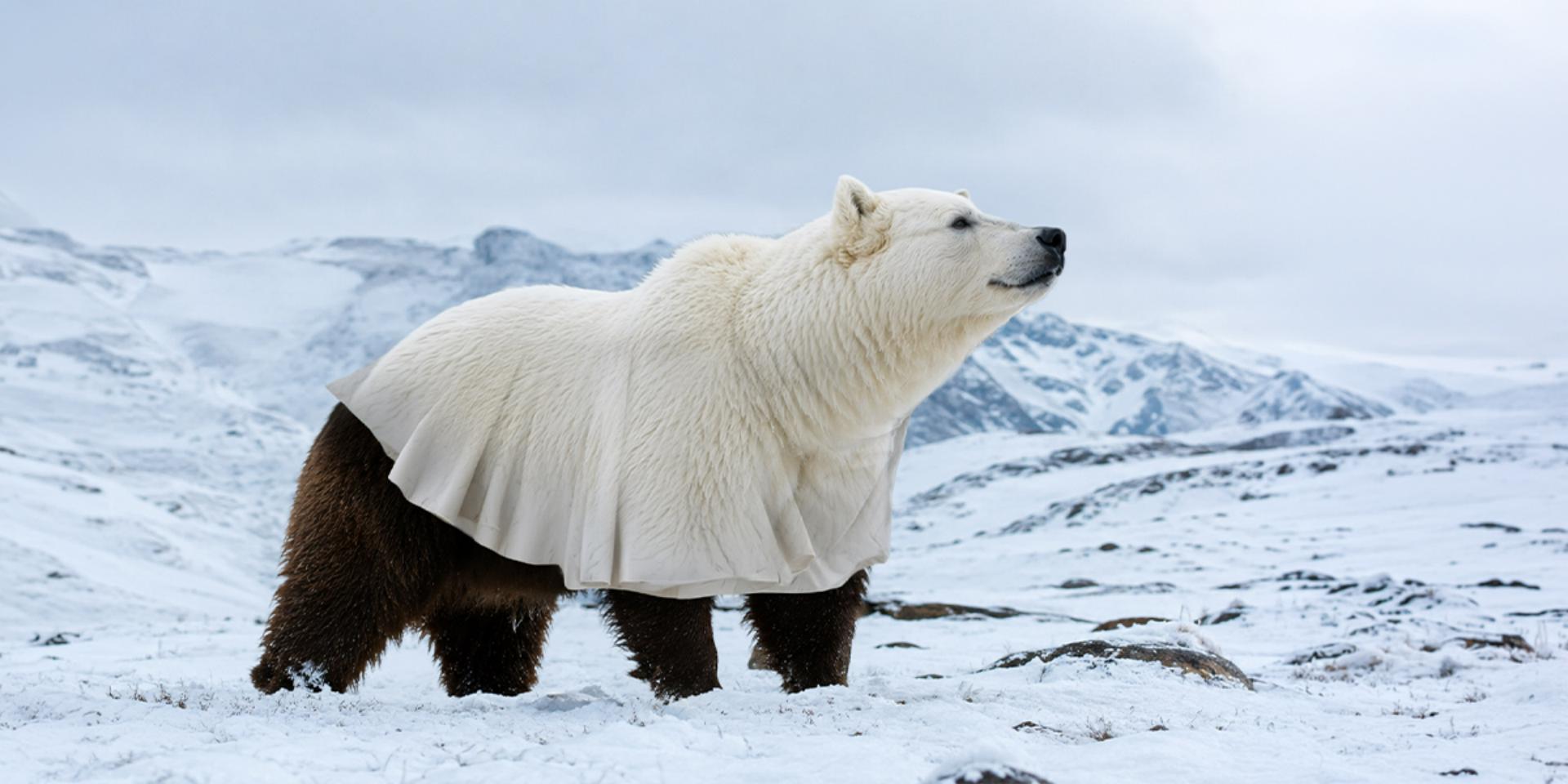
Apprenez à créer une illusion surréaliste avec les sélections, les masques de fusion et l'outil pinceau.
Publié le
Dans ce tutoriel, vous apprendrez à habiller un ours brun en ours polaire pour créer une transformation surréaliste.
Nous commencerons par préparer et isoler les différents éléments avant d'intégrer le pelage de l'ours polaire sur l'ours brun.
Puis, nous ajouterons un drapé pour construire l'illusion et faire la transition entre les deux animaux.
Enfin, nous travaillerons les ombres et les différentes zones de fusion pour harmoniser l'ensemble.
Cette technique mêle photomontage et créativité pour donner vie à une transformation originale.
Alors, pour créer votre propre illusion, lancez le tutoriel dès maintenant.
Ce que vous allez apprendre
Créer un photomontage convaincant ne consiste pas simplement à placer une image par-dessus une autre. Vous verrez ici comment extraire les parties utiles de plusieurs photographies, ajuster leur taille et leur orientation, puis masquer progressivement les zones qui ne doivent pas apparaître.
Le travail de finition joue ensuite un rôle essentiel pour rendre l’assemblage cohérent. Les masques d’écrêtage peuvent être affinés avec différentes opacités de pinceau, tandis que des calques supplémentaires permettent de recréer les ombres et le volume aux endroits où les images se rejoignent. Vous disposerez ainsi d’une méthode applicable à de nombreux montages créatifs nécessitant de combiner proprement textures, formes et sujets provenant de plusieurs photos, le tout pour un rendu original.
Dans ce tutoriel pratique, vous découvrirez comment :
Extraire proprement le sujet de photographies grâce à Sélection > Sujet,
Adapter leur orientation et leurs proportions à une nouvelle composition,
Utiliser des masques pour créer des transitions progressives entre différentes textures,
Ajouter des ombres et effectuer les dernières retouches pour unifier le photomontage.
À propos de l’artiste
Julien Tabet est un artiste digital français. Son travail explore la rencontre entre la nature et l’imaginaire, donnant naissance à des compositions poétiques. S’inspirant du monde animal et du surréalisme, il crée des images visuellement saisissantes, portées par une palette de couleurs harmonieuse. Grâce à une maîtrise affirmée de Photoshop, il transforme ses idées les plus imaginatives en œuvres numériques d’une grande précision.
You can control how Adobe websites use cookies and similar technologies by making choices below. But note that if you disable cookies and similar technologies entirely, Adobe websites may not function properly.
Cookies are small text files stored by your web browser when you use websites. There are also other technologies that can be used for similar purposes like HTML5 Local Storage and local shared objects, web beacons, and embedded scripts. These technologies help us do things like remembering you and your preferences when you return to our sites, measure how you use the website, conduct market research, and gather information about the ads you see and interact with.
You can make choices in the menu below about what cookies and other technologies you want us to use on Adobe sites when you visit them from this browser. You can always change those choices later by clicking on the Cookie Preferences link at the bottom of the page.
If enabled:
We can improve your experience by tailoring the site and the content to things we think might be of interest
We can better keep track of your preferences — like what language you prefer to use
We will better understand your likely interests so we can provide you more relevant Adobe ads and content on non-Adobe websites and in non-Adobe apps
It will help us improve the performance of our website and those of our partners who use the Adobe Experience Cloud
If disabled:
We won’t be able to remember you from session to session so the experience may not be tailored to your interests
You’ll still have access to the content of the site but certain features that depend on cookies may not function
You’ll still see ads, they just may not be as relevant to you
General information
You can control how Adobe websites use cookies and similar technologies by making choices below. But note that if you disable cookies and similar technologies entirely, Adobe websites may not function properly.
Cookies are small text files stored by your web browser when you use websites. There are also other technologies that can be used for similar purposes like HTML5 Local Storage, web beacons, and embedded scripts. These technologies help us do things like remembering you and your preferences when you return to our sites, measure how you use the website, conduct market research, and gather information about the ads you see and interact with.
You can make choices in the menu below about what cookies and other technologies you want us to use on Adobe sites when you visit them from this browser. You can always change those choices later by clicking on the Cookie Preferences link at the bottom of the page.
If enabled:
We can improve your experience by tailoring the site and the content to things we think might be of interest
We can better keep track of your preferences — like what language you prefer to use
We will better understand your likely interests so we can provide you more relevant Adobe ads and content on non-Adobe websites and in non-Adobe apps
It will help us improve the performance of our website and those of our partners who use the Adobe Experience Cloud
If disabled:
We won’t be able to remember you from session to session so the experience may not be tailored to your interests
We’ll still count your use of our site and services
You’ll still have access to the content of the site but certain features that depend on cookies may not function
You’ll still see ads, they just may not be as relevant to you
Operate the site and core servicesOperate site and measure engagement
Always active
These cookies are required, and they are used to enable the site and related services core functionality. Without them the site could not operate, so they cannot be disabled.
These cookies enable the site and related services’ core functionality and collect statistics about user engagement, such as counting active use to help us understand trends. These cookies cannot be disabled.
Measure performance
These cookies are used to analyze site usage to measure and improve performance. Without them Adobe cannot know what content is most valued and how often unique visitors return to the site, making it hard to improve information we offer to you.
These cookies are used to analyze site usage to measure and improve performance. Without them Adobe cannot know what content is most valued, making it hard to improve information we offer to you.
Extend functionality
These cookies are used to enhance the functionality of Adobe sites such as remembering your settings and preferences to deliver a personalized experience; for example, your username, your repeated visits, preferred language, your country, or any other saved preference.
Personalize advertising
These cookies are used to enable Adobe and our partners to serve ads more relevant to your interests. Without them you will still see ads, but they might not be as relevant to you.
Personalize advertising
These cookies are used to enable Adobe and our partners to serve ads more relevant to your interests. Without them you will still see ads, but they might not be as relevant to you.