Acrobat
How to create and manage cash receipts: A guide to tracking cash transactions.
A practical guide to writing, managing and securing cash receipts for accurate tracking of cash payments in any business.


Acrobat
A practical guide to writing, managing and securing cash receipts for accurate tracking of cash payments in any business.

Published by Adobe Acrobat India on 15 July 2025
JUMP TO SECTION
What are cash receipts used for?
How do you write a receipt for cash payments?
How do you write a receipt of payment in digital format?
Tips for managing cash receipts effectively
Common mistakes to avoid when preparing or managing a cash receipt
Troubleshooting: What to do if a receipt is lost, incomplete or disputed?
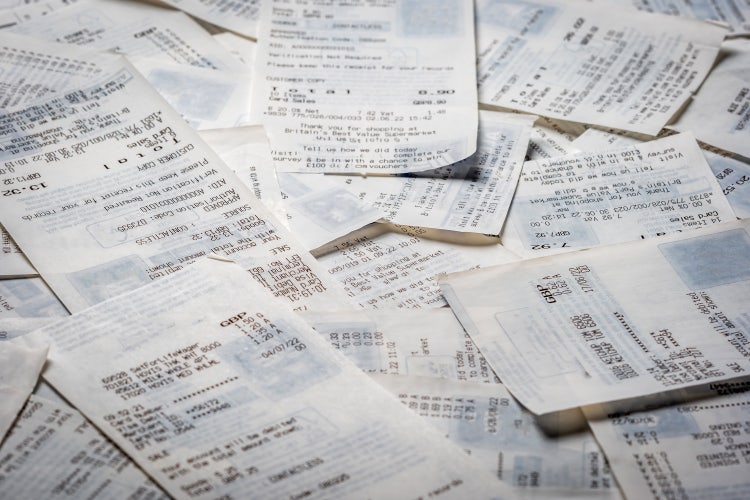
A cash receipt is a written document that confirms a customer has made a cash payment for goods or services. It includes essential information such as the date, amount paid, description of the transaction, and the names or signatures of both the payer and the payee.
Cash receipts are commonly used in retail, hospitality, professional services, and rental businesses - any setting where physical cash is exchanged. They are also often used to track advance payments or partial payments.
In practice, cash receipts serve several important purposes:
Adobe Acrobat allows users to create and fill out receipt templates in PDF format, ensuring the document is locked and secure once issued.
Cash receipts are used to record and confirm payments received in cash, rather than by card, bank transfer, or other digital methods.
These include:
Keeping a proper receipt for cash payment not only helps businesses stay organised but also provides a legally recognised trail in case of audits or financial reviews. In countries like India, where many micro and small businesses rely on cash-based trade, maintaining accurate receipts is essential for GST compliance and financial transparency.

Learning how to write a receipt properly ensures your document is valid, professional and comprehensive. If you are issuing a receipt for a cash payment specifically, it is important to clearly indicate that the payment was made in cash to avoid any confusion regarding the method of transaction.
A typical cash receipt should include the following details:
Here’s a simple example:
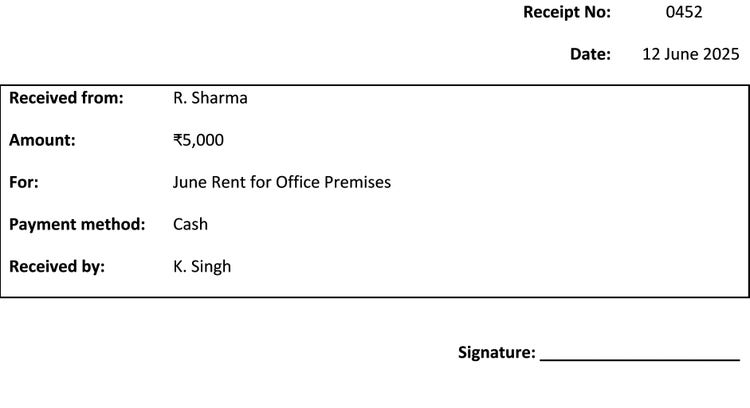
Using a structured template in Adobe Acrobat helps ensure consistency across all your receipts, so you can save a reusable file and edit it as needed for each transaction. To ensure your document remains tamper-proof and legally recognised, save it as a secured PDF. With Adobe Acrobat, you can apply password protection or lock the file after signing to prevent unauthorised changes.
Today, many businesses are moving away from handwritten receipts and using digital versions instead. If you’re wondering how to write a receipt of payment in digital form, the steps are largely the same but the tools you use matter.
By using Adobe Acrobat, you can:
This approach saves time, looks professional, and ensures your receipts are archived securely for future reference. If you’re starting from scratch, this guide on how to create a digital signature can help you set up secure signing quickly.
To stay organised and reduce manual errors, consider the following best practices when managing cash receipts:
Create a standardised receipt format and reuse it across all transactions to avoid inconsistency.
Assign a unique receipt number to each transaction. This helps with audit trails and prevents duplication.
Even if you issue handwritten receipts, scan and save a digital version. To automate this process, explore Adobe Acrobat Pro features that allow seamless scanning, editing and secure storage.
Keep your cash receipts in folders sorted by month or category (sales, rent, deposits). This will simplify year-end reconciliation.
Store digital copies on a secure cloud or encrypted drive, especially for tax or legal purposes.
Creating cash receipts may seem straightforward, but several common issues can create confusion or gaps in your records. Here’s what to watch out for:
Failing to include the date, name, amount, or description weakens the receipt’s reliability. Double-check before issuing.
If creating paper receipts, make sure handwriting is legible or opt for typed formats using editable PDFs.
Paper receipts can be lost or damaged. Always scan them and store digitally using tools like Acrobat.
This can cause major reconciliation issues. Use an automated system or manual log to track issued receipt numbers.
If a customer loses their receipt, reissue a duplicate marked “Copy” and include the original receipt number and date for traceability.
If you discover a missing detail, create an amended version and clearly note it as an update or correction to the original.
If someone disputes a payment or amount, having a clearly written and signed receipt (ideally with a digital time stamp) helps resolve the issue quickly. PDF documents created with Adobe Acrobat allow for metadata checks and digital signature validation.
In any business, proper handling of cash receipts contributes to financial clarity, legal compliance and customer trust. In India, where cash transactions are still common - particularly among micro and small businesses - well-maintained cash payment receipts also support GST reporting and simplify annual accounting. Issuing a receipt for cash payment correctly means fewer disputes, smoother audits and better business relationships. With digital tools like Adobe Acrobat, this process becomes faster, cleaner and more secure.