#1e1e1e

DESIGN

Powerful 3-colour combinations: How to use colour theory for stunning design impact.

Discover how to choose and apply three-colour combinations that bring balance, contrast and style to every design.
Explore Illustrator

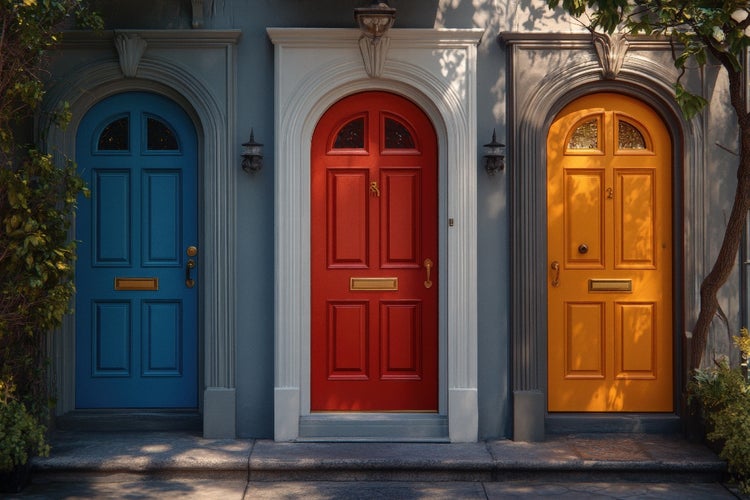
Three doors painted in contrasting colours, creating a bold architectural statement through a striking three-colour combination.
#F5F5F5
Colour plays a powerful role in shaping how people respond to design. Selecting three well-balanced colours is more than a visual choice; it is a way to bring structure, emotion and clarity to your work. For designers in India working across branding, packaging, motion graphics, web interfaces and more, mastering three-colour combinations can transform a project from ordinary to memorable. In this guide, we break down the principles of colour harmony, explore how to build effective three-colour palettes, and share standout examples for various creative scenarios. You will also find practical tips, use cases and insights into how Adobe Creative Cloud helps creators work more efficiently, make bold design decisions and achieve professional results with lasting impact.

What are three-colour combinations and why are they powerful?

Three-colour combinations harness the principles of colour harmony and contrast to achieve visual balance.

  • Harmony: A limited palette ensures unity across all design elements
  • Contrast: Introducing a third colour allows for emphasis without overwhelming the viewer
  • Flexibility: Three hues can serve as primary, secondary and accent colours, simplifying asset management
  • Accessibility: Carefully selected palettes can meet contrast requirements for readability and inclusivity

Key reasons to use three-colour combinations:

  • They provide more nuance than two-colour schemes, offering depth and visual interest
  • They avoid the chaos of multi-colour schemes while still allowing for punctuated highlights
  • They are easy to remember and replicate across different media print, digital and video

Tip: Label your primary, secondary and accent colours clearly in Creative Cloud Libraries to maintain consistency across Photoshop, Illustrator and InDesign.

https://youtu.be/YgtzLdbeZy4?si=mxhFOc4SdW1ZuG6U

How to select three colours that look good together.

Choosing 3 colours that look good together begins with understanding the colour wheel and the relationships between hues:

  • Complementary: Colours opposite on the wheel (for example, blue and orange) paired with a neutral accent such as grey or beige
  • Analogous: Three hues side by side on the wheel (for example, teal, blue and violet) for smooth transitions
  • Triadic: Three equally spaced colours (for example, red, yellow and blue) for vibrant contrast
  • Split-complementary: A base colour plus the two adjacent to its complement (for example, purple plus yellow-green and yellow-orange) for softer contrast

Step-by-step process:

  1. Identify your base hue based on brand values or project mood
  2. Choose a harmony rule (complementary, analogous, triadic or split-complementary)
  3. Use Adobe Colour Themes panel to preview combinations and adjust saturation/lightness
  4. Test in context by mocking up buttons, headlines and background areas in Photoshop or XD

Troubleshooting: If colours clash, reduce saturation or adjust luminosity to soften the palette.

Best 3 colour palettes for Indian brands and startups.

From fintech apps to wellness packaging, the right three-colour combination can create a strong first impression while aligning with your brand values. These curated palettes are rooted in Indian cultural cues and startup branding trends.

1. Indigo / turmeric yellow / white

  • Suitable for: EdTech, finance, NGO campaigns
  • Works well on: App dashboards, landing pages, social ads
  • Why it works: Indigo builds trust, turmeric adds warmth and energy, and white keeps layouts clean and accessible

2. Crimson red / sand / charcoal

  • Suitable for: Fashion, wellness, boutique eCommerce
  • Works well on: Packaging, brochures, Instagram carousels
  • Why it works: Crimson stands out on mobile, sand softens the tone, and charcoal anchors the composition

3. Peacock green / gold / ivory

  • Suitable for: Ayurveda, heritage brands, luxury D2C
  • Works well on: Label designs, influencer kits, pop-up stall graphics
  • Why it works: Rich green connects to nature, gold adds prestige, and ivory introduces elegance

4. Saffron / sky blue / ash grey

  • Suitable for: Youth platforms, regional language apps, edu campaigns
  • Works well on: App icons, reels, onboarding slides
  • Why it works: Saffron is vibrant and familiar, blue builds credibility, and grey balances the layout

5. Coral / electric violet / midnight blue

  • Suitable for: Creator tools, tech events, lifestyle apps
  • Works well on: Pitch decks, logo kits, social video graphics
  • Why it works: Coral catches attention, violet modernises the look, and midnight blue adds contrast

Tip: Save these palettes in Illustrator as swatch groups and sync them to your Creative Cloud Libraries for easy reuse across Photoshop, XD and InDesign.

High-impact bright colour combinations for Indian startups.

If your brand is targeting Gen Z, launching a festive campaign or entering the creator space, high-energy colours can help your visuals get noticed quickly. These bold trios are tailored for attention-grabbing results.

1. Neon pink / teal / lemon yellow

  • Ideal for: D2C beauty, pop-up campaigns, streetwear brands
  • Works well on: Instagram reels, product launches, GIF stickers

2. Vermilion / turquoise / cream

  • Ideal for: Food delivery, grocery apps, festival packaging
  • Works well on: Icons, in-app promos, packaging sleeves

3. Indigo / fuchsia / soft peach

  • Ideal for: Women-led platforms, mental health apps, lifestyle newsletters
  • Works well on: UI design, email templates, social content

Tips for working with bright colours:

  • Keep the base simple with white, beige or grey
  • Use one main colour for backgrounds or headers
  • Let the other two act as accents in buttons, icons or illustrations

If colours feel too intense:

Lower the saturation slightly or add translucent overlays to create more visual breathing space.

How to implement three complementary colours effectively.

A 3 complementary colours scheme combines a contrasting pair plus an analogous accent. Follow these steps:

  1. Select your primary complementary pair (e.g. teal and orange)
  2. Identify the analogous accent to one of those hues (e.g. green-blue adjacent to teal)
  3. Assign roles: Primary for large backgrounds, secondary for mid-tone elements, accent for CTAs and highlights
  4. Test contrast: Use the Colour Contrast Analyzer to ensure text over background meets WCAG 2.1 AA standards

Practical example:

  • Primary: Teal background across hero section
  • Secondary: Orange headings and subheadings
  • Accent: Green-blue icons and button hovers

Troubleshooting: If text becomes unreadable, introduce a semi-opaque overlay or change text colour to white or charcoal.

What tips ensure your three-colour combinations work across media?

Consistency and adaptability are key when applying palettes to multiple formats:

  • Create global swatches in Illustrator that update across all instances
  • Export palettes as ASE (Adobe Swatch Exchange) for use in Photoshop, InDesign and After Effects
  • Use colour styles in InDesign for paragraph and character styles that follow your palette
  • Leverage Creative Cloud Libraries to manage and share palettes with team members
  • Apply HSL adjustments in {{premiere}} to fine-tune video assets without recreating graphics

Tip: Document your palette usage guidelines—ratio of primary to secondary to accent colours—in a shared style guide for quick reference.

What troubleshooting advice helps refine three-colour schemes?

Even well-chosen palettes can present challenges. Use these solutions:

  1. Colours appear different on various screens: Calibrate monitors; embed sRGB profile for web assets
  2. Palette feels flat or dull: Increase contrast by tweaking value/lightness on one hue
  3. Too many mid-tones: Introduce a dark or light neutral to break monotony
  4. Accent colour overwhelms: Reduce saturation or limit accent usage to small UI elements
  5. Client requests colour adjustments: Quickly swap base hue in Adobe Colour Themes and preview in real time

Troubleshooting tip: Always preview your palette on both desktop and mobile mock-ups to catch scaling issues early.

Creative ways to use three-colour palettes across your projects.

Three-colour palettes shine in a variety of project types. Here are five scenarios:

1. Social media videos.

  • Application: Animate text and graphics in After Effects using your palette for lower thirds and transitions
  • Benefit: Ensures brand recognisability and visual consistency across platforms

2.For reels or animations.

  • Application: Design infographic slides in Photoshop, then sync with narration in {{premiere}}
  • Benefit: Presents information clearly with harmonious colour cues

3. Short-form branded content.

  • Application: Create 15-second Instagram Stories using triadic palettes for vibrant ad templates in Spark Post
  • Benefit: Grab attention quickly with balanced, bold colour usage

4. Client proposals.

  • Application: Format slides in InDesign with your three colours for headings, body text and call-out boxes
  • Benefit: Guides the reader’s eye through the narrative, reducing misunderstanding

5. Work together from anywhere by sharing documents online.

  • Application: Share Creative Cloud Library links containing palette swatches and style guides
  • Benefit: Streamlines team access to approved colours and reduces version conflicts

Example: A micro business owner used a 3 colour combinations scheme forest green, peach and charcoal—to redesign their product packaging in Illustrator and saw a 20 per cent uplift in shelf impact.

How to build and manage brand palettes in Creative Cloud.

Maximise efficiency by leveraging cross-app features:

  1. Adobe Colour Themes panel: Generate and save palettes directly within Photoshop, Illustrator and InDesign
  2. Creative Cloud Libraries: Store swatches, character styles and graphic assets for instant application across projects
  3. Adobe XD: Prototype UI kits with global colours and share interactive design specs
  4. Adobe {{premiere}}: Apply Lumetri Colour presets based on your three-colour palette to adjust footage rapidly
  5. Adobe After Effects: Use Essential Graphics panel to expose colour controls for motion graphics templates
  6. Adobe InDesign: Apply Paragraph and Object Styles that reference your global swatches for quick layout updates
  7. Adobe Spark: Create social posts with brand colours auto-applied for near-instant content creation

Tip: Keep your palette files organised in a single Creative Cloud folder named “Brand Palettes” to simplify onboarding new team members.

Make your designs stand out with powerful three-colour combinations.

Mastering 3 colour combinations, whether 3 bright colour combinations for maximum impact, 3 complementary colours for balanced contrast or carefully selected best 3 colour combinations for branding, empowers creative professionals to produce stunning, cohesive designs. By following the guidance above understanding colour wheel fundamentals, applying practical selection methods, testing across media and integrating with Adobe Creative Cloud workflows you will grow your brand, streamline production, deliver polished results and demonstrate clear ROI. Embrace the power of three-colour palettes today to ensure your designs stand out and resonate waith audiences.

Frequently asked questions.

Indian design often draws from rich cultural traditions and vibrant surroundings, resulting in bold and expressive colour palettes. Popular combinations include saffron, emerald green and ivory for festive branding; royal blue, silver and maroon for formal events; and turmeric yellow, indigo and white for educational or social awareness campaigns. These combinations reflect warmth, contrast and cultural familiarity, making them ideal for both print and digital applications.

Which three-colour palettes work best for Indian wedding invitations?

Indian wedding invites often blend tradition with modern aesthetics. Timeless combinations include maroon, gold and cream for a classic regal look; rose pink, sage green and ivory for contemporary elegance; and deep purple, coral and champagne for fusion or destination weddings. These palettes help convey celebration, family heritage and a sense of occasion, while offering flexibility across printed cards, digital invites and stationery sets.

What are some common mistakes to avoid when using three-colour combinations?

Common errors include using colours with poor contrast, relying on trendy palettes without considering your brand identity, or placing bright colours next to each other without balance. Overuse of vibrant shades can overwhelm users instead of creating impact.

How can I incorporate three-colour palettes into digital marketing designs?

Using a balanced three-colour scheme in digital marketing assets like banners, emailers, and social media posts can strengthen brand recognition. You can test combinations with ready-made marketing mockups to visualize designs before launch.

Are there tools available to help me test colour combinations visually?

Yes, design software like Adobe Illustrator and Photoshop allows you to test colour schemes in real time. You can also explore online palette generators or access creative apps through the Adobe Creative Cloud desktop app, which lets you manage your tools in one place.

How should I adapt my colour combinations for mobile versus desktop experiences?

On mobile screens, high-contrast colours and clear hierarchy are essential due to limited space. For desktop, you have more flexibility to use subtle contrasts and layered hues. Always preview your designs across different devices before finalizing.

What’s the role of typography when working with three-colour combinations?

Typography and colour must work together. Use one colour for headings, another for body text, and a third as an accent for calls to action or highlights. This approach ensures readability while reinforcing visual structure.

Can students use professional design apps to experiment with colour combinations?

Absolutely. Many platforms offer discounted or customized access to students. For instance, Indian students can explore Adobe's student plans which include powerful creative apps to build skills and create professional-quality designs affordably.

How do regional preferences in India affect colour perception in design?

Colours like red, yellow, and green carry specific cultural and emotional meanings across different regions in India. A design that works well in urban North India might need adjustment for audiences in South India, where colour interpretations can differ based on tradition and context.

How can I use stock imagery to complement my three-colour scheme?

Stock photos should align with your selected palette. Choose or edit images to include your three core colours for brand consistency. Platforms like Adobe Stock offer high-quality images that can be customized to fit your design’s colour theme.

What is the best way to test how a three-colour combination affects user engagement?

You can use A/B testing tools to evaluate different colour schemes. Track user interaction, bounce rate, and conversion rate to determine which palette resonates most with your audience.

How often should I update my design's colour scheme?

It depends on your brand and industry. While core brand colours should remain stable, refreshing your palette for seasonal campaigns, product launches, or festivals like Diwali and Holi can help keep your visuals fresh and engaging.

https://main--cc--adobecom.aem.page/cc-shared/fragments/creativity-for-all/default

You may also like

Content as a Service v3 - file-type graphic design collection - Monday 7 July 2025 at 18:12

https://main--cc--adobecom.aem.page/cc-shared/fragments/seo-articles/do-more-illustrator-color-blade