What is the date format UK businesses and individuals use?
Design documents with correct UK dates.
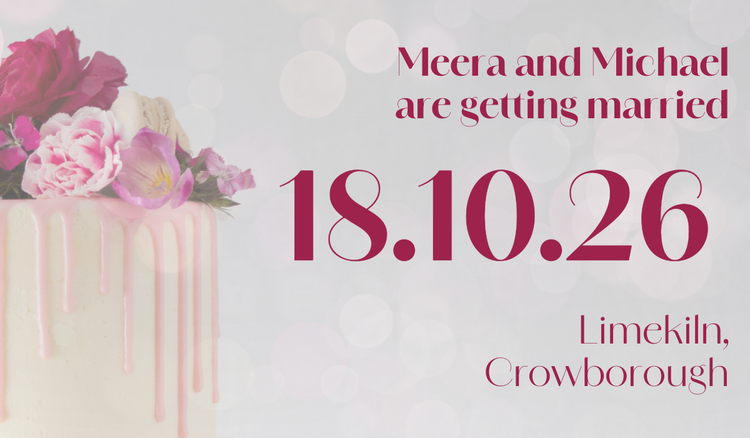




Dates can seem simple, but different formatting conventions around the world can often lead to confusion and misunderstandings. Understanding the UK date format can help ensure your documents, communications, and schedules are clear, accurate, and easy for others to interpret.
Create calendars, invitations, schedules, business documents, and other date-sensitive materials with confidence using Adobe Express.
Understanding the date format used in the UK.
In the UK, the standard date format follows the day-month-year order. This means that 1 October 2025 is written as 01/10/2025. It’s a format commonly used in business correspondence, official documents, and everyday communication. Knowing this format is crucial for clarity, particularly when dealing with international contacts or digital tools that may default to other systems. The format helps avoid confusion, especially when communicating with countries like the US, where the standard date format is month-day-year. For businesses, using the correct date format ensures invoices, contracts, and reports are professional and easily understood.
Everyday uses of the UK date format extend beyond professional communication. Calendars, event invitations, and personal planners follow the same order, ensuring consistency across various mediums. When creating digital content like social media posts, presentations or marketing materials, adhering to the correct date format maintains credibility and avoids misinterpretation. Adobe Express makes it easy to integrate dates correctly across your creations. Whether you’re designing a meeting agenda, a branded calendar or a birthday invitation, templates allow you to format dates in the UK style quickly and consistently, saving time and reducing errors.
Comparing date format styles between the UK, the US, and Europe.
The date format UK businesses and individuals use follows a day-month-year system, which contrasts with the US format of month-day-year. For example, 11 February 2025 in the UK becomes 02/11/2025 in the US. This difference can lead to confusion in international communication, especially in emails, invoices or travel documents. For example, if you didn’t know you were reading 02/11/2025 in a US format (11 February 2025), .you might think the date refers to 2 November 2025. The European continent largely uses the day-month-year format similar to the UK, though some countries also use variations like including dots instead of slashes, e.g., 14.10.2025. Being aware of these differences is essential for businesses that deal with international clients or partners. Misunderstandings can impact deadlines, schedules, and data accuracy.
Software and digital tools often default to regional settings, meaning date formats can change automatically depending on the user’s location. This can cause challenges for solopreneurs or small teams preparing marketing reports or invoices. Adobe Express allows you to manually adjust date formats and text boxes in templates so that your designs always reflect UK conventions. From invoice email templates and newsletters to social media graphics, you can control how dates appear. This ensures your content looks professional and avoids confusion when reaching a UK audience or coordinating with clients across borders.
In addition to digital communication, printed materials require attention to date formatting. Flyers, posters, and email newsletters often include event or expiry dates, which must be instantly understandable. Using the UK date format ensures clarity for your audience. Adobe Express offers editable templates for posters, invitations, and event materials, allowing you to quickly format dates accurately. You can adjust fonts, layouts, and colours while keeping your content consistent with UK standards, making your materials polished and correct.
recipe
Tips for writing UK date formats in formal and informal settings.
Using the UK date format depends on context. In formal writing, such as business letters, contracts or legal documents, it’s common to spell out the month, e.g., 14 March 2026. This reduces ambiguity and looks professional. Informal writing, such as personal emails, social media posts or event invites, often uses numerical forms like 14/03/2026. Adhering to these conventions helps maintain clarity and ensures your message is received correctly. Consistency across all your documents, digital or printed, is key.
Tips for UK date formatting:
- Spell out the month in formal documents.
- Use slashes (14/03/2026), full stops (14.03.2026) or dashes (14-03-2026) for casual notes.
- Avoid using the US month-day-year style in UK communications.
- Keep formats consistent across emails, presentations, and social media posts.
When designing content, the right date format contributes to credibility. Adobe Express helps you apply the date format UK businesses would expect to encounter across various projects, from calendars to newsletters. Templates come in a variety of designs for different uses, letting you pick the one that fits your needs and focus on your content. Learn more about how to use an official letter format and how to write a business marketing letter.
recipe
The difference between speaking the date and writing the date in the UK.
In the UK, spoken dates usually follow the day-month-year order, e.g., “the fourteenth of October, twenty twenty-five.” This differs from writing, where numerical formats like 14/10/2025 are common. Being aware of this distinction is important when presenting information verbally in meetings, videos or podcasts. Misalignment between spoken and written dates can cause misunderstandings, particularly in professional or international contexts. Formal occasions often require spoken dates to be precise and clear. For example, in presentations, reports or lectures, saying “the fourteenth of October” sounds more professional and more natural than “October fourteenth.” The latter is more natural in spoken US English. In informal settings, abbreviations like “14th Oct” can be used in conversation and casual writing. Adobe Express allows you to design materials that match spoken communication styles, such as event invites or slideshows, by formatting dates to align with what your audience expects.
When preparing multimedia content, like videos, slides or social media posts, you should choose a consistent style. Written and visual representations of dates should align with spoken references for clarity. Adobe Express provides templates for presentations, infographics, and social posts where you can display dates in the UK format, ensuring your audience easily follows timelines. This is especially useful for event promotion or instructional content where clarity is crucial. You can also use these same templates to enhance your presentations, speeches or training materials. For example, slides can include clearly formatted dates while you verbally reinforce timelines, making your delivery more confident and professional. Adobe Express even helps structure presentation decks and talking points so your audience follows the flow of events without getting lost in numbers or dates.
recipe
Create content with UK date formatting using Adobe Express.
Adobe Express makes it simple to incorporate UK date formats into all your projects. Whether you’re producing presentations, calendars or event invitations, you can adjust dates quickly to match your chosen style.
If you’re designing social media posts or newsletters, then you can use Adobe Express for help with that, too. The editor lets you format dates consistently across multiple assets. Pick the template you prefer, enter your content, and use the day-month-year format to ensure your audience reads the information correctly. This will help save you time while keeping your designs on-brand.
For printed materials, like flyers, brochures or cards, always ensure your UK date formatting is consistent across every design. You can always adjust colours, change fonts, and align your layouts to match your brand identity while keeping your dates clear and professional. Templates simplify this process, even for first-time designers. You can also design and print your own t-shirts and hoodies with UK dates for events such as music or comedy tours, sports fixtures, hen weekends or stag dos. Adding the correct date to merchandise ensures your fans, guests, or participants know exactly when the event takes place, while giving your merchandise a polished look.
How to bring your designs to life.

Adobe Express can help you.
Using UK date formats correctly helps you stay professional and clear. Adobe Express has free templates for invitations, reports, social media posts, and calendars, letting you apply UK dates instantly. Tweak colours, fonts, and layouts to match your brand. Start creating with Adobe Express today.