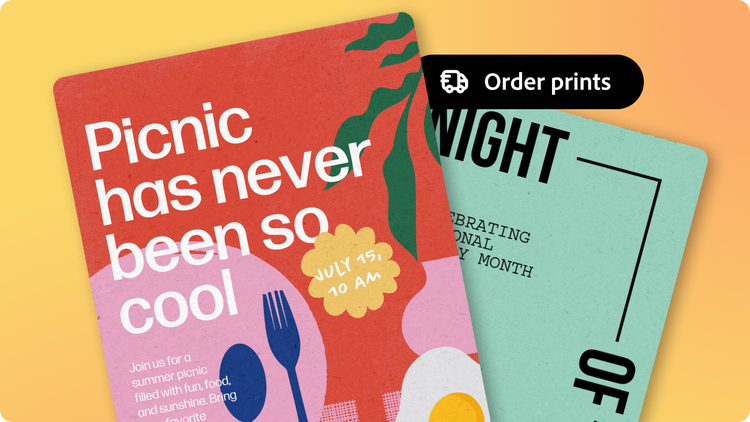
Create and order on-brand printed flyers with Adobe Express, the quick and easy create-anything app. It’s fast and easy with customizable templates and simple design tools at your side.
Jumpstart your flyer design process by choosing from one of the flyer templates below to customize. With tons of Adobe Stock graphics, images, and powerful generative AI tools at your fingertips, it's fast and easy to make stunning custom flyers for all your brand, business, and marketing needs. From dream to doorstep, Adobe Express lets you design and print flyers all in one place.
Choose from a variety of paper types and finishes.

Thin Glossy paper.
Thin Glossy paper: lightweight and budget-friendly—Thin Glossy paper delivers bright, smooth prints at an affordable price. Perfect for brochures, leaflets, and mailings where you want color to pop, without the cost of heavier stock.
Thin Matte paper.
Thin Matte paper: crisp, clean, and professional—our Thin Matte paper is lightweight yet polished, making it ideal for business mailings, flyers, and folded pieces that need a refined, no-glare finish.
Background
Rgb(248, 248, 248)
How to design and print flyers.
Select.
Pick a ready-made template design to customize.
Print.
For desktop or mobile users in the US, UK, Australia, and Canada, create your flyer and submit your order to print. Or, download your flyer design.
Deliver.
Enjoy your printed flyers, delivered to your doorstep.
It's easy to customize and print flyers with Adobe Express.
Everything you need to design and order prints. Design, order, and print any kind of flyer with easy-to-use editing tools and customizable templates in Adobe Express.
Recyclable packaging, made with love. Quickly and easily create high-quality printed flyers and more with confidence. Your order will be delivered straight to your door in planet-friendly packaging.

Background
Rgb(248, 248, 248)
Frequently asked questions.
What is the new print feature in Adobe Express?
With the new Print feature in Adobe Express, your custom flyers can go from digital designs to tangible prints, delivered straight to your door. Design, order, and print flyers for all your needs and create even faster with high-quality templates, generative AI capabilities, and easy-to-use editing tools available in the Adobe Express app.
What printed products can I order with this feature?
You can use this feature to print flyers of various sizes. Get started on your flyer design today to see what we currently offer as printed products.
What countries can I ship my custom flyer order to?
We only support shipping within the US, UK, Australia, and Canada at the moment.
Is this feature available on the mobile app?
Print is available on desktop and mobile devices in the US, UK, Australia, and Canada.
What’s the best image or file size/type to use to print my flyer?
Images with a minimum resolution of 300 DPI ensure the best print quality. Our print-ready templates are optimized to ensure the highest quality printed flyers.
What is the new print feature in Adobe Express? opened
You can control how Adobe websites use cookies and similar technologies by making choices below. But note that if you disable cookies and similar technologies entirely, Adobe websites may not function properly.
Cookies are small text files stored by your web browser when you use websites. There are also other technologies that can be used for similar purposes like HTML5 Local Storage and local shared objects, web beacons, and embedded scripts. These technologies help us do things like remembering you and your preferences when you return to our sites, measure how you use the website, conduct market research, and gather information about the ads you see and interact with.
You can make choices in the menu below about what cookies and other technologies you want us to use on Adobe sites when you visit them from this browser. You can always change those choices later by clicking on the Cookie Preferences link at the bottom of the page.
If enabled:
We can improve your experience by tailoring the site and the content to things we think might be of interest
We can better keep track of your preferences — like what language you prefer to use
We will better understand your likely interests so we can provide you more relevant Adobe ads and content on non-Adobe websites and in non-Adobe apps
It will help us improve the performance of our website and those of our partners who use the Adobe Experience Cloud
If disabled:
We won’t be able to remember you from session to session so the experience may not be tailored to your interests
You’ll still have access to the content of the site but certain features that depend on cookies may not function
You’ll still see ads, they just may not be as relevant to you
General information
You can control how Adobe websites use cookies and similar technologies by making choices below. But note that if you disable cookies and similar technologies entirely, Adobe websites may not function properly.
Cookies are small text files stored by your web browser when you use websites. There are also other technologies that can be used for similar purposes like HTML5 Local Storage, web beacons, and embedded scripts. These technologies help us do things like remembering you and your preferences when you return to our sites, measure how you use the website, conduct market research, and gather information about the ads you see and interact with.
You can make choices in the menu below about what cookies and other technologies you want us to use on Adobe sites when you visit them from this browser. You can always change those choices later by clicking on the Cookie Preferences link at the bottom of the page.
If enabled:
We can improve your experience by tailoring the site and the content to things we think might be of interest
We can better keep track of your preferences — like what language you prefer to use
We will better understand your likely interests so we can provide you more relevant Adobe ads and content on non-Adobe websites and in non-Adobe apps
It will help us improve the performance of our website and those of our partners who use the Adobe Experience Cloud
If disabled:
We won’t be able to remember you from session to session so the experience may not be tailored to your interests
We’ll still count your use of our site and services
You’ll still have access to the content of the site but certain features that depend on cookies may not function
You’ll still see ads, they just may not be as relevant to you
Operate the site and core servicesOperate site and measure engagement
Always active
These cookies are required, and they are used to enable the site and related services core functionality. Without them the site could not operate, so they cannot be disabled.
These cookies enable the site and related services’ core functionality and collect statistics about user engagement, such as counting active use to help us understand trends. These cookies cannot be disabled.
Measure performance
These cookies are used to analyze site usage to measure and improve performance. Without them Adobe cannot know what content is most valued and how often unique visitors return to the site, making it hard to improve information we offer to you.
These cookies are used to analyze site usage to measure and improve performance. Without them Adobe cannot know what content is most valued, making it hard to improve information we offer to you.
Extend functionality
These cookies are used to enhance the functionality of Adobe sites such as remembering your settings and preferences to deliver a personalized experience; for example, your username, your repeated visits, preferred language, your country, or any other saved preference.
Personalize advertising
These cookies are used to enable Adobe and our partners to serve ads more relevant to your interests. Without them you will still see ads, but they might not be as relevant to you.