What is a mood board? Meaning, purpose and tips.
Summary/Overview
Get yourself in the zone to create when you curate a mood board. Stay on track and on vibe across a range of projects – from wedding planning to content creation, life goals and other personal or professional projects. With a mood board to guide your way, you’ll never lose sight of those core things you want from your projects.
Discover what a mood board is, its purpose, and how to make an effective mood board with this guide from Adobe Express today – the create all app.
What is a mood board?
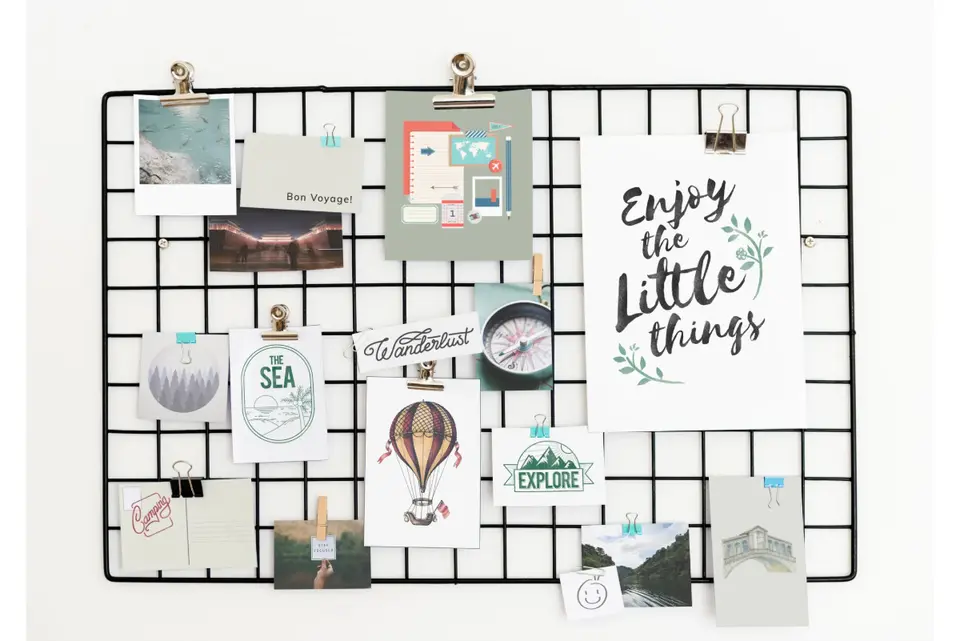
If you’re not familiar with the meaning of the term mood board, it’s simple to understand. A mood board refers to a visual board, either physical or digital, used to convey a feeling, vibe or idea of a chosen topic. Want to break it down further? A mood board is a collection of images, quotes, samples, and other materials on a digital or physical board that you can reference.
There’s a ton of potential uses for a mood board, and they may differ depending on what you’re using one for. For example, a fashion mood board might use more textiles or conceptual images than a travel mood board, which itself might focus on images of locations or activities.
There’s no right or wrong item to put on a mood board – if it fits the vibe you want, then find a way to include it.
What is a mood board used for?
Every mood board is different, unique to your project or interests – so, while there’s a guideline of things you could use a mood board for, it’s not an concrete list.
Here are some types of mood boards that might be relevant to you, just to get you started:
- Wedding mood board. A wedding mood board could be a collage of venues, meals, outfits, décor, or even some inspirational shots from weddings or scenes you’ve seen.
- Photography mood board. Inspire yourself with a photography mood board full of incredible locations, heart-stirring events, or photography styles that guide your own techniques.
- Bedroom mood board. Getting cosy is an art, and a bedroom mood board lets you turn your comfy space into your perfect sanctuary. Take inspiration from décor across the world, colours and the perfect bed linens and put them all into one place.
- Kitchen mood board. Renovations can turn into sprawling projects, so a mood board can keep you cooking on gas. Whether you’re designing your own or employing a professional, having a touchstone of styles, tiles and appliances in a kitchen mood board can ensure your kitchen is picture perfect.
- Lifestyle mood board. Ready to make some changes this year? You can assemble quotes, images and more that help you focus on what you want from life. Then, all you need to do is match reality to expectation.
- Professional mood board. Want to keep your project on track? Use a mood board that focuses on branding – logos, catchphrases, intent and images that work almost like a ‘brief’ for the overall project.
How can a mood board inspire and guide your projects?
The purpose of a mood board is to inspire and conceptualise to guide your projects, and helps to achieve this in a few different ways:
1. Clearly visualise your creative vision.
One of the major purposes of a mood board is to help visualise ideas and bring them to life in more than just words. They’re a great touchstone throughout a project, that is easy to refer to and understand at a glance.
2. Collaborate, share and get feedback on ideas.
Whether you’re presenting an idea for client or stakeholder sign off or just convincing your significant other of the kitchen renovations you must make, mood boards help visualise and share ideas. They’re also a great collaboration tool, where people involved in projects can add to board creation.
3. Maintain brand identity.
Use a mood board before starting a project to demonstrate key personality points of a brand, ensure consistency in your design work, avoid misunderstandings, and provide a strong representation of what the final product will entail.
Free mood board examples from Adobe Express.
Collection ID
(To pull in manually curated templates if needed)
Orientation
(Horizontal/Vertical)
Width
(Full, Std, sixcols)
Limit
(number of templates to load each pagination. Min. 5)
Sort
Most Viewed
Rare & Original
Newest to Oldest
Oldest to Newest
Premium
(true, false, all) true or false will limit to premium only or free only.
What to include in a mood board.
While the purpose of a mood board is consistent, what you include in them might not be. Because the intent of a mood board is to inspire and provide a visual touchstone, the real answer is to include whatever achieves that result.
However, certain things tend to crop up consistently across good, visually helpful, mood boards:
- Colour palettes. Whether you want to maintain brand identity, or just love a certain shade for your lounge, colour palettes help you remain consistent when it comes to the design process.
- Photos and inspirational images. Visual aids can be a great way to harness an aesthetic – think of them like visualising where you want to be. Whether it’s one image or a collage, they can help you through moments of creative confusion and ensure you get the result you want.
- Fabrics and textures. Including fabrics, textures, tile designs and patterns can help you to add nuance to your projects. For example, if you’re making a spring dress you could add certain textiles you love to your mood board to aid your creative process.
- Quotes or lyrics. Quotes and lyrics can be printed or stuck onto a mood board and make an excellent mantra. Maybe it’s a quote you want to include in the project, something you want to riff on, or just a “vibe” they evoke that you want to follow.
- Typography. Don’t just consider text in your mood board, think about typography too. Choosing a matching typography to your vision can give quotes a sense of personality or tone, which can inform your entire creative process.
- Patterns or graphics. Patterns or graphics could include logos, retro-style graphics, or patterns like spirals that could function as the creative base for what you’re making.
How to make an effective mood board.
Making a mood board is fun, easy and engaging – but there are a few things to consider that can help you get started:
1. Decide on your target audience.
First, consider your target audience – is it a personal mood board? Part of team ideation? Or maybe it’ll be client facing. Every scenario is valid, but you may choose to approach things differently depending on your answer.
2. Choose a template or build your mood board from scratch.
Get fit-for-purpose mood board templates to kick-start your creative journey, or enjoy the process and make your own mood boards from scratch with Adobe Express.
3. Collate your images, photos, materials, text and other inspiration.
Take those Pinterest images, saved Instagram posts, hoarded materials and hearted quotes then compile them into one location. Try to sort out your favourite sources of inspiration and be critical about what fits the vision.
4. Build your mood board.
While you might easily collate your inspiration onto a board, it might take a few goes until you’ve got something that truly reflects what you want. It’s a process of trial and error – just like any creative endeavour. Don’t be afraid to play with colour combos and weird combinations of images. This way, you can determine what clashes or doesn’t fit the vision.
5. Add any brand elements – if required.
If you’re creating a client facing or business-focused mood board, don’t forget to include brand elements to ensure designs are consistent with branding, and that your ideas fit with the brand. Branding could include colour schemes logos, or core design values.
Set up your brand kit library with Adobe Express.
6. Share your mood board.
You can keep your mood board to yourself, but if you’re collaborating on a project, you might want to share it. Easily add your mood board to presentation slides, print it for a physical reference you can hang up in your workspace, or share it with clients.
Gather your ideas with editable mood boards.
Collection ID
(To pull in manually curated templates if needed)
Orientation
(Horizontal/Vertical)
Width
(Full, Std, sixcols)
Limit
(number of templates to load each pagination. Min. 5)
Sort
Most Viewed
Rare & Original
Newest to Oldest
Oldest to Newest
Premium
(true, false, all) true or false will limit to premium only or free only.
Useful things to know.
What is the purpose of a mood board?
The purpose of a mood board is to visually communicate an aesthetic design direction or mood for a project. It can function as a reference to keep projects or goals in view and help bolster understanding between teams. They look neat too.
What should not be on a mood board?
Mood boards are trying to evoke a mood, vibe or direction – so, if they’re too literal, too cluttered, or full of conflicting imagery, they may not function as desired.
Is a mood board like a collage?
Yes, a mood board is a type of collage but serves a different purpose to what most people would think of with a photo collage. The main thing to consider with a mood board is to ensure it’s easy to absorb immediately and evokes a certain vibe rather than being a more general collection of images.