
Edit a PDF


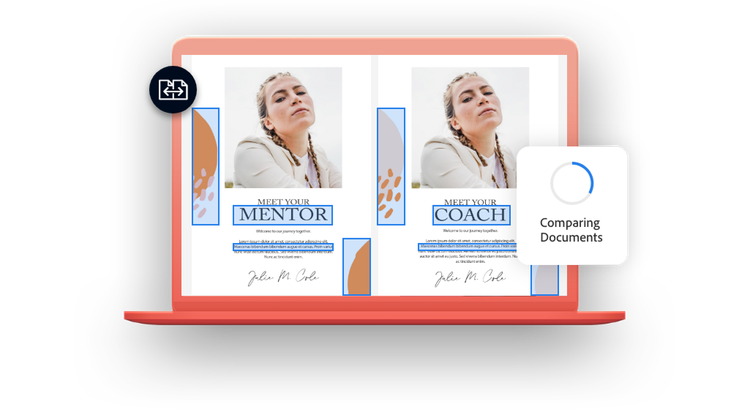
PDF comparison is easy with Adobe Acrobat. The Compare Files tool helps you quickly and accurately detect differences between two versions of a PDF. You can compare documents in a side-by-side view, or choose single page view to review all changes in your latest PDF document. It lets you quickly compare text, images, and graphics so you know exactly what has been changed from a previous version. With the handy highlight bar, each change is conveniently called out for you in the new document.
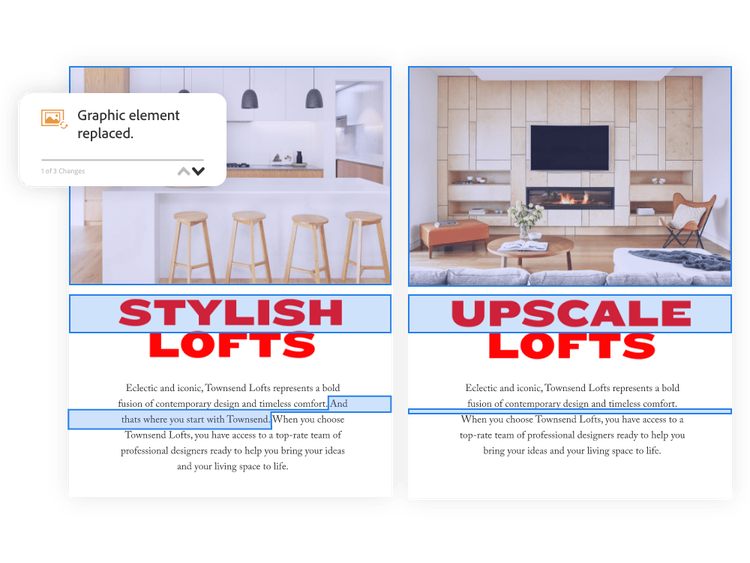
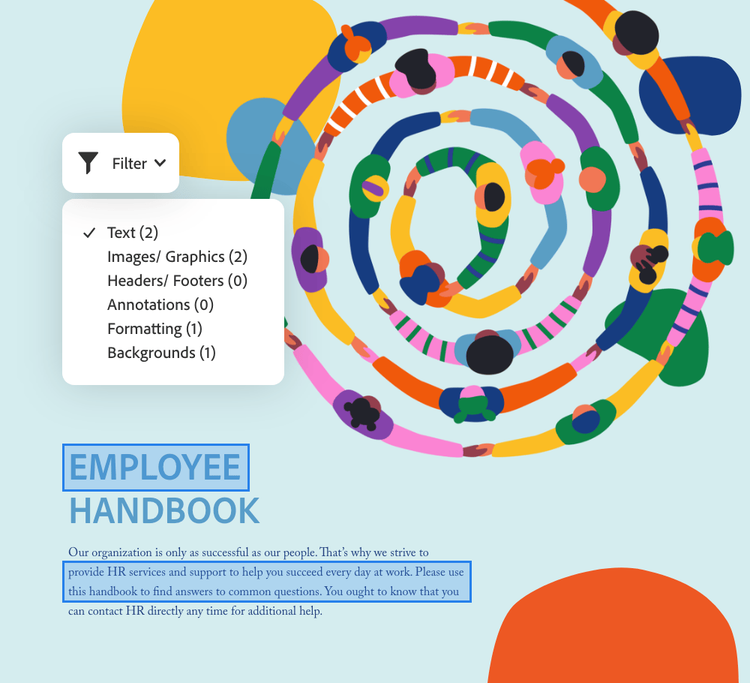
You can use the filter drop down to choose what types of changes you’d like to see during file comparison. You can select to view changes to images and graphics, text, headers and footers, formatting, annotations, and even backgrounds. View all at once or turn each one off and on as needed to focus on just the types of changes you’re interested in seeing.
Our comparison tool automatically creates a document comparison results summary to show you how many changes were made to the original document. The summary shows you how many things were replaced, inserted, or deleted. Then, you can peruse the PDF to see the changes in context. It’s a quick way to see how much has changed.
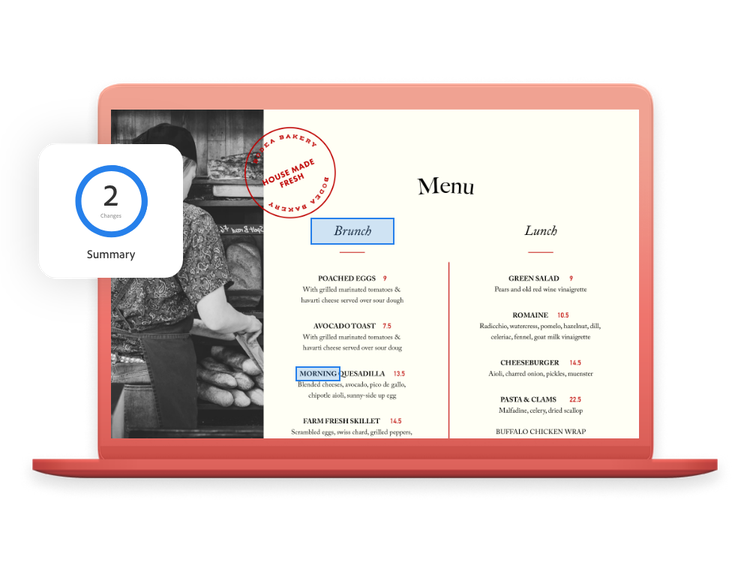
More than five million organizations around the world rely on Adobe Acrobat to create, edit, sign, and convert PDFs from other file types on the go. It also gives you compare tools to view two documents side by side to accurately track changes across versions of a PDF file, saving time and enabling high quality work. When you need smarter PDF tools that help you keep business moving, turn to Adobe — the company that invented the PDF format.

PLANS AND PRICING
Free
By clicking the “Download now” button, you acknowledge that you have read and accepted all of the Terms and Conditions.
The trusted standard for viewing and sharing PDFs

View, print, share, and comment
Available on desktop and mobile
US$19.99/mo Fee applies up to half your remaining annual commitment if you cancel after 14 days.
The secure solution for PDF & e-signature workflows
Create, edit, export, compare, and organize PDFs
Collect e-signatures and track responses
Password-protect and redact PDFs
Create web forms, turn scans into editable PDFs, and access 70+ features
US$24.99/mo Fee applies up to half your remaining annual commitment if you cancel after 14 days.
The all-in-one AI-powered PDF and design solution for business workflows
Create, edit, export, compare, and organize PDFs
Collect e-signatures and track responses
Password-protect and redact PDFs
Create web forms, turn scans into editable PDFs, and access 70+ features

Ask AI to edit, convert, or compress PDFs
Understand dense documents with AI summaries, podcasts, and interactive reports
Organize, share, and collaborate with PDF Spaces
Redesign resumes, reports, and invoices with professionally designed templates
Search
Filters
Sort
Popularity
Alphabetically
coll-no-results-text
Categories
REFINE YOUR RESULTS
Close
Special Offers - opens in a new window
filter by category
RESOURCES
1 result in
results in
coll-result-mobile-text
results in
1 result in
results for
1 result in
results in
Your search for did not yield any results
Your search for did not yield any results
Show more
coll-all-filters-text
coll-filters-category-text
coll-filters-applied-text
coll-filters-results-text
coll-filters-reset-text
Free
By clicking the “Download now” button, you acknowledge that you have read and accepted all of the Terms and Conditions.
The trusted standard for viewing and sharing PDFs
View, print, share, and comment
Available on desktop and mobile
US$239.88/yr No refund if you cancel after 14 days.
The secure solution for PDF & e-signature workflows
Create, edit, export, compare, and organize PDFs
Collect e-signatures and track responses
Password-protect and redact PDFs
Create web forms, turn scans into editable PDFs, and access 70+ features
US$299.88/yr No refund if you cancel after 14 days.
The all-in-one AI-powered PDF and design solution for business workflows
Create, edit, export, compare, and organize PDFs
Collect e-signatures and track responses
Password-protect and redact PDFs
Create web forms, turn scans into editable PDFs, and access 70+ features
Ask AI to edit, convert, or compress PDFs
Understand dense documents with AI summaries, podcasts, and interactive reports
Organize, share, and collaborate with PDF Spaces
Redesign resumes, reports, and invoices with professionally designed templates
Search
Filters
Sort
Popularity
Alphabetically
coll-no-results-text
Categories
REFINE YOUR RESULTS
Close
Special Offers - opens in a new window
filter by category
RESOURCES
1 result in
results in
coll-result-mobile-text
results in
1 result in
results for
1 result in
results in
Your search for did not yield any results
Your search for did not yield any results
Show more
coll-all-filters-text
coll-filters-category-text
coll-filters-applied-text
coll-filters-results-text
coll-filters-reset-text
Free
By clicking the “Download now” button, you acknowledge that you have read and accepted all of the Terms and Conditions.
The trusted standard for viewing and sharing PDFs
View, print, share, and comment
Available on desktop and mobile
US$29.99/mo Cancel anytime, no fee.
The secure solution for PDF & e-signature workflows
Create, edit, export, compare, and organize PDFs
Collect e-signatures and track responses
Password-protect and redact PDFs
Create web forms, turn scans into editable PDFs, and access 70+ features
US$34.99/mo Cancel anytime, no fee.
The all-in-one AI-powered PDF and design solution for business workflows
Create, edit, export, compare, and organize PDFs
Collect e-signatures and track responses
Password-protect and redact PDFs
Create web forms, turn scans into editable PDFs, and access 70+ features
Ask AI to edit, convert, or compress PDFs
Understand dense documents with AI summaries, podcasts, and interactive reports
Organize, share, and collaborate with PDF Spaces
Redesign resumes, reports, and invoices with professionally designed templates
Search
Filters
Sort
Popularity
Alphabetically
coll-no-results-text
Categories
REFINE YOUR RESULTS
Close
Special Offers - opens in a new window
filter by category
RESOURCES
1 result in
results in
coll-result-mobile-text
results in
1 result in
results for
1 result in
results in
Your search for did not yield any results
Your search for did not yield any results
Show more
coll-all-filters-text
coll-filters-category-text
coll-filters-applied-text
coll-filters-results-text
coll-filters-reset-text
US$23.99/moper license Fee applies of half your remaining annual commitment if you cancel after 14 days. Up to 10 licenses with free trial.
The highly secure PDF and e-signature solution with advanced tools, plus admin features.
Create, edit, export, compare, and organize PDFs
Collect e-signatures and track responses
Password-protect and redact PDFs
Create web forms, turn scans into editable PDFs, and access 70+ features
US$29.99/moper license Fee applies of half your remaining annual commitment if you cancel after 14 days. Up to 10 licenses with free trial.
Everything in Acrobat Pro plus PDF Spaces, Acrobat AI Assistant, Adobe Express Premium, and admin features.
Create, edit, export, compare, and organize PDFs
Collect e-signatures and track responses
Password-protect and redact PDFs
Create web forms, turn scans into editable PDFs, and access 70+ features
Ask AI to edit, convert, or compress PDFs

Get AI summaries, insights, and answers

Organize, share, and collaborate with PDF Spaces
Create flyers, social content, and presentations from documents
Search
Filters
Sort
Popularity
Alphabetically
coll-no-results-text
Categories
REFINE YOUR RESULTS
Close
Special Offers - opens in a new window
filter by category
RESOURCES
1 result in
results in
coll-result-mobile-text
results in
1 result in
results for
1 result in
results in
Your search for did not yield any results
Your search for did not yield any results
Show more
coll-all-filters-text
coll-filters-category-text
coll-filters-applied-text
coll-filters-results-text
coll-filters-reset-text
US$287.88/yrper license No refund if you cancel after 14 days. Up to 10 licenses with free trial
The highly secure PDF and e-signature solution with advanced tools, plus admin features.
Create, edit, export, compare, and organize PDFs
Collect e-signatures and track responses
Password-protect and redact PDFs
Create web forms, turn scans into editable PDFs, and access 70+ features
US$359.88/yrper license No refund if you cancel after 14 days. Up to 10 licenses with free trial
Everything in Acrobat Pro plus PDF Spaces, Acrobat AI Assistant, Adobe Express Premium, and admin features.
Create, edit, export, compare, and organize PDFs
Collect e-signatures and track responses
Password-protect and redact PDFs
Create web forms, turn scans into editable PDFs, and access 70+ features
Ask AI to edit, convert, or compress PDFs
Get AI summaries, insights, and answers
Organize, share, and collaborate with PDF Spaces
Create flyers, social content, and presentations from documents
Search
Filters
Sort
Popularity
Alphabetically
coll-no-results-text
Categories
REFINE YOUR RESULTS
Close
Special Offers - opens in a new window
filter by category
RESOURCES
1 result in
results in
coll-result-mobile-text
results in
1 result in
results for
1 result in
results in
Your search for did not yield any results
Your search for did not yield any results
Show more
coll-all-filters-text
coll-filters-category-text
coll-filters-applied-text
coll-filters-results-text
coll-filters-reset-text
US$19.99/mo Fee applies up to half your remaining annual commitment if you cancel after 14 days.
The highly secure PDF and e-signature solution with advanced tools.

Available on desktop, web, and mobile

View, print, share, and comment

Edit text and images, plus export, protect, and organize documents

Collect binding e-signatures and track responses

Create web forms, redact, compare, and access 70+ features
Acrobat AI Assistant
Add AI Assistant to your Acrobat plan for US$1.99/moUS$1.99/mo.
Add AI Assistant to your Acrobat plan for US$19.99/yrUS$19.99/yr.
Fee applies up to half your remaining annual commitment if you cancel after 14 days.
Save 71% on 20+ apps including Acrobat Pro, plus Firefly creative AI for images, video, and audio. Pay US$19.99/mo the first year and US$39.99/mo after that.

20+ creative apps, plus everything in Acrobat Pro, including:
View, print, share, and comment
Edit text and images, plus export, protect, and organize documents
Collect binding e-signatures and track responses
Create web forms, redact, compare, and access 70+ features
Acrobat AI Assistant
Add AI Assistant to your Acrobat plan for US$1.99/moUS$1.99/mo.
Add AI Assistant to your Acrobat plan for US$19.99/yrUS$19.99/yr.
Search
Filters
Sort
Popularity
Alphabetically
coll-no-results-text
Categories
REFINE YOUR RESULTS
Close
Special Offers - opens in a new window
filter by category
RESOURCES
1 result in
results in
coll-result-mobile-text
results in
1 result in
results for
1 result in
results in
Your search for did not yield any results
Your search for did not yield any results
Show more
coll-all-filters-text
coll-filters-category-text
coll-filters-applied-text
coll-filters-results-text
coll-filters-reset-text
US$239.88/yr No refund if you cancel after 14 days.
The highly secure PDF and e-signature solution with advanced tools.
Available on desktop, web, and mobile
View, print, share, and comment
Edit text and images, plus export, protect, and organize documents
Collect binding e-signatures and track responses
Create web forms, redact, compare, and access 70+ features
Acrobat AI Assistant
Add AI Assistant to your Acrobat plan for US$1.99/moUS$1.99/mo.
Add AI Assistant to your Acrobat plan for US$19.99/yrUS$19.99/yr.
No refund if you cancel after 14 days.
Save 69% on 20+ apps including Acrobat Pro, plus Firefly creative AI for images, video, and audio. Pay US$239.88/yr the first year and US$479.88/yr after that.
20+ creative apps, plus everything in Acrobat Pro, including:
View, print, share, and comment
Edit text and images, plus export, protect, and organize documents
Collect binding e-signatures and track responses
Create web forms, redact, compare, and access 70+ features
Acrobat AI Assistant
Add AI Assistant to your Acrobat plan for US$1.99/moUS$1.99/mo.
Add AI Assistant to your Acrobat plan for US$19.99/yrUS$19.99/yr.
Search
Filters
Sort
Popularity
Alphabetically
coll-no-results-text
Categories
REFINE YOUR RESULTS
Close
Special Offers - opens in a new window
filter by category
RESOURCES
1 result in
results in
coll-result-mobile-text
results in
1 result in
results for
1 result in
results in
Your search for did not yield any results
Your search for did not yield any results
Show more
coll-all-filters-text
coll-filters-category-text
coll-filters-applied-text
coll-filters-results-text
coll-filters-reset-text

Add AI Assistant to your Acrobat Pro or Creative Cloud Pro student plan. US$1.99/mo for the annual, billed monthly plan.

Contact us for more information about plans and pricing.


