


AI resume builder

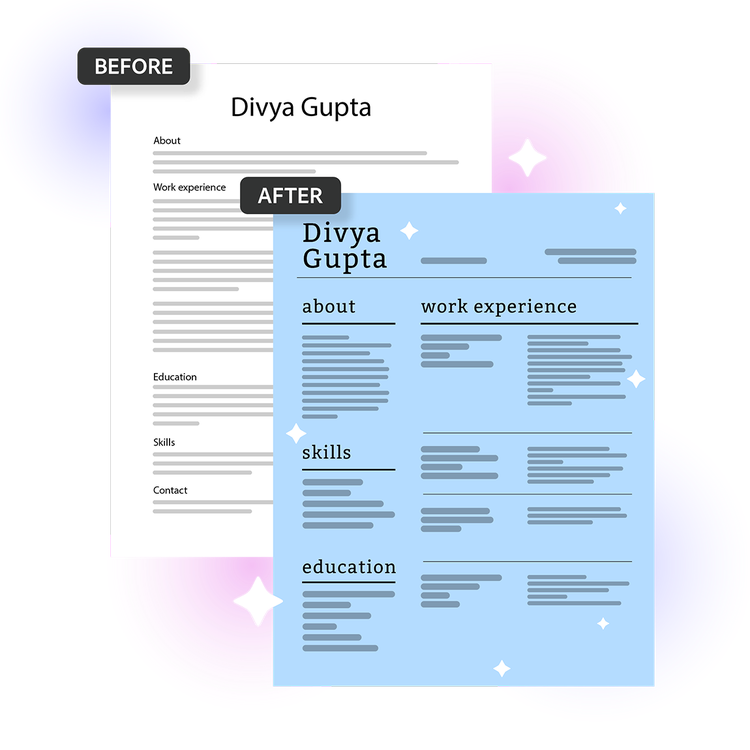
Before and after of an AI-redesigned resume with a modern blue two-column layout.
#F8F8F8

Don’t have a resume? Adobe Express can help you to create one.

Start with a template

How to build a standout resume with AI

Upload your existing resume, choose a template and let Acrobat handle the rest. Create tailored resumes for different roles in minutes.

Try our free AI resume builder

https://main--da-dc--adobecom.aem.page/dc-shared/assets/images/frictionless/icons/ai-summary.svg

Smart content mapping

Automatically organise your experience, skills and education into a polished professional layout. Great for showcasing coursework, work experience and transferable skills.

https://main--da-dc--adobecom.aem.page/dc-shared/assets/images/frictionless/icons/protect-pdf.svg

Secure and private by design

Your file is securely processed and automatically deleted unless you choose to sign in and save it. Upload resumes confidently while keeping your information protected.

https://main--da-dc--adobecom.aem.page/dc-shared/assets/images/frictionless/icons/esign-template.svg

Polished, professional templates

Choose from professionally designed templates to showcase your experience, skills and knowledge. Find a style suited to entry-level, trade or professional roles.

https://main--da-dc--adobecom.aem.page/dc-shared/assets/images/frictionless/icons/upload-signed-doc.svg

Start with your existing resume

Upload your current resume and quickly transform it into a polished new layout. Update older resumes without rewriting every section from scratch each time.

https://main--da-dc--adobecom.aem.page/dc-shared/assets/images/frictionless/icons/download-pdf.svg

Apply with confidence

Download a clean, professional PDF resume that’s ready to apply anywhere. Keep tailored resume versions ready for different opportunities and career paths.

https://main--da-dc--adobecom.aem.page/dc-shared/assets/images/frictionless/icons/credit-card.svg

No credit card required

Just upload, customise and go. No subscription required to get started. Create and download a professional resume without upfront costs or commitments.

Helpful PDF tools for resumes and job applications

Manage resumes and job application documents with easy-to-use online PDF tools.

Refine resume PDFs before submission

Refine resume PDFs before submission

Reduce resume PDF size

Reduce resume PDF size

Add supporting documents to PDFs

Add supporting documents to PDFs

Merge application documents into one PDF

Merge application documents into one PDF

AI resume builder FAQs
What is the AI resume builder and how does it work?
The AI resume builder from Acrobat helps you to create a professional resume in minutes using AI-powered formatting and customisable templates. Upload your existing resume, choose a template and Acrobat organises your content into a polished layout you can customise and download. It's a simple way to refresh an existing resume for casual jobs, graduate roles and other career opportunities.
Can I customise the design of my resume in the AI resume builder?
Yes, the AI resume builder from Acrobat includes customisable resume templates that let you adjust fonts, colours, layouts and sections to match your style or industry. The AI resume builder is built with Adobe Express design tools so you can refine as needed. Create different resume versions for casual work, apprenticeships, placements and professional roles.
What file formats can I export from the AI resume builder?
The AI resume builder from Acrobat lets you download your finished resume as a PDF, the format most employers and applicant tracking systems require. You can also convert your downloaded PDF into additional formats such as DOCX/DOC, PNG and PPTX using Adobe's free PDF Converter online.
Can the AI resume builder help me tailor my resume for different jobs?
Yes, with the AI resume builder from Acrobat you can duplicate your resume, customise it for different roles or industries and export multiple versions without starting from scratch each time.
Can I create an ATS-friendly resume with the AI resume builder?
Yes, the AI resume builder from Acrobat helps you create a clear, professional resume using structured layouts and organised sections. For the best results with an ATS (Applicant Tracking System), tailor your resume to the role and include relevant skills, qualifications and keywords from the job description.
How is the AI resume builder different from other resume builders?
The AI resume builder from Acrobat combines professional design templates with Adobe Express tools so you can create a polished, professional resume. Simply select a template and let the AI resume builder do the rest. Because it's connected to Adobe Express, you can also create matching career materials like portfolios, presentations and personal branding assets. Useful for building a consistent personal brand across resumes, portfolios and university projects.
Who is the AI resume builder best for?
The AI resume builder from Acrobat is best for job seekers who want a professionally designed resume without spending hours on formatting. It's ideal for first-time applicants, recent graduates, career changers and anyone re-entering the workforce who needs to put together a polished document quickly. It's also a strong choice for professionals who want a visually distinctive resume that stands out from standard word-processor formats.
Is the AI resume builder useful for people who are changing careers?
The AI resume builder from Acrobat is well-suited for career changers because it gives you full control over how your experience is framed and which skills are emphasised. You can choose a template with a layout that highlights what matters most for your new field, making it easy to put transferable skills and relevant experience front and centre.
Is the content I create with the AI resume builder professional enough to send to employers?
The AI resume builder from Acrobat is designed to help produce clear, professional resume content based on the information provided. You should still review and personalise every section to ensure your resume accurately reflects your experience, achievements and communication style.
How does Adobe handle personal data in the AI resume builder?
The AI resume builder from Acrobat is secure and private by design. Your file is securely processed and automatically deleted unless you choose to sign in and save it. You can learn more about Adobe's privacy practices and account protections at adobe.com/privacy.
What languages does the AI resume builder support?
The AI resume builder from Acrobat is designed for English-language resume creation, while Adobe Express supports multiple interface languages across regions.
Can I work on my resume across different devices?
Yes, the AI resume builder from Acrobat works across mobile devices, tablets, laptops and desktop computers. Sign in and continue working on your resume from a supported web browser, whether you're at home, on campus or on the move.
Is the AI resume builder free to use?
The AI resume builder from Acrobat is free to use with no sign in or credit card required. It includes core resume creation and editing features, including access to resume templates and basic design tools. To unlock additional templates, design assets and advanced features, consider an Adobe Express plan.
https://main--dc--adobecom.aem.live/dc-shared/assets/images/shared-images/frictionless/create-an-account-image/create-an-account.svg | a text bubble, pencil icon and a stacked PDF icon representing free online Acrobat tools

Use Acrobat tools for free

  • Sign in to try 25+ tools, like convert or compress
  • Add comments, fill in forms and sign PDFs for free
  • Store your files online to access from any device

Create a free account Sign in

Try these Acrobat online tools

Convert from PDF

Convert to PDF

Reduce file size

Edit

Sign & Protect

Generative AI

Convert from PDF
Convert to PDF
Reduce file size
Edit
Sign & Protect
Generative AI