50 How to make a budget tips using visual designs.
How to make a budget using simple visuals you can build in Adobe Express.
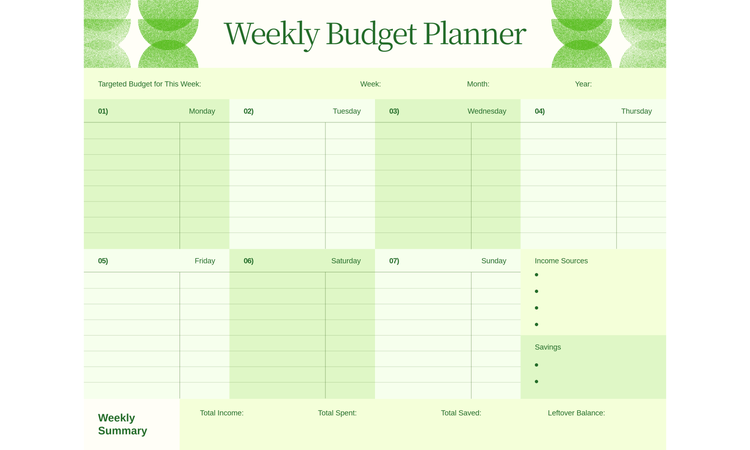




How to make a budget that holds up in real life.
Most advice on how to make a budget focuses on getting the numbers right. But in real life, budgets break in small increments. Grabbing takeout after a long day, forgetting a subscription renewal, or underestimating how often “just this once” happens. That’s where clean budget plans start to get messy.
How to make a budget that stays relevant using visual design cues.
Budgeting often feels like a math homework assignment you never asked for – which is why most people ignore their spreadsheets by the end of the month. Math isn’t the problem. It’s the interface. When you’re looking at a gray, boring grid of numbers, your brain naturally wants to disengage. To fix this, treat your budget like a UX project rather than a ledger.
Using Adobe Express, you can build a custom budget tracker to shift your passive data entry into active information. Examine your financial goals through a vision board approach. If you’re saving for a loan payment or a specific trip, seeing the words “Savings: $500” doesn't trigger the same dopamine hit as a high-quality visual representation of that goal. You can create a digital banner for your desktop or phone background with a mood board alongside a progress bar. This turns “restrictions” into a visual “rewards.”
When you customize your categories with specific icons or color-coded shapes, you create a visual language that makes spending patterns stand out immediately. You’ll notice a ‘sea of red’ for dining out faster than you'll notice a specific dollar amount in a row. This design-first approach forces you to interact with your money daily because the document reflects your personal aesthetic.
1. List all your income sources to determine your total earnings.
2. Track your expenses to understand where your money goes.
3. Categorize expenses into fixed (rent) and variable (entertainment).
Instead of just labeling rows, use an expense report template to create a high-contrast visual split between your Non-Negotiables and Flex Spending. Assign a specific shape or bold border to fixed costs like rent, creating a mental anchor to see how much “white space” is left in your month. The visual hierarchy stops you from accidentally dipping into your bill money for unnecessary spending.
4. Set financial goals, like saving for a trip or paying off debt.
Create a custom card for each specific milestone you're hitting. If you’re paying off a credit card, design a card that visualizes the finish line with a progress chart. Update it by layering semi-transparent shapes over the background as you pay it down. Seeing a physical representation of a shrinking debt or a growing travel fund makes the goal feel tangible rather than theoretical.
5. Allocate a percentage of your income to savings (e.g., 20%).
6. Use budgeting tools or apps to simplify tracking.
7. Cut unnecessary expenses to free up funds.
8. Review and adjust your budget monthly.
9. Build an emergency fund for unexpected costs.
10. Stick to your budget by practicing mindful spending.
recipe
How to make a wedding budget that keeps your vision and your bank account in sync.
Without a wedding budget, your wedding spreadsheet will feel more like a funeral for your bank account than a celebration of love. Before you book a single vendor, use a planner template to build your wedding brand kit. This is both for aesthetics and a financial filter. When you have a locked-in visual identity – specific hex codes, font pairings, and a motif – you gain a psychological “No” for everything that doesn't fit. If a gold-foiled centerpiece tempts you but your wedding brand kit is nature-inspired, you save that money instantly because you know the designs will clash.
Further, most couples lose track of their budget because vendor contracts are buried in email threads. Instead of digging through PDFs, create a vendor dashboard using a custom letter template. Dedicate one page to each vendor where you pull out the scannable data: the total fee, the deposit due date, and a photo of the service they’re providing. This becomes your live UX tool, explicitly showing you how much is left in the flowers bucket because it’s visually represented right next to your mood board.
You also have to look at the high-volume costs where design saves you cold, hard cash. For example, professional wedding invitations can range from $256 to $312 for 100 to 150 invites. However, options such as digital printing or hybrid digital-physical suites help significantly reduce costs. By starting with wedding invitation templates, you can design a high-end suite to print yourself or send digitally, reallocating those hundreds of dollars to other necessities.
1. Determine your total budget based on savings and contributions.
2. Prioritize key expenses like venue, catering, and photography.
High-impact visuals help you decide where the “big” money goes, so create a side-by-side comparison of your top three venues. Use an image editor to drop photos of the spaces next to their price tags to see if the vibe justifies the cost. This visual audit keeps your spending aligned with what will appear in your wedding gallery.
3. Allocate funds to each category (e.g., 40% for venue).
4. Track all wedding-related expenses in a spreadsheet.
5. Research vendors to find options within your budget.
6. Consider DIY options for decor or invitations.
Designing your own wedding signage is a massive money-saver. But it only works if the files are formatted correctly for professional results. Once you’ve customized your seating chart or menu, use Adobe Express to convert it to a PNG with a transparent background or in high resolution. This ensures your DIY elements don’t look "homemade" or blurry when they finally hit the printer.
7. Limit the guest list to reduce costs.
8. Set aside a contingency fund for unexpected expenses.
9. Review contracts carefully to avoid hidden fees.
10. Stick to your budget by avoiding last-minute splurges.
How to make a weekly food budget that sticks by turning your kitchen into a curated brand.
Inflation is just one reason why grocery bills spiral out of control. Another is the lack of visual organization. When you can’t see what you have, you tend to buy duplicates. When your home-cooked meals look unappetizing compared to a delivery app's high-res photos, you cave and order out. Break this cycle by using Adobe Express to move your food planning into a design-first workflow.
Instead of a list on a scrap of paper or an online app, use the online menu maker to design a Weekly Specials board for your kitchen. Use clean typography and a photo collage of the meals you enjoy making to give yourself a dopamine hit that mimics a restaurant experience. This visual experience turns eating at home into a curated event.
You also need to tackle the hidden inventory problem. Most food waste happens because that expensive pesto jar or frozen shrimp bag is buried in a dark corner where you can't see it. Create a visual pantry map that is a high-contrast infographic of your fridge and cupboard zones. If you take a quick photo of your shelves and use a photo editor to label what’s in the back, you create a live inventory that you can check before you shop for groceries.
Also, when you start browsing for dinner ideas and meal tracking layouts, focus on high-visibility designs. If your meal tracker brings you joy, you’re more likely to update it. This isn't about being extra, but about reducing the cognitive load of “What’s for dinner” so you don't default to the most expensive option.
1. Plan your meals for the week to avoid impulse buys.
Use meal planning templates to create a visual weekly menu that looks as good as a bistro chalkboard. Add icons for Quick Prep or 15-Minute Meal next to busy weeknights so you don't get overwhelmed and end up ordering takeout.
2. Make a shopping list based on your meal plan.
3. Set a weekly grocery spending limit.
4. Buy in bulk for non-perishable items to save money.
5. Choose store brands over name brands for savings.
6. Avoid eating out by preparing meals at home.
7. Use coupons or discounts to reduce costs.
8. Track your grocery spending to stay within budget.
Use a food worksheet to create a price comparison graphic for your most frequent ingredient purchases across different stores. Use color-coded bars to show where produce is cheapest so you can plan your route visually. It’s a proactive way to see exactly how much you're saving by opting for store brands over big-name labels.
9. Cook in batches and freeze meals for convenience.
Organization is the only way batch cooking actually saves you money, so use recipe cards to track what’s currently sitting in your freezer. You can design a freezer inventory card that lists the meal, the date it was made, and a quick reheat instruction icon.
10. Avoid food waste by using leftovers creatively.
How to make a budget using Adobe Express.

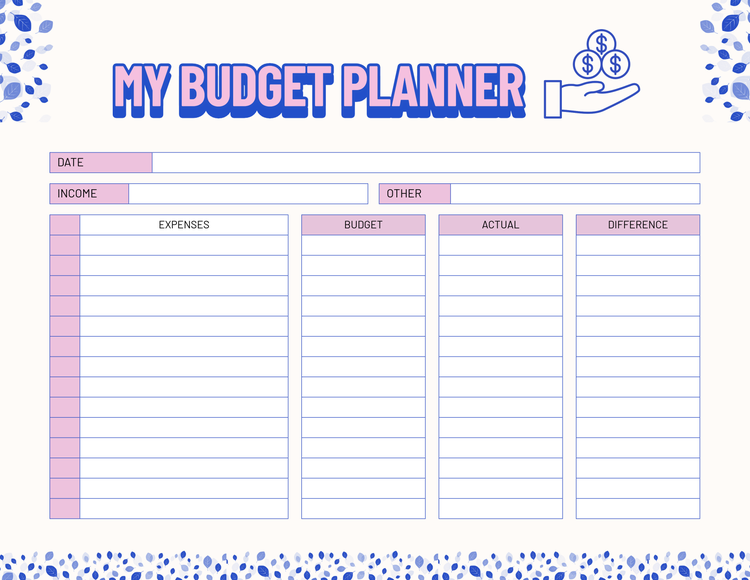
How to make a budget for students who are balancing life with a limited bank account.
The biggest threat to a student's finances is the invisible bleed of social pressure to spend money you don't actually have. Limiting your coffee runs could help, but not so much if you have six different streaming services charging you $10 a month each. You can fight this by creating a subscription audit wallpaper. Instead of letting those charges hide in your bank app, design a high-contrast digital poster that lists every recurring payment and its renewal date. Not only will you be on top of payments, but this can also be a reminder to cancel the ones you rarely use.
Student life also comes with the killjoy factor or the awkwardness of telling friends you can't afford a $50 dinner. You can solve this by designing a few social “No” cards or alternatives using a custom flyer, scaled down for mobile sharing. Instead of a long, guilty text, you can have a visually cool graphic that says something like, “Saving for [goal] this week, but let’s do coffee at the library instead.” It sounds strange, but it gives you an aesthetic that feels fun and confident.
To keep everything organized, you should integrate your financial check-ins directly into a school schedule planner. Do a Finance Friday block in your visual calendar. This ensures your spending review is as non-negotiable as attending a lecture. You can color-code your must-spend days versus no-spend days so your entire week's financial health is visible at a glance.
1. Calculate your monthly income, including allowances or part-time jobs.
Integrate your income tracking directly into a class schedule so you can see the relationship between your study hours and your earning power. Include a payday icon alongside your lecture times, and you’re less likely to overschedule yourself and burn out. You can even add a small progress bar to the bottom of the schedule to track how close you are to your monthly savings goal.
2. List all expenses, like rent, tuition, and groceries.
3. Separate needs (books) from wants (entertainment).
Adobe Express has education templates to create high-contrast priority maps for your semester. Design two distinct visual zones: one for non-negotiables, such as lab fees, and another for your fun money. Assign a bold color to your needs and a muted tone to your wants. This creates an instant visual hierarchy, guiding your choices when your bank account gets low.
4. Allocate a portion of your income to savings.
5. Use student discounts to reduce costs.
Create a discount wallet graphic that you can save as a favorite photo on your phone for quick reference at checkout. Create a simple grid listing your most-frequented spots, like the local bookstore and coffee shop, along with the specific percentage you save with your ID. Having this visual cheat sheet prevents you from forgetting to ask for a discount during busy transactions.
6. Track your spending with a budgeting app.
7. Limit eating out and cook meals at home.
8. Avoid unnecessary subscriptions or memberships.
9. Set aside money for emergencies or unexpected expenses.
10. Review your budget regularly to stay on track.
recipe
How to make a budget meal plan that uses visual organization to slash your grocery bill.
You’ll fail at meal planning if you try to juggle ten different complex recipes that have zero overlapping ingredients. This would lead to a fridge full of half-used, expensive condiments that eventually go to waste. A better way to handle this is by building a base ingredient style guide. Instead of a random list of dishes, you choose one powerhouse staple, like a bag of rice or a carton of eggs, and design three to five meal plan preps.
If you’re going with the rice as your hero ingredient, you can create a map of a Mexican-style rice bowl, a savory congee, and a fried rice dish all on one page. When you create your digital planner around a single base, you’re reducing the decision fatigue that usually leads to pricey takeout. More importantly, you’re saving money by buying in bulk.
You should also use zero-waste color-coding to ensure every scrap of food is used. If you buy jars of marinara sauce, give it a dedicated color tag in your document. You then look through your library of dinner menus and tag every other meal that uses that same ingredient. This visual overlap ensures you use ingredients multiple times each week. It stops that one-and-done ingredient trap where money rots in your pantry. By using design as a logic tool, you're making your budget feel less like a restriction and more like a high-efficiency system.
1. Plan meals around affordable and versatile ingredients.
To get the most out of a tight budget, use a meal planner maker to build a staple swap chart. You can list your main bulk ingredients and visually lay out different flavor profiles for each day of the week using simple icons. This is a design-led way to prove that a single affordable base can produce a diverse and interesting menu.
2. Use seasonal produce to save on fresh items.
Stay ahead of fluctuating prices by designing custom breakfast menus that rotate with what’s in season at your local market. If berries are cheap in the summer, have parfaits; when winter hits, swap them for baked oatmeal with seasonal apples. This is about creating a visual season in your kitchen that automatically steers your spending toward the best value.
3. Incorporate budget-friendly staples like rice, beans, and pasta.
4. Cook in bulk to save time and money.
5. Plan meals that use similar ingredients to reduce waste.
Use the shared ingredient strategy to create a food-invites-style graphic to “invite” specific leftovers into your next meal. For example, if you roast an assortment of veggies for dinner, you can create a quick visual reminder of how to repurpose them into a breakfast frittata or a lunch wrap. When you use color-coding for these connected meals in your planner, you create a clear visual path for every ingredient you buy.
6. Avoid pre-packaged meals and cook from scratch.
7. Use leftovers for lunches or new meals.
8. Shop sales and discounts to stock up on essentials.
9. Limit expensive ingredients and focus on simple recipes.
10. Stick to your meal plan to avoid overspending.
Tips on maintaining your financial momentum when you have a budget.
The hardest part of any financial plan is when the novelty wears off, and you're just trying to keep your head above water. Most people fall off the wagon because their budget is a boring chore – a black-and-white spreadsheet of banking apps. To stay consistent, hack your brain’s reward system by turning your budget into a high-utility design project.
Using Adobe Express to create a visual feedback loop changes the psychology of the process. Instead of feeling restricted, your budget becomes a personalized dashboard that reflects your progress in real time.
- Turn your no-spend streaks into a custom pattern project. Generic calendars are boring, so create a no-spend grid using the geometric shape tools. Every day you stay on track, you fill a shape with a specific color from the asset library. By the end of the month, you’ll have a piece of art that literally represents your discipline.
- Visualizing the cost convenience through comparative graphics. It’s easy to drop $15 on a lunch when you don't see what you're actually trading away. Use the free layout tools in Adobe Express to build a trade-off infographic for your phone’s lock screen. Place an icon of your “guilty pleasure” next to a visual representation of your biggest goal, like a new camera lens or a weekend getaway. Use a visual hierarchy to prioritize your future self over a temporary craving.
- Design a financial brand kit to reduce administrative anxiety. People often avoid budgeting because the documents look clinical and stressful. Fix this by creating a dedicated brand kit for your finances, complete with a color palette that makes you feel calm and in control. Use this kit to design the headers for your monthly summaries or folder covers for your digital receipts. When your tax and budget folders look like customized and premium, you’ll stop treating your money like a scary secret.
- Create milestone cards to celebrate the small wins. Staying consistent is a challenge, so you have to celebrate your small wins. Every time you hit a savings goal or pay off a specific debt, create a level-up card. Save each win to a dedicated folder. When you have a pile of cards that proves your system is working, reward yourself with a good meal or a self-care day.
Finalizing your personal budget with visuals from Adobe Express.
Transitioning from abstract numbers to a high-contrast visual plan makes your financial goals feel attainable rather than restrictive. By seeing your progress through customized trackers and color-coded summaries, you build a mental map that naturally guides your daily spending.
Even if you don't consider yourself a creative, the intuitive UI of Adobe Express ensures you won't get bogged down in technical settings. You can use professionally designed templates and drag-and-drop elements to organize your finances with zero prior design experience.