Bring your files into one smart workspace to generate insights, audio overviews, and new content. Then share it as a guided, interactive experience with an AI Assistant.
See what PDF Spaces can do, how it can help you, and easy ways to get started using it.
carousel
Carousel show4
style
center
Productivity
Sell Anything with Ryan Serhant
Learn from Ryan’s best sales stories and strategies, then use this PDF Space to get tailored advice for your own sales goals.
carousel
Carousel show4
style
center
Featured
PDF Spaces in Action - Marketing
Learn how PDF Spaces helps you be a more productive marketer.
carousel
Carousel show4
style
center
Featured
PDF Spaces in Action - Studying
Learn how PDF Spaces can help you be a better student
carousel
Carousel show4
style
center
Featured
From Headlines to Punchlines
Discover how Hasan transforms curiosity into a creative skill you can use every day.
carousel
Carousel show4
style
center
Featured
Activate Your Greatness with Alex Toussaint
A PDF Space dedicated to exploring Alex's story, his motivations and ways you can tackle any challenge ahead of you to become an unstoppable force.
carousel
Carousel show4
style
center
Productivity
Unlock Your Sales Potential with TED
Use these TED Talk transcripts to see how to apply psychology to improve your sales process and close deals faster.
carousel
Carousel show4
style
center
Lifestyle
Get Unstuck with TED
Shonda Rhimes, Alex Smith, John Wooden and other TED speakers offer up real-world advice for people navigating their career journey.
carousel
Carousel show4
style
center
Lifestyle
TED’s Guide to Happiness
Dive into the transcripts of TED’s most powerful talks on finding joy, meaning, and balance in everyday life.
carousel
Carousel show4
style
center
Lifestyle
The Space Race
Save Commander Nyla Sugg in this high-stakes interstellar rescue mission.
carousel
Carousel show4
style
center
Featured
How to Hit Your First $100k with Mrs. Dow Jones
Use her smart money strategies to hit your first big milestone.
carousel
Carousel show4
style
center
Productivity
Brainstorm Like A Marketing Genius
Learn how to rock a brainstorm session and use the PDF Space to think with you
carousel
Carousel show4
style
center
tab
explore, 4
style
s-spacing
FEATURED PDF SPACE
Prep like Kid Cudi.
Get an inside look at how he gets ready for his Big Bro podcasts. Dive into real conversations with A-list celebs and advice from Cudi himself. All powered by PDF Spaces in Adobe Acrobat.
Whether you’re a college student or professional, PDF Spaces makes it easier to organize information, get answers from your docs, and speed up your workflows.
Get up to speed across multiple docs.
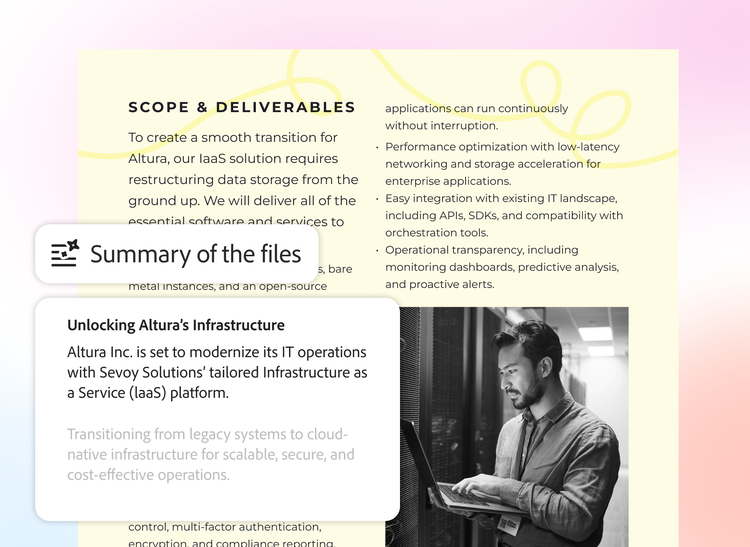
Turn complex information into actionable insights with AI-powered summaries and audio overviews that surface key info.
Find what you need fast.
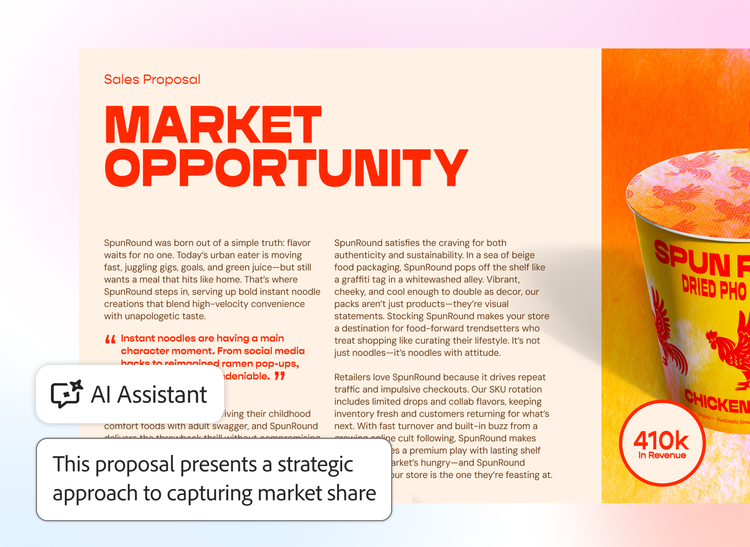
Just ask AI Assistant questions about your documents and get answers with linked citations.
Share PDFs as interactive experiences.
Turn project files into a PDF Space with a personal AI Assistant that guides recipients through your content.
style
Three up, m-spacing, max-width-10-desktop, xxl-spacing-bottom
How to create your first AI-powered workspace.
background
#F0F0F7
1. Open PDF Spaces.
In Adobe Acrobat, navigate to PDF Spaces under “Files” or “Tools” on desktop, laptop, or mobile.
2. Add multiple files.
Upload PDF files, documents, web links, and more — then organize them how you need.
3. Summarize. Chat. Analyze.
AI Assistant automatically summarizes your files. Now you can start a chat for answers, clarification, or data-driven insights.
4. Share and collaborate.
Customize your PDF Space and share with others to guide them through content and move work forward faster.
Check out all the ways sales, marketing, and business teams are using PDF Spaces to level up document management, research, and collaboration.
Sales
Get your team on the same page by sharing competitive analyses, market trends, and more in one PDF Space. You can also share an interactive experience with clients to help seal the deal.
Marketing
Create a campaign marketing plan in seconds from all your audience insights and strategy docs. Plus, uncover trends and create content for blogs, white papers, and social media.
Business
Streamline your research and reporting with PDF Spaces, designed to help you make data-driven decisions and collaborate with your teams.
PDF Spaces transform traditional PDFs into AI workspaces that you can use to search, review, and interact with all of your documents. When you add multiple documents, you can quickly get answers, summaries, and rewrites to move your projects along quickly. You can share an entire AI workspace with colleagues, instead of trudging through zip files or folder access, to achieve greater document efficiency
Yes, PDF Spaces are accessible via the Adobe Acrobat Reader mobile app, allowing you to create, manage, and collaborate on workspaces from your smartphone or tablet. With Acrobat you can take AI-powered productivity with you on the go.
All documents within PDF Spaces benefit from Acrobat’s robust security protocols, including encryption and controlled sharing settings to help keep your information protected.
PDF Spaces includes curated examples and templates in Adobe Express tailored for business scenarios like sales strategies, marketing campaigns, and project management. Explore these in the PDF Spaces gallery.
You can easily share a PDF Space by inviting collaborators directly from Acrobat. Team members receive access to the workspace with permissions you control.
PDF Spaces is included with select Acrobat plans. Check the Acrobat pricing page for details on availability and pricing.
PDF Spaces offers three styles of AI agents, each designed for distinct tasks. You can customize agent capabilities to match your document needs, whether it is reviewing content, comparing documents, or extracting insights from multiple files.
style
xl spacing
This Adobe site does not match your location.
Based on your location, we recommend the website for United Kingdom, where you'll find regional offers and pricing.
You can control how Adobe websites use cookies and similar technologies by making choices below. But note that if you disable cookies and similar technologies entirely, Adobe websites may not function properly.
Cookies are small text files stored by your web browser when you use websites. There are also other technologies that can be used for similar purposes like HTML5 Local Storage and local shared objects, web beacons, and embedded scripts. These technologies help us do things like remembering you and your preferences when you return to our sites, measure how you use the website, conduct market research, and gather information about the ads you see and interact with.
You can make choices in the menu below about what cookies and other technologies you want us to use on Adobe sites when you visit them from this browser. You can always change those choices later by clicking on the Cookie Preferences link at the bottom of the page.
If enabled:
We can improve your experience by tailoring the site and the content to things we think might be of interest
We can better keep track of your preferences — like what language you prefer to use
We will better understand your likely interests so we can provide you more relevant Adobe ads and content on non-Adobe websites and in non-Adobe apps
It will help us improve the performance of our website and those of our partners who use the Adobe Experience Cloud
If disabled:
We won’t be able to remember you from session to session so the experience may not be tailored to your interests
You’ll still have access to the content of the site but certain features that depend on cookies may not function
You’ll still see ads, they just may not be as relevant to you
General information
You can control how Adobe websites use cookies and similar technologies by making choices below. But note that if you disable cookies and similar technologies entirely, Adobe websites may not function properly.
Cookies are small text files stored by your web browser when you use websites. There are also other technologies that can be used for similar purposes like HTML5 Local Storage, web beacons, and embedded scripts. These technologies help us do things like remembering you and your preferences when you return to our sites, measure how you use the website, conduct market research, and gather information about the ads you see and interact with.
You can make choices in the menu below about what cookies and other technologies you want us to use on Adobe sites when you visit them from this browser. You can always change those choices later by clicking on the Cookie Preferences link at the bottom of the page.
If enabled:
We can improve your experience by tailoring the site and the content to things we think might be of interest
We can better keep track of your preferences — like what language you prefer to use
We will better understand your likely interests so we can provide you more relevant Adobe ads and content on non-Adobe websites and in non-Adobe apps
It will help us improve the performance of our website and those of our partners who use the Adobe Experience Cloud
If disabled:
We won’t be able to remember you from session to session so the experience may not be tailored to your interests
We’ll still count your use of our site and services
You’ll still have access to the content of the site but certain features that depend on cookies may not function
You’ll still see ads, they just may not be as relevant to you
Operate the site and core servicesOperate site and measure engagement
Always active
These cookies are required, and they are used to enable the site and related services core functionality. Without them the site could not operate, so they cannot be disabled.
These cookies enable the site and related services’ core functionality and collect statistics about user engagement, such as counting active use to help us understand trends. These cookies cannot be disabled.
Measure performance
These cookies are used to analyze site usage to measure and improve performance. Without them Adobe cannot know what content is most valued and how often unique visitors return to the site, making it hard to improve information we offer to you.
These cookies are used to analyze site usage to measure and improve performance. Without them Adobe cannot know what content is most valued, making it hard to improve information we offer to you.
Extend functionality
These cookies are used to enhance the functionality of Adobe sites such as remembering your settings and preferences to deliver a personalized experience; for example, your username, your repeated visits, preferred language, your country, or any other saved preference.
Personalize advertising
These cookies are used to enable Adobe and our partners to serve ads more relevant to your interests. Without them you will still see ads, but they might not be as relevant to you.