Compress PDF

Drag and drop a PDF to reduce its file size with our PDF compressor.

Free to use, no sign-up to try.

Select a PDF to reduce its file size fast.

Free to use, no sign-up to try.

{{verb-widget-legal}}

https://main--da-dc--adobecom.aem.page/dc-shared/fragments/roc/acrobat/online/pdf-tools

How to compress PDF online for free with Adobe Acrobat.

Follow these simple steps to compress a large PDF file in seconds:
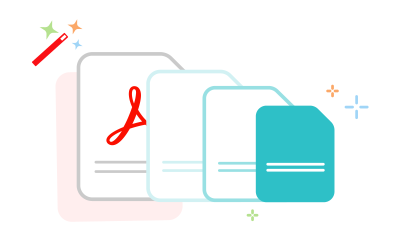
https://main--dc--adobecom.aem.live/dc-shared/assets/images/frictionless/how-to-images/compress-pdf-how-to.svg | Three documents in decreasing size showing how to compress a PDF

  • Click the Select a file button above and choose the PDF you want to compress, or drag and drop it into the upload area.
  • Review the available compression options and estimated file sizes.
  • Select High, Medium, or Low compression based on your needs, then click Compress.
  • Download your compressed PDF or sign in to continue working with your file.

Try our PDF compressor tool for free.

https://main--dc--adobecom.aem.live/dc-shared/assets/images/shared-images/frictionless/seo-icons/reduce-file.svg | A file being reduced in size

High-quality PDF compression

Use Adobe Acrobat's online PDF compressor to reduce PDF size while maintaining high-quality text, images, and layouts. Preserve the clarity of mark sheets, certificates, and admit cards submitted for JEE, UPSC, CAT, and other application processes.

https://main--dc--adobecom.aem.live/dc-shared/assets/images/shared-images/frictionless/seo-icons/edit-pdf.svg | A compressed PDF file that can be easily shared

Compress PDF files in seconds

Upload your file and let Acrobat easily compress PDFs in your browser. This online PDF size reducer quickly and efficiently reduces PDF size for GST registration, KYC compliance documents, Income Tax filings, and other financial documents.

https://main--dc--adobecom.aem.live/dc-shared/assets/images/shared-images/frictionless/seo-icons/reliable-pdf.svg | An Acrobat PDF with a measurement bar showing you can choose your compression level

Choose the right compression level

Select High, Medium, or Low compression depending on your needs. Use high compression for voter ID applications, balanced compression for UGC dissertations, or low compression for High Court and Supreme Court filings.

https://main--dc--adobecom.aem.live/dc-shared/assets/images/shared-images/frictionless/seo-icons/share.svg | An arrow representing how easy it is to share a compressed PDF file

Works with a wide range of PDFs

Compress PDFs created from Word, Excel, and PowerPoint files, plus scanned, image-based, and searchable PDF documents. No matter the PDF type, Acrobat can help make it smaller without compromising quality.

https://main--dc--adobecom.aem.live/dc-shared/assets/images/shared-images/frictionless/seo-icons/protect-pdf.svg | An Acrobat PDF with a lock demonstrating file security you can trust

Secure PDF compression you can trust

Adobe prioritises file security. Uploaded PDFs are automatically deleted after processing unless you choose to save them by signing in, helping protect Aadhaar cards, PAN cards, passports, bank documents, and other confidential files.

https://main--dc--adobecom.aem.live/dc-shared/assets/images/shared-images/frictionless/seo-icons/best-pdf.svg | A high-quality compressed PDF file

Works across devices and browsers

Compress PDF files online from nearly any device without installing software. Access Acrobat on iPhone and Android phones, iPad and Android tablets, and Windows and Mac computers using Google Chrome, Microsoft Edge, and Firefox.

Do more with your PDFs online.

After reducing file size, edit, combine, convert, or protect your PDF with Adobe Acrobat's free online tools.

Questions about PDF compression? We have answers.

How do I compress a PDF without losing quality?

The Acrobat online PDF compressor balances an optimised file size against the expected quality of images, fonts and other file content. Just drag and drop a PDF into the PDF compression tool above and let Acrobat reduce the size of your PDF files without compromising quality.

For more refined control of optimisation settings, you can try Adobe Acrobat Pro for free for seven days. Acrobat Pro lets you customise PPI settings for colour, grayscale and monochrome image quality. You can also use PDF editor tools, edit scans with OCR functionality, convert PDFs to Microsoft PowerPoint and other file formats, convert PNGs and other image file formats, organise and rotate PDF pages, split PDFs, optimise PDFs and more. You can use Acrobat on any device, including iPhones and on any operating system, including Mac, Windows, Linux, iOS or Android.
What size PDFs can I compress?
With the Acrobat PDF compressor tool, you can reduce the size of PDFs as large as 2 GB, ensuring even large documents are optimised for easy sharing and storage.
How do I check my PDF file size?
When you select a PDF to compress, the Acrobat PDF compressor tool will show the file size after uploading the file. It will also show the estimated file size after compression based on if you select the High, Medium or Low compression level.
Is the Acrobat PDF compressor free to use?
Yes, you can use the Acrobat PDF compressor for free online. Simply upload your PDF, choose a compression level, and download your compressed file.
Can I use the Acrobat PDF compressor on my phone?
Yes. You can compress PDF files from your phone using a mobile browser on iPhone, iPad, or Android devices. Simply upload your file, choose a compression level, and download the compressed PDF.
How to reduce your Aadhaar PDF size?
To reduce the size of your Aadhaar card PDF using Adobe Acrobat, follow the steps mentioned above. Adobe can compress the file while maintaining an acceptable level of quality. Adobe offers robust security features that protect the confidentiality of your documents, so you can compress your files securely, from anywhere.
Can I compress a scanned PDF without losing text quality?
Yes, the Acrobat PDF compressor tool preserves the text quality even when compressing scanned PDFs. With built-in OCR technology, text remains clear and searchable, ensuring readability while reducing the file size.
Can I compress PDFs for college admissions and internship applications?
Yes. Acrobat can help reduce PDF size for college admission forms, internship applications, resumes, certificates, mark sheets, and other supporting documents. Smaller files are easier to upload when application portals have file size limits.
Will my signature or photo become blurry after PDF compression?
Acrobat is designed to reduce PDF size while maintaining the quality of text, images, signatures, and photographs. This helps keep important details clear when submitting government documents, entrance exam forms, and other official paperwork.
How do I compress PDFs for email attachments?
To make PDFs suitable for email, upload your file to the Acrobat PDF compressor tool and select a lower compression setting. This reduces the file size without compromising essential content, making it easier to share via email without size limitation
Is it secure to use the Acrobat PDF compressor?
Yes. Your files are processed securely on Adobe servers and are automatically deleted after processing unless you choose to save them by signing in. Adobe does not train AI models on your files, inputs, or interactions, helping keep your information private and secure.
Are other Acrobat online PDF tools free to use as well?
Yes. In India, Acrobat online tools such as Merge PDF and JPG to PDF, along with other PDF tools, are free to use. Sign in with a free Adobe account for unlimited PDF tool usage, with no subscription or credit card required. AI features are excluded.
Verb
compress-pdf

Try these Acrobat online tools

Convert from PDF

Generative AI

Convert to PDF

Reduce file size

Sign & Protect

Edit

Convert from PDF
Convert to PDF
Reduce file size
Edit
Sign & Protect
Generative AI